
WEB-230 · Lesson 7 of 12 · 23 min
Security headers, HTTPS and content security policy
▶ Video coming soon A video version of this lesson is on the way.
On Tuesday, February 6, the review moves from code to configuration. A web server can send instructions to the browser in its response headers, and a handful of them switch on protections that browsers have built over the last fifteen years: always use HTTPS, refuse to run scripts the site did not intend, refuse to be framed by other sites, and so on. They cost almost nothing to add and remove whole classes of attack. They are also easy to forget, which is why missing headers appear under A02, Security Misconfiguration. Theo runs a header check against all five Food Hub hosts at the start of the session, and the public site and the PHP application send almost none of them.
HTTPS and HSTS
Everything starts with HTTPS, HTTP carried over TLS, which encrypts traffic and proves to the browser that it is talking to the real site. Without it, anyone on the same café network, or any network in between, can read and change pages, including injecting scripts. Every Food Hub host has used HTTPS since the WEB-101 launch, with certificates renewed automatically, and the certificate alerts from JS-260 warn three weeks before expiry. Lifetimes are getting shorter: the industry's maximum fell to 200 days in March 2026 and will keep falling, so automatic renewal is no longer optional.
Redirecting http to https is not quite enough. The first request a browser makes to a bare address may still go over plain HTTP, and an attacker on the network can intercept it before the redirect. HTTP Strict Transport Security (HSTS) fixes this: once a browser has seen the header Strict-Transport-Security: max-age=31536000, it will only use HTTPS for that site for a year, and it will refuse to let the user click past a certificate warning. Adding includeSubDomains covers every subdomain; adding preload and submitting the domain to the browsers' preload list protects even the very first visit. Theo will start with a short max-age, check that every subdomain works over HTTPS, then raise it to a year.
Content Security Policy
Lesson 4 described Content Security Policy (CSP) as a second layer against XSS. A policy is a list of directives, each naming the sources from which a type of content may load. The most important is script-src. A strict policy, the approach Google's security team and OWASP recommend, does not list domains at all. Instead it allows only scripts that carry a nonce, a random value generated fresh for every response and placed both in the header and on each script tag the server writes. An injected script cannot know the nonce, so it does not run; neither do inline event handlers such as onclick, or javascript: links.
| Directive | Food Hub setting | Effect |
|---|---|---|
| script-src | 'nonce-RANDOM' 'strict-dynamic' | Only scripts with this response's nonce run, plus scripts they load |
| object-src | 'none' | No plugins such as Flash or embedded objects |
| base-uri | 'none' | An injected base tag cannot redirect relative script addresses |
| frame-ancestors | 'none' | No other site may put the page in a frame (stops clickjacking) |
| form-action | 'self' | Forms can only submit to the site itself |
| default-src | 'self' | Everything else, such as images and fonts, only from the site itself |
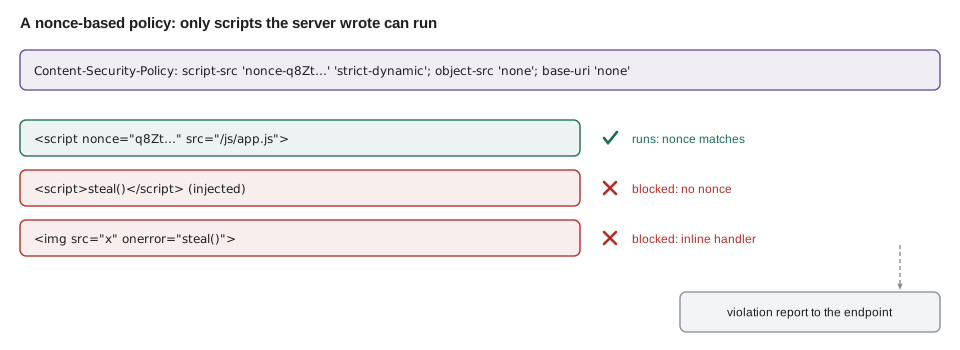
Mira wants to see it work rather than take it on trust, so she writes a small test that serves a page with a strict policy and loads it in Chromium through Playwright. The page has three scripts: one with the right nonce, one without, simulating an injection, and an image with an inline error handler.
// csp-check.mjs: serve a page with a strict policy and see what Chromium runs
import { createServer } from 'node:http';
import { chromium } from 'playwright';

const nonce = 'r4nd0mN0nce2029';            // a fresh random value on every real response
const page = `<!doctype html><title>CSP test</title>
<p id="out">waiting</p>
<script nonce="${nonce}">document.getElementById('out').textContent = 'nonce script ran';</script>
<script>document.getElementById('out').textContent = 'injected script ran';</script>
<img src="x" onerror="document.title='handler ran'">`;

const server = createServer((req, res) => {
  res.setHeader('Content-Security-Policy', `default-src 'self'; script-src 'nonce-${nonce}'; object-src 'none'; base-uri 'none'`);
  res.setHeader('Content-Type', 'text/html; charset=utf-8');
  res.end(page);
}).listen(0);

const browser = await chromium.launch();
const tab = await browser.newPage();
const blocked = [];
tab.on('console', (m) => { if (m.type() === 'error') blocked.push(m.text().split('. ')[0]); });
await tab.goto(`http://127.0.0.1:${server.address().port}/`);
await tab.waitForTimeout(300);
console.log('paragraph:', await tab.textContent('#out'));
console.log('title:', await tab.title());
console.log('violations reported:', blocked.length);
for (const b of blocked) console.log(' -', b.replace(/'nonce-[^']+'/, "'nonce-...'"));
await browser.close();
server.close();$ node csp-check.mjs
paragraph: nonce script ran
title: CSP test
violations reported: 2
- Refused to execute inline script because it violates the following Content Security Policy directive: "script-src 'nonce-...'"
- Refused to execute inline event handler because it violates the following Content Security Policy directive: "script-src 'nonce-...'"What this code does
The page is served with a policy that allows only scripts carrying the response's nonce. Chromium ran the nonce script, so the paragraph changed, and refused both the script without a nonce and the inline error handler, so the title was not changed. The two refusals are the violations the browser reports, which in production would go to a reporting endpoint.
Two directive values deserve care. 'strict-dynamic' lets a trusted script load further scripts, which is what bundlers and analytics loaders do, without listing every domain. And 'unsafe-inline' does exactly what it says; when a nonce is present, modern browsers ignore it, which is why strict policies sometimes include it for very old browsers, but on its own it defeats the purpose of the policy.
// Build a policy header from an object, and generate a nonce of the right size.
function buildCsp(policy) {
  return Object.entries(policy)
    .map(([directive, sources]) => [directive, ...sources].join(' '))
    .join('; ');
}

const nonce = btoa(String.fromCharCode(...crypto.getRandomValues(new Uint8Array(16))));
const header = buildCsp({
  'default-src': ["'self'"],
  'script-src': [`'nonce-${nonce}'`, "'strict-dynamic'"],
  'object-src': ["'none'"],
  'base-uri': ["'none'"],
  'frame-ancestors': ["'none'"],
});

console.log(header.replace(nonce, '<nonce>'));
console.log('nonce length:', nonce.length, 'characters from', 16, 'random bytes');default-src 'self'; script-src 'nonce-<nonce>' 'strict-dynamic'; object-src 'none'; base-uri 'none'; frame-ancestors 'none' nonce length: 24 characters from 16 random bytes
What this code does
The policy is kept as an object so each directive and its sources are easy to read and review. The nonce is 16 bytes from the cryptographic random generator, encoded as base64, which gives 24 characters. The printed header replaces the nonce with a placeholder, because a real nonce must change on every response and should never appear in logs or documents.
Rolling out a policy safely
A policy that blocks something the site needs breaks the site, so CSP is rolled out in two steps. First the server sends Content-Security-Policy-Report-Only with the intended policy: browsers block nothing but report every violation to an endpoint named in the policy. The team watches the reports, fixes the site's own inline scripts and handlers, and adds any legitimate sources that are missing. Only when the reports are quiet does the header switch to enforcing mode. The public site's old pages have eleven inline onclick handlers left over from 2014, which have to become event listeners in its script file first.
// Summarize CSP violation reports collected in report-only mode.
const reports = [
  { 'blocked-uri': 'inline', 'effective-directive': 'script-src-attr', 'document-uri': '/donate' },
  { 'blocked-uri': 'inline', 'effective-directive': 'script-src-attr', 'document-uri': '/programs' },
  { 'blocked-uri': 'https://widgets.mapsite.example/embed.js', 'effective-directive': 'script-src-elem', 'document-uri': '/contact' },
  { 'blocked-uri': 'inline', 'effective-directive': 'script-src-attr', 'document-uri': '/donate' },
  { 'blocked-uri': 'https://fonts.example/inter.woff2', 'effective-directive': 'font-src', 'document-uri': '/' },
];

const counts = {};
for (const r of reports) {
  const key = `${r['effective-directive']} ${r['blocked-uri']}`;
  counts[key] = (counts[key] ?? 0) + 1;
}
for (const [key, n] of Object.entries(counts).sort((a, b) => b[1] - a[1] || a[0].localeCompare(b[0]))) {
  console.log(String(n).padStart(2), key);
}3 script-src-attr inline 1 font-src https://fonts.example/inter.woff2 1 script-src-elem https://widgets.mapsite.example/embed.js
What this code does
Reports are grouped by the directive that was violated and what was blocked, then sorted by how often each happened. Inline handlers top the list, which points to the old onclick attributes that must be rewritten. The map widget and the font are third-party resources the team must decide to allow or to replace.
The other headers
| Header | Value used | What it prevents |
|---|---|---|
| X-Content-Type-Options | nosniff | Browsers guessing that an upload or text file is a script or page |
| Referrer-Policy | strict-origin-when-cross-origin | Full addresses, which may contain ids, leaking to other sites |
| Permissions-Policy | camera=(), microphone=(), geolocation=() | The page, or anything injected into it, using device features it never needs |
| Cross-Origin-Opener-Policy | same-origin | Pages opened from other sites keeping a handle to the Food Hub's window |
| Cache-Control on private pages | no-store | Shared caches or the back button showing one user's data to another |
Some older headers are no longer needed. X-Frame-Options is replaced by CSP's frame-ancestors, although it does no harm to keep for old browsers. X-XSS-Protection, which enabled a filter that browsers have since removed, should not be sent at all. Headers should be set in one place, the web server configuration or a shared middleware, so that every response gets them, including error pages.
// headers.mjs: the partner service's security headers, checked with a real request
import { createServer } from 'node:http';
import { randomBytes } from 'node:crypto';

function securityHeaders(res) {
  const nonce = randomBytes(16).toString('base64');
  res.setHeader('Strict-Transport-Security', 'max-age=31536000; includeSubDomains');
  res.setHeader('Content-Security-Policy',
    `default-src 'self'; script-src 'nonce-${nonce}' 'strict-dynamic'; object-src 'none'; ` +
    `base-uri 'none'; frame-ancestors 'none'; form-action 'self'`);
  res.setHeader('X-Content-Type-Options', 'nosniff');
  res.setHeader('Referrer-Policy', 'strict-origin-when-cross-origin');
  res.setHeader('Permissions-Policy', 'camera=(), microphone=(), geolocation=()');
  res.setHeader('Cross-Origin-Opener-Policy', 'same-origin');
  return nonce;
}

const server = createServer((req, res) => {
  securityHeaders(res);
  res.setHeader('Content-Type', 'text/html; charset=utf-8');
  res.end('<!doctype html><title>Orders</title>');
}).listen(0, async () => {
  const r = await fetch(`http://127.0.0.1:${server.address().port}/orders`);
  for (const [name, value] of r.headers) {
    if (['date', 'connection', 'keep-alive', 'content-length', 'transfer-encoding'].includes(name)) continue;
    console.log(`${name}: ${value.replace(/nonce-[A-Za-z0-9+/=]+/, 'nonce-...')}`);
  }
  server.close();
});
What this code does
The middleware sets every header in one function, with a fresh nonce for each response, so no route can forget them. A real request with fetch prints what the server actually sends, which is how the review checks configuration rather than reading it. The nonce is replaced in the printout because its value changes on every run.
$ node headers.mjs
content-security-policy: default-src 'self'; script-src 'nonce-...' 'strict-dynamic'; object-src 'none'; base-uri 'none'; frame-ancestors 'none'; form-action 'self'
content-type: text/html; charset=utf-8
cross-origin-opener-policy: same-origin
permissions-policy: camera=(), microphone=(), geolocation=()
referrer-policy: strict-origin-when-cross-origin
strict-transport-security: max-age=31536000; includeSubDomains
x-content-type-options: nosniff<?php
// In the PHP application's front controller, before any output:
$nonce = base64_encode(random_bytes(16));
header('Strict-Transport-Security: max-age=31536000; includeSubDomains');
header("Content-Security-Policy: default-src 'self'; script-src 'nonce-$nonce' 'strict-dynamic'; "
. "object-src 'none'; base-uri 'none'; frame-ancestors 'none'; form-action 'self'");
header('X-Content-Type-Options: nosniff');
header('Referrer-Policy: strict-origin-when-cross-origin');
// later, in templates: <script nonce="<?= h($nonce) ?>" src="/js/app.js"></script>// Score a host's response headers against the review's checklist.
const CHECKS = [
['strict-transport-security', (v) => /max-age=(\d+)/.test(v) && Number(v.match(/max-age=(\d+)/)[1]) >= 31536000],
['content-security-policy', (v) => /script-src[^;]*'nonce-/.test(v) && !/script-src[^;]*\*/.test(v)],
['x-content-type-options', (v) => v === 'nosniff'],
['referrer-policy', (v) => ['strict-origin-when-cross-origin', 'no-referrer', 'same-origin'].includes(v)],
];
const hosts = {
'public site': { 'strict-transport-security': 'max-age=300', 'x-content-type-options': 'nosniff' },
'partner service': {
'strict-transport-security': 'max-age=31536000; includeSubDomains',
'content-security-policy': "default-src 'self'; script-src 'nonce-abc' 'strict-dynamic'",
'x-content-type-options': 'nosniff', 'referrer-policy': 'strict-origin-when-cross-origin',
},
};
for (const [host, h] of Object.entries(hosts)) {
const missing = CHECKS.filter(([name, ok]) => !(name in h) || !ok(h[name])).map(([name]) => name);
console.log(`${host}: ${CHECKS.length - missing.length}/${CHECKS.length}` + (missing.length ? ` (fix: ${missing.join(', ')})` : ''));
}public site: 1/4 (fix: strict-transport-security, content-security-policy, referrer-policy) partner service: 4/4
What this code does
Each check names a header and a test for its value, so a header that is present but weak, such as HSTS for only five minutes, still fails. The scores show at a glance which host needs work. The public site's short HSTS max-age is deliberate during rollout, and the check keeps it on the list until it reaches a year.
Cookies, mixed content and TLS settings
Three smaller items complete the configuration review. Every cookie gets the attributes from lessons 5 and 6. Pages served over HTTPS must not load anything over plain HTTP, called mixed content; browsers block most of it now, and CSP's upgrade-insecure-requests directive can rewrite stragglers on old pages. And the TLS configuration itself should allow only TLS 1.2 and 1.3 with modern cipher suites; Theo checks it with a public scanner and with the Mozilla configuration generator's intermediate profile, which suits a site used by volunteers on older phones.
Worked problem
How long does HSTS protect a returning volunteer?
Theo plans to raise the public site's HSTS max-age in steps: 300 seconds for a week, then 86,400 for two weeks, then 31,536,000. A volunteer last visited on a day when max-age was 86,400. How many hours of protection did that visit give, and how many days will one visit give at the final value?
Show solution
- At 86,400 seconds: 86,400 ÷ 3,600 = 24 hours.
- At 31,536,000 seconds: 31,536,000 ÷ 86,400 = 365 days.
- Each visit renews the period, so a volunteer who visits monthly stays protected continuously at the final value.
Answer: The middle step protects for 24 hours after each visit; the final value protects for 365 days, renewed on every visit.
Common mistakes
MistakeRelying on a redirect from http to https.
InsteadSend HSTS, raise max-age to a year, include subdomains and consider preload.
MistakeWriting a CSP that lists dozens of domains and includes 'unsafe-inline'.
InsteadUse a strict policy: a fresh nonce per response with 'strict-dynamic', plus object-src and base-uri 'none'.
MistakeSwitching a new policy straight to enforcing mode.
InsteadStart with Content-Security-Policy-Report-Only, read the reports and fix them, then enforce.
MistakeSetting headers route by route.
InsteadSet them in one middleware or server configuration so every response, including errors, gets them.
MistakeReusing one nonce for every response.
InsteadGenerate a new random nonce for each response and never log it.
Summary and key terms
- Security headers switch on browser protections at almost no cost, and missing ones are a common misconfiguration.
- HTTPS encrypts and authenticates traffic, and HSTS makes browsers use it every time, for a year with includeSubDomains and optionally preload.
- Content Security Policy limits what can load; a strict policy allows only scripts carrying a fresh per-response nonce, with 'strict-dynamic', and sets object-src and base-uri to 'none' and frame-ancestors to stop framing.
- Policies are rolled out in report-only mode first.
- X-Content-Type-Options, Referrer-Policy, Permissions-Policy, Cross-Origin-Opener-Policy and no-store on private pages complete the set, all applied in one place.
- Checking real responses, as the review does with fetch and a headless browser, confirms what is actually sent.
- HSTS
- HTTP Strict Transport Security, a header that makes browsers use only HTTPS for a site for a set time.
- Content Security Policy (CSP)
- A response header listing where each type of content may load from, used to block injected scripts.
- Directive
- One rule in a Content Security Policy, such as script-src.
- Nonce
- A random value generated for each response and used to mark the scripts the server intended.
- Report-only mode
- Sending a policy that browsers report on but do not enforce, used to test it safely.
- Clickjacking
- Tricking users into clicking a hidden framed page; prevented with frame-ancestors.
- Mixed content
- Resources loaded over plain HTTP by a page served over HTTPS.
Practice problems
Work each problem on paper first, then reveal the answer to check.
What does HSTS protect against that a redirect does not?
Show answer
The first plain HTTP request being intercepted before the redirect, and users clicking past certificate warnings.
Why can an injected script not run under a nonce-based policy?
Show answer
It does not carry the response's random nonce, which the attacker cannot know.
Why use report-only mode first?
Show answer
To find everything the policy would block, and fix it, before the policy can break the site.
What does frame-ancestors 'none' prevent?
Show answer
Other sites framing the page, which stops clickjacking.
Try it yourself
Build a policy
Complete buildCsp(policy). policy maps directive names to arrays of sources. Return the header value: each directive followed by its sources separated by spaces, and directives joined with ; .
Directives with an empty array are written with no sources, such as upgrade-insecure-requests.
function buildCsp(policy) {
  return '';
}

console.log(buildCsp({ 'default-src': ["'self'"], 'object-src': ["'none'"], 'upgrade-insecure-requests': [] }));
console.log(buildCsp({ 'script-src': ["'nonce-abc123'", "'strict-dynamic'"] }));
Try it yourself
Missing headers
Complete missing(headers). headers is an object whose keys may be in any case. Return the names from REQUIRED that are absent, in the order of REQUIRED.
Also report strict-transport-security as missing if its max-age is below 31536000.
const REQUIRED = ['strict-transport-security', 'content-security-policy', 'x-content-type-options', 'referrer-policy'];

function missing(headers) {
  return REQUIRED.filter((name) => !(name in headers));
}

console.log(missing({ 'Strict-Transport-Security': 'max-age=31536000', 'X-Content-Type-Options': 'nosniff' }).join(', '));
console.log(missing({ 'strict-transport-security': 'max-age=300', 'content-security-policy': "default-src 'self'", 'x-content-type-options': 'nosniff', 'referrer-policy': 'no-referrer' }).join(', '));
Lesson quiz · 5 questions
Score 60% or more to complete this lesson.
Create a free account to save your progress, take quizzes and earn a certificate.