
WEB-230 · Lesson 12 of 12 · 25 min
Capstone: a security and accessibility review
▶ Video coming soon A video version of this lesson is on the way.
On Thursday, February 22, the whole team gathers to turn six weeks of work into a report. On Monday, February 26, Rhea, Theo and Sana will present it to Paul and Lucy; Paul will take a summary to the board in March, and the Food Hub's insurer will receive a letter confirming that the review took place, with its scope, date and the status of the high-risk findings. Theo's rule for the day is that a review is only as good as what happens after it. A report full of accurate findings that nobody can act on is a failure; a short list of clear findings, each with an owner, a deadline and a test that proves the fix, is a success.
This capstone walks through how the review was run, how the findings were rated and written, what the report contains, and how the team will make sure the problems stay fixed. It is also the template the studio will use next year, and for other clients.
Scope, rules and method
A review needs a written scope before it starts, and the Food Hub's was agreed in January: the public site, the volunteer portal, Theo's PHP application, the partner order service and board, the reminders script and the donation function. Out of scope were the Food Hub's office computers, its e-mail service and the payment provider, each of which has its own owner. The rules of engagement said that testing would happen on staging, never on production; that no real personal data would be used; that automated scanning would be limited in speed so it could not affect the staging server; and that any finding that suggested real data was already exposed would be reported to Paul immediately rather than waiting for the report. None did.
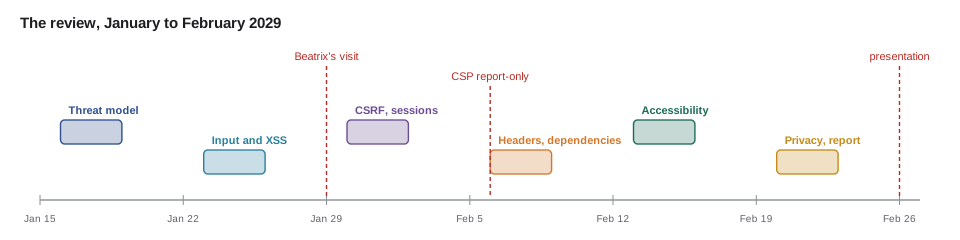
| Week | Lessons | Main methods |
|---|---|---|
| Jan 15–19 | 1–2 | Asset list, data flow diagram, STRIDE, OWASP mapping |
| Jan 22–26 | 3–4 | Code review of input handling and output, injection and XSS tests on staging |
| Jan 29–Feb 2 | 5–6 | CSRF and cookie checks, sign-in and session review; Beatrix's visit on Jan 29 |
| Feb 5–9 | 7–8 | Header and TLS checks, CSP report-only rollout, dependency audit and SRI |
| Feb 12–16 | 9–10 | WCAG review of components, automated checks, keyboard, zoom and screen reader testing |
| Feb 19–23 | 11–12 | Data inventory, retention and consent review; report writing |
Rating findings
Every finding needs a severity that the team and the Food Hub agree on, because severity sets the deadline. The security findings use the likelihood and impact matrix from lesson 1, which has the advantage of being simple enough for Paul to follow. Accessibility findings use a separate scale based on what the barrier does to a task: critical if it stops someone completing a task, serious if it makes a task much harder or depends on a workaround, moderate for lesser problems. A shared table maps both onto the deadlines.
| Severity | Security meaning | Accessibility meaning | Fix within |
|---|---|---|---|
| Critical | Score 9, or any finding with evidence of exposure | Stops a task completely | 7 days |
| High | Score 6 | Much harder, or needs a workaround | 30 days |
| Medium | Score 3 to 4 | Inconvenient, task still possible | 90 days |
| Low | Score 1 to 2 | Minor or cosmetic | Next scheduled update |
// Rate security findings and set their fix-by dates from the report date.
const REPORT = Date.UTC(2029, 1, 26);
const DAYS = { critical: 7, high: 30, medium: 90 };
const severity = (score) => (score >= 9 ? 'critical' : score >= 6 ? 'high' : score >= 3 ? 'medium' : 'low');
const fmt = (t) => new Date(t).toISOString().slice(0, 10);

const findings = [
  { id: 'F1', title: 'Shift export shows other volunteers\' phone numbers', l: 3, i: 2 },
  { id: 'F4', title: 'Board refresh does not check the device role', l: 2, i: 3 },
  { id: 'F6', title: 'Order board builds rows with innerHTML', l: 2, i: 3 },
  { id: 'F8', title: 'PHP app password rules and 180-day expiry', l: 3, i: 3 },
  { id: 'F9', title: 'PHP app keeps session id at sign-in, 90-day sessions', l: 2, i: 3 },
  { id: 'F2', title: 'Staging shows detailed error pages', l: 2, i: 2 },
  { id: 'F5', title: 'No alert on repeated failed partner sign-ins', l: 2, i: 2 },
];

for (const f of findings.map((f) => ({ ...f, score: f.l * f.i, sev: severity(f.l * f.i) }))
                        .sort((a, b) => b.score - a.score || a.id.localeCompare(b.id))) {
  const due = f.sev in DAYS ? fmt(REPORT + DAYS[f.sev] * 86400000) : 'next update';
  console.log(f.id, String(f.score).padStart(2), f.sev.padEnd(8), due.padEnd(11), f.title);
}F8 9 critical 2029-03-05 PHP app password rules and 180-day expiry F1 6 high 2029-03-28 Shift export shows other volunteers' phone numbers F4 6 high 2029-03-28 Board refresh does not check the device role F6 6 high 2029-03-28 Order board builds rows with innerHTML F9 6 high 2029-03-28 PHP app keeps session id at sign-in, 90-day sessions F2 4 medium 2029-05-27 Staging shows detailed error pages F5 4 medium 2029-05-27 No alert on repeated failed partner sign-ins
What this code does
Each finding's score is likelihood times impact, and the score sets the severity and so the deadline counted from the report date. Sorting by score puts the password rules first, followed by the four high findings due at the end of March and the two medium findings due in late May. A low finding would simply wait for the next scheduled update, as the agreed table says.
F6, the order board's innerHTML, was fixed the day it was found, and F3, the old newsletter script, was deleted from the repository in week 2. The report still lists both, marked fixed with the date and the commit, because a record of what was found and fixed is part of what the insurer and the board want to see.
Writing a finding
Theo is strict about the form of each finding, because a vague finding gets a vague fix. Each one says what is wrong, where, why it matters in terms the Food Hub cares about, how to reproduce it on staging, what to do about it, and how the fix will be verified. It does not include working attack code. For the report's audience, the reproduction is a sentence such as "signed in as a partner-staff test account, request the board refresh address and observe that it returns a token", not a script.
| Field | F4 as written in the report |
|---|---|
| Title | Board refresh does not check the device role |
| Category | OWASP A01 Broken Access Control; CWE-862 Missing Authorization |
| Severity | High (likelihood 2, impact 3); fix by March 28, 2029 |
| Where | Partner service, POST /board/refresh |
| What is wrong | Any signed-in partner account can obtain a board token, not only the enrolled board device |
| Why it matters | A partner account could read every agency's orders through the board feed |
| How to reproduce | On staging, sign in as a partner-staff test account and call the refresh address; a token is returned |
| Recommendation | Require the board-device role in the shared access-check function; add a test that partner roles are refused |
| Verification | The new test fails before the fix and passes after it; retest on staging |
// Generate the report's summary table from the findings file.
const all = [
  { id: 'F1', area: 'security', sev: 'high', status: 'open' },
  { id: 'F2', area: 'security', sev: 'medium', status: 'open' },
  { id: 'F3', area: 'security', sev: 'low', status: 'fixed' },
  { id: 'F4', area: 'security', sev: 'high', status: 'open' },
  { id: 'F5', area: 'security', sev: 'medium', status: 'open' },
  { id: 'F6', area: 'security', sev: 'high', status: 'fixed' },
  { id: 'F7', area: 'security', sev: 'low', status: 'fixed' },
  { id: 'F8', area: 'security', sev: 'critical', status: 'open' },
  { id: 'F9', area: 'security', sev: 'high', status: 'open' },
  { id: 'F10', area: 'privacy', sev: 'high', status: 'open' },
  { id: 'A1', area: 'accessibility', sev: 'critical', status: 'fixed' },
  { id: 'A2', area: 'accessibility', sev: 'critical', status: 'fixed' },
  { id: 'A3', area: 'accessibility', sev: 'high', status: 'open' },
  { id: 'A4', area: 'accessibility', sev: 'high', status: 'open' },
  { id: 'A5', area: 'accessibility', sev: 'high', status: 'open' },
  { id: 'A6', area: 'accessibility', sev: 'critical', status: 'open' },
];

const SEVS = ['critical', 'high', 'medium', 'low'];
console.log('severity'.padEnd(9), 'open', 'fixed');
for (const s of SEVS) {
  const rows = all.filter((f) => f.sev === s);
  console.log(s.padEnd(9), String(rows.filter((f) => f.status === 'open').length).padStart(4), String(rows.filter((f) => f.status === 'fixed').length).padStart(5));
}
const open = all.filter((f) => f.status === 'open');
console.log(`${all.length} findings, ${all.length - open.length} fixed during the review, ${open.length} open`);severity open fixed critical 2 2 high 7 1 medium 2 0 low 0 2 16 findings, 5 fixed during the review, 11 open
What this code does
The summary is generated from the same findings file the team works from, so the numbers in the report cannot drift from the real list. Each severity row counts open and fixed findings separately. Five of sixteen were fixed while the review was still running, which shows the board that the process works as well as what remains.
What the report contains
The report is short on purpose. Paul asked for something the board can read in ten minutes, with the detail in appendices for the studio and the insurer.
- Summary (one page): what was reviewed, when, by whom, the headline numbers, and the three most important things to fix.
- Scope and method (one page): systems in and out of scope, rules of engagement, standards used: OWASP Top 10 2025, NIST SP 800-63B-4 and WCAG 2.2 AA.
- Findings (one line each in the body, full write-ups in an appendix), sorted by severity, with owner and deadline.
- What is working well: the partner service's access checks and sessions, the portal's React escaping, the pipeline from JS-260, the public site's reflow.
- Plan and ongoing practice: the fix schedule, the new checks added to CI, and what the studio will review each year.
- Appendices: the data flow diagram, the data inventory, the full findings, the accessibility test log and the accessibility statement.
Theo insists on the section about what is working well. A review that lists only problems teaches the reader that security is hopeless; one that also says which practices worked teaches which ones to keep. It is also more accurate. The partner service, built in 2028 with these practices in mind, had three security findings, two of them in the board that was written quickly for the July 2028 trial, while the PHP application, written in 2019 before the studio's current habits, had five.
// Where did the findings come from? Group open and fixed findings by system.
const bySystem = {
  'PHP application': ['F2', 'F3', 'F7', 'F8', 'F9'],
  'volunteer portal': ['F1', 'A1', 'A2', 'A4'],
  'partner service and board': ['F4', 'F5', 'F6', 'A3', 'A5'],
  'public site': ['A6'],
  'reminders and donation function': [],
  'data and retention (all systems)': ['F10'],
};
const total = Object.values(bySystem).reduce((n, ids) => n + ids.length, 0);
for (const [system, ids] of Object.entries(bySystem)) {
  const bar = '#'.repeat(ids.length);
  console.log(system.padEnd(33), String(ids.length).padStart(2), bar);
}
console.log('total'.padEnd(33), String(total).padStart(2));PHP application 5 ##### volunteer portal 4 #### partner service and board 5 ##### public site 1 # reminders and donation function 0 data and retention (all systems) 1 # total 16
What this code does
Each system lists the ids of its findings, and a row of hash marks gives a quick picture of where problems cluster. The PHP application and the partner service have five each, but all five of the PHP application's are security findings, while two of the partner service's are about how the board is presented. The two small Node services have none, which is part of the evidence for the section on what is working well.
Making fixes stick
A fixed finding that comes back next year was not really fixed. For every finding, the fix includes a regression test: a test that fails on the broken code and passes on the fixed code, run in CI forever after. The access-control fixes get tests that request another agency's order or the board token with the wrong role. The XSS fix gets a test that saves a note containing a script tag and checks that the board shows it as text. The accessibility fixes get the ARIA snapshot tests from lesson 10 and an automated checker run on every pull request. The header fixes get a test that fetches each page and checks the headers, using the checklist from lesson 7.
| Practice | Where it lives | Added by |
|---|---|---|
| Automated accessibility check on every pull request | CI for the portal, partner pages and public site | Lesson 10 |
| Accessibility-tree snapshots for key pages | End-to-end tests | Lesson 10 |
| Access-control tests for every route | Partner service and PHP application test suites | Lesson 2 |
| Security header check after every deploy | The pipeline's smoke test from JS-260 | Lesson 7 |
| Dependency updates weekly, audit in CI, fix deadlines | Dependabot and the release checklist | Lesson 8 |
| Threat questions in the design template for new features | The team's feature template | Lesson 1 |
| Retention job scheduled and monitored | Theo's server, with an alert if it does not run | Lesson 11 |
| Paid testing with disabled volunteers before major releases | Release plan | Lesson 10 |
The last practice is the one the team cares about most. Beatrix tests the new plan page on Monday, March 5, with the fix in staging. If she can sign up for her packing shifts without phoning Lucy, the most important finding of the review is closed.
Presenting to people who are not developers
On Monday, the audience will be Paul and Lucy, not developers, and Sana coaches Mira on how to present. Lead with what matters to them: volunteers' and agencies' information is well protected in the newer systems, the older one needs five fixes by the end of March, and the portal now works with a screen reader. Use the Food Hub's own language, such as "another agency could see your orders", not category codes. Be honest about uncertainty: a review finds what it finds in the time it has, and the absence of a finding is not proof of safety. And end with what the team needs from the Food Hub, which is a decision on paying disabled testers and a board-approved update to the privacy notice.
Worked problem
Will the high findings be fixed on time?
The report lists two open critical findings, F8 (6 hours) and the map embed A6 (2 hours), and seven open high findings, F1, F4, F9, F10, A3, A4 and A5, estimated at 4, 3, 5, 3, 8, 1 and 2 hours. Theo can give the fixes 10 hours a week, starting the week of February 26. Will the criticals be done within 7 days, and how many weeks will the high findings take after that?
Show solution
- Critical work: F8 6 hours + A6 2 hours = 8 hours, which fits in the first week's 10 hours.
- High work: 4 + 3 + 5 + 3 + 8 + 1 + 2 = 26 hours.
- Time left in week 1 after the criticals: 10 − 8 = 2 hours, leaving 26 − 2 = 24 hours.
- Further weeks: 24 ÷ 10 = 2.4, so 3 more weeks, finishing in the week of March 19.
Answer: Both criticals are done in the first week, and the high findings finish in the week of March 19, inside their March 28 deadline with about a week to spare.
Common mistakes
MistakeStarting a review without a written scope and rules.
InsteadAgree the scope, the systems out of scope, and rules of engagement, including staging only, before testing.
MistakeRating every finding as urgent.
InsteadUse an agreed severity scale tied to deadlines, so the most important fixes come first.
MistakeWriting findings without a reproduction or a verification step.
InsteadSay what is wrong, where, why it matters, how to reproduce it, what to do and how the fix will be tested.
MistakeIncluding working attack code in the report.
InsteadDescribe how to reproduce on staging in plain steps; keep any test code in the private test suite.
MistakeClosing a finding without a regression test.
InsteadAdd a test that fails before the fix and passes after it, and run it in CI forever.
Summary and key terms
- A security and accessibility review starts with a written scope and rules of engagement: what is in and out, testing on staging only, no real personal data, and immediate reporting of any sign of real exposure.
- Findings are rated on an agreed scale that sets deadlines, using likelihood and impact for security and the effect on tasks for accessibility.
- Each finding states what is wrong, where, why it matters, how to reproduce it, the recommendation and how the fix will be verified, without attack code.
- A short report gives a one-page summary, scope and method, findings with owners and deadlines, what is working well, and a plan, with details in appendices generated from the same findings file.
- Fixes stick when each has a regression test in CI and when ongoing practices, from threat questions in feature design to testing with disabled people, are part of the team's normal work.
- Scope
- The systems a review covers, and those it explicitly does not.
- Rules of engagement
- The agreed limits on how testing is done, such as staging only and no real personal data.
- Severity
- An agreed rating of how serious a finding is, which sets how quickly it must be fixed.
- Finding
- A single documented problem with its location, impact, reproduction, recommendation and verification.
- Regression test
- A test that fails on the broken code and passes once it is fixed, kept to stop the problem returning.
- Accessibility statement
- A public page describing the accessibility standard aimed for, known gaps and how to get help.
Practice problems
Work each problem on paper first, then reveal the answer to check.
Why does the report include a section on what is working well?
Show answer
It shows which practices to keep, and it is a more accurate picture than a list of problems alone.
Why are reproductions written as plain steps on staging?
Show answer
They let the studio verify fixes without the report containing working attack code.
What makes a fix stick?
Show answer
A regression test that fails before the fix and passes after it, run in CI.
Why does severity matter beyond ordering?
Show answer
It sets the agreed deadline for each fix.
Try it yourself
Report summary
Complete summary(findings). Each finding has sev (critical, high, medium or low) and status (open or fixed). Return a string like critical 1/2, high 3/5, medium 1/1, low 0/1, where each pair is open count / total for that severity, in that order.
Include every severity even when its total is 0.
function summary(findings) {
  return '';
}

console.log(summary([
  { sev: 'critical', status: 'open' }, { sev: 'critical', status: 'fixed' },
  { sev: 'high', status: 'open' }, { sev: 'high', status: 'open' }, { sev: 'high', status: 'fixed' },
  { sev: 'low', status: 'fixed' },
]));
console.log(summary([]));
Try it yourself
Fix-by dates
Complete fixBy(reportDate, sev). reportDate is YYYY-MM-DD. Add 7 days for critical, 30 for high and 90 for medium, and return the new date as YYYY-MM-DD. For low, return next update.
Use UTC dates so time zones cannot change the result.
function fixBy(reportDate, sev) {
  return reportDate;
}

for (const s of ['critical', 'high', 'medium', 'low']) console.log(s, fixBy('2029-02-26', s));
Lesson quiz · 5 questions
Score 60% or more to complete this lesson.
Create a free account to save your progress, take quizzes and earn a certificate.