
WEB-230 · Lesson 3 of 12 · 24 min
Input validation and output encoding
▶ Video coming soon A video version of this lesson is on the way.
On Tuesday, January 23, Theo opens the session with the oldest file in the Food Hub's repository: the nine-line newsletter script from the 2014 site that he found in November 2026. It took a name and an e-mail address from a form and built an SQL statement by gluing them into a string. It has not run for years, but it is still in the repository, and it is a perfect example of the two ideas in today's lesson. Data that comes from outside must be validated when it enters, so that the application only accepts what it expects. And data must be encoded or kept separate when it leaves, so that whatever system receives it, a database, a shell, a web page, treats it as data and never as instructions.
Why mixing data and code is dangerous
Every interpreter, whether it is a database, a command shell or a browser, reads text and decides which parts are instructions and which are data. Quote marks, angle brackets, semicolons and spaces are how it tells them apart. When a program builds that text by joining fixed instructions with values it received, a value containing those characters can move the line between instructions and data. That is injection, and it is the same mistake whether the interpreter is SQL, a shell or HTML.
<?php
// DON'T DO THIS: the 2014 newsletter script (simplified)
$sql = "INSERT INTO subscribers (name, email) VALUES ('" . $_POST['name'] . "', '" . $_POST['email'] . "')";
$db->exec($sql);
Theo does not need an attack to show the problem. A volunteer named Siobhan O'Brien would break the script, because the apostrophe in her name ends the quoted value early and leaves the rest of the statement malformed. If an honest name breaks the query, a value chosen to fit the syntax could change what the query does. The fix is not to strip apostrophes, which would mangle real names, but to stop building queries from strings at all.
// What the database would receive if the query were built by joining strings.
function buildInsert(name, email) {
  return "INSERT INTO subscribers (name, email) VALUES ('" + name + "', '" + email + "')";
}

console.log(buildInsert('Dev Bhatt', 'dev@example.org'));
console.log(buildInsert("Siobhan O'Brien", 'siobhan@example.org'));

const quotes = (s) => (s.match(/'/g) || []).length;
console.log('quote marks:', quotes(buildInsert('Dev Bhatt', 'x')), 'then', quotes(buildInsert("Siobhan O'Brien", 'x')));INSERT INTO subscribers (name, email) VALUES ('Dev Bhatt', 'dev@example.org')
INSERT INTO subscribers (name, email) VALUES ('Siobhan O'Brien', 'siobhan@example.org')
quote marks: 4 then 5What this code does
The function only builds the text of the query; nothing is run. With an ordinary name the quote marks pair up, but the apostrophe in O'Brien adds a fifth quote, so the database would see the value end in the wrong place. This is why string-built queries fail on honest data and can be steered by crafted data.
Parameterized queries
The cure for SQL injection is the parameterized query, also called a prepared statement. The program sends the database the statement with placeholders, such as a question mark or a name like :email, and sends the values separately. The database parses the statement first, so its structure is fixed before any value arrives, and then treats each value purely as data. No value, however many quote marks it contains, can become part of the SQL.
<?php
// newsletter-fixed.php: the 2014 script rewritten with a prepared statement
$db = new PDO('sqlite::memory:');
$db->setAttribute(PDO::ATTR_ERRMODE, PDO::ERRMODE_EXCEPTION);
$db->exec("CREATE TABLE subscribers (name TEXT NOT NULL, email TEXT NOT NULL UNIQUE)");

$add = $db->prepare('INSERT INTO subscribers (name, email) VALUES (:name, :email)');
foreach ([["Siobhan O'Brien", 'siobhan@example.org'], ['Dev Bhatt', 'dev@example.org']] as [$name, $email]) {
    $add->execute([':name' => $name, ':email' => $email]);
}

$find = $db->prepare('SELECT name FROM subscribers WHERE email = ?');
foreach (['dev@example.org', "x' OR '1'='1"] as $email) {
    $find->execute([$email]);
    $row = $find->fetch(PDO::FETCH_ASSOC);
    echo $email, ' -> ', $row ? $row['name'] : 'no match', "\n";
}
echo 'subscribers: ', $db->query('SELECT COUNT(*) FROM subscribers')->fetchColumn(), "\n";$ php newsletter-fixed.php
dev@example.org -> Dev Bhatt
x' OR '1'='1 -> no match
subscribers: 2What this code does
The rewritten script prepares each statement once and passes values separately with execute. Siobhan O'Brien is stored correctly, and the second lookup, which contains SQL-like text, is compared as an ordinary string and matches nothing. The final count shows that no extra rows or changes slipped in.
Every mainstream database library offers parameters, and the partner service already used them through its PostgreSQL driver in JS-230. The same pattern works in Node's built-in SQLite module, which Mira runs to show the PHP students in the next room that the idea is the same in every language.
// lookup.mjs: the same idea in Node.js with the built-in SQLite module
import { DatabaseSync } from 'node:sqlite';

const db = new DatabaseSync(':memory:');
db.exec('CREATE TABLE volunteers (id INTEGER PRIMARY KEY, name TEXT, area TEXT)');
const add = db.prepare('INSERT INTO volunteers (name, area) VALUES (?, ?)');
add.run("Siobhan O'Brien", 'kitchen');
add.run('Marcus Ellery', 'garden');

const byArea = db.prepare('SELECT name FROM volunteers WHERE area = ? ORDER BY name');
for (const area of ['kitchen', "kitchen' OR 1=1 --"]) {
  const rows = byArea.all(area);
  console.log(JSON.stringify(area), '->', rows.map((r) => r.name).join(', ') || 'no rows');
}
What this code does
Each statement is prepared with question-mark placeholders, and run or all supplies the values. The second area value looks like an attempt to widen the query, but it is simply compared with the area column and finds no rows. The database never sees it as SQL.
$ node lookup.mjs
"kitchen" -> Siobhan O'Brien
"kitchen' OR 1=1 --" -> no rows
Parameters cover values, but not every part of a query can be a parameter. Table names, column names and sort directions are part of the statement's structure. When those must vary, for example a sort column chosen by the user, the safe approach is an allowlist: the program maps the user's choice to one of a few fixed strings and refuses anything else. JS-230 did exactly this for the order list's sort field.
Validation: accept only what you expect
Parameterized queries stop injection, but they do not make data correct. A phone field that accepts any text will fill with nonsense; a tray count that accepts any number will accept minus four or a million. Input validation checks, at the trust boundary, that each value has the type, length, format and range the application expects, and rejects it otherwise.
The strong form is allowlist validation: describe what is allowed and refuse the rest. The weak form, a blocklist, tries to list what is forbidden, such as angle brackets or certain words, and always misses something. A volunteer's area must be one of four known areas; a tray count must be a whole number from 1 to 16; a Canadian or US phone number must have ten digits once spaces, dashes and brackets are removed. Validation happens on the server, every time. The browser can repeat the same checks for convenience, as JS-110's form did, but the server's check is the one that counts.
// Allowlist validation for the volunteer sign-up form.
const AREAS = new Set(['grocery', 'kitchen', 'garden', 'classes']);

function validateSignup(input) {
  const errors = [];
  const name = String(input.name ?? '').normalize('NFC').trim();
  if (name.length < 1 || name.length > 80) errors.push('name: 1 to 80 characters');
  const email = String(input.email ?? '').trim().toLowerCase();
  if (email.length > 254 || !/^[^\s@]+@[^\s@]+\.[^\s@]+$/.test(email)) errors.push('email: not an address');
  const digits = String(input.phone ?? '').replace(/[\s().-]/g, '');
  if (digits !== '' && !/^\d{10}$/.test(digits)) errors.push('phone: 10 digits or empty');
  const areas = Array.isArray(input.areas) ? input.areas : [];
  if (areas.length === 0 || !areas.every((a) => AREAS.has(a))) errors.push('areas: choose from the list');
  return errors.length ? { ok: false, errors } : { ok: true, value: { name, email, phone: digits || null, areas } };
}

console.log(JSON.stringify(validateSignup({ name: "  Siobhan O'Brien ", email: 'Siobhan@Example.org', phone: '(613) 555-0142', areas: ['kitchen'] })));
console.log(JSON.stringify(validateSignup({ name: '', email: 'not-an-email', phone: '555-01', areas: ['kitchen', 'admin'] })));{"ok":true,"value":{"name":"Siobhan O'Brien","email":"siobhan@example.org","phone":"6135550142","areas":["kitchen"]}}
{"ok":false,"errors":["name: 1 to 80 characters","email: not an address","phone: 10 digits or empty","areas: choose from the list"]}What this code does
Each field is turned into a string, normalized and trimmed before it is checked, so that the same value always looks the same. Every rule describes what is allowed: a length range, an address shape, ten digits, and areas from a fixed set. The function returns either a cleaned value to store or a list of every problem, so the form can show all errors at once.
Two details in that function are easy to miss. The first is canonicalization: converting a value to one standard form before checking it. Unicode text can represent the same visible letter in more than one way, and normalize('NFC') makes them consistent, so that two copies of the same name compare as equal. Trimming spaces and lower-casing the e-mail address do the same job. Validating before canonicalizing can let a value pass one check and then change into something else. The second detail is that validation returns a cleaned value, and the rest of the program uses that value, never the raw input.
Validation is not a substitute for encoding. A perfectly valid name can still contain an apostrophe or an angle bracket, because real names do. Validation decides whether data is acceptable; encoding and parameters decide how acceptable data is passed safely to an interpreter.
Other interpreters: paths, shells and uploads
Databases are not the only interpreters a web application feeds. A file path is interpreted by the operating system, and a value containing ../ can climb out of the intended folder; this is path traversal, sixth in the 2025 CWE Top 25. The partner service stores uploaded dietary forms under random names that it generates itself, never under the name the user's browser sent, and looks them up through the database, so no user-supplied text ever becomes part of a path.
// Resolve a requested file name and refuse anything outside the uploads folder.
function resolveInside(base, requested) {
  const parts = [];
  for (const piece of (base + '/' + requested).split('/')) {
    if (piece === '' || piece === '.') continue;
    if (piece === '..') parts.pop(); else parts.push(piece);
  }
  const full = '/' + parts.join('/');
  return full.startsWith(base + '/') ? full : null;
}

const base = '/srv/partner-orders/uploads';
for (const name of ['8f3a2c.pdf', 'weekly/allergens.pdf', '../../../etc/passwd', '..']) {
  console.log(name.padEnd(22), '->', resolveInside(base, name) ?? 'refused');
}8f3a2c.pdf -> /srv/partner-orders/uploads/8f3a2c.pdf weekly/allergens.pdf -> /srv/partner-orders/uploads/weekly/allergens.pdf ../../../etc/passwd -> refused .. -> refused
What this code does
The function resolves the dot-dot segments the way the operating system would, then checks that the result still starts with the uploads folder. Ordinary names stay inside and are allowed. Names that climb out are refused, which is a useful second layer even though the partner service never builds paths from user input in the first place.
A shell is another interpreter, and the rule is the same: never build a command line from user input. If a program must run another program, it should pass arguments as a list to a function that does not invoke a shell, such as execFile in Node or proc_open with an array in PHP, and better still, use a library that does the job directly. File uploads, twelfth in the CWE list, need their own checks: limit the size, check the file's actual content type rather than trusting its name or the browser's claim, store it outside the web root under a generated name, and serve it with a download disposition so that a browser never runs it as a page. JS-240 set the partner service's upload rules this way.
Output encoding
The other half of the lesson is what happens when data leaves. Output encoding converts characters that are special in the destination into a form that the destination displays as text. In HTML, the less-than sign becomes < and the ampersand becomes &. In a URL, a space becomes %20. The correct encoding depends entirely on the context: where in the output the value is placed. A value that is safe inside a paragraph is not necessarily safe inside an attribute, a URL or a script.
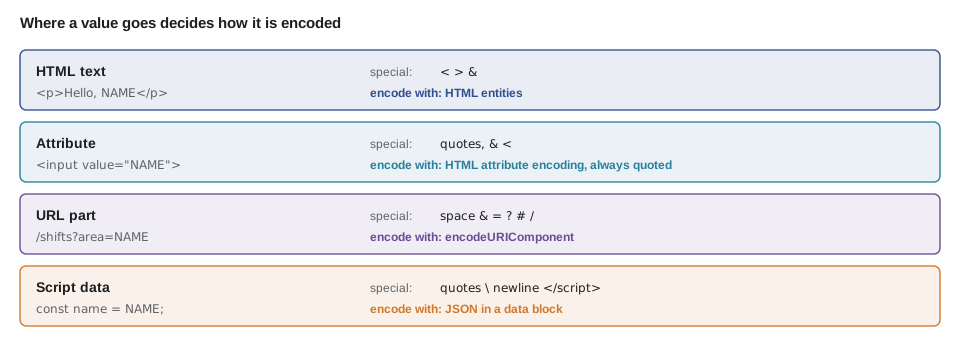
| Context | Example | Special characters | Encode with |
|---|---|---|---|
| HTML text | <p>Hello, NAME</p> | < > & | HTML entity encoding (htmlspecialchars in PHP, textContent in the DOM) |
| Quoted HTML attribute | value="NAME" | quotes, &, < | HTML attribute encoding; always quote attributes |
| URL parameter | ?area=NAME | space, &, =, ?, #, / | encodeURIComponent, or URLSearchParams |
| JavaScript data | const name = NAME; | quotes, backslash, line breaks, </script> | JSON encoding, ideally in a data attribute or JSON block |
| SQL | WHERE email = NAME | quotes and more | Not encoding: parameters |
Lesson 4 builds the HTML encoders and shows why getting the context wrong lets script into a page. For today, Mira's rule is simple: encode at the moment of output, for the context of that output, using the platform's own functions wherever they exist, and keep the stored data in its original form. Storing pre-encoded text in the database causes double encoding, ampersands that turn into &amp;, and data that is wrong for every context except one.
// The same value, encoded for three different places.
const value = 'Soup & Sandwich <special>';
const forHtml = value.replace(/&/g, '&').replace(/</g, '<').replace(/>/g, '>');
const forUrl = encodeURIComponent(value);
const forJs = JSON.stringify(value);
console.log('HTML text:', forHtml);
console.log('URL part: ', forUrl);
console.log('JS data: ', forJs);
console.log('URL decodes back:', decodeURIComponent(forUrl) === value);HTML text: Soup & Sandwich <special> URL part: Soup%20%26%20Sandwich%20%3Cspecial%3E JS data: "Soup & Sandwich <special>" URL decodes back: true
What this code does
One menu item is prepared for three destinations, and each encoding changes different characters. The HTML version escapes the ampersand first, so the entities added afterwards are not escaped twice. The URL version decodes back to exactly the original text, which shows that encoding changes how a value is carried, not what it is.
Worked problem
How many characters change?
Dev's newsletter headline is: Fish & Chips < 10 dollars? Count the characters that HTML text encoding changes and the length of the encoded string. The original is 26 characters long.
Show solution
- Special characters in HTML text: one ampersand and one less-than sign.
- Ampersand becomes & (5 characters): adds 4.
- Less-than becomes < (4 characters): adds 3.
- Encoded length: 26 + 4 + 3 = 33 characters.
Answer: Two characters change, and the encoded headline is 33 characters long. The question mark and the spaces are not special in HTML text, so they are left alone.
Common mistakes
MistakeBuilding SQL, shell commands or paths by joining strings with user input.
InsteadUse parameterized queries, argument lists without a shell, and generated file names.
MistakeRemoving apostrophes or angle brackets to make input safe.
InsteadValidate what is allowed, keep real characters, and encode or parameterize at output.
MistakeValidating only in the browser.
InsteadValidate on the server every time; the browser's checks are a convenience.
MistakeChecking a value before normalizing it.
InsteadCanonicalize first, then validate, then use only the cleaned value.
MistakeEncoding data before storing it.
InsteadStore the original and encode for each context at the moment of output.
Summary and key terms
- Injection happens when data and instructions are joined into text that an interpreter reads, letting data change the instructions.
- Parameterized queries fix SQL injection by sending the statement and the values separately; parts of a query that cannot be parameters should come from an allowlist.
- Input validation checks, on the server, that each value has the expected type, length, format and range, using allowlists rather than blocklists, after canonicalizing the value.
- Paths, shell commands and uploads need the same care: generated file names, no shell, real content checks and storage outside the web root.
- Output encoding makes special characters display as text, and the right encoding depends on the context: HTML text, attribute, URL or script.
- Store original data and encode at output.
- Injection
- A flaw where data is interpreted as instructions because it was joined into the text an interpreter reads.
- Parameterized query
- A database statement sent with placeholders, with values supplied separately so they are always treated as data.
- Input validation
- Checking at the trust boundary that a value has the expected type, length, format and range.
- Allowlist
- A description of what is permitted, with everything else refused.
- Canonicalization
- Converting a value to one standard form before checking or comparing it.
- Path traversal
- Using segments such as ../ in a file path to reach files outside the intended folder.
- Output encoding
- Converting special characters so that the destination displays them as text instead of interpreting them.
Practice problems
Work each problem on paper first, then reveal the answer to check.
Why is stripping apostrophes a poor defence against SQL injection?
Show answer
It mangles real names and still leaves other ways to break the query; parameters separate data from SQL completely.
Which parts of a query cannot be parameters, and what should be used instead?
Show answer
Names of tables and columns and sort directions; map user choices to an allowlist of fixed strings.
Why canonicalize before validating?
Show answer
So that a value cannot pass a check in one form and then be used in another.
Why store original data rather than HTML-encoded data?
Show answer
Encoding depends on the output context, and pre-encoded data is wrong for other contexts and gets encoded twice.
Try it yourself
Ten-digit phone numbers
Complete cleanPhone(raw). Remove spaces, dashes, dots and brackets. If what is left is exactly ten digits, return it; if the input is empty or only spaces, return null; otherwise return invalid.
A leading +1 is allowed and should be removed before checking.
function cleanPhone(raw) {
  return raw;
}

for (const p of ['(613) 555-0142', '+1 608.555.0199', '555-0142', '   ', '613-555-01ab']) {
  console.log(JSON.stringify(p), '->', cleanPhone(p));
}
Try it yourself
Allowlisted sort column
The order list can be sorted by the user. Complete orderBy(choice) so that it returns an ORDER BY clause from this allowlist: date gives ORDER BY delivery_date, trays gives ORDER BY trays DESC, agency gives ORDER BY agency_name.
Any other choice, including a missing one, gives the default ORDER BY delivery_date.
function orderBy(choice) {
  return 'ORDER BY ' + choice;
}

for (const c of ['trays', 'agency', 'date', 'name; DROP TABLE orders', undefined]) {
  console.log(orderBy(c));
}
Lesson quiz · 5 questions
Score 60% or more to complete this lesson.
Create a free account to save your progress, take quizzes and earn a certificate.