
WEB-230 · Lesson 6 of 12 · 24 min
Authentication, sessions and password storage
▶ Video coming soon A video version of this lesson is on the way.
On Thursday, February 1, the review turns to sign-in. JS-240 built the partner service's sign-in in the summer of 2028, with passwords for Westview and the kitchen and Microsoft or Google sign-in for the other agencies, so today is not about building it again. It is about checking both sign-in systems, the partner service's and the older one in Theo's PHP application used by Lucy, the office staff and three hundred volunteers, against current guidance, and about the part of authentication that often gets less attention: what happens after the password is accepted.
Theo frames it with the 2025 OWASP category, A07 Authentication Failures. The failures it describes are familiar: sites that accept the most common passwords, allow unlimited guessing, store passwords in a way that can be reversed or quickly cracked, or keep sessions alive forever. Each has a straightforward fix. The guidance the review uses is NIST Special Publication 800-63B, the United States government's digital identity guideline, whose fourth revision was finalized in 2025. Canada has no separate standard for this and Canadian guidance points to the same practices, so the Food Hub applies it on both sites.
What current guidance says about passwords
| Rule (NIST SP 800-63B-4) | What it means for the Food Hub |
|---|---|
| At least 15 characters when a password is the only factor | Volunteer accounts, which use a password alone, need 15 characters or more |
| At least 8 characters when the password is one of two factors | Staff accounts with a second factor may use shorter passwords, though longer is still better |
| Allow at least 64 characters, including spaces and Unicode | Passphrases such as four random words must be accepted |
| Compare every new password with a blocklist of common and breached passwords | Refuse "Riverside2029", "password1" and anything from known breaches |
| Do not impose composition rules | No "one capital, one digit, one symbol" rules: they make passwords worse |
| Do not force periodic changes | Change only when there is evidence of compromise |
| Allow password managers and pasting | The sign-in form must not block paste or autofill |
| No hints readable by others; no security questions | Remove the old "mother's maiden name" field |
The guidance surprises Lucy when Mira explains it at lunch, because it reverses rules that offices enforced for twenty years. The research behind it is straightforward. Composition rules lead people to predictable patterns, such as a capital first letter and an exclamation mark last. Forced changes lead to the same password with a number added. Length and a check against known breached passwords do far more, and they cost users less. Theo's PHP application, written in 2019, still requires eight characters with a capital and a digit, and expires passwords every 180 days. That is finding F8.
// A password check following NIST SP 800-63B-4.
const BLOCKLIST = new Set(['password1', 'riverside2029', 'foodhub123', 'qwertyuiop1234', 'iloveyou', 'volunteer2029']);

function checkPassword(pw, { hasSecondFactor = false, context = [] } = {}) {
  const length = [...pw].length;                 // count Unicode code points, not UTF-16 units
  const min = hasSecondFactor ? 8 : 15;
  if (length < min) return `too short: ${length} of at least ${min}`;
  if (length > 64) return 'ok (long passphrases are welcome)';
  const lower = pw.toLowerCase();
  if (BLOCKLIST.has(lower)) return 'refused: commonly used or breached';
  if (context.some((word) => lower.includes(word))) return 'refused: contains your name or the site name';
  return 'ok';
}

console.log(checkPassword('Riverside2029!'));
console.log(checkPassword('Riverside2029', { hasSecondFactor: true }));
console.log(checkPassword('copper kettle under maple', { context: ['lund', 'riverside'] }));
console.log(checkPassword('beatrix lund garden helper', { context: ['lund', 'riverside'] }));
console.log(checkPassword('ÉtéÉtéÉtéÉtéÉté'));too short: 14 of at least 15 refused: commonly used or breached ok refused: contains your name or the site name ok
What this code does
The minimum length depends on whether a second factor protects the account, and length is counted in code points so accented letters count once. A blocklist and a check for the user's own name or the site name refuse predictable choices. There are no rules about capitals or symbols, so the four-word passphrase is accepted and the short password with a symbol is not.
The blocklist in that example is tiny; a real one holds hundreds of thousands of entries or uses an online service. The best-known service, Have I Been Pwned's Pwned Passwords, uses a technique called k-anonymity: the site sends only the first five characters of the password's SHA-1 hash and receives every breached hash that starts with them, then checks for a match locally. The full password and even its full hash never leave the server.
// k-anonymity: only a 5-character hash prefix leaves the server.
const hex = async (s) => [...new Uint8Array(await crypto.subtle.digest('SHA-1', new TextEncoder().encode(s)))]
  .map((b) => b.toString(16).padStart(2, '0')).join('').toUpperCase();

const candidate = 'password1';
const full = await hex(candidate);
const prefix = full.slice(0, 5), suffix = full.slice(5);

// What the range service would return for that prefix (a few entries shown).
const response = [`${suffix}:2418984`, '0018A45C4D1DEF81644B54AB7F969B88D65:1', '00D4F6E8FA6EECAD2A3AA415EEC418D38EC:2'];
const match = response.map((line) => line.split(':')).find(([s]) => s === suffix);

console.log('sent to the service:', prefix);
console.log('breached:', match ? `yes, seen ${Number(match[1]).toLocaleString('en-US')} times` : 'no');sent to the service: E38AD breached: yes, seen 2,418,984 times
What this code does
The password is hashed with SHA-1 only because that is the format the range service uses; this hash is never stored. Only the first five hexadecimal characters are sent, and the comparison with the returned suffixes happens locally. The count shown is an example of the kind of number the service returns for a very common password.
Limiting guessing
Even good passwords need protection from guessing. Automated programs try leaked passwords against every sign-in form they find, a technique called credential stuffing, and they rely on sites that allow unlimited attempts. JS-240 added rate limits to the partner service; the review checks that the PHP application has them too. The goal is to slow attackers sharply without locking out honest users, which is why hard lock-outs after a few attempts are a poor choice: they let anyone lock Lucy out by typing her address wrongly ten times. Better are increasing delays, limits per account and per network address, a check of the password against breach lists at sign-in, and, for staff, a second factor.
For staff accounts, the review recommends multi-factor authentication everywhere. The strongest second factors resist phishing: passkeys, which use public-key cryptography tied to the site's address so they cannot be used on a look-alike page, and security keys. Codes from an authenticator app are good; codes sent by text message are weaker but still much better than a password alone. The PHP application will offer passkeys and authenticator codes to staff from the spring, and require one of them for anyone who can see volunteers' contact details.
Storing passwords
A site must never be able to show anyone a user's password, including its own staff. Passwords are stored as the output of a password hashing function: a one-way function deliberately designed to be slow and, in the better designs, to need a lot of memory, so that an attacker who steals the database must spend real time and money on every guess. Each password gets its own random salt, stored with the hash, so that identical passwords produce different hashes and precomputed tables are useless.
| Algorithm | Notes |
|---|---|
| Argon2id | Winner of the Password Hashing Competition; memory-hard; the first choice where available |
| scrypt | Memory-hard; used by the partner service since JS-240 |
| bcrypt | Long-established; PHP's password_hash default; limits input to 72 bytes |
| PBKDF2-HMAC-SHA256 | Not memory-hard, so it needs very many iterations; available in browsers and every platform |
| MD5, SHA-1, SHA-256 on their own | Never for passwords: far too fast |
In PHP, the right functions are built in and hard to misuse. password_hash chooses a salt and stores the algorithm and settings inside the result, password_verify checks a password against it in constant time, and password_needs_rehash tells the application when to upgrade a stored hash after a successful sign-in. The partner service's scrypt settings came from OWASP's password storage guidance in JS-240; PHP's default bcrypt is acceptable, and PASSWORD_ARGON2ID is better where the server's PHP build includes it.
<?php
// Registration
$hash = password_hash($password, PASSWORD_ARGON2ID);   // or PASSWORD_DEFAULT (bcrypt)
// store $hash; it includes the algorithm, settings and salt

// Sign-in
if (password_verify($password, $user['password_hash'])) {
    if (password_needs_rehash($user['password_hash'], PASSWORD_ARGON2ID)) {
        update_password_hash($user['id'], password_hash($password, PASSWORD_ARGON2ID));
    }
    session_regenerate_id(true);            // new session id after sign-in
    $_SESSION['user_id'] = $user['id'];
}// PBKDF2 with a per-user salt, using the Web Crypto API (fixed salt here so the output is repeatable).
const enc = new TextEncoder();
const toHex = (b) => [...new Uint8Array(b)].map((x) => x.toString(16).padStart(2, '0')).join('');
async function pbkdf2(password, saltHex, iterations) {
const salt = new Uint8Array(saltHex.match(/../g).map((h) => parseInt(h, 16)));
const key = await crypto.subtle.importKey('raw', enc.encode(password), 'PBKDF2', false, ['deriveBits']);
const bits = await crypto.subtle.deriveBits({ name: 'PBKDF2', hash: 'SHA-256', salt, iterations }, key, 256);
return toHex(bits);
}
const salt1 = '5f1d0c7a9b3e2a41', salt2 = 'c2e77a10dd09f6b3';
const a = await pbkdf2('copper kettle under maple', salt1, 600000);
const b = await pbkdf2('copper kettle under maple', salt2, 600000);
console.log('salt 1:', a.slice(0, 24) + '...');
console.log('salt 2:', b.slice(0, 24) + '...');
console.log('same password, same hash?', a === b);
console.log('stored as:', `pbkdf2-sha256$600000$${salt1}$${a.slice(0, 8)}...`);salt 1: 56d41c6657b5e701018756c5... salt 2: 371f2d988575947915d685fc... same password, same hash? false stored as: pbkdf2-sha256$600000$5f1d0c7a9b3e2a41$56d41c66...
What this code does
The password is stretched with 600,000 rounds of HMAC-SHA256, which makes each guess slow for an attacker. Two different salts give completely different results for the same password, so a stolen database reveals nothing about which users share a password. The stored string records the algorithm, iteration count and salt, so the settings can be raised later without breaking old hashes.
Sessions: what happens after sign-in
Once a password is accepted, the application issues a session: usually a random id stored in a cookie, with the user's details kept on the server. From then on, anyone who has that id is that user, so the session id deserves the same care as the password. It must be long and random, sent only over HTTPS, kept away from page script, and replaced or ended at the right moments.
| Moment | What to do | Why |
|---|---|---|
| Sign-in | Issue a new session id (session_regenerate_id in PHP) | Prevents session fixation, where an attacker plants an id before sign-in |
| Change of privilege, such as becoming admin | Issue a new id again | The more powerful session should not share an id with the old one |
| No activity for a while | End the session after an idle timeout | Limits harm from a forgotten shared computer |
| A fixed time after sign-in | End it after an absolute timeout | Even an active stolen session eventually stops working |
| Sign-out, password change or reset | Destroy the session on the server, and other sessions on a password change | Deleting the cookie alone leaves the server session usable |
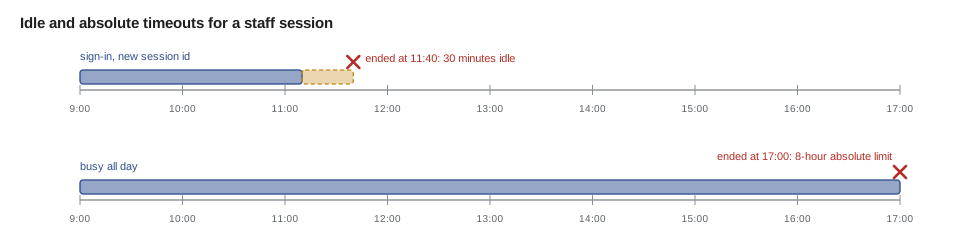
// Is a session still valid? Idle limit 30 minutes, absolute limit 8 hours (staff).
const MIN = 60 * 1000;
const IDLE = 30 * MIN, ABSOLUTE = 8 * 60 * MIN;

function sessionState(s, now) {
  if (s.revoked) return 'ended: signed out';
  if (now - s.createdAt > ABSOLUTE) return 'ended: absolute limit';
  if (now - s.lastSeenAt > IDLE) return 'ended: idle';
  return `active (${Math.round((IDLE - (now - s.lastSeenAt)) / MIN)} min of idle time left)`;
}

const at = (h, m) => Date.UTC(2029, 1, 1, h, m);
const s = { createdAt: at(9, 0), lastSeenAt: at(11, 10), revoked: false };

console.log('11:20', sessionState(s, at(11, 20)));
console.log('11:45', sessionState(s, at(11, 45)));
console.log('17:05', sessionState({ ...s, lastSeenAt: at(17, 0) }, at(17, 5)));
console.log('10:00', sessionState({ ...s, revoked: true }, at(10, 0)));11:20 active (20 min of idle time left) 11:45 ended: idle 17:05 ended: absolute limit 10:00 ended: signed out
What this code does
Each check compares fixed times rather than reading the clock, so the result is the same every time it runs. The absolute limit is checked before the idle limit, so a session kept busy all day still ends eight hours after sign-in. A session revoked on the server is ended immediately, whatever its times say.
The limits are a trade-off. Volunteers sign in to the portal from their own phones to check their shifts, and a short timeout would annoy them for little gain, so their sessions last two weeks with an idle limit of three days. Staff who can see contact details get thirty minutes idle and eight hours absolute. The partner service already met these rules; the PHP application did not regenerate the session id at sign-in and kept sessions for ninety days. That is finding F9.
The session cookie itself should have the attributes from lesson 5: Secure, so it is never sent over plain HTTP; HttpOnly, so page script cannot read it even if an XSS flaw exists; an explicit SameSite; and, where possible, the __Host- name prefix, which tells the browser to accept the cookie only if it is Secure, has Path=/ and no Domain attribute, so a subdomain cannot overwrite it.
Worked problem
How much does slowing each guess help?
An attacker who steals a database of hashes can try about 10 billion SHA-256 guesses a second on rented hardware, but only about 10,000 guesses a second against PBKDF2 at 600,000 iterations on the same hardware (both are rough, typical figures). How long would it take each way to try a list of 1 billion likely passwords against one salted hash?
Show solution
- Plain SHA-256: 1,000,000,000 ÷ 10,000,000,000 = 0.1 seconds.
- PBKDF2: 1,000,000,000 ÷ 10,000 = 100,000 seconds.
- In days: 100,000 ÷ 86,400 ≈ 1.16 days, for one user's hash.
- With 300 volunteers, each with a different salt: about 300 × 1.16 ≈ 347 days.
Answer: A tenth of a second becomes more than a day per user, and nearly a year for the whole volunteer list. Memory-hard algorithms such as Argon2id and scrypt make specialized guessing hardware even less effective.
Common mistakes
MistakeRequiring a capital, a digit and a symbol, and changing passwords every 180 days.
InsteadRequire length (15 for single-factor), check a breach blocklist, and change only on evidence of compromise.
MistakeLocking an account permanently after a few failed attempts.
InsteadUse increasing delays and per-account and per-address limits, and offer a second factor.
MistakeStoring passwords with SHA-256 or any fast hash.
InsteadUse Argon2id, scrypt or bcrypt, or PBKDF2 with many iterations, with a per-user salt.
MistakeKeeping the same session id before and after sign-in.
InsteadIssue a new session id at sign-in and at every change of privilege.
MistakeDeleting the cookie as the only sign-out step.
InsteadDestroy the session on the server, and end other sessions after a password change.
Summary and key terms
- Authentication failures include weak password rules, unlimited guessing, reversible or fast password storage and sessions that never end.
- NIST SP 800-63B-4 asks for at least 15 characters for single-factor passwords and 8 with a second factor, at least 64 allowed, a blocklist of common and breached passwords, no composition rules, no forced periodic changes, and support for password managers.
- Breach checks can use k-anonymity so the password never leaves the server.
- Guessing is slowed with increasing delays and limits rather than hard lock-outs, and staff should use a second factor, ideally passkeys.
- Passwords are stored with slow, salted hashing such as Argon2id, scrypt, bcrypt or PBKDF2.
- Sessions need new ids at sign-in, idle and absolute timeouts, server-side destruction at sign-out, and Secure, HttpOnly, SameSite cookies.
- Authentication
- Establishing who a user is, for example with a password and a second factor.
- Credential stuffing
- Automatically trying passwords leaked from one site against sign-in forms on others.
- k-anonymity
- A technique for checking a value against a list by sending only a short prefix of its hash.
- Passkey
- A phishing-resistant credential that uses public-key cryptography tied to the site's address.
- Password hashing function
- A deliberately slow one-way function, such as Argon2id, used to store passwords.
- Salt
- A random value stored with each password hash so that identical passwords produce different hashes.
- Session fixation
- An attack where a session id chosen before sign-in remains valid after it, letting an attacker share the session.
- Absolute timeout
- A limit that ends a session a fixed time after sign-in, however active it is.
Practice problems
Work each problem on paper first, then reveal the answer to check.
Why does current guidance reject composition rules?
Show answer
They push people into predictable patterns and add little strength; length and breach checks do more.
What does a salt protect against?
Show answer
Identical passwords sharing a hash and precomputed tables of hashes.
Why issue a new session id at sign-in?
Show answer
To prevent session fixation, where an id planted before sign-in stays valid afterwards.
Why is a permanent lock-out after a few failures a poor control?
Show answer
Anyone can lock out a real user by guessing wrongly with their address.
Try it yourself
Password policy
Complete policy(pw, mfa) following NIST SP 800-63B-4. Return too short if the password has fewer than 15 code points (8 when mfa is true), blocked if its lower-case form is in BLOCKED, and ok otherwise.
Do not add rules about capitals, digits or symbols.
const BLOCKED = new Set(['password1234567', 'riverside2029', 'qwertyuiop12345']);

function policy(pw, mfa) {
  if (!/[A-Z]/.test(pw) || !/[0-9]/.test(pw)) return 'needs a capital and a digit';
  return pw.length >= 8 ? 'ok' : 'too short';
}

console.log(policy('copper kettle under maple', false));
console.log(policy('Riverside2029', true));
console.log(policy('Password1234567', false));
console.log(policy('Garden!1', false));
console.log(policy('été dans le jardin', false));
Try it yourself
Session timeouts
Complete valid(createdAt, lastSeenAt, now, idleMin, absoluteMin). Times are in minutes. Return absolute if more than absoluteMin minutes have passed since createdAt, otherwise idle if more than idleMin have passed since lastSeenAt, otherwise ok.
Check the absolute limit first.
function valid(createdAt, lastSeenAt, now, idleMin, absoluteMin) {
  return now - lastSeenAt > idleMin ? 'idle' : 'ok';
}

console.log(valid(0, 100, 120, 30, 480));
console.log(valid(0, 100, 140, 30, 480));
console.log(valid(0, 470, 490, 30, 480));
console.log(valid(0, 480, 480, 30, 480));
Lesson quiz · 5 questions
Score 60% or more to complete this lesson.
Create a free account to save your progress, take quizzes and earn a certificate.