
WEB-230 · Lesson 1 of 12 · 25 min
Threats to web applications
▶ Video coming soon A video version of this lesson is on the way.
On Tuesday, January 16, 2029, Theo is back at the studio after his parental leave, and the first thing on his desk is a letter. The Food Hub's insurer renews its policy on April 1, and this year the renewal form asks whether the organization's web applications have had a documented security review in the past twelve months. The second thing is an e-mail from Lucy. During the December hamper drive, a long-time volunteer, Beatrix Lund, who is blind and uses a screen reader, could not finish signing up for packing shifts in the volunteer portal; she phoned the office instead, and Lucy entered her shifts by hand. Paul has asked the studio to look at both problems together, and Rhea has agreed: a six-week review of everything the studio has built for the Food Hub, with a report to Paul and Lucy at the end of February.
Theo will lead the security half and Sana the accessibility half, with Gareth and Mira doing much of the work. The two halves belong in one course because they share a way of thinking. Both start from the people who use the system and what could stop them from using it safely. Both are cheapest to get right while code is being written. And both are judged in the end by what a real person can do, whether that person is an attacker trying to read another agency's orders or a volunteer trying to sign up with a keyboard and a screen reader.
What a web application has to protect
Security work starts with a question that sounds simple: what is there to protect? Theo calls these the assets. Some are data, some are functions and some are trust. Mira writes the list for the Food Hub on the whiteboard, and it is longer than either of them expected.
| Asset | Where it lives | Why it matters |
|---|---|---|
| Volunteer records: names, e-mail addresses, phone numbers, availability | Theo's PHP application and its PostgreSQL database | Personal information; misuse harms real people and the Food Hub's reputation |
| Staff and partner accounts and their sessions | The PHP application and the partner order service | Whoever holds a session can act as that person |
| Partner orders and dietary forms | The partner order service and its upload folder | Agencies trust the Food Hub with details about the people they serve |
| The order board in Rosa's kitchen | A tablet reading the partner service | If it is wrong or blank, food is not prepared |
| Donation notifications | The serverless function from JS-260 | A forged notification could record a gift that was never made |
| The public site's content | Static files behind the CDN | Defacement or injected scripts would reach every visitor |
| Secrets: signing keys, database passwords, the deploy key | Environment files and the pipeline | Each one unlocks other assets |
An asset list is useful because it turns vague worry into specific questions. Nobody can defend "the website". Anyone can ask who is allowed to read a dietary form, how the system knows, and what would happen if it were wrong.
Threats, vulnerabilities and risk
Security people use a few words precisely, and the course will use them the same way. A threat is something that could cause harm: a person, a program or an event, such as a former volunteer who still knows a shared password. A vulnerability is a weakness that a threat could use, such as a page that shows any order whose number is typed into the address bar. An attack is a threat actually using a vulnerability. Risk combines how likely an attack is with how much harm it would do. A serious vulnerability in a page nobody can reach is a small risk; a small weakness on the sign-in page used by three hundred volunteers can be a large one.
The people who attack a site like the Food Hub's are rarely the patient, skilled attackers of films. Most attacks on small organizations are automated: programs that scan the whole internet for known weaknesses, try leaked passwords against every sign-in form they find, and post spam into every open text box. Some harm comes from insiders who keep access after they leave, or from honest mistakes, such as Westview's coordinator pasting the agency's key into a public page in May 2028. Defences have to work against all of these, and most of them are the same few good habits.
// Risk = likelihood x impact, each scored 1 (low) to 3 (high).
const risks = [
  { what: 'Leaked password used on staff sign-in', likelihood: 3, impact: 3 },
  { what: 'Agency reads another agency\'s order', likelihood: 2, impact: 3 },
  { what: 'Spam typed into the contact form', likelihood: 3, impact: 1 },
  { what: 'Public site defaced through the CDN account', likelihood: 1, impact: 2 },
  { what: 'Forged donation notification', likelihood: 1, impact: 2 },
];

const level = (score) => (score >= 6 ? 'high' : score >= 3 ? 'medium' : 'low');

const ranked = risks
  .map((r) => ({ ...r, score: r.likelihood * r.impact }))
  .sort((a, b) => b.score - a.score || a.what.localeCompare(b.what));

for (const r of ranked) {
  console.log(String(r.score).padStart(2), level(r.score).padEnd(6), r.what);
}9 high Leaked password used on staff sign-in 6 high Agency reads another agency's order 3 medium Spam typed into the contact form 2 low Forged donation notification 2 low Public site defaced through the CDN account
What this code does
Each risk gets a likelihood and an impact score from 1 to 3, and their product is the risk score from 1 to 9. The list is sorted by score, with ties broken alphabetically so the order is always the same. A simple matrix like this does not predict anything precisely, but it makes the team agree on what to look at first.
The scores are judgments, not measurements, and Theo is careful to say so. Their value is that they are written down, so that Paul can see why the review spends a day on sign-in and ten minutes on the contact form, and so that next year's review can see what changed.
Drawing the system: data flows and trust boundaries
Before looking for weaknesses, Theo asks Mira to draw how data moves. A data flow diagram shows the people and outside systems that use the application, the processes that handle data, the places where data is stored, and the flows between them. The most important lines on it are the trust boundaries: places where data passes from something the system does not control to something it does. Every flow that crosses a trust boundary is a place where input must be checked, identity must be established, or both.
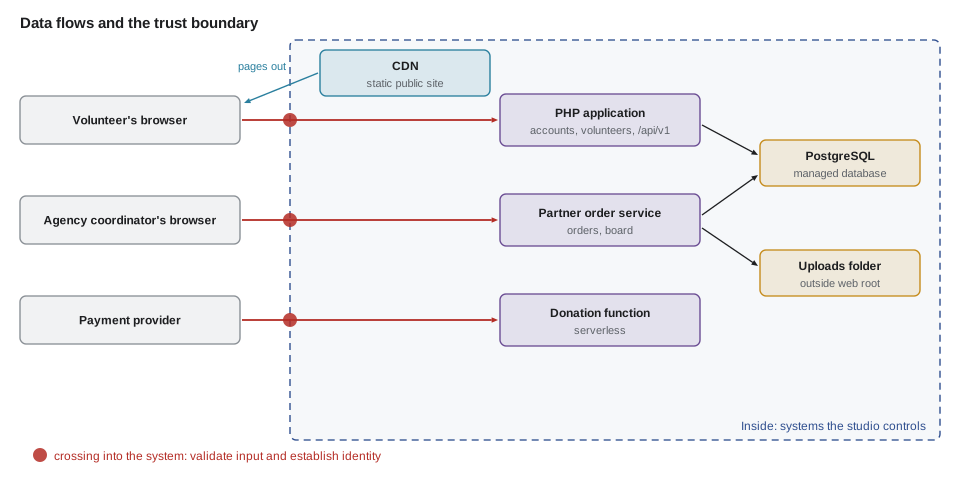
The browser is always on the far side of the boundary. That is one of the most important facts in web security and one of the easiest to forget. Everything that arrives from a browser, including form fields, the address, cookies, headers and the body of an API request, can be changed by the person using it, or by a program pretending to be a browser. JavaScript checks in the page are a convenience for honest users; they are never a defence, because anyone can skip them.
// Which flows cross a trust boundary? Each node is inside or outside.
const zone = {
  'volunteer browser': 'outside', 'agency browser': 'outside', 'payment provider': 'outside',
  'CDN': 'inside', 'PHP app': 'inside', 'partner service': 'inside', 'donation function': 'inside',
  'database': 'inside', 'uploads': 'inside',
};
const flows = [
  ['volunteer browser', 'PHP app', 'sign-up form'],
  ['agency browser', 'partner service', 'order and dietary form'],
  ['payment provider', 'donation function', 'donation notification'],
  ['PHP app', 'database', 'volunteer record'],
  ['partner service', 'uploads', 'dietary form file'],
  ['CDN', 'volunteer browser', 'public pages'],
];

for (const [from, to, data] of flows) {
  const crosses = zone[from] !== zone[to];
  const into = crosses && zone[to] === 'inside';
  const note = into ? 'CHECK: validate input, establish identity' : crosses ? 'leaves the system' : 'internal';
  console.log(`${data.padEnd(24)} ${note}`);
}sign-up form CHECK: validate input, establish identity order and dietary form CHECK: validate input, establish identity donation notification CHECK: validate input, establish identity volunteer record internal dietary form file internal public pages leaves the system
What this code does
Every node is tagged as inside or outside the system the studio controls. A flow crosses the boundary when its two ends are in different zones, and the flows that come in from outside are exactly where checks belong. The outgoing flow to browsers still matters, because what the system sends must be safe to display.
STRIDE: a checklist of what can go wrong
With the diagram drawn, the team needs a systematic way to ask what could go wrong at each element. A common checklist, developed at Microsoft, is STRIDE, an acronym for six kinds of threat. Each kind is the opposite of a security property the system wants to have.
| Threat | Violates | Food Hub example | Typical defence |
|---|---|---|---|
| Spoofing | Authentication | Someone signs in as Rosa with a guessed password | Strong sign-in, multi-factor for staff |
| Tampering | Integrity | An order's tray count is changed in transit or in the database | HTTPS, authorization on every change, audit records |
| Repudiation | Accountability | An agency denies having cancelled an order | Logs and audit records that say who did what, when |
| Information disclosure | Confidentiality | A dietary form is readable by the wrong agency | Access checks on every object, encryption |
| Denial of service | Availability | The board is flooded with requests and goes blank | Rate limits, timeouts, capacity limits |
| Elevation of privilege | Authorization | A partner-staff account reaches admin-only pages | Role checks on the server, least privilege |
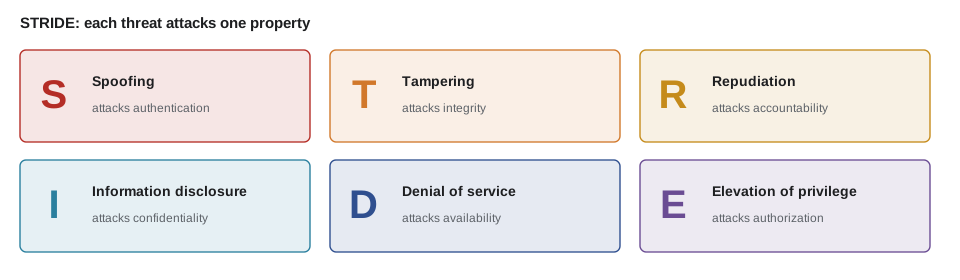
STRIDE is not a theory of attackers; it is a prompt. For each process, store and flow on the diagram, the team asks which of the six apply and writes down any that do. A process that receives input from outside is usually exposed to all six. A data store is mainly exposed to tampering, disclosure and denial of service. A flow is mainly exposed to tampering, disclosure and denial of service in transit. The output is a list of specific threats, each of which either already has a defence, needs one, or is accepted as a low risk.
// Which STRIDE categories apply to each kind of element (a common rule of thumb).
const applies = {
  'external entity': ['S', 'R'],
  process: ['S', 'T', 'R', 'I', 'D', 'E'],
  'data store': ['T', 'I', 'D'],
  'data flow': ['T', 'I', 'D'],
};
const names = { S: 'spoofing', T: 'tampering', R: 'repudiation', I: 'disclosure', D: 'denial of service', E: 'elevation' };

const elements = [
  ['agency coordinator', 'external entity'],
  ['partner order service', 'process'],
  ['uploads folder', 'data store'],
  ['order and dietary form', 'data flow'],
];

let total = 0;
for (const [name, kind] of elements) {
  const list = applies[kind];
  total += list.length;
  console.log(`${name} (${kind}): ${list.map((c) => names[c]).join(', ')}`);
}
console.log(`${total} questions to answer for four elements`);agency coordinator (external entity): spoofing, repudiation partner order service (process): spoofing, tampering, repudiation, disclosure, denial of service, elevation uploads folder (data store): tampering, disclosure, denial of service order and dietary form (data flow): tampering, disclosure, denial of service 14 questions to answer for four elements
What this code does
The table maps each kind of diagram element to the STRIDE threats that usually apply to it. Looking up each element produces the list of questions the team must answer, and the total shows why even a small system yields dozens of questions. Writing the questions down is what makes threat modelling repeatable from one review to the next.
Defence in depth and least privilege
No single defence is perfect, so good designs layer them. Defence in depth means that an attacker who gets past one control meets another. The partner service is a good example. An agency's request must carry a valid session or token, the server checks that the order belongs to that agency, the database account the service uses cannot drop tables, uploads are stored outside the web root under random names, and the logs record who did what. If any one layer fails, the others still limit the harm.
Least privilege means that every person, program and key has only the access it needs, and no more. The reminders script from JS-230 needs to read shifts and write a batch for Theo's mail queue; it does not need to change volunteer records, so its database account should not be able to. A board tablet needs to read today's orders; it should not be able to create them. Least privilege does not prevent mistakes, but it makes their consequences smaller, and it is one of the cheapest controls to apply once it is part of how the team thinks.
A third habit is to fail safely. When something unexpected happens, such as a missing setting, a database that does not answer or an input the code did not expect, the safe response is usually to refuse rather than to carry on. Lesson 2 will meet this idea again in the newest entry of the OWASP Top 10, which is about exactly this kind of failure.
Security as part of the work
The review is a one-off, but Theo's real goal is that it will not be needed in this form again. Security that is added at the end is expensive and incomplete; security that is part of design, code review and testing costs little more than the code itself. The practices the course builds toward are ordinary ones. Threats are considered when a feature is designed. Every change is reviewed by a second person who knows what to look for. Tests include the cases an attacker would try, such as another agency's order number. Dependencies are updated on a schedule. Problems found in production are fixed, then turned into tests.
Accessibility follows the same pattern, and Sana will make the same argument in lesson 9. A form designed with labels, clear errors and keyboard support costs almost nothing extra to build. The same form retrofitted after a volunteer could not use it costs a redesign, new tests, and, as Beatrix found in December, a phone call she should not have had to make.
How the review will run
Theo and Sana agree a plan for the six weeks, and the rest of the course follows it.
| Lessons | Focus | Lead |
|---|---|---|
| 1–2 | Threat model and the OWASP Top 10 applied to the Food Hub | Theo |
| 3–5 | Input, output, cross-site scripting and cross-site request forgery | Theo and Gareth |
| 6–8 | Sign-in and sessions, headers and policies, dependencies | Theo |
| 9–10 | WCAG and accessible components; testing with tools and assistive technology | Sana |
| 11 | Privacy and personal data | Theo, with Dev and Lucy |
| 12 | Putting the findings together into a report | Everyone |
The scope is everything the studio built: the public site, the volunteer portal, Theo's PHP application, the partner order service and its board, the reminders script and the donation function. Testing will happen on staging, never on production, and only on systems the studio owns or has written permission from the Food Hub to test. Theo is firm about this. Testing someone else's system without permission is not a review; in both countries it can be an offence.
Worked problem
Scoring the first threats
Mira scores three threats on the 1 to 3 scale: a leaked staff password used on sign-in (likelihood 3, impact 3), a volunteer seeing another volunteer's phone number in the portal (likelihood 2, impact 2), and the board being flooded with requests (likelihood 1, impact 3). The team agreed that a score of 6 or more is high, 3 to 5 medium and below 3 low. What is each score and level, and which should be looked at first?
Show solution
- Leaked staff password: 3 × 3 = 9, high.
- Phone number visible to another volunteer: 2 × 2 = 4, medium.
- Board flooded: 1 × 3 = 3, medium.
- Order of attention: the staff password first (9), then the phone number (4), then the board (3).
Answer: The staff sign-in threat scores 9 and comes first; the other two are medium at 4 and 3. The scores set the order of work, not whether a threat is ignored.
Common mistakes
MistakeTreating checks in the browser's JavaScript as a security control.
InsteadCheck everything again on the server; the browser is outside the trust boundary.
MistakeStarting a review by looking for bugs at random.
InsteadList the assets, draw the data flows and trust boundaries, then ask STRIDE questions at each element.
MistakeGiving every service the same powerful database account.
InsteadApply least privilege: each script, service and key gets only the access it needs.
MistakeCarrying on when a setting is missing or a dependency fails.
InsteadFail safely: refuse the request or stop the service rather than run in an unknown state.
MistakeTesting a system because it is reachable on the internet.
InsteadTest only systems you own or have written permission to test, and use staging, not production.
Summary and key terms
- A security review begins with the assets: data, functions and trust that need protecting.
- A threat is a possible cause of harm, a vulnerability is a weakness it could use, and risk combines likelihood with impact.
- A data flow diagram shows how data moves, and the trust boundaries on it mark where input must be checked and identity established.
- The browser is always outside the boundary, so checks in page scripts help honest users but are never a defence.
- STRIDE gives six questions to ask about each element: spoofing, tampering, repudiation, information disclosure, denial of service and elevation of privilege.
- Defence in depth, least privilege and failing safely limit the harm when any one control fails.
- Testing is done only with permission, on staging.
- Asset
- Anything of value that a system must protect, such as personal data, accounts or a working order board.
- Threat
- A person, program or event that could cause harm.
- Vulnerability
- A weakness that a threat could use to cause harm.
- Risk
- The combination of how likely an attack is and how much harm it would do.
- Trust boundary
- A line on a data flow diagram where data passes from something the system does not control to something it does.
- STRIDE
- A checklist of six threat types: spoofing, tampering, repudiation, information disclosure, denial of service and elevation of privilege.
- Defence in depth
- Layering several controls so that one failure does not expose an asset.
- Least privilege
- Giving each person, program and key only the access it needs.
Practice problems
Work each problem on paper first, then reveal the answer to check.
Why is the browser always on the far side of a trust boundary?
Show answer
Anything a browser sends, including fields, cookies, headers and scripts' checks, can be changed by its user or imitated by a program.
What is the difference between a threat and a vulnerability?
Show answer
A threat is something that could cause harm; a vulnerability is a weakness it could use.
Which STRIDE threat would an attacker use to act as Rosa?
Show answer
Spoofing, which attacks authentication.
Why does least privilege help even when it does not prevent an attack?
Show answer
It limits what a compromised account, program or key can do.
Try it yourself
Risk levels
Complete riskLevel(likelihood, impact). Both arguments are whole numbers from 1 to 3. Multiply them and return high for a score of 6 or more, medium for 3 to 5 and low below 3.
If either argument is outside 1 to 3, return invalid.
function riskLevel(likelihood, impact) {
  return '';
}

console.log(riskLevel(3, 3));
console.log(riskLevel(2, 2));
console.log(riskLevel(1, 2));
console.log(riskLevel(0, 3));
Try it yourself
Flows to check
Complete incoming(zone, flows). zone maps each node name to inside or outside; each flow is [from, to, data].
Return the data names of the flows that come from outside into inside, sorted alphabetically.
function incoming(zone, flows) {
  return [];
}

const zone = { browser: 'outside', provider: 'outside', app: 'inside', db: 'inside' };
const flows = [
  ['browser', 'app', 'sign-up form'],
  ['app', 'db', 'record'],
  ['provider', 'app', 'donation notice'],
  ['app', 'browser', 'page'],
];
console.log(incoming(zone, flows).join(', '));
Lesson quiz · 5 questions
Score 60% or more to complete this lesson.
Create a free account to save your progress, take quizzes and earn a certificate.