
WEB-101 · Lesson 6 of 12 · 21 min
CSS selectors, the cascade and specificity
▶ Video coming soon A video version of this lesson is on the way.
With the HTML of all five pages in place, Sana Qureshi, Brightwater's designer, brought her design for the new Food Hub site to the Monday meeting on October 19. It used the Food Hub's green and a warm orange, a clear sans-serif typeface, generous spacing, and large buttons. "Now we teach the browser to look like this," Gareth told Mira, "without touching a single line of the HTML." That separation, structure in HTML and presentation in CSS, is what lets a whole site be restyled by editing one file.
This lesson introduces CSS, Cascading Style Sheets: how a rule is written, how selectors pick out elements, and how the browser decides which rule wins when several rules set the same property on the same element. That decision process is the cascade, and specificity is its best-known part. Most of the frustration people have with CSS comes from not knowing how it works.
Rules, properties and values
A stylesheet is a list of rules. Each rule has a selector, which says which elements it applies to, and a declaration block in curly braces holding one or more declarations. Each declaration is a property, a colon, a value and a semicolon.
/* Body text for the whole site */
body {
  font-family: "Atkinson Hyperlegible", Arial, sans-serif;
  font-size: 1.125rem;
  line-height: 1.6;
  color: #1f2933;
  background-color: #ffffff;
}

h1, h2 {
  color: #1c6b58;
}
CSS property names are in American English, as are HTML's, so the property is always written color, even in a stylesheet written in Kingston for a Canadian client, and centring text uses the value center. Text between /* and */ is a comment. A browser that meets a property or value it does not understand ignores that one declaration and carries on, which is why CSS can add new features without breaking older browsers.
There are three ways to attach CSS to a page. An external stylesheet, linked from the head with a link element, is the normal choice: one file styles every page and the browser caches it. A style element in the head holds rules for one page only. A style attribute on an element, called an inline style, applies to that element alone; it is hard to maintain and beats almost every rule in a stylesheet, so Brightwater avoids it.
Simple selectors
| Selector | Example | Matches |
|---|---|---|
| Type | p | Every p element |
| Class | .button | Every element with button in its class attribute |
| ID | #main | The one element with id="main" |
| Universal | * | Every element |
| Attribute | [type="email"] | Elements whose type attribute is email |
| Pseudo-class | a:hover | Links while the pointer is over them |
| Pseudo-element | p::first-line | The first rendered line of each paragraph |
Class selectors do most of the work in a well-built stylesheet. An element can have several classes separated by spaces, as in class="button button-primary", and a class can be used on any number of elements. ID selectors match one element and are very specific, which makes them hard to override, so Brightwater uses ids for fragment links and form labels but rarely for styling.
A pseudo-class selects elements in a particular state or position. :hover applies while a pointer is over the element and :focus while it has keyboard focus. :focus-visible applies when the browser judges that a focus indicator should be shown, typically for keyboard users, which lets a design keep a strong focus outline without showing it on every mouse click. Structural pseudo-classes such as :first-child, :last-child and :nth-child(2n) select by position among siblings. :not() excludes matches, and :is() and :where() group alternatives. A pseudo-element, written with two colons, styles a part of an element, such as ::first-line, or inserts generated content with ::before and ::after.
Combinators
Selectors can be combined to match elements by their place in the DOM tree from Lesson 3.
- Descendant (a space): nav a matches every link anywhere inside a nav.
- Child (>): ul > li matches only list items that are direct children of a ul.
- Next sibling (+): h2 + p matches a paragraph that comes immediately after an h2.
- Later sibling (~): h2 ~ p matches every paragraph after an h2 with the same parent.
- Grouping (a comma): h1, h2, h3 applies the same declarations to all three; it is a list of selectors, not a combinator.
nav a {
  color: #1c6b58;
  text-decoration: none;
}

nav a:hover,
nav a:focus-visible {
  text-decoration: underline;
}

.notice > p:first-child {
  font-weight: 700;
}

a:focus-visible {
  outline: 3px solid #c58b1b;
  outline-offset: 2px;
}
The cascade
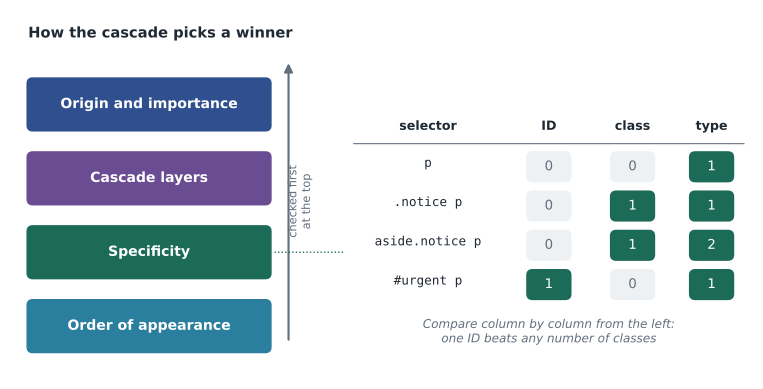
Often several rules set the same property on the same element. The paragraph inside the urgent-needs aside might be matched by a rule for p, a rule for .notice p and a rule for aside p, each giving a different colour. The cascade is the algorithm that picks one value. It compares the competing declarations in order of these questions, and stops at the first that gives an answer.
- Origin and importance. Declarations come from the browser's own default stylesheet (the user-agent origin), from the user (such as a reader's preferred font size), and from the page's author. Normal author rules beat browser defaults. A declaration marked !important reverses the usual order, and user !important rules beat everything, so that people who need high contrast or large text can always have it.
- Cascade layers. Rules placed in named @layer blocks are ranked by the order of the layers. Layers help large projects keep a reset, a framework and their own components from fighting; the Food Hub site is small enough not to need them.
- Specificity. Among the remaining declarations, the one with the more specific selector wins.
- Order of appearance. If specificity is equal, the declaration that comes last wins.
Specificity
Specificity is a score written as three numbers, often shown as (A, B, C). A counts ID selectors. B counts class selectors, attribute selectors and pseudo-classes. C counts type selectors and pseudo-elements. The universal selector and combinators count nothing. Scores are compared column by column from the left, like words in a dictionary: any score with a 1 in the ID column beats any score with 0 there, however many classes the other has.
| Selector | IDs (A) | Classes, attributes, pseudo-classes (B) | Types, pseudo-elements (C) | Score |
|---|---|---|---|---|
| p | 0 | 0 | 1 | (0,0,1) |
| aside p | 0 | 0 | 2 | (0,0,2) |
| .notice p | 0 | 1 | 1 | (0,1,1) |
| nav a:hover | 0 | 1 | 2 | (0,1,2) |
| input[type="email"]:focus | 0 | 2 | 1 | (0,2,1) |
| #urgent p | 1 | 0 | 1 | (1,0,1) |
Two details often catch people out. :is() and :not() take the specificity of the most specific selector inside them, while :where() always counts zero, which makes it useful for default styles that should be easy to override. And an inline style attribute beats any selector, which is one more reason to avoid it.
function specificity(selector) {
  const ids = (selector.match(/#[\w-]+/g) || []).length;
  const classes = (selector.match(/\.[\w-]+|\[[^\]]+\]|(?<!:):(?!:)[\w-]+/g) || []).length;
  const types = (selector.match(/(^|[\s>+~])[a-z][\w-]*/g) || []).length
              + (selector.match(/::[\w-]+/g) || []).length;
  return [ids, classes, types];
}

const selectors = ['p', 'aside p', '.notice p', 'nav a:hover', 'input[type="email"]:focus', '#urgent p', 'p::first-line'];
for (const s of selectors) {
  console.log(s.padEnd(28) + '(' + specificity(s).join(',') + ')');
}p (0,0,1) aside p (0,0,2) .notice p (0,1,1) nav a:hover (0,1,2) input[type="email"]:focus (0,2,1) #urgent p (1,0,1) p::first-line (0,0,2)
What this code does
This simplified calculator counts the three kinds of selector with regular expressions. The first pattern finds # followed by a name (IDs). The second finds a dot and a name (classes), anything in square brackets (attributes), or a single colon and a name (pseudo-classes; the lookbehind and lookahead make sure neither colon of a pseudo-element's double colon is counted). The third finds names at the start or after a space or combinator (types), and the pseudo-element count is added to it. Each match call returns a list of matches, or null when there are none, so the code uses an empty list in that case before taking the length. It handles the simple selectors in this lesson; a full calculator must also handle :is(), :not() and :where().
function compare(a, b) {
  for (let i = 0; i < 3; i++) {
    if (a[i] > b[i]) return 'first wins';
    if (a[i] < b[i]) return 'second wins';
  }
  return 'tie: the later rule wins';
}

console.log(compare([0, 1, 1], [0, 0, 2]));
console.log(compare([0, 3, 0], [1, 0, 0]));
console.log(compare([0, 1, 2], [0, 1, 2]));first wins second wins tie: the later rule wins
What this code does
Specificity is compared one column at a time, starting with IDs. The first column that differs decides the result, so three classes (0,3,0) still lose to a single ID (1,0,0). If every column is equal, the cascade falls through to the next question, the order of appearance, and the rule that comes later in the stylesheet wins.
Inheritance
Some properties are inherited: if an element has no value of its own, it takes its parent's. Text properties such as color, font-family, font-size and line-height inherit, which is why the body rule at the top of this lesson styles nearly all the text on the page. Box properties such as margin, padding, border and background do not inherit; it would make no sense for every element inside a bordered box to draw its own border. The keyword inherit forces a property to take the parent's value, initial resets it to the property's default, and unset does whichever is natural for that property.
An inherited value always loses to a rule that matches the element directly, however low that rule's specificity. That explains a common puzzle: a rule .notice { color: #b42d26; } does not turn a link inside the notice red, because the browser's own stylesheet has a rule for links that sets their colour directly.
Custom properties and colour values
Custom properties, also called CSS variables, store a value under a name that starts with two hyphens and are read with var(). Sana's design uses a handful of brand colours many times, so the stylesheet defines them once on :root, the html element.
:root {
  --brand-green: #1c6b58;
  --brand-orange: #c58b1b;
  --ink: #1f2933;
  --paper: #ffffff;
}

.button {
  background-color: var(--brand-green);
  color: var(--paper);
}

.button:hover,
.button:focus-visible {
  background-color: #155244;
}
Colours can be written in several forms. Hex codes such as #1c6b58 give red, green and blue as pairs of hexadecimal digits. rgb() gives the same three channels as numbers from 0 to 255. hsl() gives hue as an angle, then saturation and lightness, which makes lighter and darker shades easy to reason about. Newer forms such as oklch() are designed so that equal steps in lightness look equal to the eye, and are supported by all current major browsers. Lesson 11 checks that every text and background pair has enough contrast.
Worked problem
Which colour wins?
The urgent-needs box is marked up as an aside with id="urgent" and class="notice", containing a paragraph. The stylesheet has, in this order: p { color: #1f2933; } then #urgent p { color: #b42d26; } then .notice p { color: #1c6b58; }. Which colour does the paragraph get?
Show solution
- All three rules match the paragraph and have the same origin, so compare specificity.
- \[p: (0,0,1), \quad \#urgent\ p: (1,0,1), \quad .notice\ p: (0,1,1)\]
- Compare the ID column first: only #urgent p has an ID.
- \[(1,0,1) > (0,1,1) > (0,0,1)\]
Answer: The paragraph is red, #b42d26, even though the .notice p rule comes later, because specificity is checked before order of appearance. To let .notice p win, Mira would change the ID selector to a class, rather than reaching for !important.
Mira made exactly that change. Gareth's rule for the project was simple: no IDs in selectors, no !important outside the accessibility helpers, and no inline styles. "If you keep specificity low and even," he said, "the order of the file tells you what wins, and anyone can read it."
Common mistakes
MistakeWriting colour, with the Canadian spelling, as a property name in CSS.
InsteadCSS uses American spelling: the property is color and the value is center, whatever language the page is in.
MistakeUsing ID selectors for styling.
InsteadPrefer classes; IDs have such high specificity that they are hard to override.
MistakeReaching for !important to win a conflict.
InsteadLower the specificity of the competing rule or reorder the rules instead.
MistakeRemoving focus outlines because they look untidy.
InsteadKeep a clear focus indicator; style it with :focus-visible if needed.
MistakeExpecting a later rule to win against a more specific earlier one.
InsteadOrder only decides between declarations of equal specificity.
MistakeExpecting borders and backgrounds to inherit.
InsteadOnly some properties, mainly text properties, inherit.
Practice problems
Work each problem on paper first, then reveal the answer to check.
Give the specificity of .menu li a and of #footer a.
Show answer
.menu li a is (0,1,2); #footer a is (1,0,1), which is higher.
Build this: write a rule that gives every link inside the footer the brand green, using a custom property, and underlines it.
Show answer
See the model answer below. footer a has a low, even specificity of (0,0,2).
footer a {
  color: var(--brand-green);
  text-decoration: underline;
}
Practice problems
Work each problem on paper first, then reveal the answer to check.
A heading inside the footer has no color rule of its own, and the footer is styled with color: #ffffff. What colour is the heading text, and why?
Show answer
White, because color is inherited and the heading has no rule that sets it directly (assuming nothing else matches it).
Why does the stylesheet still work in a browser that does not understand oklch()?
Show answer
The browser ignores declarations it does not understand, so an earlier declaration with a hex fallback in the same rule still applies.
Try it yourself
Pick the winning rule
Each rule has a selector name, a specificity array and its position in the stylesheet.
Find the winning rule using specificity first and then the later position, and print its name.
const rules = [
  { name: 'p', spec: [0, 0, 1], position: 1 },
  { name: '.notice p', spec: [0, 1, 1], position: 2 },
  { name: 'aside.notice p', spec: [0, 1, 2], position: 3 },
  { name: '.box p', spec: [0, 1, 1], position: 4 }
];
// your code here
Summary and key terms
- A CSS rule is a selector and a block of property: value declarations; property names use American spelling.
- External stylesheets are the normal way to style a site; avoid inline style attributes.
- Selectors include type, class, ID, attribute, pseudo-class and pseudo-element; combinators match descendants, children and siblings.
- The cascade compares origin and importance, then layers, then specificity, then order of appearance.
- Specificity is (IDs, classes and attributes and pseudo-classes, types and pseudo-elements), compared column by column.
- Text properties inherit; box properties do not. An inherited value loses to any rule matching the element directly.
- Custom properties store reusable values such as brand colours; colours can be hex, rgb(), hsl() or oklch().
- CSS
- Cascading Style Sheets, the language for the presentation of web pages.
- Selector
- The part of a CSS rule that chooses which elements it applies to.
- Declaration
- A property and value pair inside a CSS rule.
- Class selector
- A selector beginning with a dot that matches elements with that class.
- Pseudo-class
- A selector such as :hover or :focus-visible that matches elements in a state or position.
- Combinator
- A symbol such as a space, > or + that relates two selectors in the DOM tree.
- Cascade
- The algorithm that decides which of several competing declarations applies.
- Specificity
- A three-part score of a selector used by the cascade to rank declarations.
- Inheritance
- An element taking a property value from its parent when it has none of its own.
- Custom property
- A named value, written with two leading hyphens, read with var().
Lesson quiz · 5 questions
Score 60% or more to complete this lesson.
Create a free account to save your progress, take quizzes and earn a certificate.