
WEB-101 · Lesson 2 of 12 · 22 min
URLs, DNS and the request-response cycle
▶ Video coming soon A video version of this lesson is on the way.
In her second week, Mira sat in on a call between Theo Marchetti, Brightwater's back-end developer, and Dev Bhatt, the Food Hub's communications lead. Dev had printed the new site's address on 2,000 flyers for the December food drive and wanted to be sure it would work on launch day. Theo walked him through what would happen when someone typed it: the phone would look up the name, find a numeric address, open an encrypted connection, ask for the page, and then ask for everything the page needed. "Four or five separate steps," Theo said, "and each one can go wrong in its own way. If we know the steps, we know where to look."
Lesson 1 described the request and response. This lesson fills in what comes before and around them: the structure of a URL, the Domain Name System that turns names into addresses, and the full request-response cycle from a tap on a link to a finished page on the screen.
The parts of a URL
A URL, a Uniform Resource Locator, is the address of a resource on the web. The rules for writing one are set out in RFC 3986 and, for browsers, in the WHATWG URL Standard. A full URL has up to six parts, and each has a job.
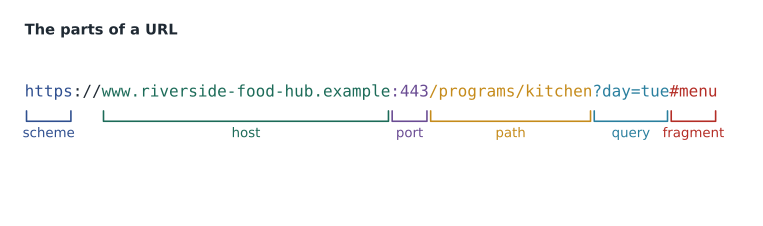
| Part | Example | What it does |
|---|---|---|
| Scheme | https | Names the protocol the client should use |
| Host | www.riverside-food-hub.example | Names the server, usually as a domain name |
| Port | 443 | Names the door on the server; left out when it is the default for the scheme |
| Path | /programs/kitchen | Names the resource on that server |
| Query | day=tue | Passes extra name and value pairs to the server |
| Fragment | menu | Names a part of the page; the browser keeps it and never sends it to the server |
The scheme comes first and is followed by a colon. For web pages it is https or, on old or local sites, http. Other schemes include mailto: for email links and tel: for phone numbers, both of which Lesson 4 uses. The host is usually a domain name, though it can be a numeric IP address. The port is a number from 0 to 65535; HTTPS uses 443 and plain HTTP uses 80 by default, so those numbers are almost never written. During development, Mira's local server ran on port 8000, so her addresses looked like http://localhost:8000/programs.
The path looks like a folder and file path and often is one on a simple static server, but it does not have to be. On the new Food Hub site, the path /programs is answered by a file called programs.html or by a folder with an index.html inside, depending on how the server is set up. Paths are case-sensitive on most servers, so /Programs and /programs can be different resources; Brightwater writes every path in lower case to avoid the confusion.
The query starts with a question mark and holds pairs written as name=value, separated by ampersands, such as ?day=tue&lang=fr. A search box sends its words in the query. The fragment starts with a hash sign and names an element on the page by its id, so a link to /programs#kitchen scrolls straight to the community kitchen section. Because the fragment is never sent to the server, it costs nothing and needs no server support.
Reading URLs in JavaScript
JavaScript has a built-in URL object that splits an address into its parts exactly as a browser does. It is the safest way to work with addresses in code, because it handles the details that hand-written string splitting gets wrong.
const address = new URL('https://www.riverside-food-hub.example/programs/kitchen?day=tue&lang=fr#menu');

console.log('protocol: ' + address.protocol);
console.log('host:     ' + address.hostname);
console.log('port:     ' + (address.port || '(default)'));
console.log('path:     ' + address.pathname);
console.log('query:    ' + address.search);
console.log('day:      ' + address.searchParams.get('day'));
console.log('fragment: ' + address.hash);protocol: https: host: www.riverside-food-hub.example port: (default) path: /programs/kitchen query: ?day=tue&lang=fr day: tue fragment: #menu
What this code does
new URL(...) parses the text of an address into an object with one property per part. The protocol includes its colon, the port is an empty string when the default is used (so the logical OR operator prints a placeholder instead), and search and hash keep their leading ? and # characters. searchParams.get('day') looks up one value in the query by name. Browsers use this same parser, so the result matches what a browser would do with the address.
Some characters cannot appear as themselves in a URL. Spaces, accented letters and characters with special meanings, such as the ampersand inside a value, must be percent-encoded: replaced by a percent sign followed by the character's bytes written as two hexadecimal digits each. The JavaScript function encodeURIComponent does the conversion, and decodeURIComponent reverses it.
const search = 'fruit & vegetable boxes';
const encoded = encodeURIComponent(search);
console.log(encoded);
console.log('/search?q=' + encoded);
console.log(decodeURIComponent(encoded));
console.log(encodeURIComponent('Café'));fruit%20%26%20vegetable%20boxes /search?q=fruit%20%26%20vegetable%20boxes fruit & vegetable boxes Caf%C3%A9
What this code does
encodeURIComponent turns each space into the three characters for a space code and the ampersand into its code, so the ampersand can no longer be mistaken for the separator between query pairs. Accented letters take two bytes in UTF-8, so é becomes two codes. decodeURIComponent turns the encoded text back into the original. When a program builds a URL from user input, it should always encode the values this way.
Domain names
Computers on the internet are found by numeric IP addresses. An IPv4 address is four numbers from 0 to 255 separated by dots, such as 203.0.113.25; there are only about 4.3 billion of them, so the newer IPv6 uses much longer addresses written in hexadecimal groups, such as 2001:db8::25. People cannot remember either kind, so the web uses domain names.
A domain name is read from right to left. In www.riverside-food-hub.example, the top-level domain (TLD) is .example, the name registered under it is riverside-food-hub, and www is a subdomain chosen by the owner. Real sites use TLDs such as .ca, .com, .org or .us; the Food Hub's real address is not used in this course. The names .example, .test and .invalid are reserved by RFC 2606 so that teaching material and testing can never point at someone's real site, which is why every example here ends in .example.
Owning a domain means renting it, usually for one to ten years at a time, through a registrar. The .ca domains are managed by the Canadian Internet Registration Authority (CIRA), which requires the registrant to have a Canadian presence; the Food Hub qualifies as an Ontario non-profit. Theo's first rule for clients is that the organization, not the web studio, must own its domain, with renewal reminders going to an address the organization will still read in five years.
The Domain Name System
The Domain Name System (DNS) is the internet's distributed directory. It answers questions of the form "what is the address for this name?" No single computer holds the whole directory. Instead, the work is split into layers, and each layer knows who to ask next.
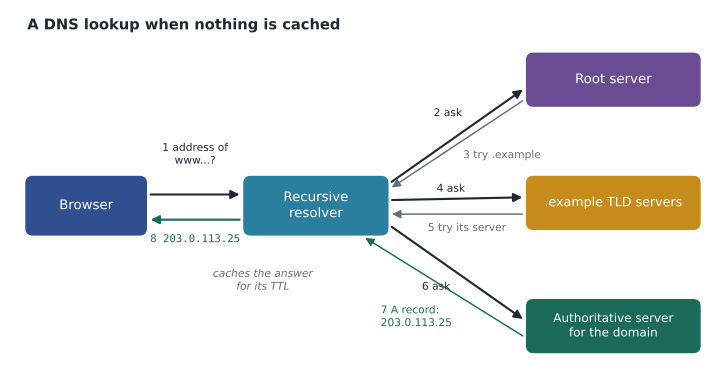
When a browser needs an address, it checks its own cache, then the operating system's cache. If neither knows, the request goes to a recursive resolver, usually run by the internet provider or a public service. The resolver asks one of the root servers, which do not know the address but know which servers handle each TLD. The TLD servers know which authoritative name server holds the records for riverside-food-hub.example. That server gives the final answer. The resolver passes it back and keeps a copy for later visitors.
The records on the authoritative server are short lines of data, each with a type.
| Record type | Holds | Food Hub example |
|---|---|---|
| A | An IPv4 address for a name | www points to 203.0.113.25 |
| AAAA | An IPv6 address for a name | www points to 2001:db8::25 |
| CNAME | Another name to look up instead (an alias) | shop points to a hosted store's name |
| MX | The mail servers that accept email for the domain | Two mail servers at the email provider |
| TXT | Free text, often used to prove ownership or set email rules | An email sender policy record |
Every record has a TTL, a time to live in seconds, which tells resolvers how long they may cache it. A TTL of 86,400 means a day. That is efficient but slow to change: if the address moves, some visitors keep going to the old server until their resolver's copy expires. A week before the Food Hub launch, Theo planned to lower the TTL on the www record to 300 seconds, so that the switch from the old host to the new one would reach everyone within about five minutes, then raise it again once the new site was settled.
The full request-response cycle
With the pieces in place, Theo's "four or five steps" can be listed in order. This is what happens between a tap on a link on Dev's flyer, by way of a QR code, and the finished page.
- Parse the URL. The browser splits the address into scheme, host, port and path, and checks whether it already has a fresh copy of the page in its cache.
- Look up the name. DNS turns www.riverside-food-hub.example into an IP address, using cached answers wherever it can.
- Connect. The browser opens a connection to that address on port 443: a TCP connection for HTTP/1.1 and HTTP/2, or a QUIC connection for HTTP/3.
- Secure the connection. The TLS handshake agrees encryption keys and checks the server's certificate against the host name. A mismatch produces a full-page security warning.
- Send the request and receive the response. The browser sends GET /programs with its headers; the server replies with a status code, headers and the HTML.
- Fetch the rest. As it reads the HTML, the browser finds stylesheets, scripts, fonts and images, and requests each one, often in parallel on the same connection.
- Render. The browser builds a tree of the page's elements, applies the CSS, works out the layout and paints pixels on the screen. Lesson 3 looks at that tree.
When something fails, the step tells you where. A message that the site cannot be reached, with no status code at all, usually means DNS or the connection failed. A certificate warning means the TLS step failed. A 404 or 500 means the request reached the server and the server answered. A page that arrives without its styling means the HTML loaded but a stylesheet request failed, which the Network panel will show in red.
Worked problem
Adding up the steps on a slow connection
On a phone with a round-trip time of 120 milliseconds to the server, Theo estimates that a first visit needs one round trip for DNS (the resolver has the answer cached), one for the TCP connection, one for the TLS handshake (TLS 1.3), one for the HTML request, and one more for the stylesheet, which is requested only after the HTML arrives. Ignoring download time, how long before the browser has both the HTML and the CSS? How much would HTTP/3 save if it combines the connection and TLS steps into a single round trip?
Show solution
- Count the round trips for the first visit.
- \[1 + 1 + 1 + 1 + 1 = 5 \text{ round trips}\]
- Multiply by the round-trip time.
- \[5 \times 120 = 600 \text{ ms}\]
- With HTTP/3, the connection and TLS steps become one round trip.
- \[4 \times 120 = 480 \text{ ms}, \quad 600 - 480 = 120 \text{ ms saved}\]
Answer: The browser has the HTML and CSS after about 600 milliseconds over HTTP/2 or 480 milliseconds over HTTP/3, before any time spent downloading. Every extra round trip, such as a stylesheet that itself imports another stylesheet, adds another 120 milliseconds, which is why Brightwater keeps the chain of requests short.
Dev's flyers went to the printer on Friday, October 2. The QR code on them encoded https://www.riverside-food-hub.example/drive, a short path that Theo promised would keep working, through a redirect if necessary, for as long as the Food Hub held the domain.
Common mistakes
MistakeThinking the fragment after # is sent to the server.
InsteadThe browser keeps the fragment and uses it to scroll to an element; the server never sees it.
MistakeBuilding a query by pasting user text straight into a URL.
InsteadEncode each value with encodeURIComponent so spaces, ampersands and accents cannot break the address.
MistakeMixing upper and lower case in paths.
InsteadPaths are usually case-sensitive; keep every path in lower case.
MistakeLetting the web studio register the client's domain in its own name.
InsteadThe organization should own its domain, with renewal notices going to an address it controls.
MistakeChanging the server address with a long TTL still in place.
InsteadLower the TTL well before a move so caches pick up the new address quickly.
Practice problems
Work each problem on paper first, then reveal the answer to check.
Name the parts of https://riverside-food-hub.example/donate?amount=50#monthly.
Show answer
Scheme https; host riverside-food-hub.example; default port (443, not written); path /donate; query amount=50; fragment monthly.
A volunteer says the site "can't be reached" but a colleague in the office can open it. Which step is most likely to have failed for the volunteer, and why?
Show answer
DNS or the connection: there is no status code, so the request never reached the server. A stale DNS cache or a network problem on the volunteer's side is likely.
Why does this course use addresses ending in .example?
Show answer
RFC 2606 reserves .example for documentation, so the examples can never point at a real organization's site.
A TXT record and an A record both exist for the Food Hub's domain. Which one does a browser use to load the home page?
Show answer
The A record (or AAAA for IPv6), which gives the server's address. TXT records hold text such as ownership proofs and email policies.
Try it yourself
Read the query
The volunteer page will receive addresses such as https://riverside-food-hub.example/volunteer?program=kitchen&day=sat.
Use the URL object to print the path, then the program and day values, each on its own line, in the form shown in the expected output.
const link = 'https://riverside-food-hub.example/volunteer?program=kitchen&day=sat';
// your code here
Summary and key terms
- A URL has a scheme, a host, an optional port, a path, an optional query and an optional fragment.
- Default ports (443 for HTTPS, 80 for HTTP) are left out; the fragment stays in the browser.
- Values placed in a URL must be percent-encoded, for example with encodeURIComponent.
- Domain names are read right to left: top-level domain, registered name, subdomains. The .example TLD is reserved for documentation.
- DNS turns names into IP addresses through resolvers, root servers, TLD servers and authoritative servers, with caching at each step controlled by the TTL.
- The request-response cycle: parse the URL, look up the name, connect, secure with TLS, request and receive, fetch the linked files, render.
- Where a failure happens tells you what to fix: no status code points to DNS or the connection, a certificate warning to TLS, and a status code to the server.
- URL
- Uniform Resource Locator, the address of a resource on the web.
- Scheme
- The first part of a URL, naming the protocol, such as https.
- Path
- The part of a URL that names a resource on the server.
- Query string
- The part of a URL after ?, holding name and value pairs.
- Fragment
- The part of a URL after #, naming a place in the page; it is not sent to the server.
- Percent-encoding
- Writing a character as a percent sign and two hexadecimal digits per byte so it can appear in a URL.
- Domain name
- A readable name for a site, such as riverside-food-hub.example.
- IP address
- The numeric address of a computer on the internet, in IPv4 or IPv6 form.
- DNS
- Domain Name System, the distributed directory that turns domain names into IP addresses.
- TTL
- Time to live: how many seconds a DNS answer may be cached.
- Registrar
- A company through which an organization rents a domain name.
Lesson quiz · 5 questions
Score 60% or more to complete this lesson.
Create a free account to save your progress, take quizzes and earn a certificate.