
PYTH-240 · Lesson 9 of 12 · 24 min
Sending email and notifications
▶ Video coming soon A video version of this lesson is on the way.
An automated job that nobody hears from is only half useful. When Jordan's Monday script finishes, Theo wants the weekly report in his inbox. When a coffee drops below the reorder point, Kai wants to know that morning, not on Friday. When the carrier's webhook says a parcel is undeliverable, Mei needs a message on her phone so she can call the customer. And when the backup script fails at two in the morning, someone should find out before the next day's sales are lost too. Sending email and notifications is how scripts report back to people.
This lesson explains how email is delivered, how to build messages properly with the standard library's email package, including HTML and attachments, and how to send them with smtplib or a provider's API. It covers chat and messaging notifications through webhooks, testing without spamming anyone, the rules that apply to commercial email, and the design of alerts that people keep reading rather than learn to ignore.
The browser Python on this page cannot send email or reach chat services, so sending is shown without a Run button. Building messages and deciding when to alert, which is where the mistakes happen, runs here.
How email gets delivered
Email travels with SMTP, the Simple Mail Transfer Protocol. A program that sends mail connects to an outgoing mail server, called a submission server, usually on port 587, upgrades the connection to TLS with a command called STARTTLS, logs in, and hands over the message. The provider's servers then deliver it across the internet to the recipient's mail server, where it waits until the recipient's mail program fetches it with IMAP or a web interface. Port 465 is an alternative that uses TLS from the start. Port 25 is for server-to-server delivery and is blocked for ordinary computers by most internet providers.
Getting mail accepted is harder than sending it. Receiving servers check that the sender is allowed to send for the domain in the From address, using three DNS-published mechanisms: SPF lists the servers allowed to send for a domain, DKIM adds a cryptographic signature to each message, and DMARC tells receivers what to do with mail that fails those checks. A script that sends from jordan@ridgelinecoffee.example through some random server will be marked as spam or rejected. Send through the organization's own mail provider, or through a transactional email service whose sending servers the domain's DNS records authorize; the person who manages the domain sets those records once.
Many businesses send automated mail through a transactional email service rather than a personal mailbox. Such services offer an HTTPS API, built on the REST and authentication patterns of lessons 2 and 3, and handle bounces, complaints, retries and delivery statistics. For a few internal messages a day, Ridgeline's normal mail provider with an app password or OAuth is enough; for order confirmations to thousands of customers, a service is the better choice.
Building a message with EmailMessage
An email is not just text. It has headers, such as From, To, Subject, Date and Message-ID, and a body that may have several parts: a plain text version, an HTML version and attachments, all wrapped in a structure called MIME. Building this by hand is error-prone. The standard library's email.message.EmailMessage class does it correctly: set the headers like dictionary entries, set the body with set_content, add an HTML alternative with add_alternative and attach files with add_attachment.
from email.message import EmailMessage
from email.utils import formatdate, make_msgid

msg = EmailMessage()
msg["From"] = "Ridgeline Reports <reports@ridgelinecoffee.example>"
msg["To"] = "Theo Barnes <theo@ridgelinecoffee.example>"
msg["Subject"] = "Weekly report: 2 to 8 November"
msg["Date"] = formatdate(1762750800, localtime=False)
msg["Message-ID"] = make_msgid(idstring="weekly", domain="ridgelinecoffee.example")
msg.set_content("Hi Theo,\n\n32 sales lines, 384.85 in sales. Low stock: RC-104 (9), RC-105 (6).\n\nThe full report is attached.\n")
msg.add_alternative("<p>Hi Theo,</p><p><b>32 sales lines</b>, 384.85 in sales.</p><p>Low stock: RC-104 (9), RC-105 (6).</p>", subtype="html")
msg.add_attachment(b"sku,bags\nRC-104,9\nRC-105,6\n", maintype="text", subtype="csv", filename="low-stock.csv")

print(msg["Subject"], "|", msg.get_content_type())
for part in msg.walk():
print(" ", part.get_content_type(), part.get_filename() or "")Weekly report: 2 to 8 November | multipart/mixed multipart/mixed multipart/alternative text/plain text/html text/csv low-stock.csv
The structure printed at the end shows what EmailMessage built: a multipart/mixed message containing a multipart/alternative part, which holds the plain and HTML versions, and the CSV attachment. Mail programs show the HTML version when they can and the plain one otherwise, so always include the plain text; it is also what screen readers, watches and spam filters read most reliably. Attachments are added as bytes with a MIME type; mimetypes.guess_type(filename) suggests the type from the file extension.
Try it yourself
Build an alert email
Write low_stock_email(to, items) that returns an EmailMessage from reports@ridgelinecoffee.example to to, with the subject Low stock: N coffees (N is the number of items) and a plain text body listing one item per line as SKU: BAGS bags. items is a list of (sku, bags) tuples.
from email.message import EmailMessage

def low_stock_email(to, items):
    msg = EmailMessage()
    msg['Subject'] = 'Low stock'
    return msg

print(low_stock_email('kai@ridgelinecoffee.example', [('RC-104', 9)]))
Sending with smtplib
smtplib sends an EmailMessage through a submission server. The pattern is always the same: connect with a timeout, start TLS with a properly checked certificate, log in with credentials from the environment, send, and let the with statement close the connection. With many providers you cannot use your normal password: you create an app password in the account's security settings, or use OAuth. Like an API key, it is a secret and belongs in an environment variable.
import os, smtplib, ssl

def send(msg, dry_run=False):
    if dry_run:
        print("DRY RUN, would send to", msg["To"], "|", msg["Subject"])
        return
    context = ssl.create_default_context()                 # checks the server's certificate
    with smtplib.SMTP("smtp.mailprovider.example", 587, timeout=20) as server:
        server.starttls(context=context)
        server.login("reports@ridgelinecoffee.example", os.environ["RIDGELINE_MAIL_PASSWORD"])
        server.send_message(msg)
The dry_run flag is not decoration. While developing, and whenever someone runs the script by hand to check it, sending real mail to real people is the last thing you want. A dry-run mode that prints what would be sent, or writes the messages to files, makes testing safe. For a closer test, Python can run a local debugging mail server with the aiosmtpd package that accepts messages and prints them instead of delivering them, so the whole SMTP conversation can be exercised on a developer's laptop.
Chat and messaging notifications
For alerts that need attention soon, email is often too slow to be noticed. Team chat tools, such as Slack, Microsoft Teams, Discord and Google Chat, accept messages from scripts through incoming webhooks: the chat tool gives you a secret URL, and a script that sends an HTTPS POST with a small JSON body to that URL makes a message appear in a channel. The URL is the credential, so it belongs in an environment variable like any other secret. Text messages and push notifications work the same way through provider APIs, at a small cost per message. Ridgeline uses a #shop-alerts channel for daytime alerts and text messages only for the overnight backup failure.
import json

def chat_payload(title, lines, level="info"):
    icon = {"info": ":information_source:", "warn": ":warning:", "error": ":rotating_light:"}[level]
    return {"text": f"{icon} {title}", "blocks": [
        {"type": "section", "text": {"type": "mrkdwn", "text": f"*{title}*\n" + "\n".join(f"- {l}" for l in lines)}}]}

payload = chat_payload("Low stock", ["RC-104 Sumatra Dark: 9 bags", "RC-105 Decaf Swiss Water: 6 bags"], "warn")
print(json.dumps(payload, indent=2))
# requests.post(os.environ["RIDGELINE_CHAT_WEBHOOK"], json=payload, timeout=10){
"text": ":warning: Low stock",
"blocks": [
{
"type": "section",
"text": {
"type": "mrkdwn",
"text": "*Low stock*\n- RC-104 Sumatra Dark: 9 bags\n- RC-105 Decaf Swiss Water: 6 bags"
}
}
]
}The payload format differs a little between chat tools, so check the documentation for the one your team uses; the text field shown here is understood by most of them, and richer layout goes in tool-specific fields. As with email, keep a dry-run mode that prints the payload instead of posting it.
Designing alerts people do not ignore
The hardest part of notifications is not sending them but sending the right number. A script that emails Kai every hour while a coffee stays below the reorder point produces a dozen identical messages a day, and within a week he filters them all into a folder he never opens. Then the one important alert, a stock count of zero on a Saturday morning, goes unread. This is alert fatigue, and it makes monitoring worse than useless because people believe they are covered when they are not.
Four habits prevent it. Alert on conditions that need action, not on everything that happened; a successful backup needs a line in a log, not a message. Deduplicate: send an alert when a condition starts, then stay quiet until it clears or until a cool-down period has passed. Group related alerts into one message or a daily digest instead of one message each. And route by urgency: a digest email for things that can wait, a chat message for things that need attention today, and a phone notification only for things that cannot wait until morning. Every alert should also say what to do, such as "reorder RC-104 from Northshore, lot NS-2611 available", not just what is wrong.
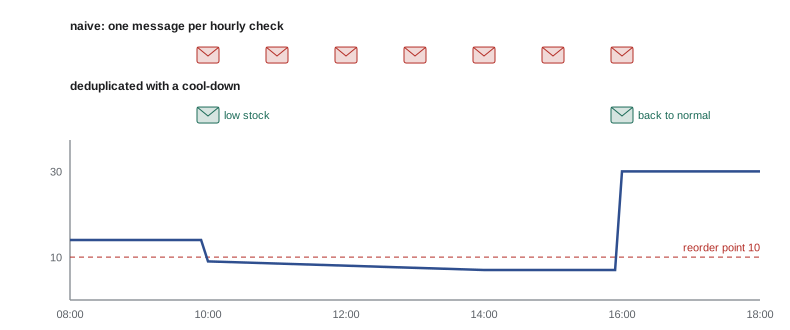
class Alerter:
    """Send when a condition starts; repeat only after a cool-down; say when it clears."""
    def __init__(self, send, cooldown=6 * 3600):
        self.send, self.cooldown, self.active = send, cooldown, {}
    def check(self, key, is_bad, now, message):
        if is_bad:
            last = self.active.get(key)
            if last is None or now - last >= self.cooldown:
                self.send(f"ALERT {message}")
                self.active[key] = now
        elif key in self.active:
            del self.active[key]
            self.send(f"CLEARED {key}")

sent = []
alerter = Alerter(sent.append, cooldown=6 * 3600)
stock = {9: 14, 10: 9, 11: 9, 12: 8, 13: 8, 14: 7, 15: 7, 16: 30, 17: 30}
for hour, bags in stock.items():
    alerter.check("RC-104 low", bags < 10, hour * 3600, f"RC-104 has {bags} bags")
print(sent)['ALERT RC-104 has 9 bags', 'CLEARED RC-104 low']
Try it yourself
Should we alert?
Write alert_times(bad_times, cooldown) that takes a sorted list of times (in minutes) at which a check found a problem, and returns the times at which an alert is actually sent: the first problem always alerts, and later problems alert only if at least cooldown minutes have passed since the last alert that was sent.
def alert_times(bad_times, cooldown):
    return bad_times

print(alert_times([0, 60, 120, 400, 410], 360))
Digests instead of floods
Some information is useful but not urgent: the parcels delivered today, the orders refunded this week, the new lots on Northshore's page. Rather than one message per event, collect the events and send one digest at a set time. A digest groups events by kind, counts them and shows the details underneath, so the reader can scan it in seconds.
from collections import defaultdict

events = [("delivered", "RDG10044"), ("delivered", "RDG10051"), ("refund", "order 5013, 18.50"),
          ("delivered", "RDG10058"), ("exception", "RDG10061 address not found"), ("refund", "order 5020, 4.95")]

def digest(events, order=("exception", "refund", "delivered")):
    groups = defaultdict(list)
    for kind, detail in events:
        groups[kind].append(detail)
    lines = []
    for kind in order:
        if groups[kind]:
            lines.append(f"{kind.upper()} ({len(groups[kind])})")
            lines.extend("  " + d for d in groups[kind])
    return "\n".join(lines)

print(digest(events))EXCEPTION (1) RDG10061 address not found REFUND (2) order 5013, 18.50 order 5020, 4.95 DELIVERED (3) RDG10044 RDG10051 RDG10058
Try it yourself
Quiet hours
Mei wants phone notifications only between 08:00 and 21:00; anything outside those hours waits until 08:00. Write delivery_hour(hour, start=8, end=21) that returns the hour (0 to 23) at which a notification raised at hour is delivered: the same hour if start <= hour < end, otherwise start. Then write urgent_ok(hour, urgent) that returns True when a notification may be sent immediately: always for urgent ones, otherwise only during the allowed hours.
def delivery_hour(hour, start=8, end=21):
    return hour

def urgent_ok(hour, urgent):
    return True

print(delivery_hour(23), urgent_ok(3, False))
One notify function for the whole program
When notifications are sent from many places in a program, each with its own email or chat code, changing how alerts work becomes a hunt. A cleaner design gives the program a single notify function that takes a level and a message and decides the channel: urgent problems to the phone, warnings to chat, information to the daily digest. The rest of the code only ever says notify("warn", ...). Swapping chat tools, adding quiet hours or sending everything to the console during testing then means changing one function.
ROUTES = {"error": ["sms", "chat"], "warn": ["chat"], "info": ["digest"]}

class Notifier:
    def __init__(self, channels, dry_run=False):
        self.channels, self.dry_run = channels, dry_run
    def notify(self, level, message):
        for name in ROUTES[level]:
            if self.dry_run:
                print(f"[dry run] {name:6} {level:5} {message}")
            else:
                self.channels[name](message)

digest_items = []
notifier = Notifier({"sms": print, "chat": print, "digest": digest_items.append}, dry_run=True)
notifier.notify("error", "Backup of till data failed at 02:00")
notifier.notify("warn", "RC-104 below reorder point (9 bags)")
notifier.notify("info", "Parcel RDG10044 delivered")[dry run] sms error Backup of till data failed at 02:00 [dry run] chat error Backup of till data failed at 02:00 [dry run] chat warn RC-104 below reorder point (9 bags) [dry run] digest info Parcel RDG10044 delivered
Commercial email has rules
Messages that tell people about an order, a delivery or a password reset are transactional, and customers expect them. Messages that promote products, such as a newsletter or a sale announcement, are commercial, and Canada's anti-spam legislation, CASL, requires consent before sending them, identification of the sender and a working unsubscribe mechanism that is honoured promptly. Express consent, such as a box the customer ticked themselves, is the safest basis. A script that sends promotions must check consent for every address and process unsubscribes automatically; the penalties for getting this wrong can be large.
Internal alerts to staff are neither, but the same courtesy applies: let people choose which alerts they receive and how, and make it easy to change.
Common mistakes
MistakeBuilding email bodies and headers by hand with string concatenation.
InsteadUse email.message.EmailMessage, which builds correct MIME structure.
MistakeSending only an HTML version.
InsteadAlways include a plain text part with set_content, and add HTML as an alternative.
MistakeTesting a mail script by sending to real customers.
InsteadUse a dry-run mode or a local debugging server until the script is right.
MistakePutting the mail password or chat webhook URL in the code.
InsteadTreat them as secrets and read them from the environment.
MistakeSending a message on every check while a condition lasts.
InsteadAlert when it starts, repeat only after a cool-down, and say when it clears.
MistakeSending promotions without checking consent and unsubscribes.
InsteadSeparate transactional from commercial mail and follow the anti-spam rules.
Summary and key terms
- Email is submitted with SMTP on port 587 with STARTTLS (or 465 with TLS); receivers check SPF, DKIM and DMARC.
- Transactional email services offer HTTPS APIs and handle bounces and delivery for large volumes.
- EmailMessage builds headers, plain and HTML alternatives and attachments in correct MIME form.
- smtplib sends messages over TLS with credentials from the environment; keep a dry-run mode for testing.
- Chat tools accept notifications through secret webhook URLs that receive a small JSON payload.
- Avoid alert fatigue: alert on actionable conditions, deduplicate with cool-downs, use digests and route by urgency.
- Commercial email needs consent or opt-out handling under the anti-spam rules; transactional email does not.
- SMTP
- The protocol for submitting and relaying email.
- STARTTLS
- An SMTP command that upgrades a plain connection to TLS.
- MIME
- The structure that lets an email hold several parts and attachments.
- multipart/alternative
- A MIME part holding the same content in several formats, such as plain and HTML.
- SPF, DKIM and DMARC
- DNS-based checks that a server may send mail for a domain.
- app password
- A separate password a mail provider issues for one program.
- incoming webhook
- A secret URL that posts a message to a chat channel when it receives JSON.
- alert fatigue
- Ignoring alerts because there are too many of them.
- cool-down
- A period after an alert during which the same alert is not repeated.
- digest
- One message that groups many events.
Practice problems
Work each problem on paper first, then reveal the answer to check.
Which port does a script normally use to submit mail with STARTTLS?
Show answer
587
Why include a plain text part in an HTML email?
Show answer
Some mail programs, devices and screen readers use it, and spam filters trust it more.
What is the credential for a chat incoming webhook?
Show answer
The webhook URL itself.
A condition is bad at 10:00, 11:00 and 17:00 with a six-hour cool-down. When are alerts sent?
Show answer
At 10:00 and 17:00.
Name two ways to test a mail script without emailing anyone.
Show answer
A dry-run mode that prints messages, or a local debugging mail server.
Is an order confirmation transactional or commercial?
Show answer
Transactional.
Lesson quiz · 5 questions
Score 60% or more to complete this lesson.
Create a free account to save your progress, take quizzes and earn a certificate.