
PYTH-240 · Lesson 3 of 12 · 25 min
Authentication and API keys
▶ Video coming soon A video version of this lesson is on the way.
Ridgeline's order data includes customers' names, addresses and email addresses, and the shipping account can spend real money on labels. No service hands that kind of access to any program that asks. Before an API answers, it wants to know who is asking, which is authentication, and whether that caller is allowed to do this particular thing, which is authorization. Lesson 1's example request carried an Authorization header with a token; this lesson explains where such tokens come from, the main ways APIs authenticate callers, and, just as important, how to keep the credentials safe once you have them.
The lesson covers API keys, HTTP Basic authentication, bearer tokens and the OAuth 2 framework, then the practical side: keeping secrets out of code and logs, using HTTPS properly, rotating keys, and verifying webhooks, the messages a service sends to you when something happens. Everything here is defensive. The goal is that Ridgeline's scripts prove who they are, ask only for what they need, and never leak a credential.
Authentication and authorization
Authentication answers "who are you?" and authorization answers "what may you do?". An API checks both on every request, because HTTP is stateless. A missing or invalid credential gets 401 Unauthorized, which despite its name is about authentication. A valid credential that lacks permission gets 403 Forbidden. The difference matters when you debug: a 401 means fix or renew the credential, while a 403 means the credential works but needs a wider permission, which someone with access to the service's settings must grant.
Most services let you create several credentials with different permissions, often called scopes. A key with the scope orders:read can list orders but not change them; a key with products:write can change stock counts. The principle of least privilege from CYB-101 applies directly: give each script the narrowest scopes it needs. Theo's weekly report only reads, so it gets a read-only key; if that key ever leaked, nobody could use it to change prices or cancel orders.
API keys
The simplest scheme is an API key: a long random string that the service generates for you in its settings page and that your script sends with every request. Some APIs expect it in a header such as X-API-Key, many in the Authorization header as Authorization: Bearer followed by the key, and a few accept it in the query string, which is the least safe option because URLs end up in server logs, browser histories and error messages. Keys are often prefixed to show what they are: Ridgeline's shop issues rk_test_ keys for the sandbox and rk_live_ keys for the real shop, so a glance shows which environment a script is pointed at.
An API key is like a password that never expires until someone revokes it. Anyone who has the string can act as your script. That is why keys must be stored and handled as secrets, a topic covered below, and why services let you create, label and revoke keys individually. Giving each script its own key, rather than sharing one key everywhere, means one leaked or retired key can be revoked without breaking everything else.
Basic authentication
HTTP Basic authentication sends a username and password with each request. The client joins them with a colon, encodes the result in Base64 and sends it in the header Authorization: Basic followed by the encoded text. The green coffee importer's price feed uses Basic authentication with an account name and a password issued to Ridgeline. Base64 is not encryption: anyone who sees the header can decode it instantly. Basic authentication is acceptable only over HTTPS, where the whole request is encrypted in transit.
import base64

def basic_auth_header(user, password):
    token = base64.b64encode(f"{user}:{password}".encode("utf-8")).decode("ascii")
    return {"Authorization": "Basic " + token}

header = basic_auth_header("ridgeline", "example-only-pw")
print(header)
encoded = header["Authorization"].split()[1]
print(base64.b64decode(encoded).decode()) # anyone can decode it: use HTTPS only{'Authorization': 'Basic cmlkZ2VsaW5lOmV4YW1wbGUtb25seS1wdw=='}
ridgeline:example-only-pwWith requests you do not build the header yourself: requests.get(url, auth=(user, password), timeout=10) does it for you. The listing shows what happens underneath, and why the password in it is plainly visible once decoded.
Try it yourself
A Basic authentication header
Write basic_header(user, password) that returns the value of the Authorization header for Basic authentication: the word Basic, a space, and the Base64 encoding of user:password in UTF-8.
def basic_header(user, password):
    return 'Basic ' + user + ':' + password

print(basic_header('ridgeline', 'pw'))
Bearer tokens and OAuth 2
Many modern APIs, including the carrier's, use OAuth 2. Instead of sending a long-lived key with every request, the script first exchanges its credentials for an access token: a string that works for a limited time, often an hour, and carries a limited set of scopes. The script then sends the token as Authorization: Bearer followed by the token. When the token expires, the API answers 401 and the script gets a new one. Short-lived tokens limit the damage if one leaks, because it soon stops working.
OAuth 2 defines several ways, called flows or grants, to get a token. For a script that acts on its own behalf, such as Ridgeline's shipping automation, the client credentials flow is used: the script sends its client ID and client secret to the service's token endpoint and receives an access token. When a program acts on behalf of a person, for example an app that reads someone's calendar, the authorization code flow is used instead: the person signs in on the service's own page, approves the requested scopes, and the program receives a code it exchanges for tokens. That flow also issues a refresh token, used to get new access tokens without asking the person again. The details belong to each service's documentation, but the shape is always the same: get a token, use it until it expires, get another.
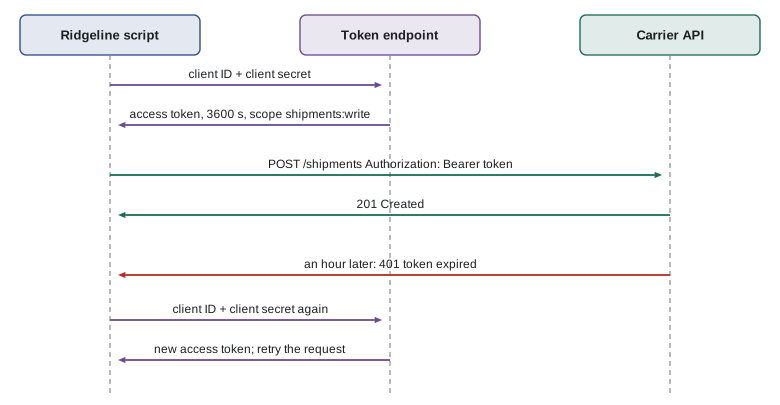
A script should not request a new token for every API call: token endpoints are often rate limited, and the round trip is wasted time. Instead it caches the token with its expiry time and reuses it until shortly before it expires. Renewing a minute early avoids sending a request with a token that expires on the way. The listing shows a small token cache with an injected clock, so it can be tested without waiting an hour.
class TokenCache:
    """Reuse an access token until shortly before it expires."""
    def __init__(self, fetch_token, clock, margin=60):
        self.fetch_token = fetch_token      # returns (token, lifetime_seconds)
        self.clock = clock                  # returns the current time in seconds
        self.margin = margin
        self.token, self.expires = None, 0
    def get(self):
        if self.token is None or self.clock() >= self.expires - self.margin:
            self.token, lifetime = self.fetch_token()
            self.expires = self.clock() + lifetime
        return self.token

issued = []
def fake_token_endpoint():
    issued.append(len(issued) + 1)
    return f"tok-{len(issued)}", 3600

now = [1000]
cache = TokenCache(fake_token_endpoint, clock=lambda: now[0])
for t in (1000, 1500, 4000, 4539, 4541, 6000):
    now[0] = t
    print(t, cache.get())
print("tokens requested:", len(issued))1000 tok-1 1500 tok-1 4000 tok-1 4539 tok-1 4541 tok-2 6000 tok-2 tokens requested: 2
Try it yourself
Does the token need renewing?
Write needs_new_token(expires_at, now, margin=60) that returns True when there is no token yet (expires_at is None) or when now is within margin seconds of expires_at or past it, and False otherwise.
def needs_new_token(expires_at, now, margin=60):
    return now > expires_at

print(needs_new_token(4600, 4541))
Keeping secrets out of code
Credentials must never be written into source code. Code is copied, shared, pasted into chat messages and committed to repositories, and a key in a committed file stays in the repository's history even after the line is deleted. Automated scanners search public repositories for keys within minutes of a push. PYTH-110 set up the pattern Ridgeline follows: secrets live in environment variables such as RIDGELINE_SHOP_KEY, a .env file holds them on a developer's own computer and is listed in .gitignore, and a committed .env.example shows which variables are needed without containing any values. On servers, the operating system's service configuration or a secrets manager supplies the values.
A script should read its secrets once at start-up and fail clearly if one is missing, rather than sending requests with an empty key and getting puzzling 401 errors. It should also make sure secrets never appear in output. Logging a request for debugging is useful; logging its Authorization header is a leak, because log files are kept for months and read by many people. Redacting the sensitive headers before logging solves this.
import os

def require_env(name):
    value = os.environ.get(name, "").strip()
    if not value:
        raise SystemExit(f"Missing setting {name}: add it to your environment or .env file")
    return value

SENSITIVE = {"authorization", "x-api-key", "cookie"}

def safe_headers(headers):
    return {k: ("***" if k.lower() in SENSITIVE else v) for k, v in headers.items()}

os.environ["RIDGELINE_SHOP_KEY"] = "rk_test_51abc"      # stands in for the real environment
key = require_env("RIDGELINE_SHOP_KEY")
headers = {"Authorization": "Bearer " + key, "Accept": "application/json"}
print(safe_headers(headers))
try:
    require_env("RIDGELINE_CARRIER_SECRET")
except SystemExit as e:
print(e){'Authorization': '***', 'Accept': 'application/json'}
Missing setting RIDGELINE_CARRIER_SECRET: add it to your environment or .env fileTry it yourself
Redact secrets from a log line
Write redact(text) that replaces any API key in a log line with ***. Keys start with rk_live_ or rk_test_ followed by letters and digits. Keep the prefix so readers can still tell which environment was used: rk_live_9fK2x becomes rk_live_***.
Use the re module.
def redact(text):
    return text.replace('rk_live_', '***')

print(redact('GET /orders key=rk_live_9fK2x status=200'))
HTTPS and certificates
Every request that carries a credential must use HTTPS, which encrypts the connection with TLS so that nobody between your script and the server can read or change it. TLS also proves the server's identity with a certificate signed by a trusted authority, which stops an attacker from impersonating the shop. Libraries check the certificate automatically. When the check fails, the error is tempting to silence with requests.get(url, verify=False), and that is a serious mistake: it switches off exactly the protection that makes it safe to send a key. A certificate error should be investigated: the system clock may be wrong, a company proxy may need its own certificate installed, or the address may be wrong.
Rotating and revoking keys
Keys should be replaced from time to time, and immediately if one might have leaked, for example after it was pasted into a chat or a laptop was lost. Rotation without downtime follows a simple order: create a new key, deploy it to every script that uses the old one, confirm the scripts work, then revoke the old key. Many services allow two active keys at once for exactly this reason. Keeping a short record of which key is used where, with its scopes and creation date but never its value, makes rotation a ten-minute job rather than a hunt.
Webhooks: verifying messages sent to you
So far the script has always called the service. A webhook reverses the direction: the service sends an HTTP POST to a URL you provide whenever something happens, such as an order being paid or a parcel being delivered. The carrier can notify Ridgeline the moment a parcel is scanned, instead of Ridgeline polling the tracking API every few minutes. The risk is obvious: anyone who discovers the URL could send fake messages, such as a false "delivered" for a parcel that is still in a depot.
Services protect webhooks with a signature. When you register the webhook, the service gives you a shared secret. With every message it computes an HMAC, a keyed hash, of the raw request body using that secret, and sends the result in a header such as X-Signature. Your receiver computes the same HMAC from the body it received and compares. Only someone who knows the secret can produce a matching signature. Two details matter. Compare with hmac.compare_digest, not ==, because it takes the same time whether the strings differ early or late, which prevents an attacker from guessing the signature byte by byte from timings. And check a timestamp included in the signed data, rejecting messages more than a few minutes old, so that a captured message cannot be replayed later.
import hashlib, hmac, json

SECRET = b"whsec_example_only"

def sign(body: bytes, timestamp: int) -> str:
    message = str(timestamp).encode() + b"." + body
    return hmac.new(SECRET, message, hashlib.sha256).hexdigest()

def verify(body: bytes, timestamp: int, signature: str, now: int, tolerance=300) -> bool:
    if abs(now - timestamp) > tolerance:
        return False                                  # too old: possible replay
    return hmac.compare_digest(sign(body, timestamp), signature)

body = json.dumps({"event": "parcel.delivered", "tracking": "RDG10044"}).encode()
sig = sign(body, 1762500000)
print(verify(body, 1762500000, sig, now=1762500030))
print(verify(body.replace(b"delivered", b"returned"), 1762500000, sig, now=1762500030))
print(verify(body, 1762500000, sig, now=1762509999))True False False
The first check passes: the body is unchanged, the signature matches and the message is 30 seconds old. The second fails because a single word in the body was changed, so the signature no longer matches. The third fails because the message is nearly three hours old. A receiver that verifies all three conditions before acting can trust the message came from the carrier and is current.
Try it yourself
Verify a webhook
Write is_genuine(body, signature, secret) that returns True only when signature is the hexadecimal HMAC-SHA256 of the bytes body using the bytes secret. Use hmac.compare_digest for the comparison.
def is_genuine(body, signature, secret):
    return len(signature) == 64

print(is_genuine(BODY, GOOD, SECRET))
Common mistakes
MistakeWriting an API key into the source code "just for now".
InsteadRead it from an environment variable, and keep .env out of version control.
MistakeUsing one all-powerful key for every script.
InsteadCreate a separate key per script with only the scopes it needs.
MistakeTreating Base64 as encryption.
InsteadBase64 is an encoding anyone can reverse; send credentials only over HTTPS.
MistakeTurning off certificate checks with verify=False to make an error go away.
InsteadFind the cause of the certificate error; never disable verification.
MistakeRequesting a new OAuth token before every API call.
InsteadCache the token and renew it shortly before it expires.
MistakeComparing webhook signatures with == and ignoring timestamps.
InsteadUse hmac.compare_digest and reject messages outside a short time window.
Summary and key terms
- Authentication proves who the caller is; authorization decides what it may do. 401 means bad credentials, 403 means not permitted.
- API keys are long-lived secrets; scope them narrowly, give each script its own, and send them in headers, not URLs.
- Basic authentication is Base64 of user:password and is safe only over HTTPS.
- OAuth 2 issues short-lived bearer tokens; scripts use the client credentials flow and cache tokens until they expire.
- Secrets belong in environment variables or a secrets manager, never in code, repositories or logs.
- HTTPS encrypts and authenticates the connection; never disable certificate verification.
- Webhooks are verified with an HMAC signature, compare_digest and a timestamp check.
- authentication
- Proving the identity of the caller.
- authorization
- Deciding what an authenticated caller is allowed to do.
- API key
- A secret string that identifies a program to an API.
- scope
- A named permission attached to a key or token.
- Basic authentication
- Sending a Base64-encoded username and password in a header.
- bearer token
- An access token sent as Authorization: Bearer, valid for whoever holds it.
- OAuth 2
- A framework for issuing limited, short-lived access tokens.
- client credentials flow
- The OAuth 2 flow in which a program exchanges its own secret for a token.
- webhook
- An HTTP request a service sends to your URL when an event happens.
- HMAC
- A keyed hash used to prove a message came from someone who knows the secret.
Practice problems
Work each problem on paper first, then reveal the answer to check.
A script gets 403 with a key that worked yesterday for other requests. What is the likely cause?
Show answer
The key is valid but lacks the scope for this request; it needs a wider permission.
Why is putting an API key in the query string risky?
Show answer
URLs are recorded in server logs, histories and error messages, so the key leaks.
What does the client credentials flow exchange for an access token?
Show answer
The program's client ID and client secret.
Give the order of steps for rotating a key without downtime.
Show answer
Create a new key, deploy it, confirm it works, then revoke the old key.
Why include a timestamp in a signed webhook?
Show answer
So an old captured message cannot be replayed later.
What should a script do if a required secret is missing from the environment?
Show answer
Stop at start-up with a clear message naming the missing setting.
Lesson quiz · 5 questions
Score 60% or more to complete this lesson.
Create a free account to save your progress, take quizzes and earn a certificate.