
PYTH-240 · Lesson 5 of 12 · 24 min
Reading web pages responsibly
▶ Video coming soon A video version of this lesson is on the way.
Not every source of useful information offers an API. Northshore Green Coffee publishes its new arrivals on a public web page a few days before the lots appear in the weekly price feed, and Kai likes to know early when a good Guatemalan or Rwandan lot arrives. Reading information out of web pages with a program is called web scraping. It is a powerful technique and a responsibility: the page belongs to someone else, it runs on their servers at their cost, and it may contain material protected by copyright or personal information protected by privacy law. Done carelessly, scraping can break the site's rules, overload a small business's server or collect data nobody agreed to share.
This lesson starts with the questions to ask before scraping anything, then shows how to read robots.txt, how HTML is structured, how to extract data with the standard library's HTML parser and with the popular Beautiful Soup library, and how to write a scraper that is polite, cached and robust when the page changes.
Look for a better source first
Before writing a scraper, check whether the information is available in a form meant for programs. Many sites have an API, sometimes only mentioned in a footer link for developers. Many publish feeds: RSS or Atom for news and updates, CSV or JSON downloads for data, sitemaps listing their pages. Some will simply send you the data if you ask; when Jordan emailed Northshore, they offered to add new arrivals to the weekly CSV feed from next season. An official source is more reliable than a scraper, which breaks whenever the page layout changes, and it comes with clear permission to use the data.
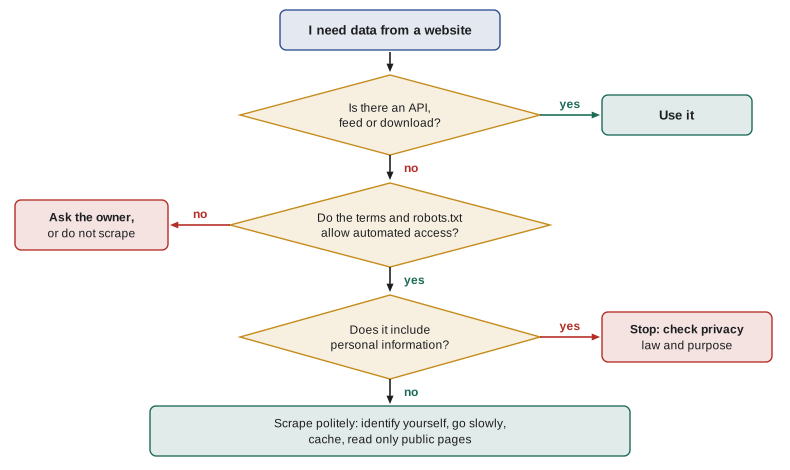
When scraping is the only option, ask four questions before writing any code. Do the site's terms of use allow automated access? Does robots.txt allow it? Is the data personal information, such as names, emails or reviews tied to people? And what load will the scraper put on the server? The answers decide whether to go ahead, and how.
Terms, copyright and personal information
A site's terms of use often say whether automated access is allowed, and some forbid it outright. Breaking them can lead to an account being closed or, in serious cases, legal action. Facts such as a price or an arrival date are generally not protected by copyright, but the text, photographs and overall compilation of a page often are, so copying descriptions or images into your own site is a different matter from noting a price. Logging in to reach data, getting around paywalls, defeating CAPTCHAs or rate limits, or pretending to be a browser to avoid a block all signal that the owner does not want automated access, and a responsible scraper does not do any of them.
Personal information needs particular care. In Canada, the collection, use and disclosure of personal information by businesses is governed by PIPEDA and, in some provinces such as Alberta, British Columbia and Quebec, by provincial privacy laws. Information being visible on a public page does not mean it may be collected and reused for any purpose. A script that gathers names, email addresses or photos of people should not be written without a clear, lawful purpose and advice on the rules that apply.
Kai's arrivals check passes all four tests: Northshore's terms allow personal and business use of the price information, robots.txt does not forbid the page, the data is about coffee lots rather than people, and one request a day is a negligible load.
robots.txt
Most sites publish a file at /robots.txt that tells automated clients, called robots or crawlers, which paths they may visit. It lists rules for user agents: Disallow lines block paths and Allow lines permit exceptions, and some sites add a Crawl-delay asking for a pause between requests. robots.txt is a convention rather than a lock, which is exactly why respecting it matters: it is the site owner's stated wish. Python's standard library can read and apply it with urllib.robotparser.
from urllib.robotparser import RobotFileParser

ROBOTS = """User-agent: *
Disallow: /account/
Disallow: /cart
Allow: /account/help
Crawl-delay: 10

User-agent: BadBot
Disallow: /
"""

rp = RobotFileParser()
rp.parse(ROBOTS.splitlines())        # a real script uses rp.set_url(".../robots.txt") and rp.read()
agent = "ridgeline-arrivals/1.0"
for path in ("/arrivals", "/account/orders", "/account/help", "/cart"):
    print(path, rp.can_fetch(agent, "https://northshore.example" + path))
print("crawl delay:", rp.crawl_delay(agent))
print("BadBot on /arrivals:", rp.can_fetch("BadBot", "https://northshore.example/arrivals"))/arrivals True /account/orders False /account/help True /cart False crawl delay: 10 BadBot on /arrivals: False
A scraper should check can_fetch before every new path and honour crawl_delay when it is given. Reading robots.txt once at start-up and keeping the parser is enough for a short run.
Try it yourself
Which pages may the script visit?
Write allowed_paths(robots_text, agent, paths) that returns the list of paths from paths that agent may fetch according to robots_text, in their original order. Use urllib.robotparser.RobotFileParser and its parse method; the site is https://northshore.example.
def allowed_paths(robots_text, agent, paths):
    return [p for p in paths if 'account' not in p]

print(allowed_paths(ROBOTS, 'ridgeline-arrivals/1.0', ['/arrivals', '/account/help', '/search?q=kenya']))
How HTML is structured
A web page is an HTML document: a tree of elements written as tags, much like the XML of lesson 4 but more forgiving. A table is a table element containing tr rows, each with th header cells or td data cells. Elements can carry attributes, and two matter most for scraping: id, a name that should be unique on the page, and class, one or more labels used for styling, such as class="lot soldout". These attributes are the handles a scraper holds on to. Your browser's developer tools, opened with F12 or a right-click and Inspect, show the tree for any part of the page, which is the quickest way to find the elements and classes you need.
Here is the part of Northshore's arrivals page Kai cares about. The listing below stores it as a string so it can be parsed without a network; in the real script, the text comes from requests.get(url).text.
<html><head><title>Northshore Green Coffee: new arrivals</title></head>
<body>
<h1>New arrivals</h1>
<table id="arrivals">
  <tr><th>Lot</th><th>Origin</th><th>Price per kg</th></tr>
  <tr class="lot"><td>NS-2616</td><td>Guatemala, Huehuetenango</td><td class="price">8.75</td></tr>
  <tr class="lot"><td>NS-2617</td><td>Rwanda</td><td class="price">9.10</td></tr>
  <tr class="lot soldout"><td>NS-2618</td><td>Brazil</td><td class="price">6.95</td></tr>
</table>
<p class="updated">Updated 2026-11-09</p>
</body></html>
Parsing HTML with the standard library
Never pull data out of HTML with string searches or regular expressions over the whole page; attributes move, whitespace changes and the code breaks. Use a parser. The standard library's html.parser.HTMLParser reads a document and calls methods you define when it meets a start tag, a piece of text and an end tag. It takes a little more code than third-party libraries, but it works everywhere with nothing to install.
PAGE = '''<html><head><title>Northshore Green Coffee: new arrivals</title></head>
<body>
<h1>New arrivals</h1>
<table id="arrivals">
  <tr><th>Lot</th><th>Origin</th><th>Price per kg</th></tr>
  <tr class="lot"><td>NS-2616</td><td>Guatemala, Huehuetenango</td><td class="price">8.75</td></tr>
  <tr class="lot"><td>NS-2617</td><td>Rwanda</td><td class="price">9.10</td></tr>
  <tr class="lot soldout"><td>NS-2618</td><td>Brazil</td><td class="price">6.95</td></tr>
</table>
<p class="updated">Updated 2026-11-09</p>
</body></html>'''

from html.parser import HTMLParser

class ArrivalsParser(HTMLParser):
    """Collect the cells of rows with class "lot", skipping sold-out lots."""
    def __init__(self):
        super().__init__()
        self.rows, self.row, self.in_cell, self.skip = [], None, False, False
    def handle_starttag(self, tag, attrs):
        classes = (dict(attrs).get("class") or "").split()
        if tag == "tr" and "lot" in classes:
            self.row, self.skip = [], "soldout" in classes
        elif tag == "td" and self.row is not None:
            self.in_cell = True
            self.row.append("")
    def handle_data(self, data):
        if self.in_cell:
            self.row[-1] += data.strip()
    def handle_endtag(self, tag):
        if tag == "td":
            self.in_cell = False
        elif tag == "tr" and self.row is not None:
            if not self.skip:
                self.rows.append(tuple(self.row))
            self.row = None

parser = ArrivalsParser()
parser.feed(PAGE)
for lot, origin, price in parser.rows:
print(f"{lot} {origin:26} {price}")NS-2616 Guatemala, Huehuetenango 8.75 NS-2617 Rwanda 9.10
The parser tracks a little state: whether it is inside a lot row, whether that row is sold out, and whether it is inside a cell. handle_starttag receives attributes as a list of name-value pairs, which dict() turns into a dictionary. The result is a list of tuples that the rest of the program can check and use, exactly like rows read from a CSV file.
Try it yourself
Read the prices from the page
Write price_cells(html) that returns a list of the texts of all td elements with the class price, converted to Decimal, in page order. Use html.parser.HTMLParser. The page is the arrivals table from the lesson, available as PAGE.
from decimal import Decimal

def price_cells(html):
    out = []
    for part in html.split('class="price">')[1:]:
        out.append(part[:4])
    return out

print(price_cells(PAGE))
Beautiful Soup
For anything more than a small table, most Python developers use Beautiful Soup, a third-party library installed with python -m pip install beautifulsoup4. It builds the whole tree and lets you search it with methods such as find and find_all or with CSS selectors, the same patterns web designers use to style pages. The scraper above shrinks to a few lines.
import requests
from bs4 import BeautifulSoup

resp = requests.get("https://northshore.example/arrivals", timeout=10,
                    headers={"User-Agent": "ridgeline-arrivals/1.0 (kai@ridgelinecoffee.example)"})
resp.raise_for_status()
soup = BeautifulSoup(resp.text, "html.parser")
for row in soup.select("table#arrivals tr.lot:not(.soldout)"):
    lot, origin, price = (td.get_text(strip=True) for td in row.find_all("td"))
    print(lot, origin, price)
The CSS selector table#arrivals tr.lot:not(.soldout) says: inside the table with id arrivals, rows with class lot that do not also have class soldout. Selectors make scrapers short and readable, and they are where a scraper usually breaks when the page is redesigned, so keep them in one place, such as constants at the top of the script.
Some pages build their content with JavaScript after loading, so the HTML that requests receives is nearly empty. Before reaching for browser automation tools such as Playwright, which drive a real browser and are much heavier, open the developer tools' Network tab: such pages usually fetch their data from a JSON endpoint, which is easier and more reliable to read directly, subject to the same rules about permission.
Being a polite scraper
A responsible scraper behaves like a considerate visitor. It identifies itself with a User-Agent that names the script and gives a contact address, so the site owner can get in touch rather than block it. It goes slowly: one request at a time, with a pause of several seconds between requests, longer if robots.txt asks for a crawl delay. It requests only the pages it needs, never follows every link on a site, and runs at quiet times. It caches what it has fetched, so running the script twice in an hour does not fetch everything twice, and it uses conditional requests with If-Modified-Since or If-None-Match, which let the server answer 304 Not Modified without sending the page again. And it stops at the first sign of trouble: a 403, a 429 or a CAPTCHA page means the site does not want this traffic.
import time

class PoliteFetcher:
    """Wait at least `delay` seconds between requests to the same host."""
    def __init__(self, fetch, delay=10, clock=time.monotonic, sleep=time.sleep):
        self.fetch, self.delay, self.clock, self.sleep = fetch, delay, clock, sleep
        self.last = {}
    def get(self, host, path):
        now = self.clock()
        wait = self.last.get(host, -1e9) + self.delay - now
        if wait > 0:
            self.sleep(wait)
            now += wait
        self.last[host] = now
        return self.fetch(host, path)

t = [0.0]
log = []
fetcher = PoliteFetcher(lambda h, p: f"<html>{p}</html>", delay=10,
                        clock=lambda: t[0], sleep=lambda s: (log.append(round(s, 1)), t.__setitem__(0, t[0] + s)))
for path in ("/arrivals", "/arrivals/NS-2616", "/arrivals/NS-2617"):
    fetcher.get("northshore.example", path)
    t[0] += 2.5                                  # time spent processing each page
print("waited:", log)waited: [7.5, 7.5]
The fetcher waits only as long as needed: the first request goes straight away, and each later one waits until ten seconds have passed since the previous request, counting the time spent processing the page. Passing in the clock and sleep functions, rather than calling time.sleep directly, lets the listing simulate a minute of polite crawling instantly, and lets tests do the same.
Try it yourself
Plan the request times
A scraper must wait at least delay seconds between the starts of requests. Write start_times(ready, delay) where ready is a sorted list of times (in seconds) at which each request becomes ready to send. Return the list of times the requests are actually sent: each one is sent at its ready time or delay seconds after the previous send, whichever is later.
def start_times(ready, delay):
    return ready

print(start_times([0, 3, 30, 31], 10))
When the page changes
A scraper depends on a page layout that its owner can change at any moment without telling anyone. Assume it will happen and design for it. Keep a saved copy of the page in your tests, so you can check the parser without the network. Check the results for sanity: if the arrivals table suddenly has no rows, or every price is empty, that is far more likely to mean a redesign than a week with no coffee, and the script should raise an alert instead of reporting "no new arrivals". Kai's script emails Jordan when it finds zero lots twice in a row, which has caught one redesign so far.
Common mistakes
MistakeScraping a site that offers an API, feed or download.
InsteadUse the official source; it is more reliable and clearly permitted.
MistakeIgnoring robots.txt and the terms of use.
InsteadCheck both before writing code, and stop if automated access is not allowed.
MistakeCollecting personal information because it is publicly visible.
InsteadPublic is not the same as free to collect; check the purpose and the privacy rules first.
MistakeParsing HTML with string searches or regular expressions.
InsteadUse an HTML parser and select elements by id and class.
MistakeSending requests as fast as possible, with a fake browser User-Agent.
InsteadGo slowly, honour crawl delays, cache results and identify the script honestly.
MistakeReporting "nothing found" when the page layout changed.
InsteadCheck results for sanity and alert when a page suddenly yields nothing.
Summary and key terms
- Prefer APIs, feeds and downloads; scrape only when nothing better exists.
- Check the terms of use, robots.txt, whether the data is personal, and the load on the server.
- urllib.robotparser applies robots.txt rules, including Allow, Disallow and Crawl-delay.
- HTML is a tree of elements; id and class attributes are the handles a scraper uses.
- html.parser.HTMLParser extracts data with no installs; Beautiful Soup with CSS selectors is shorter for larger jobs.
- Polite scrapers identify themselves, go slowly, cache and use conditional requests, and stop at signs of refusal.
- Assume layouts change: keep saved pages for tests and alert on suspicious results.
- web scraping
- Extracting information from web pages with a program.
- robots.txt
- A file in which a site states which paths automated clients may visit.
- crawl delay
- A pause between requests that a site asks crawlers to keep.
- HTML
- The markup language of web pages, a tree of tagged elements.
- id attribute
- A name meant to be unique on the page.
- class attribute
- One or more labels on an element, used for styling and selection.
- CSS selector
- A pattern that picks elements, such as table#arrivals tr.lot.
- conditional request
- A request that asks for a page only if it has changed.
- terms of use
- The rules a site sets for how it may be used.
- personal information
- Information about an identifiable person, protected by privacy law.
Practice problems
Work each problem on paper first, then reveal the answer to check.
Name three places to look for data before scraping.
Show answer
An API, a feed such as RSS or a CSV download, or simply asking the owner.
robots.txt disallows /account/ but allows /account/help. May a crawler fetch /account/help?
Show answer
Yes; the more specific Allow rule permits it.
Why are id and class attributes useful to a scraper?
Show answer
They identify the elements that hold the data, independent of their position.
A scraper receives 429. What should it do?
Show answer
Stop or slow down substantially, and respect any Retry-After header.
Why pass clock and sleep functions into a fetcher?
Show answer
So tests can simulate waiting without real delays.
The parser suddenly finds zero rows. What is the most likely cause?
Show answer
The page was redesigned and the selectors no longer match.
Lesson quiz · 5 questions
Score 60% or more to complete this lesson.
Create a free account to save your progress, take quizzes and earn a certificate.