
PYTH-240 · Lesson 2 of 12 · 30 min
Working with REST APIs
▶ Video coming soon A video version of this lesson is on the way.
Lesson 1 showed what a single HTTP exchange looks like. Real work needs many exchanges that fit together: list the orders paid since Friday, read each one, mark it as packed, create a shipment with the carrier, and update the stock of each coffee. Most web services organize these operations in a style called REST, short for representational state transfer. Once you know the conventions, a new REST API feels familiar within minutes: you can guess most of its URLs before you read the documentation, and the documentation fills in the rest.
This lesson explains resources and endpoints, how the HTTP methods map onto creating, reading, updating and deleting, how to read API documentation, how to send and receive JSON, and how to deal with the three things every real API adds: pagination, error responses and the danger of duplicate requests. It ends by wrapping the shop API in a small client class that hides the HTTP details from the rest of Ridgeline's code.
Resources, collections and endpoints
A REST API is organized around resources: the things the service knows about, such as products, orders, customers and shipments. Each kind of resource has a collection URL, and each individual resource has its own URL under it. In the shop API, /api/v2/products is the collection of products, /api/v2/products/RC-101 is one product, and /api/v2/orders/5012 is one order. Resources can be nested when one belongs to another: /api/v2/orders/5012/items lists the lines of order 5012. Each combination of method and URL that the API supports is called an endpoint.
The methods from lesson 1 give the actions. GET on a collection lists it; GET on an item reads it. POST on a collection creates a new item and usually answers 201 Created with a Location header pointing to the new resource. PUT on an item replaces it, PATCH changes some of its fields, and DELETE removes it. These four operations, create, read, update and delete, are often called CRUD, and almost every business system is built from them.
| Action | Method and URL | Typical response |
|---|---|---|
| List paid orders | GET /api/v2/orders?status=paid | 200 with a page of orders |
| Read one order | GET /api/v2/orders/5012 | 200 with the order, or 404 |
| Create a shipment | POST /api/v2/shipments | 201 Created with Location |
| Change one stock count | PATCH /api/v2/products/RC-104 | 200 with the updated product, or 422 |
| Cancel a draft shipment | DELETE /api/v2/shipments/88 | 204 No Content |
The /v2 in the path is the API version. Services change their APIs over time, and putting the version in the URL (or sometimes in a header) lets old clients keep working while new ones move to the new version. When a service announces that version 1 will be retired, the deprecation notice comes with a date, and code that talks to the API must be updated before it. Recording the version your code was written for, as a constant at the top of the client, makes that update easy to find.
Reading API documentation
Every useful API has documentation, and reading it well saves hours. Look first for the base URL and the version, then for how to authenticate (lesson 3), then for the list of endpoints with their parameters and example responses. Two sections are easy to skip and important to read: the error format, which tells you what a failed response looks like, and the rate limits, which say how many requests you may send per minute or per hour. Many services also publish a machine-readable description of the API in the OpenAPI format, a JSON or YAML file from which documentation pages, test tools and even client code can be generated.
Good documentation includes example requests and responses. Copy them into a scratch file and compare them with what your code sends and receives. Most confusing failures come from a small difference: a field name in the wrong case, a number sent as a string, a date in the wrong format, or a missing header. Services usually offer a sandbox, a test version of the API with fake data, where you can create orders and shipments without charging anyone or printing real labels. Jordan always develops against the carrier's sandbox and switches to the live base URL only when the script works.
JSON bodies in both directions
REST APIs almost always exchange data as JSON, the format PYTH-101 used for ridgeline.json. In a response, the body is a JSON document that json.loads turns into dictionaries and lists. In a request, a POST, PUT or PATCH carries a JSON body built from a dictionary with json.dumps, together with the header Content-Type: application/json. With requests, passing json=payload does both steps. Money is a special case: many APIs send prices as strings such as "18.50" rather than numbers, precisely so that no floating-point rounding can creep in, and your code should convert them with decimal.Decimal, as PYTH-102 recommended.
As in lesson 1, the listings below use a small fake shop written in Python instead of the real network. Its methods take the same paths and return the same status codes and JSON bodies that the real shop API documents, so the client code is exactly what Jordan runs against the live service.
import json

class FakeShop:
    """A tiny in-memory stand-in for the shop API (version 2)."""
    def __init__(self):
        self.products = {"RC-101": {"sku": "RC-101", "name": "Sunrise Blend", "price": "18.50", "stock": 42},
                         "RC-104": {"sku": "RC-104", "name": "Sumatra Dark", "price": "20.25", "stock": 9}}
        self.orders = [{"id": 5000 + i, "status": "paid" if i % 3 else "refunded",
                        "total": f"{15 + i * 1.25:.2f}"} for i in range(1, 12)]
    def request(self, method, path, params=None, body=None):
        params = params or {}
        if method == "GET" and path == "/orders":
            rows = [o for o in self.orders if o["status"] == params.get("status", o["status"])]
            per, page = int(params.get("per_page", 4)), int(params.get("page", 1))
            chunk = rows[(page - 1) * per: page * per]
            pages = (len(rows) + per - 1) // per
            return 200, {"page": page, "pages": pages, "orders": chunk}
        if path.startswith("/products/"):
            sku = path.split("/")[2]
            if sku not in self.products:
                return 404, {"error": {"code": "not_found", "message": f"no product {sku}"}}
            if method == "GET":
                return 200, self.products[sku]
            if method == "PATCH":
                if "stock" in body and (not isinstance(body["stock"], int) or body["stock"] < 0):
                    return 422, {"error": {"code": "invalid", "message": "stock must be a whole number of bags, 0 or more"}}
                self.products[sku].update(body)
                return 200, self.products[sku]
        return 404, {"error": {"code": "not_found", "message": f"no route {method} {path}"}}

shop = FakeShop()
status, product = shop.request("GET", "/products/RC-104")
print(status, product["name"], product["stock"])

status, product = shop.request("PATCH", "/products/RC-104", body={"stock": 39})
print(status, product["stock"])

status, err = shop.request("PATCH", "/products/RC-104", body={"stock": -3})
print(status, err["error"]["message"])

status, err = shop.request("GET", "/products/RC-999")
print(status, json.dumps(err))200 Sumatra Dark 9
200 39
422 stock must be a whole number of bags, 0 or more
404 {"error": {"code": "not_found", "message": "no product RC-999"}}Look at what each response carries. A successful PATCH returns the whole updated product, so the client can confirm the change took effect. A request with invalid data gets 422 and a JSON error body with a machine-readable code and a human-readable message. An unknown product gets 404 with the same error shape. Consistent error bodies are one of the marks of a well-designed API, and a client should always read them: the message usually says exactly what is wrong.
Filtering, sorting and pagination
Collection endpoints accept query parameters to narrow the results: ?status=paid, ?created_after=2026-11-06, ?sku=RC-104. Many also accept sort=-created to sort newest first and fields=id,total to return only some fields, which makes responses smaller and faster. The documentation lists which parameters each endpoint supports; unknown parameters are often silently ignored, which is another reason to compare your results with what you expect.
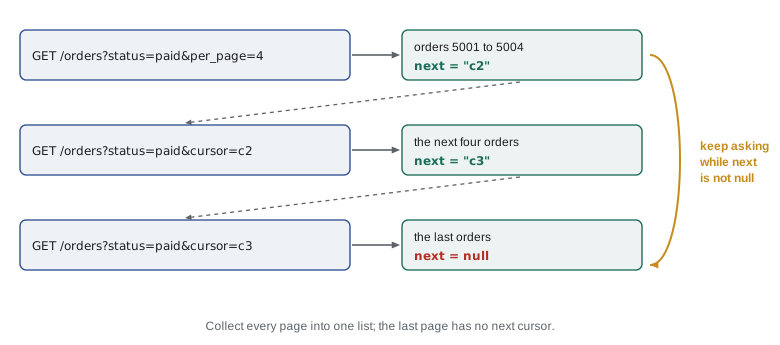
No API returns a collection of thousands of orders in one response. Instead, results come in pages, and the client asks for one page at a time. There are three common styles. Page numbers use page=1, page=2 and so on, often with per_page to set the page size, and the response says how many pages there are. Offset and limit use offset=0&limit=50, then offset=50, and so on. Cursors are the most robust: each response includes an opaque token, often called next or next_cursor, that the client sends back to get the following page, and the last page has no next token. Cursors keep working correctly even while new orders arrive in the middle of a listing, which page numbers do not.
import json

class FakeShop:
    """A tiny in-memory stand-in for the shop API (version 2)."""
    def __init__(self):
        self.products = {"RC-101": {"sku": "RC-101", "name": "Sunrise Blend", "price": "18.50", "stock": 42},
                         "RC-104": {"sku": "RC-104", "name": "Sumatra Dark", "price": "20.25", "stock": 9}}
        self.orders = [{"id": 5000 + i, "status": "paid" if i % 3 else "refunded",
                        "total": f"{15 + i * 1.25:.2f}"} for i in range(1, 12)]
    def request(self, method, path, params=None, body=None):
        params = params or {}
        if method == "GET" and path == "/orders":
            rows = [o for o in self.orders if o["status"] == params.get("status", o["status"])]
            per, page = int(params.get("per_page", 4)), int(params.get("page", 1))
            chunk = rows[(page - 1) * per: page * per]
            pages = (len(rows) + per - 1) // per
            return 200, {"page": page, "pages": pages, "orders": chunk}
        if path.startswith("/products/"):
            sku = path.split("/")[2]
            if sku not in self.products:
                return 404, {"error": {"code": "not_found", "message": f"no product {sku}"}}
            if method == "GET":
                return 200, self.products[sku]
            if method == "PATCH":
                if "stock" in body and (not isinstance(body["stock"], int) or body["stock"] < 0):
                    return 422, {"error": {"code": "invalid", "message": "stock must be a whole number of bags, 0 or more"}}
                self.products[sku].update(body)
                return 200, self.products[sku]
        return 404, {"error": {"code": "not_found", "message": f"no route {method} {path}"}}

def all_orders(shop, status):
    """Fetch every page of orders with one status and return them in one list."""
    orders, page = [], 1
    while True:
        code, body = shop.request("GET", "/orders", params={"status": status, "page": page, "per_page": 4})
        if code != 200:
            raise RuntimeError(f"listing failed with {code}")
        orders.extend(body["orders"])
        print(f"page {body['page']} of {body['pages']}: {len(body['orders'])} orders")
        if page >= body["pages"]:
            return orders
        page += 1

paid = all_orders(FakeShop(), "paid")
print(len(paid), "paid orders:", [o["id"] for o in paid])page 1 of 2: 4 orders page 2 of 2: 4 orders 8 paid orders: [5001, 5002, 5004, 5005, 5007, 5008, 5010, 5011]
The loop asks for pages until the response says there are no more, and gathers the results into one list. Two details keep such loops safe. First, there must be a clear stopping rule, such as page >= pages or next being empty; a loop that relies on an empty page might never end if the API returns the last page again. Second, if the listing is large, process each page as it arrives rather than holding everything in memory; a generator, as in PYTH-102 lesson 7, is a natural fit.
Try it yourself
Follow the cursor
The carrier API uses cursors. The setup provides a function fetch(cursor) that returns a dictionary with a list under "items" and the next cursor under "next"; the first call uses cursor=None, and the last page has "next": None.
Write collect(fetch) that calls fetch repeatedly, following the cursors, and returns all the items in order.
def collect(fetch):
    return fetch(None)['items']

print(collect(fetch))
Errors, validation and conflicts
Every API call can fail, and a good client handles failure on purpose. Network problems raise exceptions before any response arrives: with requests, a timeout raises requests.Timeout and a refused connection raises requests.ConnectionError, both subclasses of requests.RequestException. When a response does arrive, its status code and error body say what went wrong. A 422 response often lists every invalid field, so a client that shows the whole list lets a person fix all the problems at once instead of one per attempt.
409 Conflict deserves its own mention. It means the request clashes with the current state of the resource, for example cancelling a shipment that has already been collected, or updating a product that someone else changed a moment ago. Some APIs prevent lost updates with ETags: the client sends If-Match with the version it read, and the server refuses the change with 412 Precondition Failed if the resource has changed since. The right response to a conflict is to read the resource again, decide whether the change still makes sense, and only then try again.
Duplicate requests and idempotency keys
Suppose the script sends POST /api/v2/shipments to book a courier pickup, and the connection drops before the response arrives. Did the shipment get created? There is no way to know. Retrying might book two pickups and pay for both; not retrying might book none. Lesson 1 noted that POST is not idempotent, and this is where that matters.
Many APIs solve the problem with an idempotency key: the client generates a unique value, such as a random UUID or a value derived from the order number, and sends it in a header such as Idempotency-Key with the POST. The server remembers which keys it has already processed. If the same key arrives again, it returns the original result instead of creating a second shipment. The client can then retry safely after any network error, as long as it reuses the same key for the same logical request. Deriving the key from something stable, such as shipment-for-order-5012, means that even a script restarted the next day sends the same key.
import hashlib, uuid

def idempotency_key(order_id, purpose="shipment"):
    """The same order and purpose always give the same key."""
    return hashlib.sha256(f"{purpose}:{order_id}".encode()).hexdigest()[:32]

print(idempotency_key(5012))
print(idempotency_key(5012) == idempotency_key(5012))
print(idempotency_key(5013))
print(len(str(uuid.uuid4())), "characters in a random UUID")ae178196b6e81b72a8b3f82c12fd4d3d True b1dd809eeb2c0a9582ef3e4e79a54888 36 characters in a random UUID
A small API client class
Scattering request calls, URLs and error checks through a program makes it hard to change. A cleaner design wraps the API in a client class whose methods speak the language of the business: list_paid_orders(), get_product(sku), set_stock(sku, bags). Inside, the class builds URLs, adds headers, sends requests and turns error responses into exceptions with clear messages. The rest of the program never sees HTTP at all. The client takes its transport, the object that actually sends requests, as a parameter, so tests can pass a fake while the real program passes a function built on a requests Session. This is the composition and dependency injection idea from PYTH-102, applied to networking.
import json

class FakeShop:
    """A tiny in-memory stand-in for the shop API (version 2)."""
    def __init__(self):
        self.products = {"RC-101": {"sku": "RC-101", "name": "Sunrise Blend", "price": "18.50", "stock": 42},
                         "RC-104": {"sku": "RC-104", "name": "Sumatra Dark", "price": "20.25", "stock": 9}}
        self.orders = [{"id": 5000 + i, "status": "paid" if i % 3 else "refunded",
                        "total": f"{15 + i * 1.25:.2f}"} for i in range(1, 12)]
    def request(self, method, path, params=None, body=None):
        params = params or {}
        if method == "GET" and path == "/orders":
            rows = [o for o in self.orders if o["status"] == params.get("status", o["status"])]
            per, page = int(params.get("per_page", 4)), int(params.get("page", 1))
            chunk = rows[(page - 1) * per: page * per]
            pages = (len(rows) + per - 1) // per
            return 200, {"page": page, "pages": pages, "orders": chunk}
        if path.startswith("/products/"):
            sku = path.split("/")[2]
            if sku not in self.products:
                return 404, {"error": {"code": "not_found", "message": f"no product {sku}"}}
            if method == "GET":
                return 200, self.products[sku]
            if method == "PATCH":
                if "stock" in body and (not isinstance(body["stock"], int) or body["stock"] < 0):
                    return 422, {"error": {"code": "invalid", "message": "stock must be a whole number of bags, 0 or more"}}
                self.products[sku].update(body)
                return 200, self.products[sku]
        return 404, {"error": {"code": "not_found", "message": f"no route {method} {path}"}}

class ShopError(Exception):
    def __init__(self, status, code, message):
        super().__init__(f"{status} {code}: {message}")
        self.status, self.code = status, code

class ShopClient:
    API_VERSION = "v2"
    def __init__(self, transport):
        self.transport = transport          # anything with request(method, path, params, body)
    def _call(self, method, path, params=None, body=None):
        status, data = self.transport.request(method, path, params, body)
        if status >= 400:
            err = data.get("error", {})
            raise ShopError(status, err.get("code", "unknown"), err.get("message", ""))
        return data
    def get_product(self, sku):
        return self._call("GET", f"/products/{sku}")
    def set_stock(self, sku, bags):
        return self._call("PATCH", f"/products/{sku}", body={"stock": bags})["stock"]

client = ShopClient(FakeShop())
print(client.get_product("RC-101")["name"])
print(client.set_stock("RC-101", 40))
for sku, bags in (("RC-101", -1), ("RC-777", 5)):
    try:
        client.set_stock(sku, bags)
    except ShopError as e:
print("refused:", e)Sunrise Blend 40 refused: 422 invalid: stock must be a whole number of bags, 0 or more refused: 404 not_found: no product RC-777
Try it yourself
Turn errors into messages
Write a function problems(status, body) for the carrier API. It returns an empty list when the status is below 400. For a 422 response the body looks like {"errors": [{"field": "postal_code", "message": "is required"}, ...]}; return a list of strings such as "postal_code is required", one per error, in order. For any other error status return a one-item list such as "error 503".
def problems(status, body):
    if status >= 400:
        return ['error']
    return []

print(problems(422, {'errors': [{'field': 'weight_g', 'message': 'must be more than 0'}]}))
Worked problem
Planning the Monday order sync
Theo wants every paid order since Friday marked as packed in the shop, with its stock subtracted. Plan the API calls for 37 paid orders, 4 per page in the shop sandbox and 50 per page in production.
Show solution
- List the orders with GET /orders?status=paid&created_after=Friday, following pages until the last one: 10 pages in the sandbox, one page in production.
- For each order, read its lines with GET /orders/{id}/items to see which coffees and how many bags.
- Mark each order packed with PATCH /orders/{id} and body {"status": "packed"}. PATCH to the same status is safe to repeat.
- Total the bags per SKU in Python first, then send one PATCH /products/{sku} per coffee with the new stock count, instead of one call per order line.
- Log every response that is not 2xx with its error body, and stop at the first unexpected 4xx rather than carrying on with wrong data.
Answer: About 1 + 37 + 37 + 6 = 81 calls in production. Grouping the stock updates by SKU saves dozens of calls and keeps well inside the rate limit.
Common mistakes
MistakeGuessing endpoint names instead of reading the documentation.
InsteadRead the endpoint list, error format and rate limits before writing code, and test in the sandbox.
MistakeAssuming one GET returns the whole collection.
InsteadFollow the pagination until the response says there are no more pages.
MistakeWriting a pagination loop with no reliable stopping rule.
InsteadStop when the next cursor is empty or the page number reaches the page count.
MistakeConverting prices sent as strings to float.
InsteadUse decimal.Decimal for money from an API.
MistakeRetrying a POST without an idempotency key.
InsteadSend a stable Idempotency-Key so a retry cannot create duplicates.
MistakeScattering raw HTTP calls through the program.
InsteadWrap the API in a client class and pass the transport in, so it can be faked in tests.
Summary and key terms
- REST APIs organize data as resources with collection and item URLs; each method and URL pair is an endpoint.
- CRUD maps onto HTTP: POST creates, GET reads, PUT or PATCH updates, DELETE removes.
- Documentation gives the base URL, version, authentication, endpoints, error format and rate limits; develop against a sandbox.
- JSON carries data both ways; send money as strings and convert with Decimal.
- Collections are paginated by page number, offset and limit, or cursor; loop until the last page.
- Read error bodies: 422 lists invalid fields, 409 signals a conflict with the current state.
- Idempotency keys make POST safe to retry; a client class with an injected transport keeps code clean and testable.
- REST
- An API style built on resources, URLs and the standard HTTP methods.
- resource
- A thing the API knows about, such as a product or an order.
- endpoint
- One supported combination of HTTP method and URL.
- CRUD
- Create, read, update and delete, the four basic data operations.
- pagination
- Splitting a long result into pages fetched one at a time.
- cursor
- An opaque token in a response that asks for the next page.
- sandbox
- A test copy of a service with fake data.
- OpenAPI
- A standard machine-readable format for describing an HTTP API.
- idempotency key
- A unique value sent with a request so the server processes it only once.
- API client
- A class that wraps an API in methods named for business actions.
Practice problems
Work each problem on paper first, then reveal the answer to check.
Which method and URL would read the lines of order 5012?
Show answer
GET /api/v2/orders/5012/items
Why do cursors handle new orders better than page numbers?
Show answer
New orders arriving during a listing shift page boundaries, but a cursor marks a fixed position.
A PATCH returns 422. What should the client do next?
Show answer
Read the error body, fix the invalid fields, and only then send the request again.
What does an idempotency key protect against?
Show answer
A retried POST creating a duplicate resource after a lost response.
Why does the ShopClient take a transport parameter?
Show answer
So tests can pass a fake transport while the real program passes one that uses the network.
What is the danger of a pagination loop that stops only on an empty page?
Show answer
If the API repeats the last page instead of returning an empty one, the loop never ends.
Lesson quiz · 5 questions
Score 60% or more to complete this lesson.
Create a free account to save your progress, take quizzes and earn a certificate.