
PYTH-240 · Lesson 11 of 12 · 26 min
Scheduling and running scripts reliably
▶ Video coming soon A video version of this lesson is on the way.
A script that works when Jordan runs it at his desk is only the beginning. The Monday report now runs at 06:30 every week without anyone watching, the order sync runs every fifteen minutes, and the arrivals check runs every morning. Unattended scripts that talk to networks fail in ways desk-side testing never shows: the shop API is briefly down during a deployment, the carrier rate-limits a burst of requests, the Wi-Fi drops for ten seconds, the server reboots in the middle of a run, or one run is still going when the next one starts. A reliable script expects all of this. It finishes the job when it can, fails loudly when it cannot, never does the same work twice in a harmful way, and tells someone when it has stopped running altogether.
PYTH-120 introduced the tools that start scripts on a schedule: cron and systemd timers on Linux and Task Scheduler on Windows. This lesson is about what happens inside the scheduled script: timeouts, retries with exponential backoff, deciding which failures are worth retrying, checkpoints that let a job resume where it stopped, locks that prevent overlapping runs, time zones, and the monitoring that notices when a job silently stops.
A quick reminder: scheduling tools
cron runs a command at times described by five fields: minute, hour, day of month, month and day of week, so 30 6 * * 1 means 06:30 every Monday. systemd timers do the same with more control, including Persistent=true, which runs a job that was missed while the machine was off. Windows Task Scheduler offers similar triggers through its interface or PowerShell. Cloud platforms have their own schedulers that start a container or a function on a timetable. Whichever you use, the same traps from PYTH-120 apply: the job runs with a minimal environment, a different working directory and no terminal, so it needs full paths, explicit settings and somewhere to send its output.
# m   h  dom mon dow  command
30    6   *   *   1    /srv/ridgeline/bin/run weekly-report --email theo@ridgelinecoffee.example
*/15  *   *   *   *    /srv/ridgeline/bin/run order-sync
10    7   *   *   *    /srv/ridgeline/bin/run arrivals-check --notify chat
Timeouts on everything
The first rule of unattended networking is that every operation that waits must have a limit. A request without a timeout to a server that accepts the connection and then never answers will wait for hours, and the next scheduled run will start beside it. requests takes timeout=; sockets take settimeout; smtplib.SMTP takes timeout=; subprocess.run takes timeout=. A job as a whole should also have a deadline: the scheduler can kill a job that runs too long, and the script can check how long it has been running and stop cleanly before then. Choosing values is a judgement: long enough for a slow day, short enough that a hung connection is noticed. Ten seconds for an API call and twenty minutes for the whole report are Jordan's defaults.
Retrying transient failures
Many failures are transient: they go away if you wait a moment. A connection reset, a timeout, a 503 during a deployment and a 429 from a rate limit usually succeed on a second or third try. Others are permanent: a 401 from a revoked key, a 404 for a wrong URL or a 422 for invalid data will fail every time, and retrying them only wastes time and hides the real problem. A good retry policy therefore decides first whether an error is retryable, and only then retries, a limited number of times.
It also matters whether the operation is safe to repeat. Lesson 2 explained that GET, PUT and DELETE are idempotent and POST is not, unless the API supports idempotency keys. A script may retry a GET or a PATCH that sets a stock count automatically; it should retry a POST that creates a shipment only with an idempotency key.
Exponential backoff with jitter
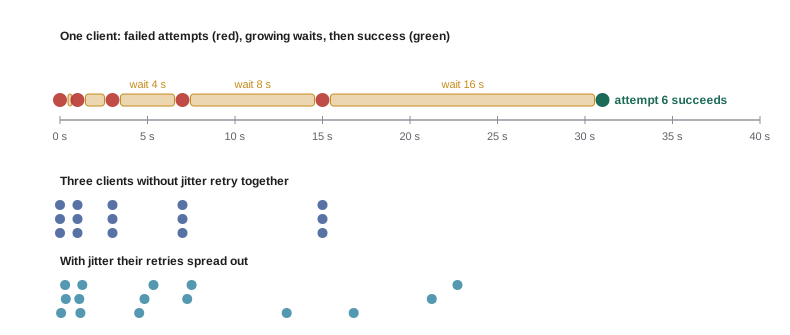
How long to wait between attempts matters. Retrying immediately, again and again, hammers a service that is already struggling and makes the outage worse. The standard approach is exponential backoff: wait a short time after the first failure, then double the wait after each further failure, up to a maximum. With a base of one second and a cap of 30, the waits are 1, 2, 4, 8, 16, 30, 30 seconds. If the server sends Retry-After, use that value instead.
When many clients fail at the same moment, for example every shop that uses the same payment processor during an outage, plain exponential backoff makes them all retry at the same instants, in synchronized waves. Adding jitter, a random part of the wait, spreads them out. A common form, called full jitter, waits a random time between zero and the exponential value. The listing shows the schedule with and without jitter; a seeded random generator makes the output the same every run, which is also how tests check retry logic.
import random

def backoff(attempt, base=1.0, cap=30.0):
    """Delay before retry number `attempt` (1 for the first retry)."""
    return min(cap, base * 2 ** (attempt - 1))

def full_jitter(attempt, rng, base=1.0, cap=30.0):
    return rng.uniform(0, backoff(attempt, base, cap))

rng = random.Random(240)
print("plain: ", [backoff(a) for a in range(1, 8)])
print("jitter:", [round(full_jitter(a, rng), 1) for a in range(1, 8)])
print("total plain wait for 7 retries:", sum(backoff(a) for a in range(1, 8)), "seconds")plain: [1.0, 2.0, 4.0, 8.0, 16.0, 30.0, 30.0] jitter: [0.9, 0.1, 3.8, 2.5, 9.9, 15.8, 19.3] total plain wait for 7 retries: 91.0 seconds
import random

class TransientError(Exception): pass
class PermanentError(Exception): pass

def with_retries(operation, attempts=5, base=1.0, cap=30.0, sleep=None, rng=None, log=print):
    rng = rng or random.Random()
    for attempt in range(1, attempts + 1):
        try:
            return operation()
        except PermanentError:
            raise                                       # retrying will not help
        except TransientError as e:
            if attempt == attempts:
                raise
            delay = rng.uniform(0, min(cap, base * 2 ** (attempt - 1)))
            log(f"attempt {attempt} failed ({e}); retrying in {delay:.1f} s")
            sleep(delay)

outcomes = iter([TransientError("503"), TransientError("timeout"), "42 orders"])
def flaky():
    result = next(outcomes)
    if isinstance(result, Exception):
        raise result
    return result

waited = []
print(with_retries(flaky, sleep=waited.append, rng=random.Random(1)))
print("waited", [round(w, 2) for w in waited])attempt 1 failed (503); retrying in 0.1 s attempt 2 failed (timeout); retrying in 1.7 s 42 orders waited [0.13, 1.69]
The helper takes the operation as a function, which keeps the retry logic in one place for every kind of call. It distinguishes the two kinds of failure with exception classes; in a real client, the code that inspects a response raises TransientError for timeouts, connection errors, 429 and 5xx, and PermanentError for other 4xx codes. sleep and rng are parameters, so the listing runs instantly and the same way every time. For production code, the tenacity library offers the same ideas as decorators, and requests can be configured to retry with urllib3's Retry class.
Try it yourself
The backoff schedule
Write delays(retries, base, cap) that returns the list of waits, in seconds, before each of retries retries using exponential backoff: base, then twice that, then four times, and so on, but never more than cap.
def delays(retries, base, cap):
    return [base] * retries

print(delays(7, 1, 30))
Try it yourself
Retry or give up?
Write should_retry(method, status, has_key=False) that returns True only when a failed request is worth retrying automatically. The status is retryable if it is 429 or any 5xx code, or None (meaning a timeout or connection error with no response). The method must also be safe to repeat: GET, PUT or DELETE always are; POST and PATCH only when has_key is True (an idempotency key was sent).
def should_retry(method, status, has_key=False):
    return status != 200

print(should_retry('POST', 503))
Checkpoints: resume instead of restart
A job that processes many items should remember how far it got. If the order sync handles orders 5001 to 5100 and the server reboots at order 5047, the next run should start at 5048, not at 5001, and certainly not skip the rest. The usual technique is a checkpoint: after each item, or each page, the job saves a small piece of state, such as the last order ID processed or the API's pagination cursor, and on start-up it reads the checkpoint and continues from there. The checkpoint must be written atomically, with the write-to-a-temporary-file-then-rename pattern from PYTH-120, so a crash in the middle of saving cannot leave a corrupted file that stops every later run.
import json, os, tempfile

def save_checkpoint(path, state):
    fd, tmp = tempfile.mkstemp(dir=os.path.dirname(path) or ".")
    with os.fdopen(fd, "w") as f:
        json.dump(state, f)
    os.replace(tmp, path)                       # atomic: old file or new file, never half

def load_checkpoint(path):
    try:
        with open(path) as f:
            return json.load(f)
    except FileNotFoundError:
        return {"last_order": 0}

def sync(orders, path, crash_after=None):
    state = load_checkpoint(path)
    done = 0
    for order_id in orders:
        if order_id <= state["last_order"]:
            continue                            # already handled in an earlier run
        if crash_after is not None and done == crash_after:
            raise RuntimeError("power cut")
        print("syncing", order_id)
        state["last_order"] = order_id
        save_checkpoint(path, state)
        done += 1

if os.path.exists("sync-state.json"):
    os.remove("sync-state.json")             # start fresh each time this listing runs
orders = [5045, 5046, 5047, 5048, 5049]
try:
    sync(orders, "sync-state.json", crash_after=3)
except RuntimeError as e:
    print("run 1 stopped:", e)
sync(orders, "sync-state.json")
print(load_checkpoint("sync-state.json"))syncing 5045
syncing 5046
syncing 5047
run 1 stopped: power cut
syncing 5048
syncing 5049
{'last_order': 5049}Checkpoints work hand in hand with idempotent operations. There is always a small window between doing an item and saving the checkpoint; if the crash falls in that window, the item will be done again on the next run. Marking an order packed twice is harmless, which is why the sync uses PATCH to a fixed status. Creating a shipment twice is not, which is why that step sends an idempotency key derived from the order number.
Try it yourself
Only the new orders
Write new_orders(orders, checkpoint) that takes a list of order dictionaries (each with an integer "id", not necessarily sorted) and a checkpoint dictionary {"last_order": N}. Return a tuple (todo, new_checkpoint): the orders with an id greater than N, sorted by id, and a new checkpoint whose last_order is the highest id seen (or the old value if there are no new orders). Do not modify the checkpoint passed in.
def new_orders(orders, checkpoint):
    return orders, checkpoint

print(new_orders([{'id': 5048}, {'id': 5046}, {'id': 5050}], {'last_order': 5047}))
Preventing overlapping runs
If the order sync runs every fifteen minutes and one run takes twenty because the shop API is slow, the next run starts while the first is still going. Two copies processing the same orders at once can double-count stock or race to write the checkpoint. The simple protection is a lock: at start-up, the job tries to create a lock file that must not already exist, and if the file is there, it exits quietly because another run is in progress. Creating the file with os.O_CREAT | os.O_EXCL makes the check and the creation a single atomic step, so two runs starting at the same instant cannot both succeed. On Linux, the flock command from PYTH-120 achieves the same from the crontab line.
import os

def acquire(path):
    try:
        fd = os.open(path, os.O_CREAT | os.O_EXCL | os.O_WRONLY)
    except FileExistsError:
        return False
    os.write(fd, str(os.getpid()).encode())
    os.close(fd)
    return True

def release(path):
    os.remove(path)

LOCK = "order-sync.lock"
print("first run gets the lock:", acquire(LOCK))
print("second run gets the lock:", acquire(LOCK))
release(LOCK)
print("after release:", acquire(LOCK))
release(LOCK)first run gets the lock: True second run gets the lock: False after release: True
A lock file has one weakness: if a run crashes without removing it, every later run will think a run is in progress. Robust versions store the process ID and start time in the file and treat a lock older than the longest plausible run as stale, or use operating-system locks such as fcntl.flock, which the system releases automatically when the process ends. Whatever the method, a job that skips because of a lock should log that it did, so a stuck lock is noticed within a run or two.
Time zones and daylight saving time
Scheduled jobs live in time zones, and twice a year in most of Canada and the United States the clocks change. A job scheduled at 02:30 local time is skipped on the night the clocks spring forward, because that time does not exist, and may run twice on the night they fall back. Schedule jobs at times that are not affected, such as 06:30, or run the scheduler in UTC. Inside the script, store and compare times in UTC with timezone-aware datetime objects and convert to local time only for display, using zoneinfo.ZoneInfo with the right zone name.
from datetime import datetime, timezone
from zoneinfo import ZoneInfo

local = ZoneInfo("America/Vancouver")
run_utc = datetime(2026, 11, 9, 14, 30, tzinfo=timezone.utc)
print(run_utc.astimezone(local))           # 2026-11-09 06:30:00-08:00
summer = datetime(2026, 7, 6, 13, 30, tzinfo=timezone.utc)
print(summer.astimezone(local))            # 2026-07-06 06:30:00-07:00
Monitoring: noticing the job that stopped
Logging failures is not enough, because the worst failure produces no log at all: the job never runs. The server was replaced and nobody copied the crontab, the virtual environment broke after an upgrade, or the scheduler itself stopped. The fix is a heartbeat, sometimes called a dead man's switch: at the end of every successful run, the job records the time of its success, for example by pinging a monitoring service's URL or writing a timestamp file, and a separate check, ideally on another system, alerts if no success has been recorded for longer than the expected interval plus a grace period. The alert then arrives even when the job has vanished completely.
def overdue(last_success, interval, grace, now):
    """True if the job has not succeeded within interval + grace seconds."""
    return last_success is None or now - last_success > interval + grace

HOUR = 3600
checks = [("order-sync", 1762700000, 15 * 60, 10 * 60),
          ("weekly-report", 1762150000, 7 * 24 * HOUR, 2 * HOUR),
          ("arrivals-check", None, 24 * HOUR, HOUR)]
now = 1762702000
for name, last, interval, grace in checks:
print(f"{name:15} {'ALERT: overdue' if overdue(last, interval, grace, now) else 'ok'}")order-sync ALERT: overdue weekly-report ok arrivals-check ALERT: overdue
Try it yourself
Is the job overdue?
Write status(last_success, interval, grace, now) that returns "ok" if the job succeeded within interval seconds, "late" if it is past the interval but still within the grace period, and "overdue" if it is past interval + grace or has never succeeded (last_success is None).
def status(last_success, interval, grace, now):
    return 'ok' if now - last_success < interval else 'overdue'

print(status(1000, 900, 600, 2000))
A runbook for every scheduled job
Every unattended job should have a short runbook, a page that says what the job does, when it runs, what it depends on, where its logs are, how to tell whether it worked, and what to do when it fails, including whether it is safe to run again by hand. Jordan keeps them in the ridgeline-tools repository under docs/runbooks. When the order sync alerted on a Saturday while Jordan was away, Sam followed the runbook, saw from the log that the shop API had returned 503 for an hour, confirmed on the shop's status page that it was a known outage, and re-ran the sync by hand once it ended. The checkpoint meant nothing was processed twice.
Common mistakes
MistakeLeaving out timeouts in unattended scripts.
InsteadSet a timeout on every network call and a deadline on the job as a whole.
MistakeRetrying every error immediately in a tight loop.
InsteadRetry only transient errors, with exponential backoff, jitter and a limit.
MistakeRetrying a POST that creates something without an idempotency key.
InsteadRetry only repeatable requests, or add an idempotency key.
MistakeRestarting a long job from the beginning after a crash.
InsteadSave an atomic checkpoint and resume from it.
MistakeLetting a new run start while the previous one is still running.
InsteadTake an atomic lock at start-up and exit if it is held.
MistakeRelying on error logs to notice a job that stopped running.
InsteadRecord each success and alert when none arrives within the interval plus a grace period.
Summary and key terms
- Unattended scripts face outages, rate limits, crashes, overlaps and clock changes, and must handle them on purpose.
- Every wait needs a timeout, and every job a deadline.
- Retry only transient failures (timeouts, connection errors, 429, 5xx) on repeatable requests, a limited number of times.
- Exponential backoff doubles the wait up to a cap; jitter spreads out clients; Retry-After overrides both.
- Atomic checkpoints let a job resume where it stopped; idempotent steps make the small overlap harmless.
- Atomic lock files or OS locks prevent overlapping runs; stale locks must be detected.
- Schedule around daylight saving changes, work in UTC, and monitor with heartbeats, a grace period and a runbook.
- transient failure
- An error that is likely to succeed if retried after a short wait.
- permanent failure
- An error that will happen again every time until something is fixed.
- exponential backoff
- Doubling the wait between retries, up to a cap.
- jitter
- A random part of a retry delay that stops clients retrying together.
- checkpoint
- Saved progress that lets a job resume after stopping.
- lock file
- A file whose existence shows that a job is already running.
- stale lock
- A lock left behind by a run that ended without removing it.
- heartbeat
- A record of each successful run, checked by a separate monitor.
- grace period
- Extra time allowed before a late job is reported.
- runbook
- A short document explaining how to operate and fix a job.
Practice problems
Work each problem on paper first, then reveal the answer to check.
List the first five backoff delays with a base of 2 seconds and a cap of 20.
Show answer
2, 4, 8, 16, 20
Should a script retry a 401 automatically?
Show answer
No; the credential is wrong and every retry will fail the same way.
Why must a checkpoint be written atomically?
Show answer
A crash during the write must not leave a corrupted file that breaks later runs.
What problem does O_CREAT | O_EXCL solve for lock files?
Show answer
It makes checking and creating the lock one atomic step, so two runs cannot both get it.
Why is 02:30 a bad time for a daily job in most of North America?
Show answer
It is skipped when clocks spring forward and can repeat when they fall back.
A job runs every 15 minutes with a 10-minute grace period. When should the monitor alert?
Show answer
When no success has been recorded for more than 25 minutes.
Lesson quiz · 5 questions
Score 60% or more to complete this lesson.
Create a free account to save your progress, take quizzes and earn a certificate.