
PYTH-240 · Lesson 4 of 12 · 23 min
JSON, CSV and XML data
▶ Video coming soon A video version of this lesson is on the way.
Ridgeline's three outside services all send data, but not in the same shape. The shop API answers in JSON. The green coffee importer, Northshore Green Coffee, publishes its weekly price list as a CSV file. The carrier's tracking service, older than the others, still sends XML. A script that brings these sources together spends most of its effort not on HTTP but on reading formats correctly: turning text into Python values, checking that the values make sense, and writing results out again. Mistakes here are quiet and expensive. A price read as a float, a date read in the wrong order or a file read with the wrong encoding produces numbers that look right and are not.
This lesson covers the three formats in turn: JSON with its type mapping and precise handling of money, CSV with its dialects, encodings and quirks, and XML with elements, attributes and namespaces. It ends with validation, the habit of checking incoming data before trusting it, and with converting between formats.
JSON in depth
JSON has six kinds of value: objects, arrays, strings, numbers, true and false, and null. The json module maps them onto Python dictionaries, lists, str, int or float, True and False, and None. Two gaps in that mapping cause most trouble. JSON has no date type, so dates travel as strings, usually in the ISO 8601 form 2026-11-09T14:30:00Z, and your code must parse them. And JSON numbers become Python floats, which cannot represent most decimal fractions exactly, so prices should either arrive as strings, as the shop API sends them, or be read with parse_float=Decimal so that every number with a decimal point becomes a Decimal.
import json
from decimal import Decimal
from datetime import datetime

text = '{"id": 5012, "placed": "2026-11-09T14:30:00+00:00", "lines": [{"sku": "RC-101", "qty": 2, "price": 18.50}, {"sku": "RC-104", "qty": 1, "price": 20.25}], "note": null}'

order = json.loads(text, parse_float=Decimal)
total = sum(line["price"] * line["qty"] for line in order["lines"])
placed = datetime.fromisoformat(order["placed"])
print(total, type(total).__name__)
print(placed.date(), placed.tzinfo)
print(order["note"] is None)

def to_json(value):
    if isinstance(value, Decimal):
        return str(value)
    if isinstance(value, datetime):
        return value.isoformat()
    raise TypeError(f"cannot store {type(value).__name__}")

print(json.dumps({"id": 5012, "total": total, "placed": placed}, default=to_json, sort_keys=True))57.25 Decimal
2026-11-09 UTC
True
{"id": 5012, "placed": "2026-11-09T14:30:00+00:00", "total": "57.25"}The default= function tells json.dumps what to do with values it does not know how to store; here it writes Decimals and datetimes as strings. sort_keys=True makes the output stable, which keeps saved files easy to compare in version control, and indent=2 makes it readable for people. ensure_ascii=False writes accented letters as themselves rather than as \u escape codes. Large exports are sometimes sent as JSON Lines, one complete JSON object per line, which lets a program process a file of a million orders one line at a time instead of loading it all.
import io, json

# A JSON Lines export: one complete order per line
EXPORT = """{"id": 5012, "total": "41.75", "status": "paid"}
{"id": 5013, "total": "18.50", "status": "refunded"}
{"id": 5014, "total": "63.00", "status": "paid"}
"""

paid = refunded = 0
for line in io.StringIO(EXPORT):          # a real file is read the same way, one line at a time
    if not line.strip():
        continue
    order = json.loads(line)
    if order["status"] == "paid":
        paid += 1
    else:
        refunded += 1
print(paid, "paid,", refunded, "refunded")2 paid, 1 refunded
Because each line stands alone, a JSON Lines file can be appended to while it is being written, read by a loop that never holds more than one record in memory, and split between several workers. The shop's bulk export of past orders uses this format, and so do many log systems, which is why it is worth recognizing: a file ending in .jsonl or .ndjson is JSON Lines, and json.load on the whole file would fail with an "extra data" error after the first record.
Real API responses are nested several levels deep, and it pays to read them defensively. order["customer"]["address"]["postal_code"] raises KeyError if any level is missing, which is sometimes exactly right and sometimes not. dict.get with a default handles optional fields, and a small helper that walks a path of keys and returns a default at the first gap keeps such code readable.
Try it yourself
Flatten an order into rows
Write order_rows(order) that takes an order dictionary like the one in the listing above (with "id" and a list of "lines", each with "sku", "qty" and "price") and returns a list of tuples (order_id, sku, qty, line_total), one per line. line_total must be a Decimal, computed from the price given as a string.
def order_rows(order):
    return [(order['id'], l['sku'], l['qty'], float(l['price']) * l['qty']) for l in order['lines']]

print(order_rows(ORDER))
CSV: simple until it is not
CSV, comma-separated values, is the most common way to exchange tables. Northshore's price feed starts like this: a header row naming the columns, then one row per green coffee lot. CSV looks too simple to need a library, and that is a trap. Values can contain commas, in which case they are wrapped in double quotes, and a quote inside a quoted value is written twice. A value can even contain a line break. Splitting lines on commas handles none of this; the csv module handles all of it.
import csv, io
from decimal import Decimal

FEED = """\ufefflot,origin,process,price_per_kg,bags_available
NS-2611,Ethiopia,washed,9.40,18
NS-2612,"Colombia, Huila",washed,8.15,40
NS-2613,Sumatra,"wet-hulled, ""giling basah"" style",7.90,12
"""

# Opening a real file: open("northshore.csv", newline="", encoding="utf-8-sig")
reader = csv.DictReader(io.StringIO(FEED.lstrip("\ufeff")))
for row in reader:
    price = Decimal(row["price_per_kg"])
print(f"{row['lot']:8} {row['origin']:16} {row['process']:33} {price:>6} {int(row['bags_available']):>3}")NS-2611 Ethiopia washed 9.40 18 NS-2612 Colombia, Huila washed 8.15 40 NS-2613 Sumatra wet-hulled, "giling basah" style 7.90 12
DictReader turns each row into a dictionary keyed by the header names, so the code reads row["price_per_kg"] instead of row[3] and keeps working if the importer adds a column. Every value arrives as a string; converting to Decimal or int is your job, and it is where bad data shows up. Three practical details matter with real files. Open them with newline="" so the csv module handles line endings itself. Use encoding="utf-8-sig" for files saved by spreadsheet programs, which often put an invisible byte order mark, the \ufeff character in the listing, at the start; without it, the first column name becomes \ufefflot and lookups of "lot" fail mysteriously. And expect dialects: files from some countries use semicolons as separators and commas as decimal points, which csv.reader(f, delimiter=";") and a careful conversion handle.
Writing CSV is the mirror image. csv.DictWriter takes the list of field names, writes the header with writeheader() and then one row per dictionary. It quotes values containing commas or quotes automatically, so the output opens correctly in any spreadsheet program.
Try it yourself
Read the price feed
Write prices(text) that reads a CSV price feed like Northshore's (columns lot,origin,process,price_per_kg,bags_available) and returns a dictionary mapping each lot code to its price per kilogram as a Decimal.
The text may start with a byte order mark (\ufeff). Use the csv module, because some values contain commas inside quotes.
def prices(text):
    out = {}
    for line in text.splitlines()[1:]:
        parts = line.split(',')
        out[parts[0]] = parts[3]
    return out

print(prices(FEED))
XML: elements, attributes and namespaces
XML, the Extensible Markup Language, was the dominant data exchange format before JSON and is still common in shipping, banking, government and office documents. An XML document is a tree of elements. Each element has a tag in angle brackets, may have attributes written inside the opening tag, and contains text, other elements or both. The carrier's tracking response for one parcel looks like the document in the next listing: a parcel element with a tracking attribute, a status element, and a list of scan events.
Python's standard library reads XML with xml.etree.ElementTree. fromstring parses a string into an Element; find returns the first matching child, findall returns all of them, and both accept simple paths such as events/event. An element's attributes are available with get, and its text with the text attribute or findtext. Larger documents usually use namespaces, a prefix bound to a URL that keeps tag names from different standards apart. In ElementTree, you pass a dictionary of prefixes to find and findall, as the listing shows.
import xml.etree.ElementTree as ET

XML = """<?xml version="1.0" encoding="UTF-8"?>
<tr:tracking xmlns:tr="https://parcelpath.example/ns/tracking/1">
  <tr:parcel number="RDG10044" service="expedited">
    <tr:status code="DLV">Delivered</tr:status>
    <tr:events>
      <tr:event time="2026-11-06T09:12:00-07:00" place="Depot">Picked up</tr:event>
      <tr:event time="2026-11-07T06:40:00-07:00" place="Hub">In transit</tr:event>
      <tr:event time="2026-11-07T15:05:00-07:00" place="Customer">Delivered</tr:event>
    </tr:events>
  </tr:parcel>
</tr:tracking>"""

NS = {"tr": "https://parcelpath.example/ns/tracking/1"}
root = ET.fromstring(XML)
parcel = root.find("tr:parcel", NS)
print(parcel.get("number"), parcel.get("service"))
status = parcel.find("tr:status", NS)
print(status.get("code"), status.text)
for event in parcel.findall("tr:events/tr:event", NS):
print(event.get("time")[:16], event.get("place").ljust(9), event.text)RDG10044 expedited DLV Delivered 2026-11-06T09:12 Depot Picked up 2026-11-07T06:40 Hub In transit 2026-11-07T15:05 Customer Delivered
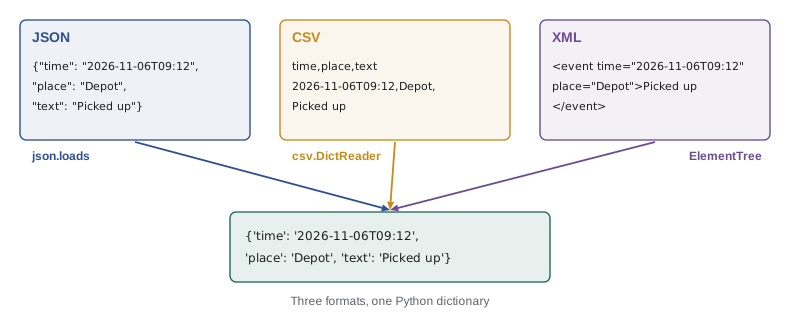
XML from untrusted sources needs one caution. The standard library's XML parsers can be tricked by deliberately crafted documents into using huge amounts of memory, and the Python documentation recommends the third-party defusedxml package for parsing data from sources you do not control. Responses from a well-known carrier over HTTPS are a reasonable risk; a file uploaded by an unknown person is not. The same caution applies to every format: a script that reads outside data should limit sizes, expect malformed input and fail safely.
Try it yourself
Scan events from XML
Write scan_places(xml_text) that parses a tracking document like the one in the listing (with the tr namespace) and returns a list of the place attributes of all tr:event elements, in order.
import xml.etree.ElementTree as ET

def scan_places(xml_text):
    root = ET.fromstring(xml_text)
    return [e.get('place') for e in root.iter('event')]

print(scan_places(XML))
Validate before you trust
Data from outside the program should be checked before it drives decisions. A validation step looks at each record and asks: are the required fields present, are the values of the right type, are they in a sensible range, and do they agree with each other? A price per kilogram of 0.00 or 940.00 is almost certainly a typing error in the feed; a stock count of -3 cannot be real; a delivery date before the pickup date is wrong. Catching these at the door, with a clear message naming the record and the field, is far better than discovering weeks later that the roast plan was built on a bad number.
from decimal import Decimal, InvalidOperation

def check_lot(row):
    problems = []
    for field in ("lot", "origin", "price_per_kg", "bags_available"):
        if not row.get(field, "").strip():
            problems.append(f"missing {field}")
    try:
        price = Decimal(row.get("price_per_kg", ""))
        if not Decimal("2") <= price <= Decimal("40"):
            problems.append(f"price {price} outside 2 to 40 per kg")
    except InvalidOperation:
        problems.append(f"price {row.get('price_per_kg')!r} is not a number")
    bags = row.get("bags_available", "")
    if bags and (not bags.isdigit()):
        problems.append(f"bags {bags!r} is not a whole number")
    return problems

rows = [{"lot": "NS-2611", "origin": "Ethiopia", "price_per_kg": "9.40", "bags_available": "18"},
        {"lot": "NS-2614", "origin": "Kenya", "price_per_kg": "940", "bags_available": "6"},
        {"lot": "NS-2615", "origin": "", "price_per_kg": "8,10", "bags_available": "-2"}]
for row in rows:
print(row["lot"], check_lot(row) or "ok")NS-2611 ok NS-2614 ['price 940 outside 2 to 40 per kg'] NS-2615 ['missing origin', "price '8,10' is not a number", "bags '-2' is not a whole number"]
The function collects every problem rather than stopping at the first, so one run shows everything that needs fixing. In larger projects, libraries such as pydantic or jsonschema describe the expected shape once and check it automatically, but the idea is the same. Whichever tool you use, decide in advance what happens to bad records: reject the whole file, skip the bad rows and report them, or stop and ask a person. For a price feed that sets what Ridgeline pays for coffee, Jordan's script stops and emails Theo; for the tracking feed, it skips the bad event and logs it.
Converting between formats
Much automation is conversion: JSON from the shop into CSV for Anita's spreadsheet, CSV from the importer into JSON for the roast planner, XML from the carrier into a row in the weekly report. The reliable pattern is to read the source into plain Python values first, check them, and then write the target format from those values. Never convert text to text directly by string replacement; the intermediate Python data is where types are fixed and errors are caught.
import csv, io, json

orders_json = '[{"id": 5012, "customer": "Lee, Ana", "total": "41.75"}, {"id": 5013, "customer": "Okafor", "total": "18.50"}]'
orders = json.loads(orders_json)

out = io.StringIO()
writer = csv.DictWriter(out, fieldnames=["id", "customer", "total"], lineterminator="\n")
writer.writeheader()
writer.writerows(orders)
print(out.getvalue())id,customer,total 5012,"Lee, Ana",41.75 5013,Okafor,18.50
The customer name Lee, Ana contains a comma, so DictWriter wraps it in quotes automatically, and the file opens with three columns in any spreadsheet program. lineterminator="\n" keeps the output tidy on screen; when writing a real file, open it with newline="" and let the csv module choose.
Common mistakes
MistakeReading prices from JSON or CSV as float.
InsteadKeep money as strings until converting with Decimal, or use parse_float=Decimal.
MistakeSplitting CSV lines on commas.
InsteadUse the csv module, which handles quotes, embedded commas and line breaks.
MistakeOpening spreadsheet exports without utf-8-sig and losing the first column name to a byte order mark.
InsteadUse encoding="utf-8-sig" and newline="" for CSV files.
MistakeCalling find("event") on a namespaced XML document and getting nothing.
InsteadPass a namespace dictionary and use prefixed paths such as tr:event.
MistakeTrusting outside data because it parsed without errors.
InsteadValidate required fields, types, ranges and consistency, and report every problem.
MistakeConverting formats with string replacement.
InsteadParse into Python values, check them, then write the target format.
Summary and key terms
- JSON maps onto dicts, lists, strings, numbers, booleans and None; it has no date type and its numbers become floats.
- Use parse_float=Decimal or string prices for money, fromisoformat for ISO dates, and default= to write them back.
- The csv module handles quoting, embedded commas and dialects; DictReader and DictWriter work with named columns.
- Open CSV files with newline="" and, for spreadsheet exports, encoding="utf-8-sig".
- ElementTree reads XML trees; find, findall and get reach elements and attributes, with a prefix dictionary for namespaces.
- Use defusedxml for XML from untrusted sources, and limit the size of any outside data.
- Validate incoming records and convert formats through plain Python values.
- JSON
- A text format of objects, arrays, strings, numbers, booleans and null.
- JSON Lines
- A file with one complete JSON object per line.
- ISO 8601
- The international standard date and time format, such as 2026-11-09T14:30:00Z.
- CSV
- A text table with one record per line and fields separated by commas.
- dialect
- The separator, quoting and line-ending conventions of a CSV file.
- byte order mark
- An invisible character some programs put at the start of a UTF-8 file.
- XML element
- A tagged node in an XML tree, with attributes, text and children.
- attribute
- A name="value" pair inside an XML opening tag.
- namespace
- A URL-identified prefix that keeps XML tag names from different vocabularies apart.
- validation
- Checking that incoming data has the required fields, types and sensible values.
Practice problems
Work each problem on paper first, then reveal the answer to check.
What does json.loads("1.10", parse_float=Decimal) return?
Show answer
Decimal('1.10')
Why might row["lot"] raise KeyError for a file whose header clearly says lot?
Show answer
A byte order mark makes the first header \ufefflot; open with utf-8-sig.
How does CSV store the value Colombia, Huila?
Show answer
In double quotes: "Colombia, Huila".
In <event place="Hub">In transit</event>, what is the attribute and what is the text?
Show answer
place="Hub" is the attribute; In transit is the text.
Why read data into Python values before writing another format?
Show answer
Types are fixed and errors are caught in between, instead of copying mistakes across.
Name two checks for a stock count arriving from a feed.
Show answer
It is a whole number, and it is zero or more.
Lesson quiz · 5 questions
Score 60% or more to complete this lesson.
Create a free account to save your progress, take quizzes and earn a certificate.