
MSBA-351 · Lesson 9 of 12 · 20 min
Requisitions and planning
▶ Video coming soon A video version of this lesson is on the way.
Every Monday morning in the old system, Imogen walked through the roastery with a clipboard, looked at the shelves and decided what to order. It mostly worked, but twice in 2026 Corbel & Finch ran out of retail bags, once for four days, because the supplier's lead time had quietly grown from a week to three. "I do not want a robot buying coffee," Imogen said at the planning session. "I want a list every Monday of what we will run short of and when, and I will decide." That is what Business Central's requisition worksheet does.
Supply and demand
Planning in Business Central compares demand, such as sales orders, blanket order quantities, transfer demand from the cafés, assembly component needs and forecasts, with supply, such as inventory, purchase orders, transfer orders and assembly orders. Where projected supply falls short, planning suggests new supply. How much and when depends on each item's replenishment system and reordering policy.
| Replenishment system | Planning suggests | Corbel & Finch items |
|---|---|---|
| Purchase | Purchase orders from the item's vendor | Green coffee, packaging, merchandise |
| Assembly | Assembly orders | Roasted coffee |
| Transfer | Transfer orders from another location (on stockkeeping units) | Café SKUs supplied from the roastery |
| Prod. Order | Production orders (Premium) | Not used |
Reordering policies
The Reordering Policy on the item or SKU decides the shape of suggestions. Fields on the Planning FastTab tune it.
| Policy | How it decides the quantity | Key fields | Good for |
|---|---|---|---|
| Fixed Reorder Qty. | Orders a fixed quantity when projected inventory drops to the reorder point | Reorder Point, Reorder Quantity, Safety Stock | Packaging bought in full pallets |
| Maximum Qty. | Orders enough to bring inventory back to the maximum | Reorder Point, Maximum Inventory | Café SKUs with shelf limits |
| Order | One supply order per demand line, no stock built | None beyond lead time | Private-label and special-order items |
| Lot-for-Lot | Combines demand within a time bucket into one supply order | Time Bucket, Safety Stock, Lot Accumulation Period | Green coffee and roasted blends |
| Blank | Not planned | None | Items managed by hand |
Other planning fields refine the result. Safety Stock Quantity is a buffer planning tries never to dip below. Lead Time Calculation (lesson 3) sets how early supply must be ordered. Safety Lead Time adds extra days. Minimum Order Quantity, Maximum Order Quantity and Order Multiple round suggestions to what the vendor sells; retail bags come in boxes of 500, so their order multiple is 500. Time Bucket sets the period for checking reorder points. Dampener settings stop planning from suggesting tiny changes to existing orders.
Worked problem
Setting up retail bags
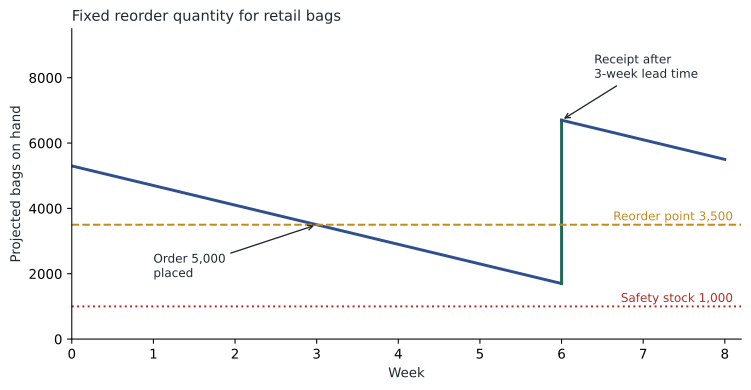
The roastery uses about 600 retail bags a week. The supplier now needs 3 weeks and sells in boxes of 500. Imogen wants a buffer of 1,000 bags. What planning settings stop the stock-out from happening again?
Show solution
- Reordering Policy: Fixed Reorder Qty.
- Lead Time Calculation: 3W on the item vendor catalog line for the supplier, so the supplier's real lead time is used.
- Safety Stock Quantity: 1,000.
- Reorder Point: usage during lead time plus safety stock, 3 x 600 + 1,000 = 2,800. Imogen rounds up to 3,500 to cover busy weeks.
- Reorder Quantity: 5,000, about eight weeks of use; Order Multiple: 500.
Answer: Fixed reorder quantity with a reorder point that covers three weeks of use plus safety stock, so the order is placed in time.
Demand forecasts
Sales orders show only demand that is already booked. For items roasted to stock, Corbel & Finch also needs a view of demand not yet ordered. A demand forecast records expected sales by item, location, variant and period. Planning can use a forecast as demand so that assembly suggestions cover the coming weeks. Forecasts can be entered by hand or built with the sales and inventory forecast feature, which uses Azure AI on historical sales and is listed among Business Central's AI capabilities. Callum built a weekly forecast for the six main blends from two years of history and had the sales team adjust it for known events such as the winter campaign.
The requisition worksheet
The requisition worksheet is where Imogen's Monday list comes from. Calculate Plan looks at items with replenishment system Purchase or Transfer, within a date range and with filters, and fills the worksheet with action messages: New, Change Qty., Reschedule, Resched. & Chg. Qty. and Cancel. Each line shows the item, quantity, due date, vendor and the demand that triggered it.
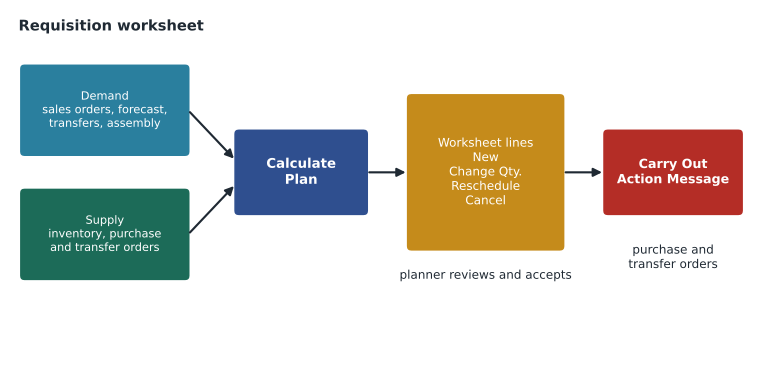
The planner reviews each line, changes vendors or quantities, and selects Accept Action Message on the lines to act on. Carry Out Action Message then creates the purchase orders, grouped by vendor if chosen, and transfer orders, and changes or cancels existing ones. Nothing happens until the planner carries out the actions, which is the "I will decide" that Imogen asked for. Order Tracking and Untracked planning elements explain why a line was suggested: which demand it covers and what made up the quantity.
The planning worksheet is the broader tool. It plans assembly orders as well as purchases and transfers and, in Premium, production orders. Corbel & Finch runs the planning worksheet weekly for roasted coffee, so assembly orders for each blend are suggested from sales orders and the forecast, and the component needs it creates flow into the requisition worksheet for green coffee and packaging. Ysmay reviews the roasting suggestions on Friday for the following week.
Drop shipments and special orders
Two features connect a sales order directly to a purchase order through the Purchasing Code on the sales line. A drop shipment has the vendor deliver straight to the customer; the goods never enter Corbel & Finch's inventory, though the sale and purchase still post through items. A special order buys an item for a specific sales order but delivers it to Corbel & Finch first. Both are created with Get Sales Orders on the requisition worksheet or from the purchase order.
Corbel & Finch uses drop shipments for commercial espresso machines sold to wholesale cafés: the machine dealer ships to the café, and Corbel & Finch invoices the café and pays the dealer. Special orders are used for unusual merchandise a customer asks for, so it is bought only once it is sold.
Planning parameters at the cafés
The café SKUs from lesson 1 have replenishment system Transfer from ROASTERY and reordering policy Maximum Qty., with maximums set by shelf space. Running the requisition worksheet for CAFE1 and CAFE2 suggests the Monday van load as transfer orders. The café managers check them on Sunday evening, which replaced the Monday phone call.
Lot-for-lot and time buckets
Green coffee and roasted blends use Lot-for-Lot, which combines demand within a period into one supply order rather than ordering a fixed quantity. The Lot Accumulation Period, for example 1W, decides how far ahead demand is grouped. For roasted coffee, a weekly period fits the weekly roast cycle: planning sums the next week's sales orders and forecast for each blend and suggests one assembly order to cover it, adjusted for stock on hand and safety stock. For green coffee, a monthly period matches how Imogen calls off sacks from the port warehouse, and the resulting suggestions line up with the blanket orders.
| Item group | Policy | Key settings | Reason |
|---|---|---|---|
| Roasted blends | Lot-for-Lot | Lot accumulation 1W, safety stock 2 days of sales | Roasted weekly to demand |
| Green coffee | Lot-for-Lot | Lot accumulation 1M, order multiple 1 SACK | Monthly call-offs in full sacks |
| Retail bags and labels | Fixed Reorder Qty. | Reorder point, reorder quantity, order multiple | Bought in boxes and pallets |
| Café SKUs | Maximum Qty. | Reorder point, maximum inventory | Shelf space limits |
| Private-label blends | Order | None | Made only to order |
| Merchandise | Fixed Reorder Qty. | Reorder point and quantity | Steady sales |
Planning and availability together
Planning and the availability views tell the same story from different angles. When Callum runs Item Availability by Period for a blend, the projected available balance includes the assembly orders created from planning. If the balance dips below zero in a future week, planning has not yet been run or a suggestion was not carried out. The Order Tracking page on a sales line shows which supply covers it: on hand, a planned assembly order, or nothing. Noor encouraged Callum to check order tracking whenever planning surprised him, rather than overriding the suggestion by hand.
Worked problem
Reading an action message
The requisition worksheet shows a Reschedule action for an existing purchase order of 20 sacks of Colombia, moving the expected receipt date from February 15 to February 1. Why, and what should Imogen do?
Show solution
- Open order tracking on the worksheet line: a large blanket sales release for a grocery chain has moved forward, raising demand for the blend that uses Colombia in late January.
- Planning suggests receiving the existing order earlier instead of creating a new one.
- Imogen calls the importer: they can deliver on February 3, not February 1.
- She changes the date on the worksheet line to February 3, accepts the action message and carries it out; the purchase order is updated and the grocery chain's order is covered with a small safety-stock dip.
Answer: The message moves supply to meet earlier demand; Imogen checks with the vendor, adjusts the date, and carries out the change.
Getting planning data right
Planning is only as good as its inputs. Before relying on the worksheet, Callum checked four things for each planned item: the replenishment system is right, the vendor and lead time are filled, the reordering policy and its quantities make sense, and open documents have realistic dates. He found 18 old purchase orders from the migration with expected receipt dates in the past, which made planning think stock was about to arrive; closing them removed dozens of misleading suggestions. A short checklist run each month keeps the data clean.
Safety stock and service levels
Safety stock is a trade-off. Too little, and a late delivery or a busy week causes stock-outs; too much, and money sits on the shelf and coffee goes stale. Business Central does not calculate safety stock for you; it uses the quantity you set. Imogen and Callum set it by thinking about two risks: how much demand can jump in a lead time, and how late a vendor can be. For retail bags, the supplier is reliable but slow, so the buffer covers about two weeks of use. For green coffee, deliveries from the port warehouse are dependable but demand for some origins varies with wholesale orders, so the buffer is a fixed number of sacks per origin. For roasted coffee, which goes stale, safety stock is kept small, about two days of sales, and the weekly roast does the rest.
Business Central also offers Safety Lead Time, a number of days added to every suggestion so supply arrives before it is needed. The default comes from Manufacturing Setup's Default Safety Lead Time and can be overridden on the item or SKU. Corbel & Finch uses one day, so that sacks arrive the day before a roast rather than on the morning of it.
Planning for the cafés in more detail
When the requisition worksheet plans the cafés, it reads each café SKU's transfer-from location, ROASTERY, and suggests transfer orders rather than purchases. Those transfers become demand at the roastery, which the roastery's own planning then covers with assembly orders. This chain, café SKU to transfer to roastery demand to assembly order to green coffee purchase, means a busy weekend at a café eventually shows up as a slightly bigger green coffee call-off, without anyone passing the message on by phone.
Common mistakes
MistakeLetting planning run without lead times.
InsteadSet realistic lead times on vendors, catalog lines or items, or suggestions arrive too late.
MistakeIgnoring vendor pack sizes.
InsteadUse order multiples and minimum quantities so suggestions match what vendors sell.
MistakeCarrying out every action message without review.
InsteadReview and accept lines; check order tracking when a suggestion looks odd.
MistakePlanning roasted coffee from sales orders alone.
InsteadAdd a demand forecast for items made to stock.
MistakeUsing a drop shipment when the goods must be checked first.
InsteadUse a special order so the goods arrive at your location before delivery.
Summary and key terms
- Planning compares demand with supply and suggests new supply by replenishment system.
- Reordering policies (fixed, maximum, order, lot-for-lot) and planning fields shape suggestions.
- Demand forecasts add expected sales for items made or bought to stock.
- The requisition worksheet suggests purchases and transfers; Carry Out Action Message creates them.
- The planning worksheet also plans assembly orders.
- Drop shipments and special orders link sales orders to purchase orders through purchasing codes.
- Reordering policy
- The rule that decides how planning sizes and times supply.
- Reorder point
- The projected inventory level that triggers a new order.
- Safety stock
- A buffer quantity planning tries to keep.
- Requisition worksheet
- A worksheet that suggests purchase and transfer orders.
- Action message
- A planning suggestion such as New, Change Qty. or Reschedule.
- Demand forecast
- Expected sales by item and period used as demand in planning.
- Drop shipment
- A purchase delivered by the vendor directly to the customer.
Practice problems
Work each problem on paper first, then reveal the answer to check.
What does Carry Out Action Message do?
Show answer
Creates, changes or cancels purchase and transfer orders from the accepted worksheet lines.
Which policy suits café stock limited by shelf space?
Show answer
Maximum Qty., which orders up to the maximum inventory.
What is the difference between a drop shipment and a special order?
Show answer
A drop shipment goes from the vendor to the customer; a special order comes to your own location first.
Lesson quiz · 5 questions
Score 60% or more to complete this lesson.
Create a free account to save your progress, take quizzes and earn a certificate.