
MSBA-351 · Lesson 8 of 12 · 20 min
Assembly management
▶ Video coming soon A video version of this lesson is on the way.
Roasting is the heart of Corbel & Finch, and in the foundations course Bettina made a decision that shapes this lesson: the company runs on Essentials licences, not Premium, so Business Central's full manufacturing module is not available. Instead, roasting is modelled with assembly management, which Essentials includes. "We are not a factory with routings and work centres," Bettina said. "We take green coffee and a bag, roast and pack it, and we want to know what it cost." Ysmay Thorvaldsen, the roastery manager, joined the session with the roast logs to check that the model matched what happens at the roaster.
What assembly management does
Assembly management combines components into a new item, the assembly item, using an assembly bill of materials (BOM). An assembly order consumes the components, adds any resource costs, and outputs the assembly item into inventory. Assembly is a single-level, single-step process: there are no routings, operations or work centres, which is exactly why it suits a roaster with one main step.
| Need | Assembly management (Essentials) | Manufacturing (Premium) |
|---|---|---|
| Bill of materials | Assembly BOM, single level per item | Production BOMs, multi-level, versions |
| Operations and capacity | Resources on the BOM for time and cost | Routings, work centres, machine centres, capacity planning |
| Orders | Assembly orders, to stock or to a sales order | Production orders with statuses and output journals |
| Good fit | Kitting, simple conversions, roasting and packing | Multi-step manufacturing |
The assembly item and its BOM
An item becomes an assembly item when its Replenishment System is set to Assembly on the item card. Its Assembly BOM lists components, each an item or a resource, with a quantity per assembly item and a unit of measure. The BOM is opened from the item card. Components can themselves be assembly items, but each assembly order handles only one level.
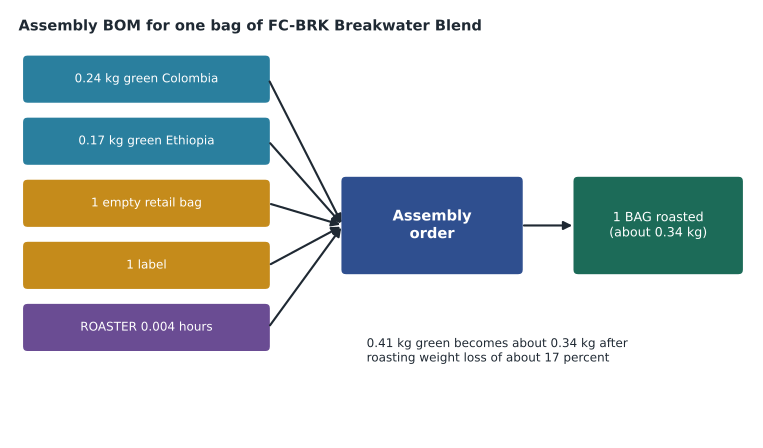
Roasting loses weight, mostly moisture, so the green coffee needed for one bag is more than the bag holds. Ysmay's logs showed losses of 15 to 18 percent depending on the roast. Breakwater Blend is a medium roast, so Corbel & Finch uses 17 percent: a bag of 340 grams needs about 0.41 kilograms of green coffee, split between the two origins in the blend. The BOM therefore lists 0.24 kg of Colombia Huila and 0.17 kg of Ethiopia Yirgacheffe, plus one bag, one label and a share of roaster time. When a roast batch loses more or less than planned, the assembly order's consumption quantities can be changed before posting so actual cost reflects what happened.
| Component | Type | Quantity per BAG | Unit of measure |
|---|---|---|---|
| GC-COL-HUI Colombia Huila | Item | 0.24 | KG |
| GC-ETH-YIR Ethiopia Yirgacheffe | Item | 0.17 | KG |
| PK-BAG340 retail bag with valve | Item | 1 | PCS |
| PK-LBL-BRK Breakwater label | Item | 1 | PCS |
| ROASTER roaster and operator time | Resource | 0.004 | HOUR |
The ROASTER resource represents the roaster and its operator. A resource has a unit cost per hour, so including it in the BOM adds labour and machine cost to each bag. Noor set its cost from a simple calculation: the roastery's monthly wages, gas and maintenance divided by roasting hours. A batch of 15 kilograms takes about 15 minutes, so each bag uses about a quarter of a minute, or 0.004 hours.
Assembly policies: to stock or to order
An assembly item's Assembly Policy decides when it is made.
| Assembly policy | How orders are created | Corbel & Finch use |
|---|---|---|
| Assemble-to-Stock | Assembly orders are created by planning or by hand; output goes to inventory and is sold from stock | All regular blends, roasted weekly to forecast |
| Assemble-to-Order | Entering the item on a sales line creates a linked assembly order; the assembly output is shipped with the sales line | Custom gift boxes and private-label blends for wholesale customers |
With Assemble-to-Order, the sales line and its assembly order are linked: the Qty. to Assemble to Order on the sales line drives the assembly order's quantity, the assembly order's due date follows the shipment date, and posting the shipment posts the assembly at the same time. The order taker can open the linked assembly order from the sales line to adjust components, such as swapping a tin for a box in a gift set. A sales line can also mix the two, taking some units from stock and assembling the rest.
Assembly orders
An assembly order has a header, which names the assembly item, quantity, location, due and starting dates, and lines copied from the BOM, each with a quantity to consume. Before posting, the order can be changed: lines added or removed, quantities changed, or a component lot chosen. The Show Availability action shows whether components are available; Business Central warns if they are not.
Worked problem
Roasting a batch of Breakwater
Ysmay plans to roast 120 bags of Breakwater Blend on Tuesday. The BOM calls for 0.41 kg of green coffee per bag. After roasting, the batch fills only 118 bags because the beans lost a little more weight. How is this posted?
Show solution
- Create an assembly order for FC-BRK, quantity 120, location ROASTERY. The lines show 28.8 kg Colombia, 20.4 kg Ethiopia, 120 bags, 120 labels and 0.48 hours of ROASTER.
- Assign the green coffee lots to the consumption lines with item tracking lines (lesson 7).
- After roasting, set Quantity to Assemble to 118 and Quantity to Consume on the bag and label lines to 118. Leave the green coffee at the full amount, because all of it went into the roaster.
- Assign the new roast lot number to the output with Assign Lot No.; the expiration date is calculated from the item.
- Post. Business Central consumes the components, outputs 118 bags with their roast lot, and posts the remaining 2 bags as outstanding; close the order by changing its quantity to 118 or deleting the remaining quantity.
Answer: Post 118 bags of output with all the green coffee consumed, so the extra weight loss raises the cost per bag instead of disappearing.
Posting an assembly order creates item ledger entries of type Assembly Consumption for components and Assembly Output for the assembly item, plus resource and capacity ledger entries for resource time. The posted assembly order keeps the history. If a posting was wrong, Undo Assembly on the posted order reverses it, as long as the output has not been used.
Costing assembled items
The cost of an assembled bag is the sum of consumed component costs plus resource costs. How that cost reaches the item depends on its costing method. With Standard costing, which Noor recommended for roasted coffee, the bag carries a fixed standard cost calculated from the BOM with Calculate Standard Cost on the item card or the Standard Cost Worksheet, and any difference between actual and standard posts as a variance. With FIFO or average costing, the output simply takes the actual cost of what was consumed.
Standard cost suits a roaster because green coffee prices move with every lot, while the café and wholesale price lists need a stable cost to compare against. The variance account shows each month how far actual roasting costs drifted from the plan, which is a useful number in its own right. Lesson 11 returns to standard cost and variances.
Assembly and item tracking
Tracked components must have their lots selected on the assembly lines before posting, and a tracked assembly item must have its output lot assigned. This is what links green coffee lots to roast lots for Item Tracing in lesson 7. The assembly order's tracking lines are opened from each line, just like on sales and purchase documents.
Kits and assemble-to-order for wholesale
Two wholesale customers buy custom products: a hotel group takes a private-label house blend in 1-kilogram bags with their logo, and an office supplier sells a gift box with two bags and a branded mug. Both are set up as assemble-to-order items. When the hotel orders 40 bags, the sales line creates a linked assembly order; the roastery roasts and packs to that order; and posting the shipment posts the assembly and the sale together. Customers never see the assembly order; they see a sales order shipped on time.
Business Central also offers Explode BOM on sales lines, which replaces an item with its BOM components on the line. This suits a kit that is not stocked or assembled, such as a bundle sold as separate items. Corbel & Finch uses assemble-to-order instead for the gift box, because it wants the box itself to have a cost and an item number.
Assembly setup
The Assembly Setup page holds the number series for assembly orders and posted assembly orders, the Default Location for Orders, and Stockout Warning. It also has Copy Component Dimensions from (item or order header) and Create Movements Automatically for locations with advanced warehousing. At Corbel & Finch the default location is ROASTERY, and stockout warnings are on so that an assembly order for a blend without enough green coffee is flagged before the roast is planned.
| Setting | Corbel & Finch choice | Effect |
|---|---|---|
| Assembly Order Nos. | ASM- series | Numbering of open assembly orders |
| Posted Assembly Order Nos. | PASM- series | Numbering of posted assembly orders |
| Default Location for Orders | ROASTERY | New assembly orders start at the roastery |
| Stockout Warning | On | Warns when components are short |
| Copy Component Dimensions from | Order header | Components carry the order's dimensions, such as DEPARTMENT ROASTING |
Roast planning with assembly orders
Ysmay plans roasting a week ahead. Each Friday, the planning worksheet (lesson 9) suggests assembly orders for each blend from the sales order book and the forecast; she reviews the suggestions, adjusts quantities to full roaster batches of 15 kilograms of green coffee, about 36 bags, and carries them out. The assembly orders for the week then appear on the roastery's schedule, sorted by starting date, with component availability shown on each. When a green coffee is short, she either swaps the blend's components on the order, if the blend recipe allows a substitute origin, or moves the roast to a later day.
Changing components on an assembly order affects only that order; the assembly BOM stays the same. If a recipe changes for good, for example when one origin is replaced in the blend for the new year, the BOM is changed and the standard cost recalculated (lesson 11), so future orders and costs follow the new recipe.
Where-used and BOM reports
The Where-Used view on an item, opened from the item card, lists every assembly BOM that uses it. Before Imogen agrees to drop a green coffee from next year's contracts, she checks where it is used, which blends would need a new recipe, and how much is on hand. The Assemble to Order - Sales report and the BOM Cost Shares page show how the cost of an assembled item builds up from its components and resources, which Bettina uses when setting wholesale prices.
Worked problem
A cost share check
Bettina wants to know what share of a bag of Breakwater's standard cost is green coffee. The standard cost is 5.90 dollars: green coffee 4.67, bag 0.38, label 0.07 and roaster time 0.78. What share is green coffee?
Show solution
- Open BOM Cost Shares for FC-BRK; the components and resource show their cost contributions.
- Green coffee: 4.67 of 5.90 dollars.
- Share: 4.67 divided by 5.90 is about 0.79, or 79 percent.
- So a 10 percent rise in green coffee prices raises the bag's cost by about 8 percent.
Answer: About 79 percent of the bag's cost is green coffee, so green prices drive most of the cost.
Assembly and warehousing
At the roastery, components are taken from their default bins and the output goes to the blend's default shelf bin. The assembly order's lines carry a Bin Code for each component, defaulting from the location's From-Assembly Bin Code and To-Assembly Bin Code or from the bin contents. Because the roastery does not use directed put-away and pick, the roaster operator simply takes the sacks and bags from their bins and records the consumption on the order.
Common mistakes
MistakeAssuming Essentials cannot model roasting.
InsteadUse assembly management, with resources for roaster time.
MistakeEntering the green coffee per bag at the bag's finished weight.
InsteadBuild roasting weight loss into the BOM quantities.
MistakeReducing consumption to match fewer bags when all the coffee was roasted.
InsteadConsume what was actually used so cost per bag rises with extra losses.
MistakeLeaving resources out of the BOM.
InsteadInclude roaster and labour time so assembled cost is complete.
MistakeUsing Explode BOM for items that need their own cost and stock.
InsteadUse assemble-to-order when the finished kit needs an item number and cost.
Summary and key terms
- Assembly management, included in Essentials, combines components into an assembly item in one step.
- An item with replenishment system Assembly has an assembly BOM of items and resources.
- BOM quantities should include real losses such as roasting weight loss.
- Assemble-to-stock builds inventory; assemble-to-order links assembly orders to sales lines.
- Assembly orders consume components and output the assembly item, with item tracking on both sides.
- Standard cost suits assembled items with variable component prices; variances show drift.
- Assembly item
- An item with replenishment system Assembly, made from an assembly BOM.
- Assembly BOM
- The list of component items and resources for an assembly item.
- Assembly order
- A document that consumes components and outputs an assembly item.
- Assemble-to-order
- An assembly policy where a sales line creates a linked assembly order.
- Assemble-to-stock
- An assembly policy where assembled items are made to inventory.
- Resource
- A person or machine with a cost per unit of time used on BOMs and documents.
- Explode BOM
- An action that replaces an item on a line with its BOM components.
Practice problems
Work each problem on paper first, then reveal the answer to check.
Which field makes an item an assembly item?
Show answer
Replenishment System set to Assembly on the item card.
What happens when a sales line has an assemble-to-order item?
Show answer
A linked assembly order is created, and posting the shipment posts the assembly too.
Why include a resource on an assembly BOM?
Show answer
To add machine and labour cost to the assembled item.
Lesson quiz · 5 questions
Score 60% or more to complete this lesson.
Create a free account to save your progress, take quizzes and earn a certificate.