
MSBA-351 · Lesson 3 of 12 · 21 min
Purchase orders and receipts
▶ Video coming soon A video version of this lesson is on the way.
Imogen buys three kinds of things. Green coffee comes from four specialty importers, usually under annual contracts that fix a price and a total quantity, with sacks shipped from a port warehouse over several months. Packaging comes from two suppliers of bags, labels and cases. Everything else, from mugs to grinders and cleaning supplies, is bought as needed. In the old system she raised purchase orders in a spreadsheet and emailed them; receiving was a signature on the delivery slip, and Callum found out what had arrived when the vendor's invoice turned up. "Nobody could tell me what we had on order," Imogen said. "I kept a second spreadsheet just for that, and it was always wrong."
The purchase document chain
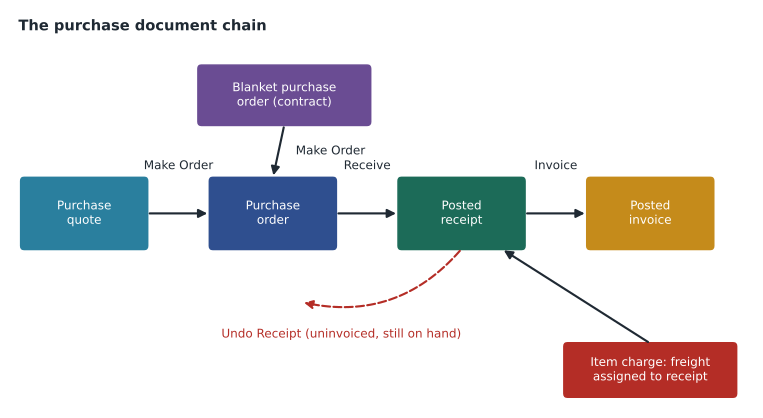
Purchasing mirrors sales. A purchase quote asks a vendor for a price; a purchase order commits to buy; posting the order receives the goods and later invoices them. Each step leaves a posted document.
Vendor master data for purchasing
The finance course set up vendors for payables. Purchasing adds the fields the study guide calls core vendor settings: order address, lead time and locations.
| Field or table | Purpose | Corbel & Finch example |
|---|---|---|
| Order Address | A separate address that receives purchase orders, often a sales office or broker | An importer whose orders go to its broker in Vancouver while invoices come from head office |
| Lead Time Calculation | Default time from order to receipt, as a date formula | 3W for green coffee from the port warehouse, 5D for packaging |
| Location Code | Default receiving location on purchase documents | ROASTERY |
| Purchaser Code | The buyer responsible | IMOGEN |
| Prices Including Tax | Whether vendor prices include tax | Off for all importers |
| Item Vendor Catalog | Vendor item numbers and lead times by item | The importer's lot code for each green coffee |
Lead time can be set on the vendor, on the item vendor catalog for a specific item from that vendor, or on the item or stockkeeping unit. Business Central uses the most specific one available. On the purchase line, the Expected Receipt Date is calculated from the order date plus the lead time plus the location's inbound warehouse handling time, which at the roastery is one day to sample, weigh and put sacks away. The same dates feed planning in lesson 9.
Purchase quotes and orders
Imogen sends purchase quotes for one-off purchases, such as a new grinder for CAFE2 or a trial lot of green coffee, and compares the replies. When she chooses, Make Order turns the quote into a purchase order. For routine buying she creates the order directly. Lines carry the item, quantity, unit of measure (SACK for green coffee), direct unit cost and expected receipt date. The order then goes through the purchase approval workflow from the foundations course: Imogen can approve up to 2,000 dollars herself, Callum up to 25,000, and Bettina above that.
After approval, the order is released. Releasing locks the header and lines against casual changes and tells the warehouse that receipts are expected. Purchase orders are sent from Business Central as PDFs through document sending profiles; the importer's broker receives them at the order address.
Receiving items
When goods arrive, the receiving clerk opens the order and fills in Qty. to Receive on each line, then posts Receive. This creates a posted purchase receipt, increases inventory with an item ledger entry at the expected cost, and leaves the order open for invoicing. At the roastery, Dovrin's team also records the lot number printed on each sack at this point (lesson 7). If the warehouse later uses warehouse receipts (lesson 6), the same posting happens from the warehouse document instead.
Receiving more items than ordered
Vendors sometimes deliver more than ordered: a packaging supplier rounds up to a full pallet, or green coffee arrives a few kilograms heavy because sack weights vary. By default, Business Central does not allow Qty. to Receive to exceed the outstanding quantity. The over-receipt feature handles this. An over-receipt code sets a tolerance percentage, the most the received quantity may exceed the ordered quantity, and whether approval is required. The code is assigned to vendors or items and appears on the purchase line.
Worked problem
Over-receipt on packaging
Corbel & Finch orders 20 BOX of retail bags. The supplier ships 21 to fill a pallet. The vendor has over-receipt code PALLET with a 10 percent tolerance and no approval. What happens when the clerk enters 21 in Qty. to Receive?
Show solution
- Business Central calculates the excess: 1 box, which is 5 percent of 20.
- Because 5 percent is within the 10 percent tolerance, it accepts the quantity and fills Over-Receipt Quantity with 1.
- The line quantity increases to 21 so the receipt and the invoice match.
- If the tolerance had been exceeded, the clerk would see an error; with approval required, the order would need approval through workflow first.
Answer: The extra box is accepted as an over-receipt within tolerance, and the order line grows to 21.
Reversing a receipt
If a receipt was posted by mistake, for the wrong item or the wrong quantity, Undo Receipt on the posted purchase receipt line reverses it. Business Central posts a correcting line, reduces inventory and puts the quantity back on the order. Like Undo Shipment, it works only before the receipt is invoiced, and only while the stock is still on hand: if the coffee has already been roasted or shipped, there is nothing to take back, and the correction must go through a return or an adjustment instead. Undo also checks that the items have not been put away into bins that are now empty, and it returns lots to the same lot number.
Invoicing a purchase order
Vendor invoices usually arrive after the goods. Callum opens the order, checks that Qty. to Invoice matches the vendor's invoice, fills Vendor Invoice No., and posts Invoice. The posted purchase invoice creates the payable, and the cost of the received items changes from expected to actual. If the invoice price differs from the order, Callum changes the direct unit cost before posting and Business Central adjusts the inventory value.
Some vendors invoice several deliveries at once. Instead of opening each order, Callum creates a purchase invoice and uses Get Receipt Lines to pull in every uninvoiced receipt line for the vendor. This also suits importers who invoice monthly for several shipments under one contract. The Payables Agent planned for March 2027, described in the finance course, can draft such invoices from incoming documents for review.
Item charges: landed cost
Green coffee is bought at a price per kilogram, but the real cost includes freight from the port warehouse, sometimes import duties and brokerage fees. Business Central handles these extra costs with item charges. An item charge is a line type on purchase documents, such as FREIGHT-IN, that is assigned to the receipt lines it relates to. Posting it adds a value entry to each assigned item ledger entry, so the cost of the coffee includes its freight.
| Assignment method | How the charge is split | Good for |
|---|---|---|
| Equally | The same amount to each line | Small fixed fees |
| By Amount | In proportion to line amounts | Insurance based on value |
| By Weight | In proportion to gross weight | Freight on mixed green coffee shipments |
| By Volume | In proportion to volume | Bulky packaging |
The freight company's invoice arrives separately from the importer's. Callum posts it as a purchase invoice with an item charge line, chooses Get Receipt Lines in the item charge assignment, picks the receipts for the sacks the truck carried, and suggests assignment by weight. If the coffee has already been roasted and sold, Business Central still adds the cost to the original receipt entry; the cost adjustment batch job (lesson 11) then carries it forward to the roasted coffee and to cost of goods sold.
Recurring purchase lines and blanket purchase orders
Standard purchase codes, the purchasing counterpart of recurring sales lines, are named sets of lines assigned to vendors through Recurring Purchase Lines. Corbel & Finch has one for the weekly milk and pastry order for the cafés from a local dairy, inserted automatically on new purchase orders for that vendor.
A blanket purchase order suits Imogen's annual green coffee contracts. The blanket order records the agreed total, for example 120 sacks of Colombia Huila at a fixed price for 2027, and each release, when Imogen calls off 20 sacks from the port warehouse, is created with Make Order. The blanket order shows how much of the contract has been drawn and how much remains, and planning in lesson 9 can see the remaining quantity as expected supply if needed.
Deferrals on purchase documents
Purchase lines can carry a deferral template, so a cost paid in advance is spread over the periods it covers. The finance course used INS12 for insurance. In purchasing, Corbel & Finch applies the same template type to the annual software subscription for the roasting profile software, posted from a purchase invoice with a G/L account line. The template can be set on the G/L account, the item or the resource, or chosen on the line itself.
Purchase document statuses and changes
A purchase order moves through Open, Pending Approval, Released and, if needed, back to Open with Reopen. While an order is released, most fields are locked so the vendor, the warehouse and the planner all see the same commitment. If Imogen needs to change the quantity on a released order, she reopens it, changes it and releases it again; if the order needs approval, the change sends it back through the workflow. Lines that have been partly received keep their received quantity, and Business Central will not let the quantity drop below what has already been received.
Orders can be archived. With Archive Orders turned on in Purchases & Payables Setup, Business Central keeps a version each time an order is printed, released or deleted after posting, so Imogen can see how an order to an importer changed over a contract's life. Archives are read-only copies and can be compared with the current order.
Partial receipts and backorders
Green coffee rarely arrives in one delivery. A release of 20 sacks from the port warehouse may come as 12 sacks on Tuesday and 8 the next week. Each time, the clerk enters Qty. to Receive for what arrived and posts; the order line shows Quantity Received and Outstanding Quantity. The Purchase Lines list, filtered by outstanding quantity, replaced Imogen's spreadsheet of what was on order: it shows every line not yet received, its expected receipt date and its vendor. When a vendor confirms it will never ship the rest, she reduces the line quantity to what was received, which closes it.
| Field on the purchase line | Meaning |
|---|---|
| Quantity | What was ordered |
| Qty. to Receive | What will be received in the next posting |
| Quantity Received | Total posted on receipts so far |
| Qty. to Invoice | What will be invoiced in the next posting |
| Quantity Invoiced | Total posted on invoices so far |
| Outstanding Quantity | Ordered but not yet received |
| Expected Receipt Date | When the goods should arrive, from lead time and handling time |
Purchase prices on the line
The Direct Unit Cost on a purchase line comes from the vendor's purchase price list (lesson 4) if one matches, otherwise from the item's Last Direct Cost. The line also shows the line discount and the Unit Cost (LCY) after discount and currency conversion. For importers who invoice in another currency, the purchase order carries the currency code and Business Central converts at the exchange rate on the posting date; the difference between the rate at receipt and at invoice affects inventory cost only through actual cost on the invoice, which is why Callum compares received and invoiced costs at month end.
Worked problem
Calling off sacks from a blanket order
Imogen's blanket order with an importer covers 120 sacks of Colombia Huila for 2027 at 8.40 dollars per kilogram. In January she needs 20 sacks. What does she do?
Show solution
- Open the blanket purchase order and set Qty. to Ship on the line to 20.
- Choose Make Order. Business Central creates a purchase order for 20 sacks at the contract price and records the link to the blanket order.
- The blanket line now shows 20 ordered and 100 remaining.
- Release the new order and send it to the importer's order address; it goes through approval if the amount is above her limit.
Answer: Release the quantity with Make Order from the blanket order, so the new purchase order carries the contract price and the contract balance drops to 100 sacks.
Purchase reports
Several reports support purchasing. Purchase Order prints the order. Vendor - Purchase List and Vendor - Top 10 List show spend by vendor. Purchase Reservation Avail. and Inventory - Availability Plan show how incoming orders cover demand. Imogen's most used view is a saved filter on the purchase order list showing released orders with outstanding quantities due in the next two weeks, sorted by expected receipt date, which she reviews with Dovrin every Monday.
Common mistakes
MistakeTyping purchase orders without lead times.
InsteadSet lead time on the vendor or item vendor catalog so expected receipt dates and planning work.
MistakeRefusing extra goods because the order is too small, then raising a second order.
InsteadUse an over-receipt code with a tolerance for vendors who round up.
MistakePosting freight to a general expense account.
InsteadPost it as an item charge assigned to the receipts so inventory cost is right.
MistakeTrying to undo a receipt for coffee that has already been roasted.
InsteadUndo works only for uninvoiced stock still on hand; use a return or adjustment otherwise.
MistakeOpening each order to invoice a monthly statement.
InsteadUse Get Receipt Lines on one purchase invoice.
Summary and key terms
- Purchase quotes become orders; orders post receipts and invoices separately or together.
- Vendor order addresses, lead times and locations shape purchase documents and dates.
- Over-receipt codes allow receiving more than ordered within a tolerance, with optional approval.
- Undo Receipt reverses an uninvoiced receipt while the stock is still on hand.
- Get Receipt Lines invoices many receipts at once.
- Item charges add freight and other landed costs to inventory value.
- Recurring purchase lines and blanket purchase orders handle repeat and contracted buying.
- Purchase quote
- A request for a vendor's price that is never posted.
- Posted purchase receipt
- The record of goods received on a purchase order.
- Over-receipt code
- A setting that allows receiving more than ordered within a tolerance.
- Item charge
- An extra cost, such as freight, assigned to item ledger entries.
- Order address
- An alternative vendor address that receives purchase orders.
- Blanket purchase order
- A contract for a total quantity from which purchase orders are released.
- Lead Time Calculation
- A date formula for the time from ordering to receipt.
Practice problems
Work each problem on paper first, then reveal the answer to check.
How is the expected receipt date on a purchase line calculated?
Show answer
From the order date plus the lead time plus the location's inbound warehouse handling time.
Why assign freight on green coffee by weight?
Show answer
Freight cost depends on weight, so each sack carries its share in proportion to how heavy it is.
When can a posted purchase receipt be undone?
Show answer
When it has not been invoiced and the received items are still in stock.
Lesson quiz · 5 questions
Score 60% or more to complete this lesson.
Create a free account to save your progress, take quizzes and earn a certificate.