
MSBA-351 · Lesson 2 of 12 · 19 min
Sales quotes, orders and invoices
▶ Video coming soon A video version of this lesson is on the way.
Corbel & Finch sells three ways. Wholesale customers, about 140 cafés, grocers and offices, order cases of roasted coffee by email or phone. The web shop sends its orders through an integration to a single WEB customer. The two cafés sell over the counter through their point-of-sale system, which posts a daily summary. Wholesale is where Business Central's sales documents matter most, and it was the process Bettina most wanted to fix: in the old system, orders lived in an inbox, shipments in a clipboard at the loading door, and invoices in a separate program that someone updated on Fridays. "Half our credit notes come from shipping the wrong thing or invoicing the wrong quantity," she said at the October session. "If the order, the shipment and the invoice are the same record, that should stop."
The sales document chain
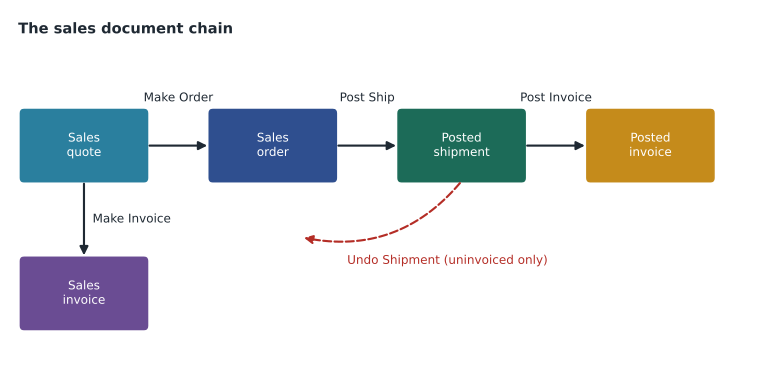
Business Central's sales process is a chain of documents, each created from the one before. Not every sale uses every step, but each step has a purpose and leaves a posted record behind.
| Document | Posted result | What it changes |
|---|---|---|
| Sales quote | None (a quote is never posted) | Nothing; it is an offer. Quotes do not reserve stock or affect planning |
| Sales order | Posted sales shipment and posted sales invoice | Shipping reduces inventory; invoicing posts revenue, receivables and cost of goods sold |
| Sales invoice | Posted sales invoice (and a shipment for inventory items) | Ships and invoices in one step; good for simple counter or service sales |
| Blanket sales order | None | A long-term agreement that releases ordinary sales orders |
| Sales credit memo and return order | Posted credit memo and return receipt | Reverse sales (lesson 10) |
Customer master data for sales
The finance course set up customers for receivables: posting groups, payment terms and credit limits. Sales adds the fields that control how goods reach the customer. The study guide lists shipping agents, locations and shipping addresses among the core customer settings.
| Field or table | Purpose | Example |
|---|---|---|
| Location Code (customer card) | Default location that ships to the customer | ROASTERY for wholesale customers |
| Ship-to Address | Extra delivery addresses; one can be the default | A grocer with three stores, each a ship-to code |
| Shipping Agent Code and Service | The carrier and service level | Local courier, next-day; freight company for pallets |
| Shipment Method Code | Delivery terms such as who pays freight | Prepaid and added, or customer pickup |
| Shipping Advice | Partial or Complete | Complete for customers who want one delivery |
| Combine Shipments | Allows several shipments on one invoice | Weekly invoicing for offices |
| Reserve | Never, Optional or Always | Optional at Corbel & Finch |
Shipping agents are set up with their services, and each service has a shipping time that Business Central adds when it calculates a planned delivery date. Together with the location's outbound warehouse handling time, this gives the order realistic dates: if a customer wants delivery Friday, Business Central works back to the shipment date the roastery must meet.
Sales quotes
A sales quote records an offer: the customer or prospect, the items, quantities, prices and a validity date. Quotes can be sent as a PDF from Business Central and can be addressed to a contact who is not yet a customer; when the quote becomes an order, Business Central creates the customer from a customer template. Quotes do not affect availability, reservations, planning or cash flow forecasts, which keeps an optimistic sales team from tying up stock.
A quote ends in one of two ways. Make Order converts it into a sales order, which suits stocked goods that need shipping. Make Invoice converts it straight into a sales invoice, which suits a quoted service or a sale shipped and invoiced at once. Either way, the quote is deleted and its lines carry over; the quote number is stored on the new document for reference, and archived quote versions can be kept if quote archiving is turned on in Sales & Receivables Setup.
Analysing item availability
Before promising delivery, the order taker needs to know whether the coffee will be there. Business Central has several availability views, opened from the sales line or the item card through Item Availability by.
| View | Question it answers |
|---|---|
| Event | When will stock go up or down, and what will be left after each event? |
| Period | What is the projected available balance by day, week or month? |
| Variant | Which grind has stock? |
| Location | Is there stock at the roastery or only in a café? |
| Lot | Which lots are on hand and available? (lesson 7) |
| Unit of Measure | How many cases and bags does the stock represent? |
The sales line also has an availability check: if the quantity entered is more than will be available on the shipment date, Business Central shows a notification with the projected inventory, scheduled receipts and gross requirements. The Order Promising action calculates two kinds of date. Available to promise finds the earliest date the stock is free. Capable to promise goes further and plans the supply needed, such as an assembly order, to meet a later date. Noor turned on the check but left reservations optional; most coffee is roasted weekly to the order book, and reserving every line would create more work than it saves.
Shipping and invoicing a sales order
A sales order can be posted in three ways: Ship, Invoice, or Ship and Invoice. For each line, Qty. to Ship and Qty. to Invoice say how much to post this time. Partial shipments are normal: if a grocer orders 20 cases and only 16 are roasted, the warehouse ships 16, and the order stays open for the other 4. Posting the shipment reduces inventory and records the cost as expected; posting the invoice creates the receivable and revenue and turns the cost into actual cost.
Shipping before invoicing gives a posted sales shipment and leaves the order with lines shipped but not invoiced. Corbel & Finch invoices wholesale customers when goods leave, so the warehouse posts Ship and Invoice together for most orders. Offices with Combine Shipments turned on are shipped through the week and invoiced on Friday: the Combine Shipments batch job, or Get Shipment Lines on a new sales invoice, collects every uninvoiced shipment for the customer onto one invoice.
Worked problem
A partial shipment
Order S-ORD-1042 from Bayside Café has 20 CASE of Breakwater Blend and 4 CASE of Foghorn Espresso. Only 16 cases of Breakwater are packed by Tuesday. Bayside's Shipping Advice is Partial. What does the warehouse do?
Show solution
- Set Qty. to Ship to 16 on the Breakwater line and 4 on the espresso line.
- Post Ship and Invoice. Business Central posts a shipment and an invoice for the 20 cases shipped.
- The order stays open with 4 cases of Breakwater outstanding; Qty. to Ship resets to the remaining quantity.
- On Thursday, when the rest is roasted, post the remaining 4 cases. The order is deleted when every line is fully shipped and invoiced.
Answer: Post the 20 available cases now and the remaining 4 later; the order tracks what is outstanding.
Reversing a shipment
Mistakes happen at the loading door. If a shipment was posted for goods that never left, Undo Shipment on the posted sales shipment line reverses it: Business Central posts a correcting shipment line with a negative quantity, puts the quantity back on the order line, and restores inventory with the original cost. Undo works only for shipments that have not been invoiced. Once a line is invoiced, the correction is a credit memo or a return (lesson 10). Undo also respects item tracking: the lot that was shipped comes back as the same lot.
Recurring sales lines and blanket orders
Many wholesale customers order the same coffees every week. Business Central handles this with standard sales codes, called recurring sales lines: a named set of lines, such as WEEKLY-OFFICE with 6 cases of Breakwater and 2 cases of decaf, assigned to customers through Recurring Sales Lines on the customer card. Each assignment says whether the lines are inserted automatically on new quotes, orders or invoices, or offered for the user to pick. Corbel & Finch uses automatic insertion on orders for eleven offices, and a sales coordinator adjusts quantities before release.
A blanket sales order records a longer agreement, such as a grocery chain committing to 600 cases of a seasonal blend over the winter. The blanket order is never posted itself. Each delivery is released with Make Order, which creates a normal sales order for the quantity in Qty. to Ship on the blanket line and reduces what remains. Blanket orders show in availability and planning, so the roastery can see the committed demand, and the sales team can see how much of the agreement has been drawn.
Deferrals on sales documents
The finance course set up deferral templates for prepaid expenses. Sales documents use the same tool for revenue that is earned over time. Corbel & Finch's Coffee Club sells a 12-month subscription paid in advance: the customer pays once and receives a bag every month. The Coffee Club service item carries a deferral template REV12 that spreads the revenue over 12 periods. When the invoice is posted, revenue goes to a deferred revenue account and is released month by month, while the bags themselves ship on their own monthly orders. A deferral can also be added or changed on an individual sales line before posting.
Taxes on sales documents
Sales tax on each line comes from the customer's or ship-to address's tax area code and the item's tax group code, as set up in the finance course. In Canada, a wholesale sale in British Columbia attracts GST, and PST applies to some products but not to most coffee sold as food; the external accountant confirmed the treatment for each tax group. Exempt wholesale customers who resell the goods carry an exemption number and a tax-exempt setting. Because tax is calculated per line from these codes, the main sales-side error is a wrong ship-to tax area, which is why Corbel & Finch set the tax area on every ship-to address.
The Sales Order Agent
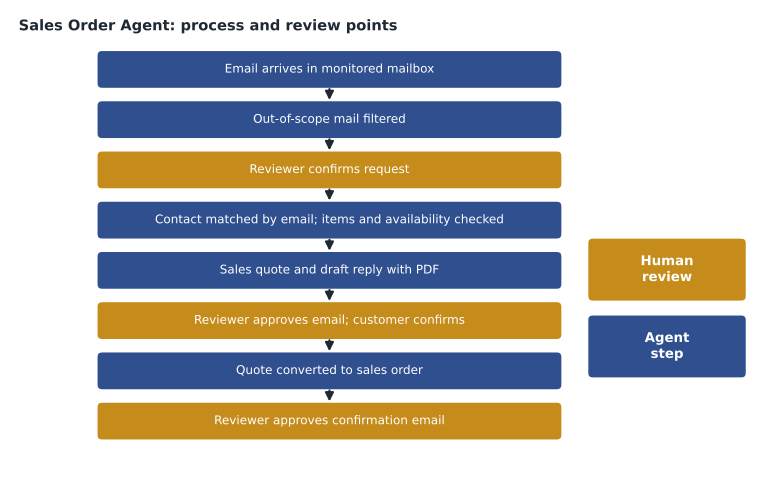
Business Central version 29 includes a Sales Order Agent, one of the built-in agents listed on Microsoft's Business Central AI page. It monitors a chosen mailbox for customer requests and turns them into sales quotes and, after confirmation, sales orders. Microsoft's documentation describes a step-by-step process with human review at each customer-facing point.
| Aspect | How the agent behaves |
|---|---|
| Input | Emails to a monitored mailbox, including PDF, PNG and JPG attachments; unsupported files are skipped with an explanation |
| Finding the customer | Matches the sender to a contact by the E-Mail field only; forwarded emails need a reviewer to pick the right contact |
| Finding items | Searches descriptions, attributes, variants and cross-references; item data can take up to 15 minutes to become searchable |
| Output | Always a sales quote first, with a PDF and a drafted reply; a sales order only after the customer confirms |
| Review | Designated users review the request, every outgoing email and the order confirmation |
| Billing | Copilot Credits per interaction; with no credits, it stops taking new emails and resumes later |
Setup happens on the agent's configuration page: the mailbox to monitor, how much review the agent needs, which users can act on its tasks, and the agent's permissions and profile, which decide which tables, pages and actions it can use. Turning off Send quotes for confirmation and turning on Make orders from quotes lets it create orders straight from requests, though outgoing messages are still reviewed. Because contacts are matched only by email, Callum's first job before a pilot would be cleaning up contact email addresses for wholesale buyers.
Bettina decided not to switch on the agent at go-live. The billing setup from the foundations course was in place, but she wanted three months of clean item and contact data first. The plan is a pilot with ten wholesale customers in spring 2027, reviewed by the sales coordinator, with the credit consumption compared against the time saved.
Sales order statuses
Like purchase orders, sales orders are Open or Released, and can be Pending Approval or Pending Prepayment. Releasing a sales order locks it and tells the warehouse it can be picked. Corbel & Finch's credit limit workflow from the foundations course sends orders over a customer's credit limit to Callum before release, so the warehouse never picks an order that finance would stop.
Common mistakes
MistakeExpecting a sales quote to reserve stock or appear in planning.
InsteadQuotes affect nothing until they become orders; convert or reserve when the customer commits.
MistakeUndoing a shipment after it has been invoiced.
InsteadUndo works only on uninvoiced shipments; use a credit memo or return order after invoicing.
MistakeLeaving ship-to addresses without tax area codes.
InsteadSet the tax area on every ship-to address so tax follows the delivery address.
MistakeTyping the same weekly order by hand for each office.
InsteadAssign recurring sales lines to the customer.
MistakePiloting the Sales Order Agent with messy contact emails.
InsteadClean up contact E-Mail fields first; the agent matches only on email address.
Summary and key terms
- Quotes become orders or invoices; orders post shipments and invoices separately or together.
- Customer shipping fields, ship-to addresses and shipping agents set locations and delivery dates.
- Availability views and order promising tell the order taker what can be delivered and when.
- Undo Shipment reverses an uninvoiced shipment and restores inventory at its original cost.
- Recurring sales lines and blanket orders handle repeat and committed demand.
- Deferral templates on sales lines spread prepaid revenue such as subscriptions.
- The Sales Order Agent turns emailed requests into quotes and orders, with human review of every outgoing message.
- Sales quote
- An offer to a customer or contact that is never posted.
- Posted sales shipment
- The record of goods shipped on a sales order.
- Blanket sales order
- A long-term agreement from which ordinary sales orders are released.
- Recurring sales lines
- Standard sales codes assigned to a customer and inserted on new documents.
- Capable to promise
- An order promising calculation that plans new supply to meet a date.
- Shipping agent
- A carrier set up with services and shipping times.
- Sales Order Agent
- A built-in agent that processes emailed sales requests into quotes and orders.
Practice problems
Work each problem on paper first, then reveal the answer to check.
What are the two ways to convert a sales quote?
Show answer
Make Order, which creates a sales order, and Make Invoice, which creates a sales invoice.
How does an office invoiced weekly get one invoice for five shipments?
Show answer
Combine Shipments is on for the customer, and the Combine Shipments batch job or Get Shipment Lines collects the uninvoiced shipments onto one invoice.
How does the Sales Order Agent identify the customer?
Show answer
By matching the sender's email address to the E-Mail field on a contact card.
Lesson quiz · 5 questions
Score 60% or more to complete this lesson.
Create a free account to save your progress, take quizzes and earn a certificate.