
MSBA-351 · Lesson 5 of 12 · 20 min
Inventory locations and transfers
▶ Video coming soon A video version of this lesson is on the way.
Coffee at Corbel & Finch lives in three places: the roastery, which holds green coffee, packaging and finished coffee for wholesale and the web shop, and the two cafés, which each keep a small stock of retail bags, beans for the espresso machines and merchandise. Until now, the cafés phoned the roastery on Mondays and someone drove a van over with whatever seemed right. Nobody posted anything, so the roastery's stock looked too high and the cafés' too low until a year-end count reset everything. "If a bag of coffee is in the van, where is it?" Dovrin asked at the late-October session. Business Central's answer is a location called IN-TRANSIT.
Locations
A location is a physical place where inventory is kept: a warehouse, a store, a van or a third-party warehouse. Every item ledger entry records a location, and with Location Mandatory turned on in Inventory Setup (lesson 1), a location is required on every inventory line. Locations are created on the Locations page; the study guide lists "Create locations" as a core inventory skill.
| Location | Use as In-Transit | Purpose |
|---|---|---|
| ROASTERY | No | Main warehouse: green coffee, packaging, finished coffee, merchandise |
| CAFE1 | No | Downtown café stock |
| CAFE2 | No | Waterfront café stock |
| IN-TRANSIT | Yes | Goods on the van between roastery and cafés |
The location card holds the address and contact, the inbound and outbound warehouse handling times used in date calculations, the base calendar for working days, and the warehouse settings in lesson 6. Each location needs rows in the Inventory Posting Setup for every inventory posting group it will hold, so that Business Central knows which G/L inventory account to use. Noor's checklist for a new location therefore had three items: create the location, add its inventory posting setup lines, and assign users who should see it through Warehouse Employees if warehouse documents are in use.
Location can also be a dimension, but at Corbel & Finch the BUSINESS LINE dimension already identifies the cafés for financial reporting. Locations answer a different question, where the goods physically are, so the two are kept separate even when they line up.
Transfer orders
A transfer order moves inventory from one location to another. It has a transfer-from location, a transfer-to location and, unless it is a direct transfer, an in-transit code: a location flagged Use As In-Transit that holds the goods while they travel. The transfer is posted in two steps, a shipment from the source and a receipt at the destination.
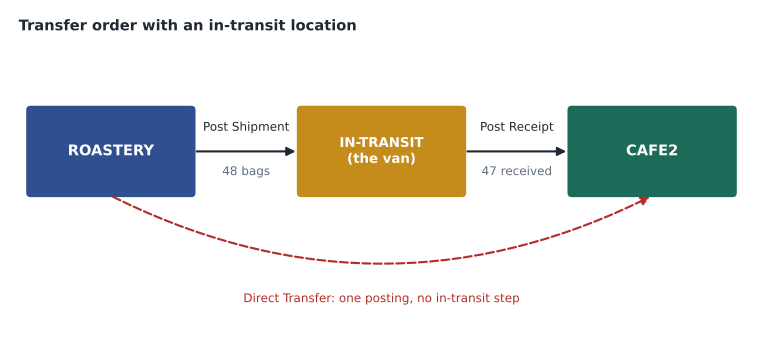
| Step | Posted document | Inventory effect |
|---|---|---|
| Post Ship | Posted transfer shipment | Quantity leaves ROASTERY and is held in IN-TRANSIT |
| Post Receive | Posted transfer receipt | Quantity leaves IN-TRANSIT and arrives at CAFE2 |
| Partial shipment or receipt | Several posted documents | The order stays open for the remaining quantity |
Transfers move inventory at cost; they do not create revenue or cost of goods sold. The value moves from one location's inventory account to the other's through the inventory posting setup. If both locations use the same inventory account, the G/L shows no net change, but the item ledger still shows exactly where the coffee is, which is the point.
Transfer routes save typing: a route from ROASTERY to CAFE2 names the in-transit code, the shipping agent and the shipping time, and new transfer orders between the two locations fill them in. The shipping time and the handling times let Business Central calculate the receipt date from the shipment date, so the café knows which day the van arrives.
Direct transfers skip the in-transit step: turning on Direct Transfer on the transfer order posts shipment and receipt together. Inventory Setup has a Direct Transfer Posting option that decides whether a direct transfer posts as a receipt and shipment or as a single direct transfer document. Corbel & Finch uses direct transfers only for corrections, such as moving stock from one location to another after a misposting, because the van trip is real and the café should confirm what arrived.
Worked problem
The Monday van
CAFE2 needs 48 bags of Breakwater Blend (WHOLE variant), 12 bags of Foghorn Espresso and 6 mugs. The van leaves at 9:00 and reaches the café by 10:00. On arrival, the café counts 47 bags of Breakwater because one bag was damaged. What do the roastery and café post?
Show solution
- The roastery creates a transfer order from ROASTERY to CAFE2; the transfer route fills IN-TRANSIT and the shipping agent.
- Dovrin's team picks the goods, sets Qty. to Ship to the full quantities and posts the shipment. The stock is now in IN-TRANSIT.
- At the café, the manager opens the order, enters Qty. to Receive of 47 for Breakwater and the full quantities for the rest, and posts the receipt.
- One bag remains in IN-TRANSIT on the open order. The roastery checks the van, confirms the bag was damaged, and posts a negative adjustment for it from IN-TRANSIT with a reason code, then the remaining line is closed.
Answer: A transfer order shipped from the roastery and received at the café, with the damaged bag written off from in-transit rather than lost in the count.
Item journals: receipts, shipments and adjustments
Not every inventory movement has a sales or purchase document. The item journal posts quantities directly. Its entry types are Purchase, Sale, Positive Adjmt. and Negative Adjmt.; posting a purchase or sale through an item journal records quantity and cost without a vendor or customer. Corbel & Finch uses item journals for samples given to cafés, damaged goods, and opening balances at go-live.
Business Central also has inventory documents: the inventory receipt and inventory shipment. They post positive and negative adjustments as documents with a header, lines, a number series, optional approval and a printed record, which suits processes where a signed document is needed. The study guide lists processing inventory receipts and inventory shipments as separate skills. Corbel & Finch uses inventory shipments to write off coffee donated to community events, so the donation has a document and an approval.
Every adjustment should carry a reason code so reports can separate damage, samples, donations and count differences. The general business posting group on an adjustment line can also route it to a different G/L account through general posting setup, for example samples to a marketing expense account rather than to inventory adjustments.
Reclassifying inventory
The item reclassification journal changes an attribute of stock that is already on hand without changing the quantity: its location, its bin, its variant in some cases, its lot or serial number, its expiration date, or a dimension. Each line has a current value and a new value, such as New Location Code or New Lot No. Posting creates a pair of entries, out of the old and into the new. Corbel & Finch uses it when the cafés' stock is moved between the front counter and the back room bins, and when a green coffee lot is relabelled after the importer corrects a lot number.
Counting inventory
Book inventory drifts away from reality through breakage, mistakes and theft. Physical inventory brings them back together. Business Central has two ways to count.
| Method | How it works | Best for |
|---|---|---|
| Physical inventory journal | Calculate Inventory fills lines with expected quantities; counters enter counted quantities; posting adjusts the difference | Small counts and simple locations |
| Physical inventory orders and recordings | An order collects items to count; one or more recordings capture counts, possibly by several people; finishing the order posts differences | Larger counts, several counters, audit trail |
Counting does not have to happen all at once. Cycle counting uses physical inventory counting periods: codes such as MONTHLY, QUARTERLY or YEARLY with a number of counts per year, assigned to items or stockkeeping units. Calculate Counting Period then suggests which items are due. Corbel & Finch counts green coffee monthly, because it is high value and lots matter, finished coffee weekly at the cafés, and packaging and merchandise quarterly. The year-end full count at the roastery stays, but it is now a check rather than a reset.
During a count, Business Central compares the counted quantity with the calculated quantity at the moment the lines were created. Posting new transactions after calculating can make the comparison wrong, so the count should either freeze activity at that location or use a recording that is entered promptly. The difference is posted as positive or negative adjustments, valued at the item's unit cost, with the count recorded on the entries for audit.
Location-specific setup
Several setups depend on location. Stockkeeping units (lesson 1) hold planning and replenishment per location. Inventory posting setup decides G/L accounts per location and inventory posting group. Users can be given a default location on the Warehouse Employees page and through User Setup so documents open with the right location. And the Location list itself can be filtered on documents so a café manager sees only CAFE1 lines. Each café manager's profile in Business Central opens on a role center showing open transfer orders to their café, the item list filtered to their location, and a count journal.
| Setup | Where | What it controls by location |
|---|---|---|
| Inventory Posting Setup | Per location and inventory posting group | Inventory and interim accounts |
| Stockkeeping unit | Per item, location and variant | Reorder settings, replenishment, transfer-from location |
| Location card | Per location | Handling times, calendar, warehouse settings |
| Warehouse Employees | Per user and location | Which warehouse documents a user sees |
| Transfer route | Per pair of locations | In-transit code, shipping agent, shipping time |
Availability by location
With stock in several places, the question "do we have it?" becomes "where do we have it?". Item Availability by Location shows inventory, gross requirements, scheduled receipts and projected available balance for each location side by side. The Items by Location page shows a matrix of items and locations. When a wholesale customer needs coffee urgently and the roastery is short, Callum can see whether a café has spare bags that could be transferred back.
Opening balances at go-live
At go-live on January 1, 2027, Corbel & Finch must load opening inventory: every item, at every location, with its quantity, cost and, for tracked items, its lots and expiration dates. The plan Noor drew up uses an item journal with entry type Positive Adjmt., posting date December 31, 2026, unit costs from the old system's final valuation, and item tracking lines for green and roasted coffee lots. Because inventory posting goes to the G/L automatically, the journal line's balancing effect goes to the opening balance account agreed with the external accountant, so the G/L inventory balance matches the migrated item value. The finance course covered the G/L side; this is the item side.
Worked problem
Loading opening stock for one coffee
On December 31, 2026, the roastery holds 340 kg of Ethiopia Yirgacheffe in two lots, 180 kg and 160 kg, valued at 9.10 dollars per kg. How is it loaded?
Show solution
- In an item journal batch OPENING, add a line: item GC-ETH-YIR, entry type Positive Adjmt., location ROASTERY, bin COOL-02-B, quantity 340 KG, unit cost 9.10, posting date December 31, 2026.
- Open Item Tracking Lines and add the two lots with quantities 180 and 160 and their expiration dates.
- Post the batch after the test report shows no errors. Inventory value of 3,094.00 dollars posts to inventory and the opening balance account.
- Compare the Inventory Valuation report with the old system's final valuation for the item.
Answer: A positive adjustment in an opening batch, with location, bin, cost and lots, posted on the day before go-live.
Reports for locations and movements
The Inventory - Transaction Detail report lists item ledger entries by item and date; Inventory Valuation shows value by item and, with a location filter, by location; and the Transfer Order and posted transfer documents show what moved. For the cafés, Callum built a simple monthly view: transfers received, sales posted from the point-of-sale summaries, adjustments by reason code and closing stock, which together explain each café's coffee usage. When the numbers do not add up, the adjustments by reason code are the first place to look.
Common mistakes
MistakeMoving stock between locations with paired negative and positive adjustments.
InsteadUse a transfer order so the movement is a single traceable document at cost.
MistakeCreating a location without inventory posting setup lines.
InsteadAdd posting setup for each inventory posting group before the first posting.
MistakeUsing direct transfers for every move.
InsteadUse in-transit when goods travel, so the destination confirms what arrived.
MistakePosting adjustments without reason codes.
InsteadUse reason codes to separate damage, samples, donations and count differences.
MistakePosting sales between calculating and posting a count.
InsteadFreeze activity or record promptly so expected quantities stay valid.
Summary and key terms
- Locations hold inventory; each needs inventory posting setup lines and, with Location Mandatory, every line names one.
- Transfer orders ship from one location to an in-transit location and receive at another.
- Transfer routes fill in-transit codes, shipping agents and times; direct transfers post in one step.
- Item journals and inventory receipts and shipments post adjustments without sales or purchase documents.
- The item reclassification journal changes location, bin, lot or other attributes without changing quantity.
- Physical inventory journals or orders count stock; counting periods support cycle counts.
- Location
- A physical place where inventory is kept.
- In-transit location
- A location that holds goods between transfer shipment and receipt.
- Transfer order
- A document that moves inventory between locations in a shipment and a receipt.
- Transfer route
- Defaults for transfers between two locations.
- Item reclassification journal
- A journal that changes attributes of stock on hand.
- Inventory shipment
- A document that posts a negative adjustment with a header and lines.
- Physical inventory counting period
- A code that sets how often an item is counted.
Practice problems
Work each problem on paper first, then reveal the answer to check.
Where is stock that has been shipped from the roastery but not yet received at a café?
Show answer
In the in-transit location named on the transfer order.
What does the item reclassification journal change?
Show answer
An attribute of stock on hand, such as location, bin, lot or expiration date, without changing the quantity.
Why assign counting periods to items?
Show answer
So Calculate Counting Period can suggest which items are due for a cycle count.
Lesson quiz · 5 questions
Score 60% or more to complete this lesson.
Create a free account to save your progress, take quizzes and earn a certificate.