
MSBA-351 · Lesson 1 of 12 · 23 min
Items and item categories
▶ Video coming soon A video version of this lesson is on the way.
With the finance setup finished in CONFIG, Noor turned the autumn sessions toward the part of Business Central that Corbel & Finch touches every hour of the day: the coffee itself. The old accounting package had a single "product" list of 260 lines, where a sack of green beans, a retail bag of roasted coffee, a box of empty bags and a branded mug all looked the same. "Business Central will treat those very differently," Noor told Callum at the first session in late September, "and almost every later decision about pricing, warehousing and costing starts on the item card. If the items are wrong, everything downstream is wrong in a consistent and confusing way." Imogen, who buys the green coffee, and Dovrin Mwangi-Ross, the warehouse lead at the roastery, joined for the inventory sessions because they would live with the results.
This course covers the sales, purchasing and inventory side of Business Central for the MB-800 exam. Lesson 1 sets up the item master. Lessons 2 to 4 cover sales, purchasing and pricing. Lessons 5 to 9 cover locations, warehousing, item tracking, assembly and planning. Lesson 10 handles returns, lesson 11 explains inventory costing, and lesson 12 brings everything together in a case study of a wholesale business.
Item types
Every item in Business Central has a Type field, and the type decides whether Business Central keeps a quantity and a cost for it. The three types behave very differently, so choosing the right one is the first decision for each product.
| Type | Inventory tracked? | Typical use | Corbel & Finch examples |
|---|---|---|---|
| Inventory | Yes: quantity, value and item ledger entries | Physical goods that are bought, made or sold from stock | Green coffee, roasted coffee, empty bags, mugs |
| Non-Inventory | No quantity on hand; cost posts directly | Physical goods consumed or resold without stock control | Cleaning supplies for the cafés, printed menus |
| Service | No | Work or fees on sales and purchase documents | Grinder maintenance visits, barista training sessions |
Only Inventory items create item ledger entries with a running quantity, can be counted, reserved, transferred between locations and tracked by lot. Non-inventory and service items can still appear on sales and purchase lines, carry prices and post revenue and cost to the general ledger, but Business Central never asks how many are on the shelf. A common mistake is to create something as a service item to avoid setting up posting groups, then discover months later that nobody knows how many of it are in the warehouse.
Callum's cleanup sorted the 260 old products into 214 inventory items, 31 non-inventory items and 15 services. The 214 inventory items fall into four inventory posting groups already set up in the foundations course: GREEN for unroasted beans, FINISHED for roasted coffee ready to sell, PACKAGING for bags, labels and cases, and MERCH for mugs, grinders and other resale goods.
The item card
The item card is long, so Business Central groups its fields into FastTabs. Most fields can be filled from an item template, and Noor set up one template per kind of item so that a new coffee or a new mug arrives with sensible defaults.
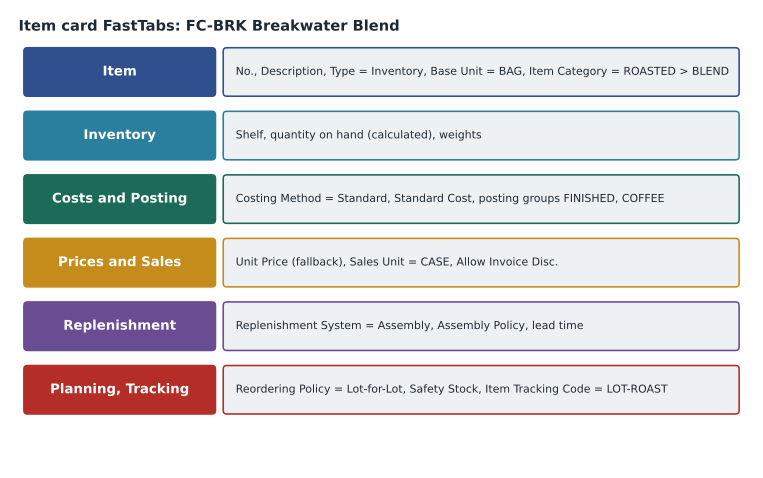
| FastTab | Key fields | Why they matter |
|---|---|---|
| Item | No., Description, Type, Base Unit of Measure, Item Category Code, Blocked | Identity, the unit stock is counted in, and the category that brings attributes |
| Inventory | Shelf No., Inventory (calculated), Gross and Net Weight | Physical facts; quantity on hand is calculated from item ledger entries, never typed |
| Costs & Posting | Costing Method, Unit Cost, Standard Cost, Gen. Prod. Posting Group, Inventory Posting Group, Tax Group Code | How cost flows and which G/L accounts the item posts to |
| Prices & Sales | Unit Price, Price/Profit Calculation, Sales Unit of Measure, Allow Invoice Disc. | The default price before price lists apply |
| Replenishment | Replenishment System, Vendor No., Lead Time Calculation, Purch. Unit of Measure, Assembly Policy | How new stock arrives: bought, assembled or transferred |
| Planning | Reordering Policy, Reorder Point, Safety Stock Quantity, Maximum Inventory | How much to order and when (lesson 9) |
| Item Tracking | Item Tracking Code, Lot Nos., Expiration Calculation | Lot and serial number rules (lesson 7) |
Two fields cannot easily be changed later. The Base Unit of Measure is the unit every item ledger entry uses, and once entries exist Business Central will not let you change it. The Costing Method cannot be changed after the item has entries either, because it decides how existing cost layers are valued. Noor asked Callum to treat both as decisions to make once, carefully, and to write the reasons down.
Units of measure
Each item has a base unit of measure and any number of item units of measure, each with a Qty. per Unit of Measure relative to the base. Purchase, sales and put-away documents can use any of them; Business Central converts everything to the base unit when it posts.
| Item | Base unit | Other units | Used on |
|---|---|---|---|
| GC-ETH-YIR, green coffee, Ethiopia Yirgacheffe | KG | SACK = 60 KG | Purchases in SACK, roasting consumption in KG |
| GC-COL-HUI, green coffee, Colombia Huila | KG | SACK = 70 KG | Purchases in SACK |
| FC-BRK, Breakwater Blend, roasted | BAG (340 g) | CASE = 12 BAG | Wholesale sells CASE, cafés and web shop sell BAG |
| PK-BAG340, empty retail bag with valve | PCS | BOX = 500 PCS | Purchases in BOX, roasting consumption in PCS |
| MR-MUG-BLK, branded mug | PCS | CASE = 24 PCS | Purchases in CASE, sold in PCS |
The foundations course recorded the most common green-coffee sack as 69 kilograms, but Imogen pointed out that sacks differ by origin: Ethiopian coffee usually ships in 60-kilogram sacks and many Central and South American origins in 69 or 70. Because the unit of measure belongs to the item, each green coffee can carry its own SACK conversion. That one detail removes a monthly reconciliation problem from the old system, where every sack was assumed to weigh the same.
The Purch. Unit of Measure and Sales Unit of Measure fields on the item card set the defaults on documents. The Put-away Unit of Measure matters once bins are in use (lesson 6). Units of measure can also be rounded: the Qty. Rounding Precision on an item unit of measure stops someone selling a third of a mug.
Item categories and attributes
Item categories group items in a hierarchy for reporting, filtering and default attributes. Each category can have a parent, so Corbel & Finch built a tree: COFFEE with children GREEN and ROASTED; ROASTED with children SINGLE ORIGIN, BLEND and ESPRESSO; then PACKAGING and MERCH. Reports and analysis views can total by category, and the web shop export uses the category to place products in the right section.
Item attributes describe items with named values: text, integer, decimal or an option list. Attributes are defined once and assigned to items, and a category can carry default attributes so every new item in it asks for the same facts. For roasted coffee Corbel & Finch uses Origin (option), Process (washed, natural, honey), Roast Level (light, medium, dark), Tasting Notes (text) and Certified Organic (option). Customers on the web shop filter by these, and staff can filter the item list by attribute values from the filter pane.
Worked problem
Setting up a new single-origin coffee
Imogen has bought a new Kenyan lot. Callum needs a green coffee item and a roasted coffee item for it. What does he set up, and in what order?
Show solution
- Create the green coffee from the GREEN template: Type Inventory, base unit KG, inventory posting group GREEN, category COFFEE > GREEN, lot tracking code LOT-EXP, vendor the importer.
- Add a SACK unit of measure with the quantity per sack from the importer's contract, and set it as the purchase unit.
- Create the roasted coffee from the ROASTED template: base unit BAG, CASE = 12 BAG, category ROASTED > SINGLE ORIGIN, inventory posting group FINISHED, replenishment system Assembly (lesson 8).
- Fill the category's default attributes: Origin Kenya, Process washed, Roast Level light, tasting notes from the cupping sheet.
- Set the unit price and check the tax group so the item is taxed correctly on sales documents.
Answer: Two items, each from its own template, with their own units of measure, category and attributes; the roasted item is assembled from the green one.
Item variants
An item variant is a version of an item that shares almost everything with it but must be counted separately. Variants have their own code and description, and every inventory document line can carry a Variant Code. Quantities are tracked by item and variant, but the variant uses the item's posting groups and, by default, its cost and price.
Corbel & Finch sells most roasted coffees whole bean and in three grinds. Rather than four items per coffee, each roasted coffee has variants WHOLE, ESPRESSO, FILTER and FRENCH. Price lists can price a variant differently if needed, and stockkeeping units can plan each variant separately. Variants are a good fit when the products share a description, a cost structure and a reporting line; if two versions need different posting groups, different costing or different vendors, they should usually be separate items.
Stockkeeping units
A stockkeeping unit (SKU) is the combination of item, location and, optionally, variant, with its own copy of the planning and replenishment fields. Without SKUs, the item card's reorder point and lead time apply everywhere. With SKUs, the roastery can reorder Breakwater Blend at 300 bags while each café reorders at 24, and the cafés can be replenished by transfer from the roastery rather than by purchase.
SKUs are created from the item or location with Create Stockkeeping Unit, which copies the item's values to start from. The SKU card can override costing fields for items using standard or average cost by location, replenishment system, transfer-from location, lead time, reorder policy and quantities, and counting period. Noor recommended SKUs only where a location really behaves differently. Twenty-seven of Corbel & Finch's items got café SKUs; the rest manage fine with the item card alone.
Inventory Setup
The Inventory Setup page holds company-wide rules for inventory. Some of its choices are very hard to undo, so Noor went through it line by line.
| Field | Corbel & Finch choice | Effect |
|---|---|---|
| Automatic Cost Posting | On | Inventory value posts to the G/L as items are posted, not in a separate batch |
| Expected Cost Posting to G/L | Off | Received-not-invoiced value stays in interim inventory reports, not the G/L |
| Automatic Cost Adjustment | Never (job queue runs Adjust Cost nightly) | Cost adjustment is scheduled, not run on every posting |
| Average Cost Calc. Type and Period | Item; Month | How average cost is calculated (lesson 11) |
| Location Mandatory | On | Every inventory transaction must name a location |
| Prevent Negative Inventory | On | Users cannot ship or consume more than is on hand |
| Item Nos., Transfer Order Nos., Posted Transfer Nos. | Number series set | Numbering for items and transfer documents |
Location Mandatory deserves a word. Corbel & Finch has stock in three places, so a transaction without a location would put coffee nowhere. Turning the field on makes Business Central refuse any inventory line without a location code, which catches a whole class of errors at the moment they happen. Prevent Negative Inventory is similar: the cafés sometimes sold coffee in the old system before the transfer from the roastery had been entered, which left negative stock and wrong costs. Now the transfer has to be received first.
Items, item ledger entries, value entries and the general ledger
The MB-800 study guide asks candidates to assess the relationship between items, item ledger entries, value entries and general ledger entries. The relationship explains almost every inventory report, so it is worth learning as a picture.
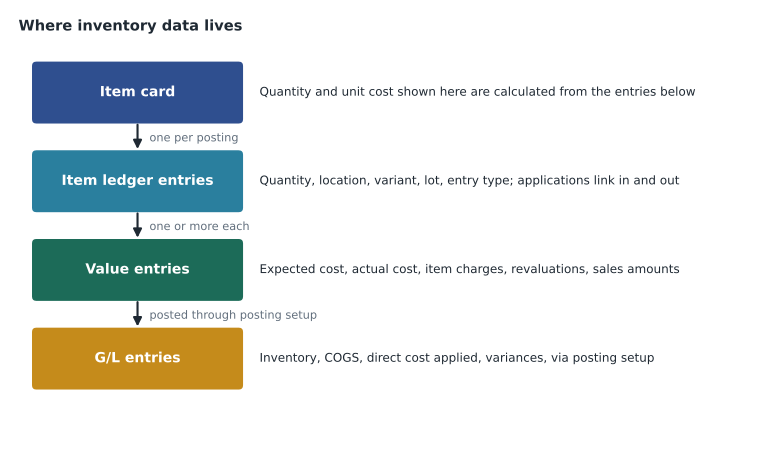
Each time an inventory item is posted, Business Central creates an item ledger entry that records the quantity, location, variant, lot or serial number, and the entry type (purchase, sale, positive or negative adjustment, transfer, consumption, assembly output). The item ledger entry also links to other entries through item application: when a sale takes coffee out, its item ledger entry is applied to the purchase or output entry it came from, which is how costing methods are carried out.
Amounts are not stored on item ledger entries directly. Each item ledger entry has one or more value entries, one for each event that affects its value: the expected cost when goods are received, the actual cost when the invoice is posted, an item charge for freight added later, a revaluation, or an adjustment from the cost adjustment batch job. Value entries carry the cost amount (actual and expected) and, for sales, the sales amount.
Value entries then post to the general ledger through the General Posting Setup (combinations of general business and product posting groups) and the Inventory Posting Setup (combinations of location and inventory posting group). The inventory account comes from inventory posting setup; cost of goods sold, purchases and direct cost applied come from general posting setup. When inventory and the G/L disagree, the Inventory - G/L Reconciliation report compares the two by posting group.
Worked problem
Tracing one sack
Corbel & Finch receives 10 sacks of Colombian coffee (700 KG) at a cost of 8.40 dollars per kilogram, invoices them a week later, and pays 210 dollars of freight through an item charge. How many item ledger entries and value entries are there for the receipt?
Show solution
- The receipt creates one item ledger entry: purchase, 700 KG, location ROASTERY, with the lot number from the sack labels.
- Receiving creates a value entry with expected cost 5,880 dollars (700 x 8.40).
- Posting the purchase invoice creates a value entry that reverses the expected cost and records actual cost 5,880 dollars.
- Posting the freight item charge creates another value entry on the same item ledger entry with actual cost 210 dollars, so the coffee now costs 6,090 dollars, or 8.70 per kilogram.
- Each actual-cost value entry posts to the G/L: inventory (GREEN posting group at ROASTERY) and direct cost applied.
Answer: One item ledger entry for the quantity; several value entries (expected, invoiced, item charge) for its amounts, each posting to the G/L.
Copilot and the item master
Two Copilot capabilities in Business Central help with items. Marketing text suggests a product description from the item's attributes and description, which Corbel & Finch uses for the web shop after a person edits the draft for tone and accuracy; the café team did not want the assistant inventing tasting notes. Item substitutions suggestions can propose substitute items when one is out of stock. Both are listed on Microsoft's Business Central AI page and are switched on or off individually on the Copilot & agent capabilities page set up in the foundations course. Neither changes data without a person accepting the suggestion.
Common mistakes
MistakeCreating physical goods as service items to avoid setting up posting groups.
InsteadUse Inventory for anything counted; use Non-Inventory or Service only when no stock is kept.
MistakeChoosing a base unit of measure in a hurry.
InsteadChoose the smallest unit stock is counted in; it cannot change once entries exist.
MistakeAssuming every sack of green coffee weighs the same.
InsteadSet the SACK conversion on each item from the contract.
MistakeUsing variants for versions that need different posting groups or costs.
InsteadUse separate items when accounting differs; use variants when only the version differs.
MistakeCreating stockkeeping units for every item and location by default.
InsteadCreate SKUs only where a location plans or costs differently.
Summary and key terms
- Item type decides whether Business Central tracks quantity and cost: Inventory, Non-Inventory or Service.
- The item card groups fields into FastTabs; templates fill sensible defaults.
- Base unit of measure and costing method are hard to change once entries exist.
- Item categories form a hierarchy and carry default attributes that describe items.
- Variants separate versions of one item; stockkeeping units set planning and costing by location.
- Inventory Setup holds company-wide rules such as automatic cost posting and location mandatory.
- Item ledger entries hold quantities, value entries hold amounts, and value entries post to the G/L.
- Item ledger entry
- An entry recording a quantity of an item posted in or out of inventory.
- Value entry
- An entry recording an amount (cost or sales) linked to an item ledger entry.
- Item category
- A node in a hierarchy that groups items and carries default attributes.
- Item attribute
- A named property, such as origin or roast level, with a value for each item.
- Item variant
- A version of an item counted separately but sharing its setup.
- Stockkeeping unit
- An item at a location, optionally for one variant, with its own planning fields.
- Item application
- The link between an inbound and outbound item ledger entry used for costing.
Practice problems
Work each problem on paper first, then reveal the answer to check.
Why can the base unit of measure not be changed after posting?
Show answer
Every item ledger entry is stored in the base unit; changing it would make existing quantities wrong.
Where does Business Central find the G/L inventory account for an item at a location?
Show answer
In the Inventory Posting Setup, from the combination of location and inventory posting group.
When should a café have its own stockkeeping unit?
Show answer
When it reorders, replenishes or costs the item differently from the item card.
Lesson quiz · 5 questions
Score 60% or more to complete this lesson.
Create a free account to save your progress, take quizzes and earn a certificate.