
MSBA-350 · Lesson 9 of 12 · 20 min
Intercompany
▶ Video coming soon A video version of this lesson is on the way.
Corbel & Finch is one legal entity, so it has no intercompany transactions today. But Bettina had raised an idea at the November 2026 planning session: one day the wholesale business might become a separate company, selling coffee to the cafés and the web shop, which would stay in the original company. Nothing was decided. Noor used the idea as a training exercise. In the TRAINING environment she created two demonstration companies, CF DEMO ROASTING and CF DEMO RETAIL, and showed Callum how Business Central handles trade between companies of the same group. "Even if Bettina never does it, MB-800 covers it, and partners see it all the time," she said. This lesson follows that exercise.
What intercompany means
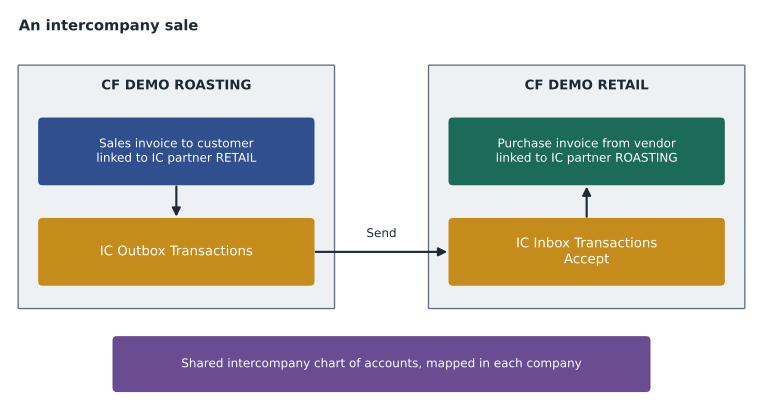
Intercompany transactions are sales, purchases, charges and loans between companies in the same group. Each company records its own side: when ROASTING sells coffee to RETAIL, ROASTING records a sale and a receivable, and RETAIL records a purchase and a payable. Without help, both sides are typed separately, often with different amounts or dates, and the group's accountants spend days matching them. Business Central's intercompany features create the partner's side automatically from the first company's posting, using a shared chart of accounts and a mailbox model of outboxes and inboxes.
Setting up intercompany
Each company in the group needs the same basic setup. Newer versions of Business Central bring it together on the Intercompany Setup page, which Microsoft describes as a single place to set up intercompany posting.
| Setup | Purpose | In the exercise |
|---|---|---|
| Intercompany Setup | The company's own IC partner code and how transactions are exchanged | ROASTING and RETAIL codes, exchanged directly between companies |
| IC Partners | One record per other company, with its company name, linked customer and vendor, and receivables and payables accounts | In ROASTING: partner RETAIL; in RETAIL: partner ROASTING |
| Linked customer and vendor | The customer and vendor cards that represent the partner | Customer RETAIL in ROASTING; vendor ROASTING in RETAIL |
| IC Chart of Accounts | A shared list of accounts used in intercompany transactions, mapped to each company's own accounts | IC 40000 Intercompany Sales maps to 40500 in ROASTING |
| IC Dimensions | Shared dimensions mapped to each company's dimensions | IC BUSINESS LINE mapped in both companies |
| Auto-accept and auto-send options | Whether transactions flow without manual steps | Manual at first, to see each step |
The intercompany chart of accounts is the shared language. Each company maps its own G/L accounts to IC accounts for outgoing transactions, and maps IC accounts back to its own accounts for incoming ones. That way the two companies can keep different charts of accounts and still exchange transactions. The IC chart can be exported from one company and imported into the others, so it is identical everywhere. IC dimensions work the same way for dimension values.
How transactions travel between companies is a setting. Companies in the same environment can exchange transactions directly. Microsoft's 2023 release wave 2 added intercompany transactions across Business Central environments, which uses an API connection between environments; older methods based on exchanging files or email still exist for partners outside Business Central. Each IC partner record says how to reach that partner.
Intercompany journals
The simplest intercompany transaction is a journal entry. In the intercompany general journal, a line can have account type IC Partner, or a G/L account with an IC partner G/L account named on the line. For example, ROASTING charges RETAIL a monthly management fee for shared administration. The line debits the receivable from RETAIL and credits management fee income, and names the IC account the partner should post to. When posted, the transaction goes to ROASTING's IC Outbox Transactions, ready to send.
Microsoft's 2022 release wave 1 added an auto-accept option for intercompany general journal transactions, so the partner's journal can be created and, if set up, posted without anyone opening the inbox. Noor left auto-accept off in the exercise so Callum could see each step, but explained that most groups turn it on once they trust the mapping.
Intercompany documents
Intercompany sales and purchase documents are created from normal documents. When a sales order or invoice is created for a customer that is linked to an IC partner, Business Central treats it as an intercompany document. When it is posted (or, depending on setup, when it is sent), an IC transaction is placed in the outbox. The partner receives it in its IC Inbox Transactions, where accepting it creates a purchase invoice or order for the linked vendor, with lines mapped from the IC accounts or matched items. Item references can map items between companies so that the partner's purchase lines use its own item numbers.
Worked problem
A coffee sale between the demo companies
In the training exercise, CF DEMO ROASTING sells 200 kilograms of roasted coffee to CF DEMO RETAIL for 3,600 dollars. How does the transaction reach RETAIL's books?
Show solution
- In ROASTING, create a sales invoice for customer RETAIL, which is linked to IC partner RETAIL. Add the item line and post.
- Business Central creates an IC outbox transaction. Callum opens IC Outbox Transactions and sends it.
- In RETAIL, the transaction appears in IC Inbox Transactions from partner ROASTING. Callum chooses Accept.
- A purchase invoice for vendor ROASTING is created with the matching item and amount, ready for review and posting.
- After posting, ROASTING has a receivable of 3,600 from RETAIL, and RETAIL a payable of 3,600 to ROASTING.
Answer: Post the sales invoice to the IC customer, send from the outbox, accept in the partner's inbox, then post the created purchase invoice.
The outbox and inbox in practice
The IC Outbox Transactions page lists transactions waiting to be sent, with actions to send them, return them to the original document for correction, or cancel them. The IC Inbox Transactions page lists received transactions, with actions to accept, return to the sender or cancel. Handled IC Outbox Transactions and Handled IC Inbox Transactions keep the history. When something is wrong, such as a missing mapping, the inbox shows an error and the transaction can be returned with a note.
| Problem | Symptom | Fix |
|---|---|---|
| Missing IC account mapping | Accepting fails with a mapping error | Map the IC account to a company account, then accept |
| Partner's vendor not linked | The inbox cannot create a purchase document | Link the vendor to the IC partner |
| Wrong price | The partner disputes the amount | Return the transaction; the sender corrects and resends |
| Duplicate sending | Two identical inbox entries | Cancel the duplicate in the inbox |
Reconciling intercompany balances
Even with automation, group accountants check that intercompany balances agree. At month end, ROASTING's receivable from RETAIL should equal RETAIL's payable to ROASTING, and ROASTING's intercompany sales should equal RETAIL's intercompany purchases. Business Central's intercompany reports and the IC partner balances help, and using separate G/L accounts for intercompany receivables, payables, sales and purchases makes the comparison simple. Differences usually come from transactions still in an outbox or inbox, posting dates in different months, or exchange rate differences when the companies use different currencies.
Intercompany balances matter most when the group prepares consolidated financial statements, because they must be eliminated: a sale from one company to another is not a sale to the outside world. Lesson 10 covers consolidation and elimination. Noor's advice was to reconcile intercompany balances before every consolidation, so that eliminations are clean.
Settling intercompany balances
Intercompany receivables and payables are settled like any others. RETAIL pays ROASTING through its payment journal; ROASTING receives the payment through its cash receipt journal; each applies the payment to the invoice. Some groups net balances periodically instead of paying each invoice, posting a netting entry in each company through intercompany journals. The choice depends on the group's banking and tax situation, which the group's accountants decide.
At the end of the exercise, Callum wrote a one-page note for Bettina: what a separate wholesale company would mean for setup (an IC partner pair, an IC chart of accounts, linked customers and vendors, and monthly reconciliation), what would stay the same (each company's own processes), and what would be new work (consolidation each month). Bettina read it and said the idea could wait until at least 2028.
An intercompany journal, step by step
Noor's second exercise used the intercompany general journal. CF DEMO ROASTING charges CF DEMO RETAIL a monthly management fee of 2,000 dollars for bookkeeping, IT and purchasing services that ROASTING's staff provide to both companies.
Worked problem
Charging a management fee
How does ROASTING charge RETAIL the 2,000-dollar fee for October 2026 so that both companies record it?
Show solution
- In ROASTING, open the intercompany general journal. Enter a line: account type IC Partner, account RETAIL, amount 2,000, with the IC partner G/L account IC 61000 Management Fees on the line so RETAIL knows where to post its side.
- Set the balancing account to G/L account 71500 Management Fee Income in ROASTING. Post the journal.
- ROASTING now has a receivable from RETAIL of 2,000 and income of 2,000. An IC outbox transaction is created; send it.
- In RETAIL, accept the inbox transaction. An intercompany journal line is created that posts 2,000 to RETAIL's own management fee expense account (mapped from IC 61000) against the payable to ROASTING.
- With auto-accept turned on, the last step would happen without anyone opening the inbox.
Answer: Post an IC journal line in ROASTING to the IC partner with the IC account named; send it; RETAIL accepts and posts the mirror entry.
Mapping accounts and dimensions
The mappings are where intercompany setup succeeds or fails. Each company maps outgoing accounts (its own account to the IC account the partner sees) and incoming accounts (the IC account received to its own account). In the exercise the two demo companies had slightly different charts, so the mapping table did real work.
| IC account | ROASTING account | RETAIL account |
|---|---|---|
| IC 40000 Intercompany Sales | 40500 Intercompany Coffee Sales | not used |
| IC 50000 Intercompany Purchases | not used | 50500 Intercompany Coffee Purchases |
| IC 61000 Management Fees | 71500 Management Fee Income | 61800 Management Fees |
| IC 12000 Intercompany Receivable | 12900 Due from Retail | not used |
| IC 22000 Intercompany Payable | not used | 22900 Due to Roasting |
Dimensions are mapped the same way. The exercise mapped IC dimension STORE to RETAIL's BUSINESS LINE dimension, so an intercompany charge for a particular café arrived with the right café value. Without dimension mapping, intercompany entries arrive without dimensions and fail any value posting rule that requires them.
Currencies between partners
Partners can use different currencies. An intercompany document is created in the sender's currency or in a currency agreed for the partner, and the receiving company records it like any foreign-currency document, with exchange differences posted through its currency accounts. That is one reason intercompany balances can differ slightly at month end: each company revalues its open intercompany items at its own month-end rate. Group accountants agree a rule for which side absorbs such differences, and the elimination in lesson 10 handles what remains.
Intercompany and the audit trail
Auditors look at intercompany transactions closely, because they can move profit between companies. Business Central helps by keeping the link between both sides: each intercompany transaction has a transaction number shared by the outbox and inbox entries, the handled outbox and inbox pages keep the history of what was sent, accepted, returned or cancelled, and the posted documents and entries in each company refer to the IC partner. A group policy usually sets how prices between companies are calculated, such as cost plus a markup, and who approves exceptions. In the exercise, Noor added a simple control: any intercompany sales price that differed from the agreed price list by more than 2 percent needed Callum's approval before the sending company posted it. The rule was a workflow condition, not a feature of intercompany itself, which showed how the approval tools from the foundations course combine with the finance features.
Common mistakes
MistakePosting intercompany sales to the same accounts as external sales.
InsteadUse separate intercompany accounts so balances can be reconciled and eliminated.
MistakeLeaving transactions in the outbox at month end.
InsteadClear the outbox and inbox before closing the period.
MistakeCreating intercompany documents for customers not linked to IC partners.
InsteadLink the customer and vendor to the IC partner so documents flow automatically.
MistakeDifferent IC charts of accounts in different companies.
InsteadExport the IC chart from one company and import it into the others.
Summary and key terms
- Intercompany features create the partner company's side of a transaction automatically.
- Setup includes the company's IC partner code, IC partners, linked customers and vendors, the IC chart of accounts and IC dimensions.
- Intercompany journals and documents place transactions in the outbox; partners accept them from the inbox.
- Auto-accept and cross-environment exchange are available in newer versions.
- Intercompany balances must be reconciled each period and eliminated in consolidation.
- Settlement uses normal payments or periodic netting.
- IC partner
- A record representing another company in the group for intercompany transactions.
- Intercompany chart of accounts
- A shared list of accounts that each company maps to its own accounts.
- IC Outbox Transactions
- Transactions waiting to be sent to a partner.
- IC Inbox Transactions
- Transactions received from a partner, waiting to be accepted.
- Auto-accept
- An option that creates the partner's journal entry without manual acceptance.
- Elimination
- Removing intercompany balances and transactions from consolidated statements.
Practice problems
Work each problem on paper first, then reveal the answer to check.
What makes a sales invoice an intercompany document?
Show answer
Its customer is linked to an IC partner.
Where does the receiving company accept a transaction?
Show answer
On the IC Inbox Transactions page.
Why use separate G/L accounts for intercompany sales?
Show answer
So intercompany balances can be reconciled and eliminated in consolidation.
Lesson quiz · 5 questions
Score 60% or more to complete this lesson.
Create a free account to save your progress, take quizzes and earn a certificate.