
MSBA-350 · Lesson 5 of 12 · 20 min
Payables and vendor payments
▶ Video coming soon A video version of this lesson is on the way.
Corbel & Finch buys from about 180 vendors: green coffee importers, a packaging printer, a freight company, utilities, the landlord and dozens of small suppliers. Imogen, the purchasing lead, places the orders; Callum pays the bills. In the old system the two of them kept separate lists and argued every month about which invoices were approved. In November 2026 Noor set up payables in CONFIG so that the purchase invoice, its approval, the vendor ledger entry and the payment all live in one place. This lesson covers vendors, Purchases & Payables Setup, posting purchase invoices, paying vendors, and the controls that keep payments safe.
The payables chain
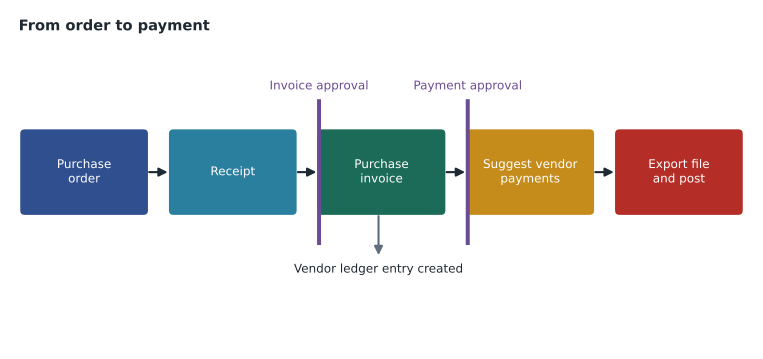
Payables mirror receivables. A posted purchase invoice creates a vendor ledger entry for the amount owed, and G/L entries that credit the payables account (set by the vendor posting group) and debit expense, inventory or fixed assets plus any recoverable tax. A payment posted to the vendor and applied to the invoice closes it. Detailed vendor ledger entries record each change: the initial amount, applications, discounts and exchange rate adjustments. As with customers, the Aged Accounts Payable report and the payables G/L account should always agree, because Direct Posting is off on the control account.
Vendor setup
The finance fields on a vendor card parallel those on a customer card: Vendor Posting Group (DOMESTIC or FOREIGN at Corbel & Finch), Gen. Bus. Posting Group, Payment Terms Code, Payment Method Code, Currency Code for importers who invoice in another currency, Tax Area Code and Tax Liable, and Blocked (payment, all). The card also holds the Vendor Bank Accounts used for electronic payments, and a Preferred Bank Account Code. In the US version, the card holds the vendor's tax identification for 1099 reporting, and in Canada the business number used on some government reports.
Vendor bank accounts deserve special care. A fraudster who can change a vendor's bank account number can redirect real payments. Noor set up three controls: only the BC-Finance security group can edit vendor bank accounts; the change log records every change to the Vendor Bank Account table; and a record change approval workflow sends any change to a vendor bank account to Bettina before it takes effect. Callum added a fourth control outside the system: any request by email to change bank details is confirmed by phone, using a number already on file.
Purchases & Payables Setup
The Purchases & Payables Setup page holds company-wide purchasing rules. Finance-relevant settings include the number series for vendors, orders, invoices and posted invoices; Ext. Doc. No. Mandatory, which forces the vendor's own invoice number to be entered and blocks the same number being posted twice for a vendor; Discount Posting; Copy Comments settings; the default posting date; and options for invoice rounding and for how receipts and invoices relate. Callum turned on Ext. Doc. No. Mandatory immediately. "That alone would have saved us paying the printer twice in 2025," he said.
Posting purchase invoices
A purchase invoice can be created in several ways: from a purchase order after the goods are received, directly for services and expenses, by combining several receipts into one invoice with Get Receipt Lines, or from an incoming electronic document. Invoice lines can be of type Item, G/L Account, Fixed Asset, Charge (Item) for freight and duties spread across items, or Resource. Each line's posting groups decide the accounts, and allocation accounts or deferral templates can split or spread the cost (lesson 1).
| Line type | Posts to | Example |
|---|---|---|
| Item | Inventory through inventory posting setup | Sacks of green coffee |
| G/L Account | The account on the line | Office supplies, utilities |
| Fixed Asset | The asset's acquisition cost (lesson 7) | A new grinder |
| Charge (Item) | Spread across item receipts as part of their cost | Inbound freight and import duty |
| Allocation Account | Split across accounts or dimension values | Shared rent |
Before posting, purchase invoices at Corbel & Finch go through the approval workflow from the foundations course: Imogen can approve up to 2,000 dollars, Callum up to 25,000, and Bettina above that. The Release action marks a document as ready, and Reopen returns it for changes; workflows release documents automatically when approved. Posted purchase invoices are corrected like sales invoices, with Correct, Cancel or Create Corrective Credit Memo, provided they have not been paid.
The Payables Agent and e-documents
More vendors now send invoices as PDF attachments or as structured electronic documents. Business Central's e-documents framework receives incoming documents from services and email, reads them, and creates draft purchase invoices. In the 2026 release wave 2 (version 29), the Payables Agent builds on this. The agent monitors a mailbox, reads incoming vendor invoices, matches them to vendors and to purchase order lines, and drafts purchase invoices for a person to review. Microsoft's release notes for version 29 describe matching to order lines by quantity, line amount and expected receipt date, with warnings for differences that inform the reviewer without blocking the draft. The agent is billed in Copilot Credits per document and per line, as the foundations course explained.
The agent drafts; people decide. Every draft goes to a reviewer, who checks it and finalizes the invoice, and the normal approval workflow still applies. Corbel & Finch scheduled a Payables Agent review for March 2027, after the first close, because Noor wanted Callum to understand the manual process thoroughly first. "If you can't check its work, you can't use it," she said.
Paying vendors
Vendor payments are prepared in a payment journal. The Suggest Vendor Payments action fills the journal with open vendor entries that are due, using options such as the last payment date, whether to take available payment discounts, a maximum available amount, and whether to summarize several invoices per vendor into one payment. The suggested lines can be edited or deleted. Each line names the vendor, the amount, the applied invoice, the payment method and the balancing bank account.
Worked problem
A weekly payment run
Every Thursday Callum pays vendors electronically. In a test run on November 19, 2026, how does he prepare and send the payments?
Show solution
- Open the payment journal, batch EFT-WEEKLY. Choose Suggest Vendor Payments with last payment date November 26 (so invoices due in the next week are included), find payment discounts selected, summarize per vendor selected and bank account MAIN.
- Review the 23 suggested lines. Remove the packaging printer, whose invoice is disputed, and reduce one utility payment to the agreed amount.
- Send the batch for approval because the total exceeds 10,000 dollars. Bettina approves it from her approval request.
- Choose Export to create the bank payment file in the bank's format, then post the journal.
- Upload the file to the bank's portal. When the payments appear on the statement, they match in the bank reconciliation.
Answer: Suggest, review, approve, export the payment file, post, then upload to the bank.
Payments can be made in several ways, chosen by payment method and bank account: electronic payments exported as files in the bank's format; computer cheques printed from the journal with the cheque report, which posts the cheque and records its number; manual cheques written by hand and recorded; and card or other payments recorded against a balancing account. When a printed cheque is spoiled, the Void Check action reverses it properly rather than deleting anything.
Applications, discounts and differences
Vendor payments are applied to invoices with Apply Entries or the Applies-to Doc. No. field, exactly as customer payments are. Payment discounts from terms such as 2/10NET30 can be taken when the payment is applied within the discount period; Suggest Vendor Payments can take them automatically. Payment tolerance works for vendors as it does for customers, and Unapply Entries fixes payments applied to the wrong invoice. For foreign-currency vendors, the payment is posted in the vendor's currency, and the difference between the invoice's exchange rate and the payment's exchange rate posts as a realized gain or loss to the currency's accounts.
| Situation | What Business Central does | Where it posts |
|---|---|---|
| Paid within discount period | Closes the invoice for the discounted amount | Payment discount received account (vendor posting group) |
| Paid a few cents short or over | Closes the invoice within tolerance | Payment tolerance accounts |
| Foreign currency rate changed | Posts the difference at payment | Realized gain or loss accounts (currency) |
| Open at month end in foreign currency | Revalued by Adjust Exchange Rates | Unrealized gain or loss accounts (currency) |
Reporting to tax authorities
Some vendor payments must be reported. In the United States, payments to certain non-employee service providers are reported on IRS 1099 forms. Business Central's US version includes 1099 reporting: vendors are marked with their form type and box, payments are tracked by period, and the forms can be prepared, printed or exported for electronic filing. Corbel & Finch's Canadian company has no 1099 obligation, but Canada has its own information returns, such as the T4A for certain fees and the T5018 for construction contractors, which the business does not need. Callum noted the requirement in the year-end checklist (lesson 11).
Payables reports and controls
The Aged Accounts Payable report shows what is owed by due date. Vendor - Balance to Date proves balances at a date. The Vendor - Payment Receipt and remittance advice documents tell vendors what a payment covered. A Vendor Ledger Entries page filtered for open entries shows everything unpaid. Duplicate-invoice controls (Ext. Doc. No. Mandatory), approval workflows, vendor bank account change approvals, segregation of duties between people who enter invoices and people who release payments, and the change log together form the payables control set that Corbel & Finch's auditors will test.
Taking payment discounts on purpose
Early-payment discounts from vendors are often worth more than they look. A 2 percent discount for paying 20 days early is equivalent to a high annual return on the money paid early, so many businesses take every discount they can afford. In Business Central, the Find Payment Discounts option in Suggest Vendor Payments includes invoices whose discount date falls before the last payment date, with the discounted amount. The Pmt. Disc. Date and Remaining Pmt. Disc. Possible fields on vendor ledger entries show what is available. Callum added a column for discount date to the vendor ledger entries view and reviewed it every Thursday before the payment run.
Worked problem
Is the discount worth taking?
The packaging printer offers 2/10NET30 on a 9,000-dollar invoice. Paying on day 10 instead of day 30 costs 20 days of cash. What does Corbel & Finch gain, and roughly what annual rate does that represent?
Show solution
- Discount: 2 percent of 9,000 = 180 dollars.
- Cash paid early: 8,820 dollars, 20 days sooner.
- Return for 20 days: 180 divided by 8,820 = about 2.04 percent.
- There are about 18 periods of 20 days in a year, so the annual rate is roughly 37 percent, far more than the business pays on its operating line.
Answer: The discount saves 180 dollars, equivalent to an annual return of roughly 37 percent, so it is worth taking if cash allows.
Vendor prepayments and purchase credit memos
Some green coffee importers require a deposit when a contract is signed. Purchase prepayments work like sales prepayments: a prepayment percentage on the vendor, item or order; a Post Prepayment Invoice action on the purchase order; and automatic deduction from the final invoice. Returns and price adjustments from vendors are recorded with purchase credit memos, either created from scratch, copied from the posted invoice with Copy Document, or created with Create Corrective Credit Memo on the posted invoice. Applying the credit memo to the invoice closes the amount, and the next payment run nets it.
| Report | Shows | Used when |
|---|---|---|
| Aged Accounts Payable | Open vendor amounts by due date bands | Weekly, to plan payments |
| Vendor - Balance to Date | Each vendor's balance at a date with open entries | Month end, to reconcile to the G/L |
| Vendor - Trial Balance | Opening balance, activity and closing balance by vendor | Month end and audit |
| Remittance advice | Which invoices a payment covers | With each electronic payment |
Common mistakes
MistakeLetting the same person change vendor bank details and release payments.
InsteadSeparate the duties and require approval for bank detail changes.
MistakeLeaving Ext. Doc. No. Mandatory off.
InsteadTurn it on to capture vendor invoice numbers and stop duplicates.
MistakePosting a payment journal before exporting the bank file.
InsteadExport first, then post, so the file and the ledger agree.
MistakeTreating the Payables Agent's drafts as approved invoices.
InsteadReview every draft; normal approvals still apply.
Summary and key terms
- Purchase invoices create vendor ledger entries and G/L entries on the payables control account.
- Vendor cards hold posting groups, terms, payment methods, currency, tax and bank accounts.
- Purchases & Payables Setup controls number series, external document numbers and discount posting.
- Invoices come from orders, receipts, direct entry or e-documents; the Payables Agent drafts invoices for review.
- Suggest Vendor Payments prepares payment journals; payments are exported, printed or recorded, then posted and applied.
- Approvals, bank detail controls and duplicate checks protect payables.
- Vendor ledger entry
- An entry in the vendor subledger for an invoice, payment or credit memo.
- Suggest Vendor Payments
- An action that fills a payment journal with due vendor entries.
- Payment journal
- A journal used to prepare, export and post vendor payments.
- Record change approval
- A workflow that requires approval before a change to a record takes effect.
- E-document
- A structured electronic invoice or other document exchanged with a business partner.
- Payables Agent
- A Business Central agent that reads incoming vendor invoices and drafts purchase invoices for review.
Practice problems
Work each problem on paper first, then reveal the answer to check.
Which setup field blocks the same vendor invoice number being posted twice?
Show answer
Ext. Doc. No. Mandatory on Purchases & Payables Setup.
Which action fills a payment journal with due invoices?
Show answer
Suggest Vendor Payments.
What happens to a spoiled printed cheque?
Show answer
It is voided with Void Check, which reverses it properly.
Lesson quiz · 5 questions
Score 60% or more to complete this lesson.
Create a free account to save your progress, take quizzes and earn a certificate.