
MSBA-350 · Lesson 2 of 12 · 21 min
Journals and posting
▶ Video coming soon A video version of this lesson is on the way.
Early in October 2026, Callum asked Noor a question that had worried him since the foundations course. "In the old system I could fix a wrong entry by editing it. Here I can't. So how do I make adjustments without making a mess?" Noor's answer was journals. Most transactions in Business Central start on documents, such as sales and purchase invoices, but every adjustment, accrual, transfer, payment and opening balance that is not a document goes through a journal. Learning to use journals well, and to reverse them cleanly when something is wrong, is the core skill of a Business Central accountant.
Templates, batches and lines
Journals are organized in three levels. A journal template defines a kind of journal: general, cash receipts, payments, recurring, sales, purchases, fixed asset and others. The template sets the page the journal opens in, the default source code that marks where entries came from, and the reports used to test and post. Under each template are journal batches, which are named sets of lines, each with its own number series and optional balancing account. Users enter journal lines in a batch and then post the batch.
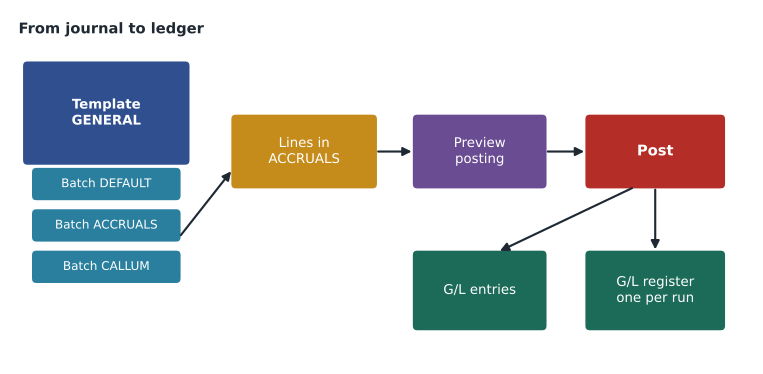
Batches are how a finance team keeps work separate. At Corbel & Finch the general journal template got four batches: DEFAULT for one-off entries, ACCRUALS for month-end accruals, OPENING for the go-live balances, and a personal batch for Callum so that his half-finished work never mixed with anyone else's. Each batch can have a No. Series so that document numbers are filled in automatically, and the template or batch can force a balancing account so that every line has an automatic other side, which is handy for a cash journal where every line is balanced against the same bank account.
| Template type | Typical use | Example batch |
|---|---|---|
| General | Adjustments, accruals, reclassifications, opening balances | ACCRUALS |
| Cash Receipts | Customer payments and other money received | BANK-MAIN |
| Payments | Vendor payments and other money paid out | EFT-WEEKLY |
| Recurring | Entries that repeat on a schedule, with allocations | MONTHLY |
| Fixed Asset G/L | Acquisitions, depreciation and disposals that post to the G/L | DEPREC |
| Intercompany | Entries sent to intercompany partners | IC-GEN |
Anatomy of a journal line
A journal line has a posting date, a document type (blank, payment, invoice, credit memo, refund and others), a document number, an account type and number, a description, an amount, and a balancing account type and number. The account type can be a G/L account, customer, vendor, bank account, fixed asset, employee, intercompany partner or allocation account. Positive amounts are debits to the account and negative amounts are credits, with the balancing account taking the opposite side. Lines can also carry dimensions, posting groups, tax fields, currency codes and an external document number.
Lines without a balancing account must balance among themselves: the total of lines with the same document number and posting date must be zero. Business Central shows the running balance and the total balance at the bottom of the journal, and it will refuse to post an unbalanced document. This is a common surprise for people used to entering one side at a time.
Worked problem
Accruing an unbilled utility bill
On October 31, 2026, the roastery's natural gas bill for October has not arrived. Callum estimates it at 1,840 dollars. How does he record the accrual in the CONFIG test company?
Show solution
- Open the general journal, batch ACCRUALS, posting date October 31, document number ACC-2610-01.
- Line 1: account type G/L Account, 62200 Utilities, amount 1,840, dimension DEPARTMENT = ROASTING, BUSINESS LINE = WHOLESALE.
- Set the balancing account to G/L Account 21500 Accrued Liabilities on the same line.
- Use Preview Posting to see the G/L entries that would be created, then post.
- In November, reverse the accrual (see "Reversing entries" below) so the real bill can be posted normally.
Answer: One line, 62200 debit 1,840 with 21500 as balancing account, posted on October 31 and reversed on November 1.
Checking before posting
Business Central offers three ways to check a journal before posting. Preview Posting shows every entry that would be created, in every ledger, without saving anything. The journal itself shows warnings in a Journal Check factbox when lines are missing information or would fail to post, so many errors appear while typing. The test report for the template lists every line and every error, which is useful for a long batch or a second reviewer. Noor's rule for Corbel & Finch was simple: preview every batch before posting, and print the test report for opening balances and any batch over 50 lines.
When posting fails, Business Central explains why. Typical reasons are a posting date outside the allowed window, a missing dimension that a value posting rule requires, a blocked account, an unbalanced document, or a direct posting to a control account. The error message usually names the field and value, and newer versions show the errors in a list with links to the problem lines, so they can be fixed in one pass.
What posting creates
Posting a batch creates G/L entries for every general ledger effect, plus entries in any subledger involved, such as customer ledger entries, vendor ledger entries and bank account ledger entries. Each posting run also creates a G/L register, a record of the range of entry numbers created together, with the user, date and source code. Registers are the audit trail. From the G/L Registers page, a user can open the entries of any posting run, see which journal and user created them, and reverse them if needed.
| Record | Created by posting | Used for |
|---|---|---|
| G/L entry | Every amount posted to a G/L account | Trial balance, financial reports, audit |
| Customer or vendor ledger entry | Every amount posted to a customer or vendor | Open items, aging, applications |
| Detailed ledger entry | Each part of a customer or vendor entry: the original amount, applications, discounts, exchange rate adjustments | Tracing how an open amount changed |
| Bank account ledger entry | Every amount posted to a bank account | Bank reconciliation |
| G/L register | One record per posting run | Finding and reversing a whole posting |
Entries cannot be edited or deleted. That is a deliberate control. A wrong entry is corrected by posting a new entry, so the books always show what happened and when. For documents, Business Central has correction actions that create the right credit memos automatically, covered in lessons 4 and 5. For journals, the tool is reversal.
Reversing entries
A posted journal can be reversed in two ways. From the G/L Registers page, the Reverse Register action reverses every entry from one posting run. From individual entries, the Reverse Transaction action reverses one transaction. Both create new entries with the opposite sign, marked as reversed and linked to the originals, and both work only for journal postings, not for postings from documents, which have their own correction tools. Entries that have since been applied, such as a customer payment that was applied to an invoice, must be unapplied first.
For accruals, a better approach is often to post with an automatic reversal. Journal lines have a Reversing Entry option in some setups, and recurring journals offer reversing recurring methods that post the entry and its reversal on the first day of the next period. Corbel & Finch chose recurring journals for its regular accruals, as described next, and kept Reverse Register for genuine mistakes.
Recurring journals
A recurring journal holds lines that post again and again on a schedule. Each line has a Recurring Method and a Recurring Frequency. The frequency is a date formula, such as 1M for monthly, that moves the posting date forward each time the batch is posted. The method decides what amount is posted and whether it is reversed. An Expiration Date stops the line after a certain date.
| Recurring method | What it posts | Typical use |
|---|---|---|
| F Fixed | The same amount every time | Monthly rent |
| V Variable | The amount typed each time; the amount is cleared after posting | Monthly accruals that change |
| B Balance | The balance of the account, moving it to another account | Clearing a suspense account |
| RF Reversing Fixed | A fixed amount, reversed the next day | Fixed monthly accrual |
| RV Reversing Variable | A variable amount, reversed the next day | Utilities accrual estimated each month |
| RB Reversing Balance | The account balance, reversed the next day | Temporary reclassification for reporting |
| BD and RBD | The balance by dimension, optionally reversed | Moving balances while keeping dimension detail |
Recurring journal lines can also carry allocations. Instead of a balancing account, the line has allocation lines that split the amount by percentage or fixed amount across accounts and dimension values. A recurring line for 9,000 dollars of rent with method RF and allocations of 70 percent to ROASTING and 30 percent to ADMIN posts the split every month. Lesson 1 described the newer allocation accounts, which do a similar job on any journal or document; Noor's advice was to use allocation accounts for amounts that arrive on purchase invoices and recurring allocations for pure journal entries.
Worked problem
A monthly accrual that reverses itself
Callum wants to accrue cleaning services each month, because the cleaning company always bills two weeks late. The amount changes every month. Which recurring method should he use, and what happens when he posts?
Show solution
- Create a line in the MONTHLY recurring batch: account 62700 Cleaning, balancing account 21500 Accrued Liabilities, recurring method RV Reversing Variable, frequency 1M.
- At October month end, type the estimate (for example 2,300 dollars) and post with a posting date of October 31.
- Business Central posts the accrual on October 31 and an automatic reversal on November 1.
- The posting date on the line moves to November 30, and the amount is cleared, ready for next month's estimate.
- When the real October bill is posted in November, the reversal and the bill net out, leaving only the true November cost.
Answer: RV Reversing Variable with a 1M frequency: posts the estimate at month end, reverses it the next day, and waits for the next amount.
Standard journals and copying
For lines that repeat irregularly, a standard journal saves a set of lines as a template that can be loaded into a batch whenever needed. Corbel & Finch saved the quarterly sales tax payment layout as a standard journal so that the accounts and dimensions were always right. Journals can also be filled by copying posted entries, by importing from Excel through the Edit in Excel action, or by actions that suggest lines, such as Suggest Vendor Payments (lesson 5) or Calculate Depreciation (lesson 7).
Journals, approvals and source codes
Journals can be protected by approval workflows. The foundations course set up a workflow that sends payment journal batches over 10,000 dollars to Bettina. The same idea can apply to general journals: a batch can be sent for approval, and only an approved batch posts. Source codes mark each entry with its origin, such as GENJNL for general journal, CASHRECJNL for cash receipts or SALES for sales documents. The Source Code Setup page decides which code each journal and process uses. Source codes make it possible to filter the ledger for, say, every manual journal entry in a month, which is exactly what an auditor asks for.
By the end of October, Callum had posted a full test month in CONFIG through journals and documents, previewed every batch and reversed two deliberate mistakes with Reverse Register to see how it worked. "It's stricter than I'm used to," he admitted to Bettina, "but I can always see who did what, and nothing disappears."
Dimensions on journal lines
Journal lines carry dimensions just as documents do. When a line uses an account with default dimensions, such as a G/L account that always belongs to DEPARTMENT ADMIN, the default fills in automatically. The global dimensions appear as columns in the journal, shortcut dimensions can be shown as extra columns, and the Dimensions action on the line opens the full set. Value posting rules from the foundations course still apply: if account 62200 Utilities requires a DEPARTMENT value (Code Mandatory), a line without one will not post. Callum added the BUSINESS LINE and DEPARTMENT columns to every batch he used, because seeing them saved him from posting accruals to the wrong department.
| Situation | What fills the dimension | What to check |
|---|---|---|
| G/L account with a default dimension | The default on the account | That the value posting rule allows it |
| Customer or vendor line | The default on the customer or vendor | Priority rules if the balancing account also has defaults |
| Recurring line with allocations | The dimensions on each allocation line | That every allocation line has a value |
| Line entered in Excel and published | The values typed in the shortcut columns | That the codes exist and are not blocked |
Lines can also be entered in Excel. The Edit in Excel action opens a batch in an Excel workbook connected to Business Central; users type or paste lines, publish them back, and then preview and post in Business Central as usual. Corbel & Finch used this for the payroll journal, which arrives each month as a spreadsheet from the payroll provider. Publishing does not post; it only creates lines, so every check in this lesson still applies.
Common mistakes
MistakePosting a batch without previewing it.
InsteadUse Preview Posting and the Journal Check factbox before every post.
MistakeCorrecting a posted journal by posting an opposite entry by hand with a new description.
InsteadUse Reverse Register or Reverse Transaction so the reversal is linked to the original.
MistakeUsing a fixed recurring method for an accrual whose amount changes.
InsteadUse V or RV so the amount is entered each period.
MistakeSharing one DEFAULT batch among several people.
InsteadGive each person or task its own batch.
Summary and key terms
- Journals are organized as templates, batches and lines; batches keep work separate.
- Lines without a balancing account must balance within the document and posting date.
- Preview Posting, the Journal Check factbox and the test report catch errors before posting.
- Posting creates G/L entries, subledger entries and a G/L register; entries cannot be edited.
- Reverse Register and Reverse Transaction correct journal postings with linked reversals.
- Recurring journals post repeating entries with fixed, variable, balance and reversing methods, optionally with allocations.
- Journal batch
- A named set of journal lines under a template, with its own number series and settings.
- Balancing account
- The account that takes the other side of a journal line.
- G/L register
- A record of all entries created by one posting run.
- Preview Posting
- An action that shows the entries a posting would create without saving them.
- Recurring method
- The rule that decides the amount a recurring journal line posts and whether it reverses.
- Source code
- A code on every entry that shows which journal or process created it.
Practice problems
Work each problem on paper first, then reveal the answer to check.
Which page lets you reverse every entry from one journal posting?
Show answer
G/L Registers, with the Reverse Register action.
A recurring line has frequency 1M and posting date October 31. What is its posting date after posting?
Show answer
November 30.
Why does Business Central refuse to post some journals with no balancing account?
Show answer
The lines with the same document number and posting date do not balance to zero.
Lesson quiz · 5 questions
Score 60% or more to complete this lesson.
Create a free account to save your progress, take quizzes and earn a certificate.