
MSBA-350 · Lesson 6 of 12 · 18 min
Sales tax and VAT setup
▶ Video coming soon A video version of this lesson is on the way.
Tax was the part of the project Callum feared most. "If I get posting groups wrong, the reports are wrong," he said. "If I get tax wrong, the government sends letters." In mid-November 2026 Noor walked him through how Business Central calculates tax. The first thing she explained was that Business Central has two tax engines. The North American versions for Canada and the United States use sales tax, built from jurisdictions, areas and groups. Most other countries use value-added tax (VAT), built from VAT posting groups. Corbel & Finch runs the Canadian version, so it uses sales tax, but the MB-800 exam and many international customers use VAT, so this lesson covers both.
Sales tax building blocks
Sales tax in the North American versions is assembled from four setup lists. Each answers one question.
| Setup list | Question it answers | Corbel & Finch example |
|---|---|---|
| Tax Jurisdictions | Which taxing authority, and which accounts? | GST (federal) and PST-BC (provincial) |
| Tax Areas | Which jurisdictions apply at a place? | BC = GST + PST-BC |
| Tax Groups | What kind of product or service is it? | COFFEE, MERCH, FREIGHT, EXEMPT |
| Tax Details | What rate applies for each jurisdiction and group, from what date? | GST, MERCH: 5 percent; PST-BC, MERCH: 7 percent |
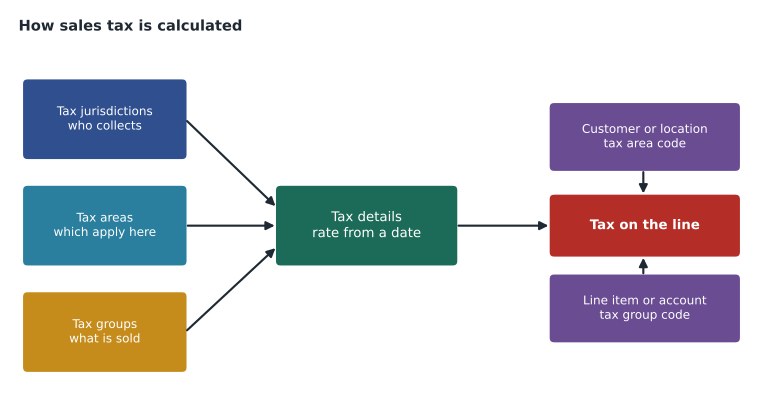
A tax jurisdiction represents a taxing authority. Each jurisdiction has a code, a description, a report-to jurisdiction that names the authority the tax is paid to, and G/L accounts for tax collected on sales, tax paid on purchases and, where needed, unrealized tax and reverse-charge tax. A tax area is a set of jurisdictions that apply at a location; a customer in another province or state gets a different tax area. A tax group classifies items, resources and G/L accounts by how they are taxed. Tax details give the rate for each combination of jurisdiction and tax group, with an effective date so that rate changes can be entered ahead of time, and a tax type such as Sales and Use Tax, Sales Tax Only, Use Tax Only or Excise Tax.
On documents, the calculation needs two codes. The tax area code comes from the customer (for sales) or from the company or location (for purchases), and the tax group code comes from each line's item, resource or G/L account. The Tax Liable field on the customer or vendor must be on for tax to be calculated. For each line, Business Central looks up the tax details for every jurisdiction in the tax area with the line's tax group, and adds up the tax. Customers who are exempt, such as resellers buying for resale, have Tax Liable off or a tax exemption number on file.
Worked problem
Taxing a merchandise order
A café customer in the same province as Corbel & Finch orders 40 branded mugs for 480 dollars, tax group MERCH. What tax does the invoice calculate?
Show solution
- The customer's tax area BC contains GST and PST-BC.
- Tax details for MERCH: GST 5 percent, PST-BC 7 percent.
- Tax per jurisdiction: GST 24.00, PST 33.60.
- Total tax: 57.60, posted to the GST and PST collected accounts set on each jurisdiction.
Answer: The invoice adds 57.60 (12 percent combined), split by jurisdiction so each authority's amount can be reported.
The rates in the example were current in late 2026 for that product type, but rates and product rules change, and food, beverages and prepared items are treated differently from merchandise in both countries. Callum confirmed every tax group's treatment with Corbel & Finch's external accountant before go-live, entered the agreed rates in Tax Details with effective dates of January 1, 2027, and created an EXEMPT tax group with zero rates for products that are zero-rated or exempt. Business Central calculates what it is told; deciding what the law requires is the accountant's job.
Canada: GST, HST and PST
Canada has a federal goods and services tax (GST), a harmonized sales tax (HST) in some provinces that combines GST with the provincial tax, and separate provincial sales taxes (PST) in others, including British Columbia. Quebec has its own QST. The Canadian version of Business Central handles these with the same jurisdictions, areas, groups and details, plus some Canadian specifics. Microsoft's Canadian documentation (updated October 2026) describes a Provincial Tax Area Code on Company Information, locations and purchase documents, used to decide which province's tax applies on purchases.
Input tax credits are the key difference between GST and PST. GST and HST paid on business purchases can usually be recovered from the government, so they post to a receivable-type account. PST paid on purchases generally cannot be recovered, so it is part of the cost. Business Central handles this with the Expense/Capitalize option on tax details: when selected, the tax is added to the cost of the item or expense instead of being posted to a tax account. For Corbel & Finch, PST on office supplies is expensed with the supplies, and GST is posted to an input tax credit account. The GST/HST and PST reports in the Canadian version list tax collected and paid by jurisdiction for filing.
United States: state and local sales tax and use tax
In the United States, sales tax is set by states and often added to by counties, cities and special districts, so a tax area might contain three or four jurisdictions. Many businesses use a tax calculation service connected through an extension to look up rates by address, which saves maintaining hundreds of tax details by hand. Corbel & Finch sells in Canada, so US sales tax is background knowledge for Callum, useful for the exam and for any future US expansion.
Use tax applies when a business buys something for its own use and the vendor did not charge sales tax, for example equipment bought from an out-of-state supplier. The business owes the tax itself. In Business Central, a tax detail with tax type Use Tax Only, or a jurisdiction set up for use tax, calculates the use tax on the purchase invoice and posts it both as an expense or asset cost and as a liability, so it can be paid with the next return. The Canadian equivalent concept is self-assessment of PST on purchases where the vendor did not charge it.
VAT: the other model
Outside North America, Business Central uses VAT. VAT is charged at each stage of the supply chain, and businesses recover the VAT they pay on purchases, so the setup focuses on what is charged and recovered rather than on where the customer is.
| Setup | Purpose | Example |
|---|---|---|
| VAT Business Posting Groups | Who the trading partner is | DOMESTIC, EU, EXPORT |
| VAT Product Posting Groups | What is being sold or bought | STANDARD, REDUCED, ZERO |
| VAT Posting Setup | The VAT percent, calculation type and accounts for each combination | DOMESTIC + STANDARD = 20 percent, Normal VAT |
| VAT Statement | Lines that add up the VAT return boxes | Box 1: VAT on sales |
| VAT Return Period and VAT Return | Periods and submissions, often electronic | Quarterly return |
The VAT Posting Setup is a matrix, like the general posting setup. Each combination of VAT business and VAT product posting group has a VAT percent, a VAT Calculation Type (Normal VAT, Reverse Charge VAT for cross-border business purchases, Full VAT for VAT-only lines, or Sales Tax in mixed setups), and the accounts for sales VAT and purchase VAT. Newer versions also separate the VAT date from the posting date, so a document can be reported in the VAT period its tax point falls in. Unrealized VAT handles cash-basis VAT, where tax is due only when payment is received. The VAT return is built from the VAT statement and, in many countries, submitted electronically through a localization feature.
Noor drew the comparison on the whiteboard for Callum. Sales tax asks, "Where is the customer, and what are they buying?" VAT asks, "Who is the partner, and what is the product?" Both meet in a setup table that gives a rate and accounts, and both post tax to G/L accounts that are reported and paid at period end.
Testing tax before go-live
Noor's rule was to test tax with real scenarios, not just look at the setup pages. Callum built a test plan with twenty sales and purchase cases: a domestic wholesale order of coffee, a mug order, a web shop sale to another province, an export sale, a tax-exempt reseller, a purchase of office supplies, a freight invoice, an equipment purchase on which use tax applied, and so on. For each case he wrote the expected tax by jurisdiction before posting, posted in CONFIG, and compared. Two cases failed the first time: a freight item had no tax group, and an exempt customer had Tax Liable still turned on. Both were setup fixes.
| Report | What it shows | When |
|---|---|---|
| Sales Tax Details by Jurisdiction (or equivalent) | Tax collected and paid per jurisdiction for a period | Each filing period |
| Canadian GST/HST and PST reports | Amounts needed for Canadian returns | Each filing period (Canada) |
| VAT Statement and VAT Return | Return box amounts and submission | Each VAT period (VAT countries) |
| G/L detail on tax accounts | Every tax posting, for reconciliation | Month end |
At each filing period, Callum reconciles the tax report to the balances of the tax G/L accounts before filing, then posts the payment to the authority through the payment journal, using the standard journal saved for that purpose in lesson 2.
Tax on purchases and tax rounding
Purchase documents calculate tax with the same building blocks as sales, but the tax area normally comes from the company or the receiving location rather than from the vendor, because tax depends on where the goods are delivered. Recoverable tax posts to the tax jurisdiction's purchase tax account; non-recoverable tax is expensed or capitalized as described above. Tax is calculated per line and per jurisdiction, then rounded; when a document has many lines, the rounded totals can differ by a cent from a vendor's own calculation. Business Central lets a user adjust the tax amount on a purchase document within a maximum difference set in setup, so the posted tax matches the vendor's invoice exactly.
| Test case | Expected result | Result in CONFIG |
|---|---|---|
| Wholesale coffee to a local café | Treatment as confirmed by the accountant for COFFEE | Matched |
| Branded mugs to a local café | Full rate for MERCH in the café's tax area | Matched |
| Web shop sale to another province | Rate of the ship-to tax area | Matched |
| Reseller with exemption on file | No tax | Failed: Tax Liable still on; fixed |
| Freight charge on an invoice | Treatment for FREIGHT | Failed: no tax group on the freight item; fixed |
| Office supplies purchase | Recoverable part to the tax account, non-recoverable part in the cost | Matched |
Tax setup is also a security matter. Changes to tax details, tax areas and tax groups affect every document, so Noor limited them to the BC-Finance security group and turned on the change log for the four tables. A wrong rate entered for a single day can affect hundreds of invoices; the change log shows who changed it and when, which shortens the fix.
Filing and paying the tax
At the end of each filing period, the tax report is run for the period and compared with the balances of the tax accounts. When they agree, the return is prepared from the report and filed with the authority outside Business Central, through the authority's own online service, unless a localization or extension files it directly. The payment is posted through the payment journal: a line to each jurisdiction's tax payable account, balanced against the bank. For Canadian GST, the net amount is tax collected less input tax credits, so the payment line clears both the collected and the recoverable accounts. Callum saved this layout as a standard journal so the accounts and the authority's vendor card were the same every period, and added a check that the tax accounts show zero for the period after the payment posts.
Common mistakes
MistakeLetting Business Central "decide" a product's tax treatment.
InsteadConfirm treatment with a tax adviser and set the tax group accordingly.
MistakeLeaving items or G/L accounts with no tax group.
InsteadGive every sold or purchased item and account a tax group, even if exempt.
MistakePosting non-recoverable PST to a tax account.
InsteadUse Expense/Capitalize so non-recoverable tax becomes part of the cost.
MistakeChanging tax detail rates on the day of a rate change.
InsteadEnter a new tax detail with an effective date in advance.
Summary and key terms
- North American versions use sales tax; most other versions use VAT.
- Sales tax combines tax jurisdictions, tax areas, tax groups and tax details with effective dates.
- The tax area code comes from the customer, company or location; the tax group code comes from each line.
- In Canada, GST/HST input tax credits are recoverable; non-recoverable PST is expensed or capitalized.
- Use tax covers purchases where the vendor charged no tax.
- VAT uses business and product posting groups in a VAT posting setup matrix, VAT statements and VAT returns.
- Tax jurisdiction
- A taxing authority, with its accounts and report-to authority.
- Tax area
- A set of tax jurisdictions that apply at a location.
- Tax group
- A classification of items and accounts by tax treatment.
- Tax detail
- The rate for a jurisdiction and tax group from an effective date.
- Use tax
- Tax a buyer owes on purchases for its own use when the vendor did not charge tax.
- VAT posting setup
- The matrix of VAT business and product posting groups that gives rates and accounts.
Practice problems
Work each problem on paper first, then reveal the answer to check.
Which two codes does Business Central need to calculate sales tax on a line?
Show answer
The tax area code (from the customer, company or location) and the tax group code (from the line).
How do you prepare for a tax rate change on a known date?
Show answer
Enter a new tax detail with that effective date.
What does Expense/Capitalize on a tax detail do?
Show answer
Adds the tax to the cost of the purchase instead of posting it to a tax account.
Lesson quiz · 5 questions
Score 60% or more to complete this lesson.
Create a free account to save your progress, take quizzes and earn a certificate.