
MSBA-350 · Lesson 8 of 12 · 20 min
Budgets and cash flow forecasts
▶ Video coming soon A video version of this lesson is on the way.
Every November, Bettina sits down with a printed income statement and a pencil to plan next year. In November 2026 she did it differently. Callum had loaded 24 months of history into CONFIG, and Noor showed both of them how to build the 2027 budget in Business Central, compare it with actual results each month, and forecast cash a few weeks ahead. "The budget tells me whether we're making money," Bettina said after the session. "The cash forecast tells me whether we can pay the green coffee importers in March." This lesson covers both.
G/L budgets
A G/L budget is a named set of budget amounts by G/L account, date and dimension. A company can have several, such as BUDGET2027, a revised FORECAST2027-Q2 and a stretch-target version. Budgets are created on the G/L Budgets page; each has a name, a description and up to four budget dimensions chosen from the company's dimensions, in addition to the global dimensions. Corbel & Finch's budget used BUSINESS LINE and DEPARTMENT, the two global dimensions, plus CAMPAIGN as a budget dimension so that marketing spend could be planned by campaign.
Budget amounts are entered in the budget matrix, a grid that shows G/L accounts (or dimension values) down the side and periods across the top. The view can be switched between accounts, periods and dimensions, filtered by any dimension, and set to show months, quarters or years. Each cell is backed by G/L budget entries, which hold the account, date, amount and dimension values. Entering 12,000 in a yearly cell spreads the amount across the months, and it can be adjusted later.
| Way to build a budget | How | When to use it |
|---|---|---|
| Type in the budget matrix | Enter amounts by account and period | Small budgets or adjustments |
| Export to Excel and import | Export the budget, edit in Excel, import back | Most budgets; Excel is easier for modelling |
| Copy G/L Budget | Copy actual entries or another budget, with an adjustment factor and date change | Starting from last year plus growth |
| Edit in Excel | Open budget entries in Excel through the Excel add-in and publish changes | Bulk changes to existing entries |
The Copy G/L Budget action is the usual starting point. It copies posted G/L entries or an existing budget into a budget, with a date change formula (for example 1Y to move last year's dates forward one year) and an adjustment factor (for example 1.06 for six percent growth), with rounding options. Callum copied 2026 actual results into BUDGET2027 with a factor of 1.05, then adjusted the lines Bettina had views on: higher green coffee costs, a rent increase at both cafés, and lower web shop advertising.
Worked problem
Building the 2027 budget from 2026 results
Coffee Sales (40100) for the WHOLESALE business line were 610,000 dollars in the 12 months to October 2026, plus an estimate for November and December. Bettina expects 8 percent growth in wholesale. How does Callum build the line?
Show solution
- Run Copy G/L Budget from G/L Entry, dates January 1 to December 31, 2026, filtered to account 40100 and BUSINESS LINE WHOLESALE, to budget BUDGET2027.
- Set the date change formula to 1Y and the adjustment factor to 1.08.
- Because November and December 2026 are not yet posted, he types those two months' 2027 amounts in the matrix from his estimate times 1.08.
- He reviews the monthly pattern in the matrix with the period set to Month, keeping the seasonal peak in December.
Answer: Copy actual entries with 1Y and 1.08, fill the unposted months by hand, then review the monthly pattern.
Comparing budget with actual
A budget earns its keep only when it is compared with actual results. In Business Central the comparison happens in several places. The Trial Balance/Budget report compares actual and budget amounts by account for a period. Financial reports (formerly called account schedules) can have column definitions with column type Net Change and ledger entry type Budget Entries, so a report shows actual, budget, variance and variance percent side by side (lesson 11 of the foundations course covered building them). The G/L Account card and chart of accounts can show budget amounts beside actual amounts when a budget filter is set. Analysis views include budget entries, and the Power BI finance apps can show budget against actual if budgets are maintained.
| Column | Column type | Ledger entry type | Formula |
|---|---|---|---|
| A Actual month | Net Change | Entries | |
| B Budget month | Net Change | Budget Entries | |
| C Variance | Formula | A-B | |
| D Variance percent | Formula | C/B*100 (shown as percent) |
Bettina's monthly pack in 2027 would have one page: the income statement by business line with actual, budget and variance, and a short comment from Callum on every variance over 2,000 dollars. Noor's tip was to build the report in CONFIG with 2026 actual data and a test budget, so the layout was settled before go-live.
Budgets for other areas
Business Central also supports budgets outside the general ledger. Item budgets (sales budgets and purchase budgets) plan quantities and amounts by item, customer or vendor, and are compared with actual sales and purchases through item analysis views. Fixed asset projections come from the Fixed Asset - Projected Value report (lesson 7), which forecasts depreciation for the budget. Projects, when used, have their own budget lines. Corbel & Finch used only the G/L budget at first, with a sales budget by item category planned for later.
Cash flow forecasting
Profit is not cash. A wholesale customer's invoice counts as revenue on the day it posts but brings in cash 30 days later; a large green coffee order is cash out when paid but becomes cost only when the coffee is sold. The cash flow forecast in Business Central predicts cash receipts and disbursements over a period from many sources, so a business can see a shortfall before it happens.
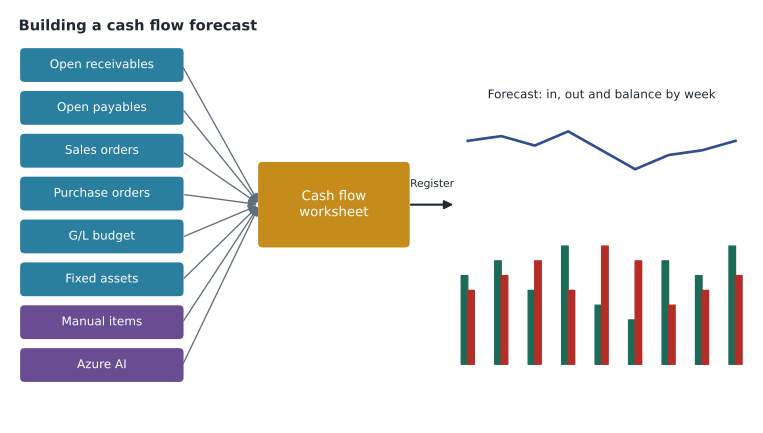
The setup has several parts. Cash Flow Setup names the number series, the accounts for receivables, payables, sales and purchase orders, and the connection to the Azure AI forecasting service if used. Cash flow accounts form a separate chart of the lines that appear in the forecast, such as Receivables, Payables, Sales Orders, Purchase Orders, Payroll, Rent, Taxes and Loan Payments; each can be linked to G/L accounts. A Cash Flow Forecast card defines one forecast and the sources to include. Cash Flow Manual Expenses and Manual Revenues add items that do not exist as documents yet, such as payroll or a planned loan.
To produce the forecast, the Suggest Worksheet Lines action on the Cash Flow Worksheet collects entries from the chosen sources: open customer and vendor entries by due date, open sales and purchase orders by expected dates, budget amounts, fixed asset plans, service and project data where used, manual items and, optionally, the AI forecast. The user reviews the lines, adjusts dates or amounts, and registers them into the forecast. The Cash Flow Forecast chart and the Cash Flow Date List report then show expected receipts, disbursements and the running balance by day, week or month.
| Source | What it adds | Timing |
|---|---|---|
| Receivables | Open customer entries | By due date, or adjusted by payment behaviour |
| Payables | Open vendor entries | By due date, or payment discount date |
| Sales and purchase orders | Unshipped and unreceived orders | By expected dates plus payment terms |
| G/L budget | Budgeted amounts on linked accounts | By budget date |
| Fixed assets | Planned acquisitions and disposals | By planned date |
| Manual revenues and expenses | Payroll, rent, loans, tax payments | By recurrence |
| Azure AI | A forecast from historical patterns | By period |
The Azure AI option uses a machine learning service to forecast sales tax payable and cash in and out based on history. It needs enough history to give useful results and appears in the forecast as separate lines for review. Business Central's documentation lists cash flow forecasting among its built-in AI capabilities, alongside late payment prediction (lesson 4). Noor told Bettina to treat the AI lines as a second opinion: useful for spotting a trend, not a replacement for known payments.
Worked problem
Seeing the March pinch
In a test forecast built in CONFIG on November 20, 2026, with invented 2027 data, the weekly chart shows the bank balance falling below 15,000 dollars in the second week of March. What could cause it, and what can Bettina do?
Show solution
- Drill into the forecast for that week. A large green coffee purchase order is due for payment, the quarterly tax payment falls the same week, and February receipts are seasonally low.
- Check whether the importer offers terms that move the payment a few weeks, or whether the order can be split into two shipments.
- Check whether the tax payment date is fixed (it is), and whether customer receipts can be pulled forward with reminders.
- Bettina decides to ask the bank to raise the operating line limit for the first quarter, and Imogen negotiates a split shipment.
Answer: The forecast reveals overlapping large payments in a low-receipt month; the business acts weeks ahead by moving payments or arranging credit.
Keeping forecasts useful
A forecast is only as good as its data. Due dates must be right, which depends on payment terms (lesson 1); orders must have realistic expected dates; manual items must be maintained; and the forecast must be refreshed regularly. Corbel & Finch planned a weekly routine: every Monday Callum would suggest worksheet lines, review anything unusual, register the forecast and send Bettina the chart. Old forecasts are kept, so a later comparison of forecast with actual shows how reliable the forecast was.
Budget versions and revisions
Budgets change during the year. Rather than overwriting the original, most companies keep it and create a new budget for each revision. Corbel & Finch's plan for 2027 was BUDGET2027 as approved in December 2026, then a FORECAST2027-Q2 in April that copies BUDGET2027 and replaces the remaining months with the latest expectations. Financial reports can show actual against either, and a column comparing the two shows how expectations moved. A G/L budget can be blocked once approved, so no one changes the approved figures by mistake.
| Budget name | Created | Purpose | Status |
|---|---|---|---|
| BUDGET2027 | December 2026 (planned) | The approved annual budget | Blocked after approval |
| FORECAST2027-Q2 | April 2027 (planned) | Actual to March plus revised expectations | Open until replaced |
| STRETCH2027 | December 2026 (planned) | A higher-growth scenario for the bank | For discussion only |
Budgets by dimension
Because budget entries carry dimensions, a budget can be as detailed as the business needs. Corbel & Finch budgeted revenue by BUSINESS LINE, wages by DEPARTMENT, and marketing by CAMPAIGN, but kept rent and insurance at company level. In the budget matrix, the Show as Lines option can be switched from G/L Account to a dimension, so Bettina could see, for example, total marketing spend by campaign across all accounts. The same dimensions let financial reports compare actual with budget for one business line at a time, which is how the café managers would see their own results.
A common trap is to budget at a finer level than actual entries are posted. If actual sales are posted without the CAMPAIGN dimension, a budget by campaign has nothing to compare with. Noor's rule was to budget only on dimensions that are reliably filled in on actual postings, which is another reason the value posting rules from the foundations course mattered.
Excel and Power BI for budgeting
Many finance teams prefer to model the budget in Excel and keep Business Central as the place where the approved figures live. Business Central supports this in both directions: Export to Excel on the budget creates a workbook with the accounts, periods and dimensions chosen, and Import from Excel reads the edited workbook back, either adding to or replacing the budget entries. For reporting, the Power BI finance apps for Business Central include budget and actual comparisons when budgets are maintained, and the Excel reports included with Business Central can be refreshed with current data. Callum built the 2027 budget in Excel, imported it into BUDGET2027, and then checked the import by comparing the budget's yearly totals by account with the workbook.
Common mistakes
MistakeBuilding a budget once and never comparing it with actual results.
InsteadBuild a budget-against-actual financial report and review it monthly.
MistakeTyping a large budget cell by cell.
InsteadCopy last year with a factor, or export to Excel and import.
MistakeTreating profit as cash.
InsteadUse the cash flow forecast for timing of receipts and payments.
MistakeAccepting AI forecast lines without review.
InsteadUse them as a second opinion beside known documents and manual items.
Summary and key terms
- G/L budgets hold amounts by account, date and dimension, with up to four budget dimensions.
- Budgets are built in the matrix, in Excel or by copying actual entries with a date formula and factor.
- Financial reports, the Trial Balance/Budget report and analysis views compare budget with actual.
- Cash flow forecasts collect receipts and payments from receivables, payables, orders, budgets, fixed assets, manual items and AI.
- Suggest Worksheet Lines and Register produce a forecast shown as a chart and report.
- Forecasts need accurate dates and a regular refresh.
- G/L budget
- A named set of budget amounts by account, date and dimension.
- Budget dimension
- One of up to four extra dimensions available on a G/L budget.
- Adjustment factor
- A multiplier applied when copying amounts into a budget.
- Cash flow account
- A line in the cash flow chart, such as receivables or payroll.
- Cash flow worksheet
- Where suggested forecast lines are reviewed before registering.
- Cash flow forecast
- A registered set of expected receipts and payments over time.
Practice problems
Work each problem on paper first, then reveal the answer to check.
Which action copies last year's actual results into a budget with growth?
Show answer
Copy G/L Budget, with a date change formula and an adjustment factor.
In a financial report, which ledger entry type shows budget amounts?
Show answer
Budget Entries.
Which action fills the cash flow worksheet?
Show answer
Suggest Worksheet Lines.
Lesson quiz · 5 questions
Score 60% or more to complete this lesson.
Create a free account to save your progress, take quizzes and earn a certificate.