
MSBA-350 · Lesson 3 of 12 · 20 min
Bank accounts and reconciliation
▶ Video coming soon A video version of this lesson is on the way.
Corbel & Finch has three bank accounts: a main operating account, a separate account that receives the web shop's card settlements, and a US-dollar account for paying coffee importers. In the old system, Callum reconciled them in a spreadsheet at month end, ticking off lines one by one. It took most of a day. When Noor demonstrated bank reconciliation in Business Central in mid-October 2026, with a downloaded statement and the matching rules switched on, the main account reconciled in eleven minutes. "The other seven hours were me," Callum said, only half joking. This lesson covers how bank accounts are set up, how money moves through them, and the two reconciliation tools Business Central provides.
Setting up a bank account
Each real bank account is a bank account card in Business Central. It is a subledger, like customers and vendors, with its own bank account ledger entries. The card holds the bank's name and address, the account number, the bank branch or transit number, IBAN and SWIFT codes where they apply, the currency code (blank for the local currency), and the Bank Account Posting Group, which names the G/L account the bank account posts to. Each bank account should have its own G/L account so that the general ledger and the bank subledger can be compared one to one.
| Bank account | Currency | Posting group and G/L account | Used for |
|---|---|---|---|
| MAIN | Local | OPERATING, 10100 Bank, Operating | Customer receipts, vendor payments, payroll |
| CARDS | Local | CARDS, 10150 Bank, Card Settlements | Web shop card settlements |
| IMPORT | USD | IMPORT, 10200 Bank, Foreign Currency | Payments to green coffee importers |
Other fields on the card control payments and statements. The Last Statement No. and Balance Last Statement fields record where the last reconciliation ended, so the next one starts from there. The Payment Export Format and Bank Statement Import Format fields name the file formats the bank uses, set up through Bank Export/Import Setup. Many banks provide statements in standard formats such as camt.053 (an ISO 20022 XML format), and Business Central includes data exchange definitions that read common formats; a partner can add others. For cheque-printing banks, the card also holds the last cheque number used.
Bank account numbers are sensitive. Corbel & Finch's security design from the foundations course limited the Bank Account card to the BC-Finance security group, and turned on the change log for the bank account and vendor bank account tables so that any change to account numbers is recorded. Changing a vendor's bank details is a favourite trick of payment fraud, so lesson 5 adds an approval for it.
How money moves in and out
Money reaches the bank account ledger in several ways. Cash receipt journals post customer payments and other receipts (lesson 4). Payment journals post vendor payments and other payments (lesson 5). Sales and purchase documents with a payment method that has a balancing bank account post the payment at the same time as the invoice, which suits card payments in the cafés. General journals can post bank fees, interest and transfers between accounts. Each posting creates a bank account ledger entry and a G/L entry on the bank's G/L account.
Transfers between Corbel & Finch's own bank accounts are simple journal lines: account type Bank Account, account MAIN, balancing account type Bank Account, balancing account IMPORT. When the two accounts use different currencies, Business Central converts using the exchange rate on the posting date and posts any rounding to the currency's accounts.
Bank account reconciliation
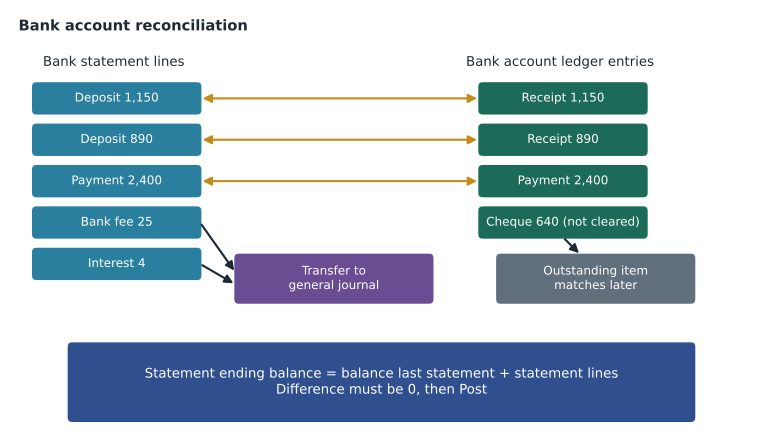
The Bank Account Reconciliation page compares the bank's statement with the bank account ledger entries in Business Central. Each reconciliation is identified by a bank account and statement number. The workflow follows the same steps every month.
| Step | Action | What happens |
|---|---|---|
| 1 | Create the reconciliation and enter the statement date and ending balance | The statement number follows from the last one |
| 2 | Import Bank Statement, or Suggest Lines if entering by hand | Statement lines fill the left side |
| 3 | Match Automatically | Business Central matches lines to ledger entries by amount, date and text, within tolerance settings |
| 4 | Match Manually the rest | The user pairs remaining lines and entries, including one-to-many matches |
| 5 | Handle bank-only items | Fees and interest are transferred to a general journal and posted |
| 6 | Check the difference is zero, then Post | Matched entries are closed and the statement number and balance are stored |
Automatic matching uses the amount, the transaction date within a set number of days, and text in the description or document number. Business Central lets the user choose the date tolerance when running Match Automatically, so a payment that clears three days after it was entered can still match. A statement line can match several ledger entries (one bank deposit for several customer cheques) and several statement lines can match one entry.
Items that appear only on the statement, such as bank fees, interest and card processing charges, are moved to a general journal with the Transfer to General Journal action, posted, and then matched. Items that appear only in Business Central, such as cheques written but not yet cashed, simply stay open. They appear on the reconciliation report as outstanding and will match next month when they clear.
Worked problem
Reconciling the main account for October
The October statement for MAIN ends at 84,206.15 dollars. After importing and Match Automatically, 312 of 330 statement lines are matched. What does Callum do with the rest?
Show solution
- Review the 18 unmatched statement lines. Twelve are customer payments with slightly different references; he matches them manually after checking the amounts.
- Four are bank fees and one is interest. He selects them and chooses Transfer to General Journal, assigning 63100 Bank Charges and 71100 Interest Income, and posts the journal.
- The last line is a deposit he cannot identify. He posts it to a suspense account, 19900 Unidentified Receipts, with a note to investigate, rather than guessing.
- Match the newly posted entries, confirm the total difference is zero and post the reconciliation.
- Leave the six cheques issued on October 30 open; they will clear in November.
Answer: Match the rest by hand, transfer bank-only items to a journal, park the unknown deposit in suspense, then post with a zero difference.
Copilot bank reconciliation assist
Business Central includes a Copilot capability for bank reconciliation, listed among the Copilot features on Microsoft's Business Central AI page. It suggests matches that the rule-based matching misses, by reading the descriptions on statement lines and ledger entries, and it can suggest which G/L account to post unmatched lines to, such as a recurring card processing fee. Suggestions appear for review; the user accepts or rejects them before anything is posted. Corbel & Finch kept the capability active for go-live, as recorded in the foundations course. Noor reminded Callum that Copilot's suggestion is a starting point: he still checks unusual amounts, and he never accepts a suggestion that posts to an account he would not have chosen himself.
Payment reconciliation journals
Bank account reconciliation answers one question: does the bank agree with Business Central? A second tool answers another: which customer or vendor does each bank line belong to? The payment reconciliation journal imports a bank statement and matches each line to open customer and vendor ledger entries, not just to bank entries. When the journal is posted, it posts the payments, applies them to the invoices they pay and reconciles the bank account, all in one step.
| Question | Bank Account Reconciliation | Payment Reconciliation Journal |
|---|---|---|
| What is matched? | Statement lines to bank account ledger entries already posted | Statement lines to open customer and vendor entries, or to G/L accounts |
| When are payments posted? | Before, in cash receipt and payment journals | By the journal itself |
| Best for | Payments already recorded elsewhere | Recording and applying payments straight from the statement |
| Matching help | Amount, date and text rules; Copilot assist | Payment application rules with confidence levels; text-to-account mapping |
The payment reconciliation journal uses payment application rules, which rank possible matches by confidence (high, medium, low) based on whether the document number, the amount and the customer or vendor name appear on the statement line. Text-to-account mapping sends lines with known text, such as the name of the card processor, straight to a chosen G/L account. Lines are reviewed, adjusted and then posted. Corbel & Finch used the payment reconciliation journal for the CARDS account, where the web shop's daily settlements need to be split between card sales and processing fees, and for the main account's incoming customer payments.
The choice between the two tools is not either-or. Callum's routine became: post most customer receipts through the payment reconciliation journal as statements arrive during the month, then run a bank account reconciliation at month end to prove the balance.
Bank reports and controls
Several reports support the bank process. The Bank Account Reconciliation test report and posted Bank Account Statement show what was matched and what was outstanding. The Bank Account - Detail Trial Balance lists entries by account and period. The Bank Account Register shows each posting run. A simple control check at month end is that the balance of the bank's G/L account equals the balance of the bank account in the subledger; if Direct Posting is off on the G/L account, they always will.
Banks in North America also offer positive pay, a fraud control in which the company sends the bank a file of cheques issued and the bank refuses cheques that do not match. Business Central's North American versions can export positive pay files from the bank account. Corbel & Finch pays most vendors electronically, but Callum set up positive pay for the few cheques the business still writes.
Statement import formats
Importing statements is what makes reconciliation fast, so the format matters. On the Bank Export/Import Setup page, each format names a data exchange definition that tells Business Central how to read the bank's file: which column or XML element holds the date, amount, description and reference. Business Central includes definitions for common formats, and partners can add more for local banks. The bank account card then names the import format to use. When a bank changes its file layout, statements stop importing cleanly; the fix is to update the definition, not to type statement lines by hand.
| Statement source | How it reaches Business Central | Notes |
|---|---|---|
| Bank file (for example camt.053 or CSV) | Import Bank Statement on the reconciliation or payment reconciliation journal | Needs a data exchange definition for the format |
| Bank statement service | An extension that downloads statements | Availability depends on the country and bank |
| Manual entry | Suggest Lines from ledger entries, then edit | Slow; for small accounts only |
Foreign-currency bank accounts
Corbel & Finch's IMPORT account holds US dollars. Its reconciliation works in the account's own currency: statement lines and ledger entries are compared in that currency, so exchange rates do not cause false differences. The G/L account behind it, however, holds amounts in the local currency. At month end, the Adjust Exchange Rates process revalues the bank account's balance at the month-end rate and posts the unrealized gain or loss, so the G/L value is current. Callum added a step to his checklist: reconcile IMPORT in its own currency first, then run the exchange rate adjustment, then compare the bank's G/L balance with the bank subledger in local currency.
Worked problem
A transfer between currencies
In a test posting, Callum moves 10,000 US dollars from IMPORT to MAIN. How is it posted, and which exchange rate is used?
Show solution
- In a general journal, enter account type Bank Account, account MAIN, and balancing account type Bank Account, balancing account IMPORT, with the currency of the IMPORT account on the line.
- Business Central converts the amount at the posting date's exchange rate and posts each bank account in its own currency.
- Any difference from the rates used for earlier postings on IMPORT is part of the next exchange rate adjustment.
- Both bank accounts show the transfer, and each will match a line on its own statement.
Answer: One journal line between the two bank accounts; Business Central converts at the posting date rate and each account records its own currency.
Common mistakes
MistakePointing two bank accounts at one G/L account.
InsteadGive each bank account its own G/L account so balances can be compared.
MistakeGuessing an account for an unidentified deposit to make the reconciliation balance.
InsteadPost it to a suspense account and investigate.
MistakeAccepting every Copilot match suggestion without review.
InsteadReview suggestions, especially unusual amounts and new G/L accounts.
MistakePosting a reconciliation with an unexplained difference.
InsteadFind the difference first; posted reconciliations close the matched entries.
Summary and key terms
- Each bank account is a subledger card with its own posting group and G/L account.
- Money moves through cash receipt, payment and general journals, and through documents with payment methods.
- Bank account reconciliation imports the statement, matches lines to bank ledger entries and posts with zero difference.
- Copilot bank reconciliation assist suggests matches and G/L accounts for review.
- The payment reconciliation journal posts and applies customer and vendor payments straight from the statement.
- Change log, permissions and positive pay protect bank details and payments.
- Bank account ledger entry
- An entry in the bank subledger for an amount posted to a bank account.
- Bank account reconciliation
- The process that matches a bank statement to bank ledger entries.
- Payment reconciliation journal
- A journal that posts and applies payments from imported statement lines.
- Payment application rule
- A rule that ranks possible payment matches by confidence.
- Text-to-account mapping
- A rule that sends statement lines with known text to a chosen account.
- Positive pay
- A bank service that pays only cheques listed in a file the company sends.
Practice problems
Work each problem on paper first, then reveal the answer to check.
Which action moves bank fees from a reconciliation to a journal?
Show answer
Transfer to General Journal.
What makes the payment reconciliation journal different from bank account reconciliation?
Show answer
It posts and applies payments to open customer and vendor entries, not just matching existing bank entries.
Where is the G/L account for a bank account set?
Show answer
In the bank account posting group on the bank account card.
Lesson quiz · 5 questions
Score 60% or more to complete this lesson.
Create a free account to save your progress, take quizzes and earn a certificate.