
MSBA-331 · Lesson 4 of 12 · 19 min
Vendor collaboration
▶ Video coming soon A video version of this lesson is on the way.
Marisol kept a spreadsheet of every open casting order with a column called Confirmed? and another called Chased. Every Monday she emailed each foundry a list of order numbers and asked them to confirm quantities and dates, then typed the replies into the spreadsheet and, when dates changed, into the old system. It took most of her Monday. Annelise asked a simple question at the start of the session: what if the foundries could do that themselves, in the system, and Marisol only looked at the exceptions?
What vendor collaboration is
Vendor collaboration is a set of pages in finance and operations apps that external vendor users can sign in to. Through it, a vendor can see purchase orders sent to it, accept or reject them, propose changes to quantities, prices and dates, see consignment stock and its consumption, respond to requests for quotation, upload invoices, and maintain some of its own master data, depending on what the buying company allows. Vendor users are real users in the system's Microsoft Entra ID tenant, usually as guest users, with security roles that limit them to their own vendor account.
Setting it up
Several pieces of setup are needed. In Procurement and sourcing parameters, the company chooses whether purchase orders sent to vendors require a vendor response and whether vendors can see prices. On each vendor account, Collaboration activation decides how that vendor works: Not active, Active (purchase order is auto-confirmed), or Active (purchase order is not auto-confirmed). The first active option means that when the vendor accepts an order without changes, it is confirmed automatically; the second means that even an unchanged acceptance waits for the buyer to confirm.
| Collaboration activation on the vendor | What happens when the vendor accepts without changes |
|---|---|
| Not active | No vendor collaboration; orders are sent by print management |
| Active (PO is auto-confirmed) | The purchase order is confirmed automatically |
| Active (PO is not auto-confirmed) | The acceptance is recorded; the buyer confirms the order |
Vendor users are added through the vendor collaboration user request process. A vendor contact, or a buyer on the vendor's behalf, requests access; a workflow routes the request for approval; and once approved, a user is provisioned with a vendor collaboration security role and linked to the vendor's contact person. Cobalt Ridge's IT team was cautious about external accounts, so the workflow includes a security review step, and each foundry gets at most three users. Guest access in the tenant follows the identity rules set by IT, including multifactor authentication for every external user.
Security roles control what vendor users see. The standard external roles cover administering the vendor's own users, working with purchase orders and consignment, working with vendor invoices, and responding to requests for quotation; check the current role names in the security configuration, because they have changed over releases. Each role is restricted to data for the vendor account the user belongs to, so Ferrolux cannot see Lakehead Forge's orders.
The purchase order response
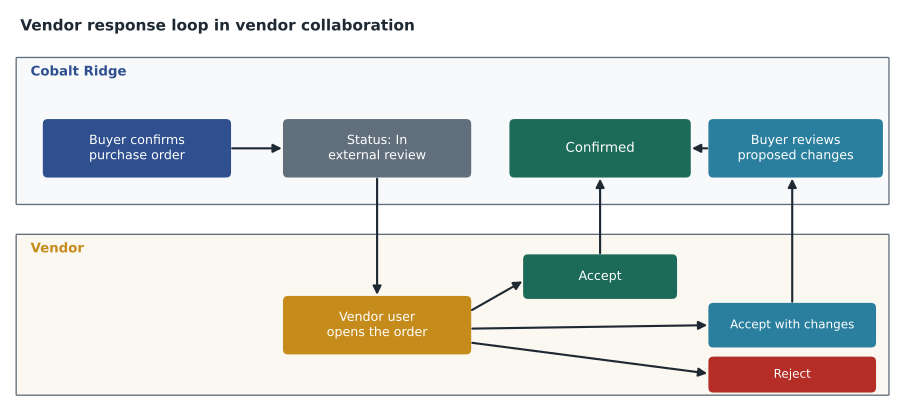
When a buyer confirms a purchase order for a vendor with collaboration active, the order is sent for the vendor's response and its approval status becomes In external review. The vendor user sees it in the list of purchase orders waiting for review in the vendor collaboration workspace and can respond in three ways.
| Vendor response | Effect |
|---|---|
| Accept | The vendor agrees to the order as sent; it is confirmed automatically or waits for the buyer, depending on activation |
| Reject | The vendor declines; the buyer must change the order, find another vendor, or cancel |
| Accept with changes | The vendor proposes changes, such as a later date, a split delivery, a different quantity or price, or a substitute item; the buyer reviews them |
Accept with changes is where most of the value lies. A foundry that can deliver 800 of the 1,000 kilograms this week and the rest next week can propose a line split with two delivery dates. A vendor can propose a substitute item, add a comment, or change the unit price if the buyer allows vendors to see and propose prices. The buyer sees the proposed changes side by side with the original values in the Purchase order responses or the buyer workspace and can accept the changes, which updates the order, or reject them and contact the vendor. After the changes are processed, the order returns to Confirmed, and its version history records the vendor's proposal and the buyer's decision.
Every response is recorded. The purchase order's history keeps the version the vendor received, the vendor's response with its date, user and comments, and the version that resulted after the buyer processed it. This matters in disputes. When a foundry later claims it never agreed to a date, the buyer can open the history and show the acceptance by the foundry's own user. It also matters for vendor evaluation: the percentage of orders accepted without changes and the number of date changes per vendor are useful measures of reliability, and Teodora added them to the quarterly vendor scores from lesson 1.
Vendors can also be asked to confirm again when the buying company changes an order. If Marisol increases a quantity on a confirmed order for a collaborating vendor, the order goes back through approval and, when confirmed, is sent to the vendor again as a new version for response. The vendor sees what changed, and the cycle repeats. For small changes that the vendor does not need to see, such as an internal note or a financial dimension, the change management settings can be configured so that the order does not need re-approval, through the re-approval rule in the purchasing policy.
What buyers see
Buyers work with vendor collaboration from the Purchase order preparation workspace and related tiles. They see orders waiting for vendor response, orders rejected by vendors, orders accepted with changes, and orders whose vendor confirmed delivery dates are later than requested. Marisol's Monday spreadsheet became a filtered list of the third and fourth tiles. The first week of the pilot with Lakehead Forge showed what changed: 41 order lines were sent, 33 were accepted without changes and confirmed automatically, 6 came back with later dates, and 2 were split; Marisol spent about an hour on the exceptions instead of a morning on all of them.
| Buyer tile or list | What it shows | Typical action |
|---|---|---|
| Waiting for vendor response | Orders in external review with no reply | Chase the vendor after two days |
| Rejected by vendor | Orders the vendor declined | Find another source or renegotiate |
| Accepted with changes | Proposals waiting for the buyer | Accept or reject the proposed changes |
| Confirmed delivery later than requested | Lines at risk for production | Check impact with planning |
Beyond purchase orders
Vendor collaboration covers more than order responses. Vendors with consignment agreements can see their stock on hand at the buyer's warehouse and what has been consumed, which avoids monthly calls about usage. Vendors can respond to requests for quotation with prices, dates and alternatives, attaching documents, and the buyer compares bids in the RFQ case. Vendors can see the status of their invoices and payments, which reduces the number of emails to accounts payable asking whether an invoice has been paid. Vendors can also update some of their own data, such as contact people and certifications, through requests that go through approval.
The vendor onboarding process uses the same infrastructure. A prospective vendor receives an invitation, completes a registration with company details, banking information and the questionnaires attached to the procurement categories it wants to supply, and a workflow routes the request through procurement, quality and accounts payable. When approved, the vendor account and its collaboration users are created. For direct-material vendors, Cobalt Ridge's onboarding questionnaire asks for quality certifications and the country of origin of the material.
Vendor invoices through the portal
Vendors can also submit invoices through vendor collaboration. A vendor user creates an invoice from a confirmed purchase order, so the lines, items, quantities and prices are copied from the order and the received quantities, and the vendor only adds the invoice number, date and any differences. The invoice arrives in accounts payable as a pending vendor invoice and goes through the same matching and vendor invoice workflow as any other invoice. Because it was built from the order, it rarely fails matching on item or unit. Thandeka was keen on this: about a third of the price discrepancies in the old system were caused by invoices that referred to the wrong order line.
Invoices from vendor collaboration do not replace other invoice channels. Many vendors will keep sending PDF invoices by email, which accounts payable can capture with invoice automation, and some large vendors send electronic invoices. The goal is to move as much volume as possible to channels that produce structured data tied to the order.
Vendor collaboration compared with EDI
Large vendors sometimes ask for electronic data interchange instead of a portal. EDI exchanges structured documents, such as purchase orders, order responses, advance shipping notices and invoices, between systems without anyone signing in. It is efficient for high volumes but needs setup on both sides, often through an integration partner, and it handles exceptions less flexibly. Vendor collaboration needs no integration on the vendor's side, only a browser and an account, which suits mid-size and small vendors. Cobalt Ridge decided that the motor supplier, which already exchanges EDI with its larger customers, would be connected through EDI in phase 2, while the foundries would use the portal.
| Channel | Best for | Effort for the vendor | Handles exceptions |
|---|---|---|---|
| Vendor collaboration portal | Mid-size and small vendors with regular orders | Low: a browser and an account | Well: proposals, comments, attachments |
| EDI | High-volume vendors with their own systems | High: integration setup | Less flexibly; needs agreed message types |
| Email with the procurement agent | Vendors that will not use a portal | None | The agent extracts changes; buyers review them |
| Email and manual entry | Occasional vendors | None | Depends on the buyer |
A rollout plan
The team wrote a simple rollout plan for vendor collaboration. Wave 1, from go-live: Lakehead Forge, which had piloted in the CONFIG sandbox. Wave 2, four weeks later: the other two foundries. Wave 3, by the end of the first quarter: the ten largest indirect vendors by order count. Each wave starts with a 30-minute training call, a test order in the sandbox, user provisioning, and two weeks of daily checks on the response tiles. Kiri Langford, the project manager, added the waves to the project plan with Marisol as owner and a measure of success: at least 80 percent of order lines confirmed through the portal within two business days.
Vendor collaboration and the procurement agent
Not every vendor will sign in to a portal. Small foundries in particular prefer email. For those vendors, Microsoft's procurement agent in Supply Chain Management, covered in lesson 11, can read confirmation and change emails and map them to purchase order fields, and its impact analysis capability also handles change requests that arrive through the vendor collaboration interface. The two approaches work together: large vendors use the portal, and the agent handles the email traffic from the rest. Piotr's plan is to have the three foundries and the motor supplier on vendor collaboration by the end of the first quarter after go-live, and to pilot the agent for the long tail of small indirect vendors.
Adoption and data quality
Vendor collaboration fails quietly when vendors do not use it. The buyer then has orders sitting in external review with no reply, and planning works with dates nobody confirmed. Annelise's checklist for adoption included a short training call with each vendor's users, a one-page guide with screenshots, a named contact at Cobalt Ridge, and a rule that an order with no response after two business days is chased by phone. She also recommended keeping vendor contacts and email addresses accurate, because invitations and notifications go to them, and reviewing vendor user accounts every six months, removing people who have left the vendor.
Data quality on the buyer's side matters too. Vendors can only confirm dates and quantities that make sense if the orders they receive are accurate. Purchase orders with placeholder delivery dates, or lines in the wrong unit, generate rejections and change proposals that waste everyone's time. The team made the unit of measure on casting lines a reviewed field before the first foundry was activated, after a test order showed kilograms on one line and pieces on another.
Worked problem
Handling a split delivery proposal
Lakehead Forge responds to PO-CRCA-000431, line 2: 1,000 kg of CS-3300 castings for November 16. It accepts with changes, proposing 600 kg on November 16 and 400 kg on November 23.
Show solution
- Open the order from the Accepted with changes tile and review the proposed line split.
- Check with planning whether 600 kg on November 16 covers the production orders due that week.
- Planning confirms that 600 kg is enough until November 23.
- Accept the changes; the line is split into two delivery schedule lines with the proposed dates.
- The order returns to Confirmed, and the version history records the vendor's proposal.
Answer: The order now matches what the vendor will actually deliver, and planning uses the confirmed dates.
Common mistakes
MistakeActivating vendor collaboration and assuming vendors will start using it.
InsteadTrain vendor users, give them a contact and chase unanswered orders.
MistakeGiving vendor users broad internal security roles.
InsteadUse the vendor collaboration roles, which restrict users to their own vendor data.
MistakeChoosing auto-confirmation for vendors whose orders always need buyer review.
InsteadUse Active (PO is not auto-confirmed) where the buyer should confirm every acceptance.
MistakeSending orders with placeholder dates or inconsistent units to vendors.
InsteadReview dates and units before activating vendors, so their responses are meaningful.
Summary and key terms
- Vendor collaboration lets external vendor users work with purchase orders, RFQs, consignment and invoices in finance and operations apps.
- Collaboration activation on the vendor decides whether an unchanged acceptance confirms the order automatically.
- Vendors can accept, reject or accept with changes; buyers review proposed changes before they update the order.
- Vendor users are provisioned through a request workflow and restricted by vendor collaboration security roles.
- Adoption needs training, accurate contacts and follow-up; the procurement agent can handle vendors that prefer email.
- Vendor collaboration
- The interface through which external vendors work with purchase orders and related documents.
- In external review
- The approval status of a purchase order waiting for the vendor's response.
- Accept with changes
- A vendor response that proposes changes to an order for the buyer to review.
- Collaboration activation
- The vendor setting that enables vendor collaboration and controls auto-confirmation.
- Vendor onboarding
- The process by which a prospective vendor registers and is approved.
Practice problems
Work each problem on paper first, then reveal the answer to check.
Which activation option confirms an order automatically when the vendor accepts without changes?
Show answer
Active (PO is auto-confirmed).
What approval status does an order have while waiting for the vendor's response?
Show answer
In external review.
Name two things besides purchase orders that vendors can see or do in vendor collaboration.
Show answer
For example: respond to RFQs, see consignment stock and consumption, see invoice and payment status.
Lesson quiz · 5 questions
Score 60% or more to complete this lesson.
Create a free account to save your progress, take quizzes and earn a certificate.