
MSBA-331 · Lesson 11 of 12 · 19 min
Copilot for procurement
▶ Video coming soon A video version of this lesson is on the way.
Piotr had volunteered for one of the two Copilot pilots that the foundation course planned for after go-live: help with purchase orders that vendors had confirmed with changes. In the session, he explained why. Every week his buyers received dozens of emails from vendors: confirmations, new dates, partial shipments, price changes, and questions. Vendor collaboration would handle the large foundries, but most of the 2,400 vendors would never sign in to a portal. "If something can read those emails and tell my buyers which ones matter," he said, "I will take it, as long as a buyer still decides." Desmond Oyediran-Platt, the developer, added the rule the project had already agreed: agents may draft and propose, but never post on their own.
Copilot and agents in Supply Chain Management
Microsoft has added generative AI to Supply Chain Management in two forms. Copilot features are built into pages: summaries, suggestions and drafting help that a user triggers and reviews. Agents do work in the background on behalf of users, such as monitoring an email inbox or analysing changes, and present the results for people to act on. This lesson covers both as they apply to procurement in November 2026. These features change quickly and several are in preview, so the lesson describes what they do and how to govern them, and the real setup must follow the current Microsoft Learn documentation.
| Feature | Form | Status in late 2026 | What it does |
|---|---|---|---|
| Purchase order change summaries | Copilot feature | Introduced in 2023 release plans; check current availability | Summarizes confirmed purchase orders with changes and highlights risky ones |
| Procurement agent: supplier communications | Agent | Production-ready preview | Reads and classifies vendor emails, extracts confirmations and changes, drafts follow-ups |
| Procurement agent: impact analysis | Agent | Production-ready preview | Assesses how supplier changes affect inventory, production and customer deliveries |
| Copilot chat in finance and operations apps | Copilot feature | Check current availability | Answers questions about the current page and records |
Two practical facts help when planning. First, generative AI features in finance and operations apps are switched on per environment, and some must also be enabled in Feature management or in the Copilot settings for the app; an administrator must also allow the data movement or regional processing the features need, depending on where the environment is hosted. Second, agents such as the procurement agent are built on Microsoft Copilot Studio and Dataverse, which is why their consumption is measured in Copilot Studio credits and why a linked Dataverse environment is part of the setup; Cobalt Ridge's environment is already linked, as the product course noted for Inventory Visibility. The exact switches move between releases, so the team kept a one-page record of what was enabled where and when, signed off by IT.
Purchase order change summaries
The first Copilot feature for procurement came out of a familiar problem. When vendors confirm orders with changes, buyers must decide which changes matter. The confirmed purchase orders with changes feature shows such orders in the buyer's workspace and uses Copilot to summarize the changes in plain language, such as a delivery date moved by nine days on a line that feeds a production order, and to flag the ones with downstream impact. The buyer still opens the order and accepts or follows up; the summary saves the reading.
Piotr's pilot will measure two things: how long buyers spend on confirmed orders with changes per week, and how many risky changes are caught before they affect production. The baseline from the old process, measured over four weeks in October, was about six hours a week across the team, and two production orders in that period started late because a date change was missed.
The procurement agent
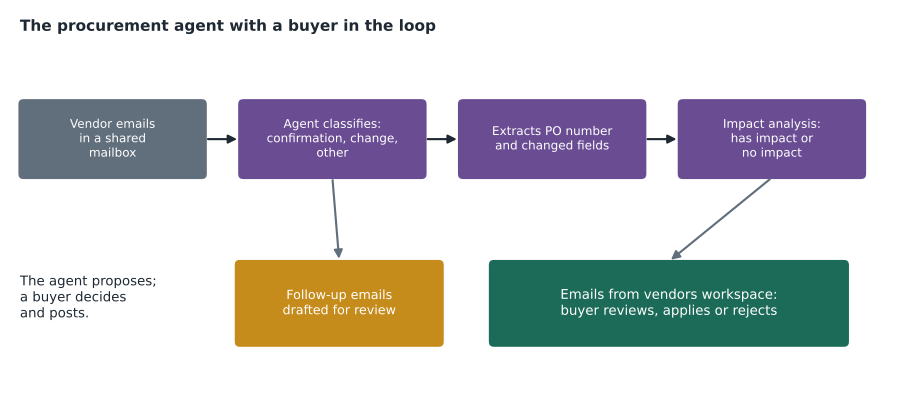
The procurement agent in Supply Chain Management has two capabilities that can be enabled separately or together. Supplier communications monitors and classifies inbound vendor emails. For emails about purchase orders, it identifies confirmations and change requests and the fields that changed, so purchasers can confirm and apply changes without opening each order; it also supports outbound emails, such as asking a vendor to confirm an order or explain a late delivery, which can be sent automatically or saved as drafts for a buyer to review. Impact analysis assesses how supplier changes affect inventory, production schedules and customer deliveries; it handles change requests from emails processed by supplier communications and from the vendor collaboration interface, and classifies each as having impact or no impact. Purchasers can also start an analysis for a selected purchase order.
Microsoft Learn describes both capabilities as a production-ready preview as of the August 2026 documentation: available for real use, but not generally available, under supplemental preview terms, with documentation that may change. Use is billed in Copilot Studio credits, with a fixed cost per run plus a variable cost based on resources consumed, and agent management settings control how much it runs. Cobalt Ridge's agreed position was to pilot it, not to depend on it, until it reaches general availability.
Humans in control
The agent's design keeps purchasers in charge of decisions. Extracted changes appear in the Emails from vendors workspace, where a buyer confirms and applies them to the purchase order. For impact results, a change with no impact can be accepted and the order updated; a change with impact shows details, and the buyer decides whether to follow up with the supplier, accept the change, cancel the order or inform stakeholders. Outbound emails can be set to draft mode so a buyer reads each one before it is sent.
| Agent output | Buyer action at Cobalt Ridge |
|---|---|
| Confirmation with no changes | Buyer reviews daily in a batch and applies |
| Change request, no impact | Buyer accepts and updates the order |
| Change request, has impact | Buyer reviews the impact details with planning before deciding |
| Unclassified or unclear email | Buyer reads the email and handles it manually |
| Drafted follow-up email | Buyer reviews and sends; no automatic sending during the pilot |
These rules turned the project's principle into practice. The agent proposes; the buyer posts. During the pilot, outbound emails stay in draft mode, and every applied change is made by a named buyer, so the purchase order history shows a person, not the agent, as the one who changed the order.
Setting up responsibly
Before the pilot, the team worked through a setup list based on the documentation and the project's own governance rules. Each item has an owner, because an agent that reads vendor email touches IT, procurement and compliance at once.
| Setup area | Decision at Cobalt Ridge | Owner |
|---|---|---|
| Copilot features enabled in the environment | Enabled in UAT for the pilot; production after sign-off | IT |
| Mailbox to monitor | A shared purchasing mailbox, not personal inboxes | IT and procurement |
| Vendors in scope | 30 indirect vendors with frequent email changes | Procurement |
| Outbound email mode | Draft only | Procurement manager |
| Credit consumption limits | Monthly cap in agent management, reviewed weekly | IT and finance |
| Data handling review | Privacy and data review of email content processing | Compliance |
| Success measures | Time on changes, missed changes, accuracy of extraction | Piotr |
Cost deserved its own discussion. Because the agent is billed per run with a variable component, a busy mailbox costs more than a quiet one, and a mailbox flooded with newsletters costs money for nothing. The team narrowed the scope to emails from the 30 pilot vendors and set a monthly limit. Thandeka asked for a weekly report of credits consumed against emails processed, so the cost per handled email could be compared with the buyer time saved.
Good data makes a better agent
The agent matches emails to purchase orders, vendors and lines. It works best when the data it matches against is clean. Purchase order numbers must appear on the orders vendors receive, which print management already ensures. Vendor contacts must have the right email addresses, so the agent can tell which vendor sent a message. Line numbers and item descriptions on purchase orders should be ones a vendor can quote back. And the confirmed delivery dates in the system must be current, or impact analysis compares new dates against old ones.
Marisol's team did a short clean-up before the pilot: they checked the email addresses of the 30 pilot vendors' contacts, closed old purchase order lines that would never be delivered, and asked vendors to put the purchase order number in the subject line of their emails. Annelise noted that these steps would help the buyers even without the agent, which is a good sign that a pilot is worth doing.
Telling vendors
Vendors deserve to know how their emails are handled. Cobalt Ridge added a short paragraph to its purchase order terms stating that vendor correspondence sent to the purchasing mailbox may be processed with automated tools to update orders, and that all changes are reviewed by Cobalt Ridge staff. The drafted follow-up emails use the buyer's name and signature, and buyers edit them so they read like the buyer, not like a template. Piotr was clear that a vendor should never feel it is negotiating with a machine.
Roles matter on the inside too. The team limited access to the Emails from vendors workspace and the right to apply changes to buyers through security roles, and gave the procurement manager access to the agent's configuration and credit usage. Developers and IT manage the environment settings but do not process vendor emails. That separation follows the same segregation of duties thinking as the rest of procurement.
Data and trust
An agent that reads email processes the content of vendors' messages, which can include names, phone numbers and commercial terms. Cobalt Ridge's compliance officer reviewed where processing happens, what is retained and who can see results, using Microsoft's documentation for Copilot in finance and operations apps and the company's own data classification. The review's main outcome was practical: the monitored mailbox is a shared purchasing mailbox with only vendor correspondence, and buyers are reminded not to forward unrelated emails into it.
Trust also depends on accuracy. Extraction from email can be wrong: an email that mentions two purchase orders, a date written in a different format, or a reply that quotes an old message can confuse any automated reader. The pilot's accuracy measure counts how many extracted changes the buyer had to correct. Annelise's advice was to treat the agent like a new junior buyer: helpful from the first week, checked on everything for the first month, and trusted with more only when the numbers show it.
Copilot beyond the agent
Other Copilot help is available to procurement users. Copilot chat in finance and operations apps can answer questions about the page a user is on, such as summarizing a vendor's open orders. Copilot can help draft text, such as a note to a vendor or a description for a requisition. In Microsoft 365, buyers with Microsoft 365 Copilot can summarize long email threads with a vendor before calling them. None of these change records by themselves. For the MB-330 exam, note that the procurement and sales objectives in the skills measured as of October 21, 2026 do not list a separate Copilot objective; the exam is about the processes, and this lesson prepares you for the work rather than for exam questions.
Measuring the pilot
The pilot runs for eight weeks after go-live. The table shows the measures and the targets that would justify expanding it. If the agent meets them, phase 2 adds more vendors and considers allowing automatic acceptance of confirmations with no changes; if it does not, the team will keep the change summaries and stop the agent.
| Measure | Baseline (October 2026) | Target to expand |
|---|---|---|
| Buyer hours per week on vendor confirmations and changes | About 6 | Under 3 |
| Production orders delayed by a missed vendor change | 2 in four weeks | 0 |
| Extracted changes corrected by buyers | Not applicable | Under 10 percent |
| Agent cost per handled email | Not applicable | Less than the buyer time it saves |
Worked problem
Handling an agent-flagged change
A small fastener vendor emails that 2,000 M12 bolts on PO-CRCA-000502 will ship eight days late. The agent extracts the PO number, line and new date, and impact analysis marks it Has impact because a production order for MC-150 frames needs the bolts.
Show solution
- Open the email in the Emails from vendors workspace and read the extracted change and the original text.
- Check the impact details: the production order would be short 400 bolts on its start date.
- Ask the vendor, with a drafted follow-up the buyer edits, whether 400 bolts can ship on the original date.
- When the vendor agrees to a split, apply the change to the order as two delivery lines.
- Planning confirms the production order can start on time.
Answer: The late delivery was caught before it delayed production, and a buyer made every change.
Common mistakes
MistakeTreating a preview agent as a finished part of the core process.
InsteadPilot it with measures and keep a manual process until it is generally available and proven.
MistakeLetting the agent send outbound emails automatically from the first day.
InsteadStart in draft mode and review every message.
MistakeMonitoring a mailbox full of unrelated mail.
InsteadUse a shared mailbox for vendor correspondence and limit the vendors in scope to control cost and accuracy.
MistakeAssuming extracted changes are always right.
InsteadHave buyers review and apply changes, and measure how often they correct the agent.
Summary and key terms
- Copilot features help users on pages; agents work in the background and present results for people to act on.
- Purchase order change summaries highlight confirmed orders with changes that affect downstream plans.
- The procurement agent offers supplier communications and impact analysis, both in production-ready preview in late 2026.
- Agent use is billed in Copilot Studio credits; scope, limits and draft modes control cost and risk.
- Buyers review and apply every change; pilots should be measured against a baseline before expanding.
- Copilot feature
- Generative AI help built into a page that a user triggers and reviews.
- Agent
- An AI capability that performs work in the background and presents results for review.
- Supplier communications
- The procurement agent capability that reads and classifies vendor emails and drafts follow-ups.
- Impact analysis
- The procurement agent capability that assesses how supplier changes affect inventory, production and deliveries.
- Production-ready preview
- A preview feature available for real use under preview terms, not yet generally available.
Practice problems
Work each problem on paper first, then reveal the answer to check.
Name the two capabilities of the procurement agent.
Show answer
Supplier communications and impact analysis.
How is procurement agent use billed?
Show answer
In Copilot Studio credits, with a fixed cost per run plus a variable cost.
Where do buyers review and apply changes extracted from vendor emails?
Show answer
In the Emails from vendors workspace.
Lesson quiz · 5 questions
Score 60% or more to complete this lesson.
Create a free account to save your progress, take quizzes and earn a certificate.