
MSBA-331 · Lesson 3 of 12 · 19 min
Purchase orders and receiving
▶ Video coming soon A video version of this lesson is on the way.
The bearings had been easy. The castings would not be. Cobalt Ridge buys about 40 tonnes of high-chrome and duplex steel castings a month from three foundries, and every receipt is a small event: a truck arrives at the Hamilton dock, the receiving clerk counts pieces, weighs a sample, records heat numbers for the quality team, and the casting goes either to stock or to the inspection area. Annelise asked Marisol to bring the real paperwork from one delivery, and the session followed that delivery from purchase order to product receipt.
The purchase order
A purchase order is a commitment to buy specific goods or services from a vendor at agreed prices and dates. The header holds the vendor, currency, delivery address, delivery terms, payment terms and financial dimensions; the lines hold items or procurement categories, quantities, units, prices, discounts, delivery dates and the inventory dimensions where goods will be received. Purchase orders can be created by hand, from requisitions, from planned orders in master planning, from purchase agreements, from sales orders for drop shipments, and from intercompany chains.
Purchase orders have a purchase type. Most are of type Purchase order. A Returned order is used for returns to the vendor, which lesson 8 covers. The older type Journal, a draft that does not affect inventory, still exists but is rarely used today.
Two kinds of status
Purchase orders track two kinds of status at the same time. The approval status comes from change management and workflow. The document status and the order status come from processing: which documents, such as confirmations, receipts and invoices, have been posted. Annelise drew both on the whiteboard because buyers new to the system often confuse them.
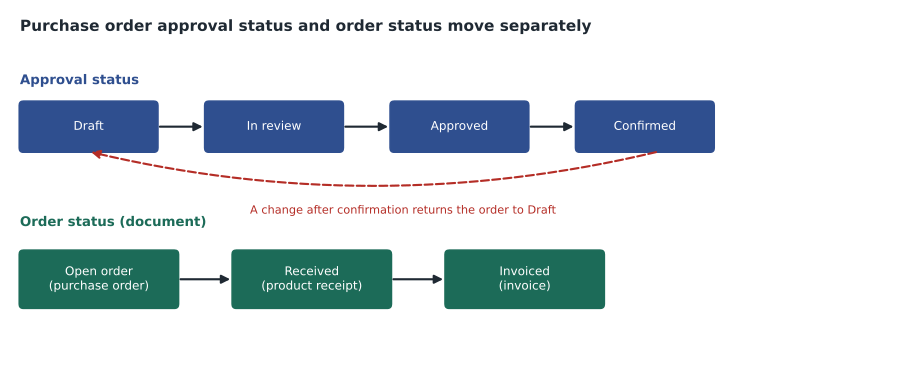
| Status | Values | What changes it |
|---|---|---|
| Approval status | Draft, In review, Rejected, Approved, In external review, Confirmed, Finalized, Cancelled | Workflow, confirmation and change management |
| Order status | Open order, Received, Invoiced, Canceled | Receipts and invoices for all lines |
| Document status | None, Purchase order, Receipts list, Product receipt, Invoice | The last document posted |
With change management active, a purchase order starts in Draft. Submitting it sends it to the workflow, and once approved it can be confirmed. Confirmation is a posting: it records the order version as the one sent to the vendor, and optionally prints or emails the purchase order document. If the buyer later changes a quantity or price, the order returns to Draft and must be approved and confirmed again; the system keeps every confirmed version, so the history shows exactly what the vendor was told and when. The approval status In external review appears when the order is shared with a vendor through vendor collaboration and the vendor has not yet responded, which lesson 4 covers.
How the confirmed order reaches the vendor is decided by print management. Print management settings can be defined for the module, for a vendor or for a single order, and they choose the report format, the destination (printer, email, screen or file) and the number of copies. Cobalt Ridge set up print management so that confirmations for vendors with an email address are emailed as a PDF to the vendor's purchasing contact, with a copy to the buyer, and vendors on vendor collaboration see the order in the portal instead. A version number in the document footer tells the vendor which revision it is reading, and the Purchase order versions page lets the buyer compare any two confirmed versions side by side. Marisol called that page the single most useful thing in the session, because disputes with foundries are usually about which revision of an order they received.
Line details that matter
Several line settings decide how the order behaves later. The delivery date and confirmed delivery date drive planning and the vendor's performance figures. The delivery schedule splits one line into several deliveries with their own quantities and dates, which Cobalt Ridge uses for blanket casting orders delivered weekly. The over and under delivery percentages on the line decide how much more or less than the ordered quantity can be received before the system objects; they default from the item and the procurement parameters. Receiving requirements, such as whether a product receipt is needed before invoicing, come from the item, the category policy and the line.
| Line setting | Cobalt Ridge rule for castings |
|---|---|
| Unit | Purchased in kilograms, stocked in pieces (from the product course) |
| Delivery schedule | Weekly deliveries against a monthly quantity |
| Over delivery | 5 percent, because foundry batches vary |
| Under delivery | 5 percent; the rest of the line is closed if accepted |
| Receiving warehouse and location | Plant receiving dock, then inspection |
| Quality order | Created at product receipt by the HCC-IN association |
Over and under delivery deserve a closer look. If an order line is for 1,000 kilograms with 5 percent over delivery allowed, a receipt of up to 1,050 kilograms posts without a warning. A receipt of 1,080 kilograms is blocked, and the clerk must either get the buyer to raise the line quantity or refuse the excess. Under delivery works the other way: if 960 kilograms arrive and the vendor says no more is coming, the remaining 40 kilograms can be closed by posting the receipt with the line marked as complete, as long as the shortage is within the 5 percent tolerance. Without that, the line would stay open for 40 kilograms forever, and planning would keep expecting them.
Charges, discounts and prices on lines
Prices on purchase lines come from trade agreements, which lesson 5 covers in detail, or from purchase agreements, or from the price on the released product as a fallback. Line discounts and multiline discounts work the same way. Charges, such as freight or handling, can be added to the header or the line, either manually or automatically through auto charges. Freight on castings was a sore point: the foundries charge freight per delivery, and in the old system it was posted to an expense account and never reached the item cost. Lesson 10 shows how Cobalt Ridge used auto charges to include it in inventory cost.
Arrival, registration and product receipt
Receiving has up to three steps. The arrival is when goods physically come in; it can be recorded through an arrival journal created from the Arrival overview page, or, in warehouses using warehouse management, by scanning on the mobile app. Registration records the quantity received into specific inventory dimensions, such as the receiving location, batch numbers and serial numbers; registered stock is physically present but not yet formally received. The product receipt is the posting that updates inventory physically, records the receipt against the purchase order and, if the item model group says so, posts the physical value to the ledger.
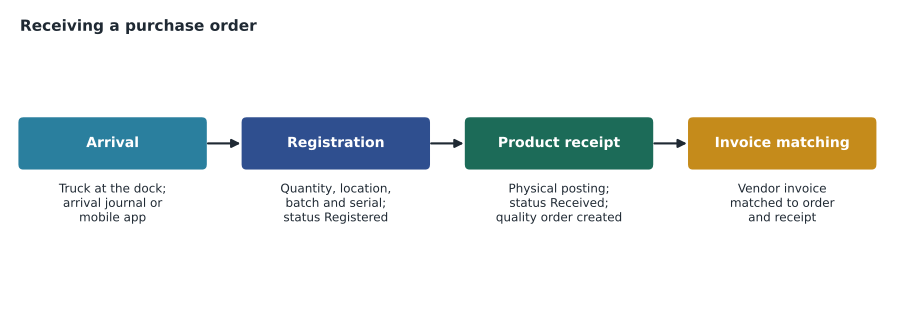
In a warehouse that does not use warehouse management, a clerk can post the product receipt directly from the purchase order, entering quantities and dimensions in the posting dialog. In the Calgary distribution warehouse, which uses warehouse management, receiving happens on mobile devices and creates work to put the goods away, and the product receipt is posted afterwards, often in batch. The Hamilton plant chose the simpler path at go-live: arrival journals for registration, then a product receipt posted by the receiving clerk at the end of each truck.
Registration matters for tracked items. The castings carry heat numbers, which Cobalt Ridge stores as batch numbers. At registration, the clerk splits the received quantity across the batches on the foundry's delivery note: 18 pieces of heat H26-4471 and 12 pieces of heat H26-4472, for example. Because the castings' item model group requires inspection, the quality association from the product course creates a quality order at product receipt, and the batch disposition code HOLD blocks the pieces from being reserved until Teodora's inspectors release them.
| Receipt status on the inventory transaction | Meaning |
|---|---|
| Ordered | On a purchase order, not yet arrived |
| Arrived | Recorded by an arrival journal but not registered |
| Registered | Received into specific dimensions, not yet product receipted |
| Received | Product receipt posted (physical update) |
| Purchased | Vendor invoice posted (financial update) |
Product receipt corrections and cancellations
Mistakes happen at the dock. A product receipt can be corrected, for example to fix the quantity or the batch number, or cancelled, which reverses it completely. Both create offsetting transactions, so the audit trail remains. Corrections are only possible while the receipt has not been invoiced and while the received stock has not been consumed or moved in ways that prevent the reversal. Marisol asked who should be allowed to correct receipts. The team gave the right to the receiving lead and the buyers only, and every correction needs a reason code.
Consignment inventory
Some stock belongs to the vendor until it is used. In consignment inventory, the vendor places goods in the buyer's warehouse, the buyer reports what it consumes, and the vendor invoices only for that. In Supply Chain Management, consignment uses the Owner tracking dimension from the product course. A consignment replenishment order records the vendor's deliveries, which are received into inventory with the vendor as owner; the stock is visible and can be reserved, but it has no value on the buyer's books. When the stock is consumed, or when the buyer formally takes ownership through an inventory ownership change journal, a purchase order is created for the quantity and posted, and the ownership changes to the buying company.
| Step | Document | Owner of the stock |
|---|---|---|
| Vendor ships to the buyer's warehouse | Consignment replenishment order | Vendor |
| Goods are received | Product receipt for the replenishment order | Vendor (no inventory value) |
| Buyer takes the stock for use | Inventory ownership change journal | Changes to the buyer |
| Purchase is recorded | Purchase order created from the journal, then invoiced | Buyer |
Cobalt Ridge's motor supplier proposed consignment for the 15 kilowatt and 22 kilowatt motors used on the MC-150, because those motors are expensive and their demand is steady. The product course had already marked the owner dimension for phase 2. Piotr liked the cash benefit; Thandeka wanted to see how consignment stock appears in the inventory value reports before agreeing. They wrote it into the phase 2 plan, with a test scenario in the UAT sandbox in spring 2027.
Direct delivery and drop shipment
Sometimes goods should not pass through the company's warehouse at all. A direct delivery links a sales order line to a purchase order line so that the vendor ships straight to the customer. The purchase order is created from the sales order, with the customer's address as the delivery address. When the vendor confirms shipment, the product receipt on the purchase order and the packing slip on the sales order can be posted together, so inventory moves in and out in one step. Cobalt Ridge uses direct delivery for spare-part kits that a Canadian distributor buys from the seal kit manufacturer in large quantities; lesson 6 shows the sales side.
Following up on open orders
Buyers spend much of their day chasing. The Purchase order preparation and Purchase order receipt and follow-up workspaces list orders waiting for approval or confirmation, orders not yet confirmed by the vendor, lines past their confirmed date, and receipts waiting to be posted. Each list can be filtered and saved. Marisol's team uses three saved views: unconfirmed orders older than two days, lines due this week, and lines more than three days late. The late list feeds a weekly vendor call. In lesson 4, vendor collaboration takes care of much of the confirmation work, and in lesson 11, the procurement agent starts to take care of the follow-up emails.
Matching and invoicing
The vendor invoice belongs to accounts payable in Finance, but procurement setup affects it. Invoice matching compares the invoice with the purchase order and the product receipt. Two-way matching compares invoice and order prices; three-way matching also compares invoice and received quantities. Price and quantity tolerances decide when a mismatch is allowed to post and when it needs approval. Cobalt Ridge chose three-way matching for stocked items and two-way for services, with a price tolerance of 2 percent, and the vendor invoice workflow from the foundation course handles exceptions.
Worked problem
Receiving a casting delivery with an over-delivery
PO-CRCA-000418 has a weekly line for 1,000 kg of CS-3300 castings. The truck brings 57 pieces, weighed at 1,048.8 kg, from two heats. Over delivery is 5 percent.
Show solution
- Check the tolerance: 1,000 kg plus 5 percent allows up to 1,050 kg, so 1,048.8 kg is within tolerance.
- Create an arrival journal from Arrival overview and register 31 pieces to heat H26-4471 and 26 pieces to heat H26-4472.
- Confirm the unit conversion: 57 pieces at 18.4 kg is 1,048.8 kg, matching the weighbridge ticket.
- Post the product receipt for the line; the quality order from HCC-IN is created and the batches go on HOLD.
- Send the delivery note and weighbridge ticket to accounts payable for three-way matching.
Answer: The receipt posts without warnings, both heats are tracked as batches, and the castings wait for inspection before they can be used.
Common mistakes
MistakeAssuming an approved purchase order has been sent to the vendor.
InsteadConfirm the purchase order; confirmation records the version sent to the vendor.
MistakeLeaving lines open for small shortages the vendor will never deliver.
InsteadClose short lines within the under-delivery tolerance when the receipt is posted.
MistakePosting a product receipt for the whole quantity without registering batches.
InsteadRegister tracked items into their batch or serial numbers before or during the receipt.
MistakeCorrecting receipts without a reason or by anyone who can post.
InsteadLimit corrections to named roles and require a reason code.
Summary and key terms
- A purchase order commits to buy goods or services; approval status and order status move separately.
- With change management, orders are approved and confirmed, and changes after confirmation need approval again.
- Delivery schedules, over and under delivery percentages and receiving requirements are set on the line.
- Receiving can include arrival, registration into dimensions, and the product receipt that physically updates inventory.
- Invoice matching in accounts payable compares invoices with orders and receipts under price and quantity tolerances.
- Purchase order
- A commitment to buy goods or services from a vendor at agreed terms.
- Confirmation
- The posting that records the version of the purchase order sent to the vendor.
- Registration
- Recording received quantities into specific inventory dimensions before the product receipt.
- Product receipt
- The posting that physically updates inventory for a purchase order receipt.
- Three-way matching
- Comparing invoice, purchase order and product receipt prices and quantities.
Practice problems
Work each problem on paper first, then reveal the answer to check.
A line for 500 pieces allows 10 percent over delivery. What is the most that can be received without being blocked?
Show answer
550 pieces.
Which receipt status comes between Arrived and Received?
Show answer
Registered.
What happens to the approval status when a confirmed order is changed under change management?
Show answer
It goes back to Draft and needs approval and confirmation again.
Lesson quiz · 5 questions
Score 60% or more to complete this lesson.
Create a free account to save your progress, take quizzes and earn a certificate.