
MSBA-302 · Lesson 8 of 12 · 20 min
Pinning actions and supply chain risk
▶ Video coming soon A video version of this lesson is on the way.
Yevgenia opened the eighth session with a story from March 2025, when a widely used third-party action was compromised. An attacker who gained access to the action's repository moved its version tags to a malicious commit. Thousands of workflows that used the action by a tag such as @v45 ran the attacker's code on their next run, and in many public repositories that code printed secrets into the build logs, where anyone could read them. The workflows had not changed at all; the code behind their tags had. "Your workflow file is a list of other people's code that runs with your token," Yevgenia said. "The question is how firmly you have nailed that list down." Tidewater's workflows used fourteen third-party actions, every one of them by tag.
How uses: resolves
When a step says uses: owner/repo@ref, the runner downloads the action's code at that ref when the job starts. The ref can be a branch, such as main, which changes whenever someone pushes; a tag, such as v4 or v4.2.1, which the action's owner can move or delete and recreate; or a full commit SHA, a 40-character identifier that refers to one exact commit and cannot be changed to mean anything else. Only the SHA gives you the same code every time.
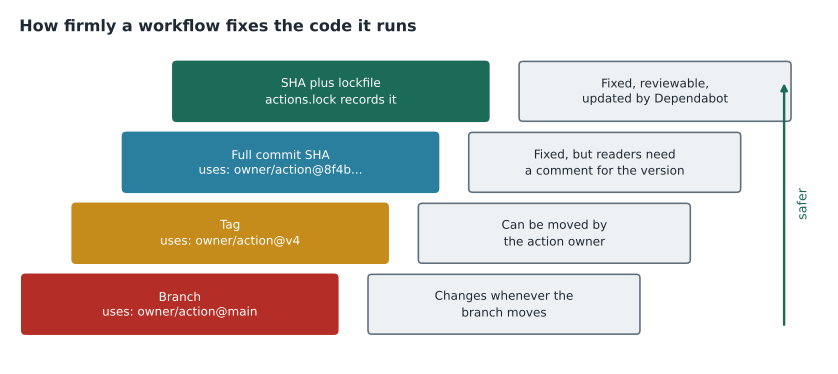
Major version tags exist for a good reason: they let consumers receive compatible fixes automatically. The trade-off is trust. Using @v4 means trusting the action's maintainers, and everyone who can push to the action's repository, not to move v4 to something harmful, and trusting that their account security is good enough that nobody else can. For GitHub's own actions that trust is usually reasonable. For an action maintained by one volunteer, it is a significant bet.
Pinning to a full commit SHA
Pinning replaces the tag with the commit it currently points to. By convention, a comment after the SHA records the version, so readers and tools know what the SHA means.
steps:
  # before: mutable tags
  - uses: actions/checkout@v5
  - uses: peaceiris/actions-gh-pages@v4

  # after: pinned to full commit SHAs, version in a comment
  - uses: actions/checkout@08c6903cd8c0fde910a37f88322edcfb5dd907a8 # v5.0.0
  - uses: peaceiris/actions-gh-pages@4f9cc6602d3f66b9c108549d475ec49e8ef4d45e # v4.0.0
A pinned SHA protects you only if it is the right SHA. Copy it from the action repository's release or tag page, check that the tag points to that commit in the original repository rather than a fork, and prefer releases that the publisher has made immutable. Since October 2025, GitHub has supported immutable releases, which lock a release's tag and assets once published, so the tag can no longer be moved to different code. When an action publishes immutable releases, its version tags carry much of the safety of a SHA.
Enforcing pinning by policy
Since August 2025, the allowed-actions policy at the enterprise, organization and repository levels can require actions to be pinned to a full-length commit SHA. With it on, a workflow that uses an action by tag or branch fails before running. Local actions are exempt, and reusable workflows may still be referenced by tag under that policy. Turning the requirement on without preparation breaks every unpinned workflow at once, so Lena first pinned everything, then enabled the policy in TrailCheck, and finally at the organization level a week later.
Keeping pins up to date
Pinning creates a maintenance cost: a SHA never receives fixes by itself, including security fixes. Dependabot version updates for the github-actions ecosystem solve most of it. Configured in dependabot.yml, Dependabot checks the actions your workflows use and opens pull requests when new versions are released; for pinned actions it updates the SHA and the version comment together. Each pull request is a small, reviewable change, and the action's release notes are linked so a reviewer can see what changed.
# .github/dependabot.yml
version: 2
updates:
  - package-ecosystem: "github-actions"
    directory: "/"
    schedule:
      interval: "weekly"
    groups:
      actions:
        patterns: ["*"]
    commit-message:
      prefix: "ci"
Actions lockfiles
Pins in workflow files have two weaknesses. They are scattered across many files, and they cover only the actions you name directly, not the actions those actions use. A composite action that uses another action by tag reintroduces exactly the risk you removed. Actions lockfiles, in public preview from October 14, 2026 and generally available from October 28, 2026, address both. A lockfile, .github/workflows/actions.lock, records the exact commit for every action a repository's workflows use, including the actions they depend on. Runs resolve actions through the lockfile and fail if what would run does not match. A require lockfile policy can be set at the enterprise, organization or repository level, a lockfile satisfies the SHA-pinning requirement, and Dependabot updates the lockfile along with the workflows. A GitHub CLI extension generates and refreshes lockfiles locally.
Because lockfiles had become generally available only a month before the session, Lena treated them as a second step. TrailCheck, the public repository with the most outside contributions, got a lockfile first, and the team agreed to evaluate requiring lockfiles across the organization after a month. At Skerry, the store systems organization already requires lockfiles, matching the stricter controls on code that runs in stores.
Other supply chain controls for actions
| Control | Protects against | Level |
|---|---|---|
| Allow selected actions with patterns | Unreviewed actions entering workflows | Enterprise, organization, repository |
| Block specific actions with ! patterns | Known bad actions or versions | Enterprise, organization, repository |
| Require full-length SHA pinning | Moved tags and branches | Enterprise, organization, repository |
| Require lockfiles | Moved tags in dependencies of actions | Enterprise, organization, repository |
| Dependabot updates for actions | Pins going stale and missing fixes | Repository |
| Forking or vendoring an action into the organization | Upstream changes outside your review | Organization |
| Narrow token permissions and step-scoped secrets | Damage a compromised action can do | Workflow and job |
Some organizations go further and vendor critical actions: they fork the action into an internal or private repository, review it, and use their copy, pulling upstream changes only after review. That gives the most control and the most work, because every upstream fix must be reviewed and merged by hand. Skerry vendors only five actions, the ones that run in deployment workflows with cloud access; everything else is pinned and covered by lockfiles.
Container-based actions have one more layer. A Docker action whose metadata names an image by tag can change underneath you even if the action's commit is pinned. Well-maintained Docker actions reference their image by digest, and when you write your own, do the same. The same applies to container jobs and service containers in your workflows: an image referenced by digest is fixed in the way a commit SHA is.
Limiting the damage
No pinning strategy is perfect, so the final layer is limiting what a compromised action could do. The compromise in March 2025 was most damaging in workflows that gave every step access to secrets and broad token permissions. A job that runs a linter with contents: read and no secrets has little to lose; a job that holds a cloud credential and contents: write has a lot. Keeping powerful credentials in small, separate jobs that use few actions, and using OIDC so there is no long-lived secret to print, turns a supply chain incident from a disaster into an inconvenience.
Reviewing a new action before allowing it
Pinning fixes which code runs; it does not decide whether that code should run at all. Before adding an action to the allow list, Lena asked four questions, which became Tidewater's review template. Who maintains it, and is the repository active, with recent releases and responses to issues? What does it do with the token and secrets, judging from its documentation and a quick read of its source? Does it download and run other code at run time, such as a script fetched from a website, which pinning cannot fix? And is there a simpler alternative, such as a two-line shell step or an action from GitHub or a verified creator? For small actions, reading the source takes minutes and is the most reliable review there is.
| Question | Warning sign |
|---|---|
| Who maintains it? | A single personal account, no releases for years, unanswered security issues |
| What does it touch? | Asks for write permissions or secrets it does not obviously need |
| Does it fetch code at run time? | Downloads scripts or binaries from URLs without checksums |
| Does it pin its own dependencies? | Uses other actions by tag inside a composite action |
| Is there a simpler option? | The same result takes a few lines of shell |
When an action is compromised
Pinning also shapes what happens when a compromise is announced. With tags, every workflow that ran during the window may have executed the malicious code, and the response is to rotate every secret those workflows could reach. With SHAs pinned to a commit from before the compromise, workflows did not run the bad code, and the response is to confirm the pinned commit is safe and avoid updating to compromised versions. Either way, the steps are the same: identify the affected actions and versions from the advisory, search the organization's workflows and lockfiles for them, check run logs during the affected period, rotate any secrets that could have been exposed, and block the bad versions with a ! pattern until a fixed release is available. Dependabot alerts for GitHub Actions, raised from the GitHub Advisory Database, help with the first two steps.
Yevgenia summarized Skerry's approach as layers rather than a single rule: an enterprise allow list of about a hundred patterns, SHA pinning required everywhere, lockfiles required where code reaches stores, Dependabot updating pins weekly, five vendored actions for deployment, and narrow permissions in every job. "Any one of those can fail," she said. "We have never seen all of them fail at once." Tidewater's version is smaller, but it has the same shape, and each layer was cheap to add once the inventory existed.
Pinning has one more benefit that is easy to overlook: reproducibility. When a run fails in a way nobody can explain, a workflow that pins every action can be re-run months later against exactly the same action code, which removes one variable from the investigation.
Worked problem
Reviewing a pinning pull request
Dependabot opens a pull request changing uses: some-org/upload-report@1f2e...c9 # v2.3.0 to uses: some-org/upload-report@7a8b...d4 # v2.4.0 in TrailCheck. What should a reviewer check before approving?
Show solution
- Open the linked release notes for v2.4.0 and confirm the changes make sense.
- Confirm the new SHA is the commit the v2.4.0 tag points to in the original repository, and whether the release is immutable.
- Check whether the new version requests new permissions or inputs, and look at the diff between the two commits if the action is small.
- Let the checks run; then merge.
Answer: Read the release notes, verify the SHA matches the upstream tag, check for permission changes, and merge after checks pass.
Worked problem
Finding the hidden dependency
TrailCheck pins all its actions to SHAs, yet a security review flags that one of its pinned composite actions uses another action as actions/cache@v4 inside its action.yml. Is TrailCheck exposed, and what helps?
Show solution
- The composite action's own steps resolve their uses: references at run time, so actions/cache@v4 can still move even though the composite action is pinned.
- TrailCheck cannot edit the composite action, but a lockfile records and enforces the exact commits of transitive actions.
- Alternatively, ask the composite action's maintainer to pin its dependencies, or vendor the action.
Answer: Yes, through the transitive tag; an actions lockfile pins transitive actions, or the composite action must pin its own dependencies.
Common mistakes
MistakeBelieving a version tag such as @v3 always refers to the same code.
InsteadTags can be moved; only a full commit SHA, or an immutable release, is fixed.
MistakePinning SHAs and never updating them.
InsteadUse Dependabot version updates for the github-actions ecosystem.
MistakeTurning on required SHA pinning across the organization before pinning existing workflows.
InsteadPin first, enable on one repository, then widen the policy.
MistakeAssuming pinning your direct actions also pins the actions they use.
InsteadTransitive actions need lockfiles or pinning by the action's maintainer.
By the end of the session every Tidewater workflow used SHAs with version comments, Dependabot had opened its first grouped update, TrailCheck had a lockfile, and the organization required SHA pinning. Lena timed the whole change at under two hours, most of it spent reading release pages.
Summary and key terms
- Branches and tags can change; a full commit SHA always means the same code.
- A compromised action whose tags were moved in March 2025 showed why pinning matters.
- Pin with a version comment, verify the SHA against the upstream tag, and prefer immutable releases.
- Policies can require full-length SHA pinning (since August 2025) and, since October 2026, actions lockfiles.
- Lockfiles cover transitive actions; Dependabot updates pins and lockfiles.
- Limit damage with narrow permissions, step-scoped secrets, OIDC and small credential-holding jobs.
- Pinning
- Referencing an action by its full commit SHA so the same code runs every time.
- Mutable reference
- A branch or tag that can be changed to point at different code.
- Immutable release
- A release whose tag and assets cannot be changed after publication.
- Actions lockfile
- The .github/workflows/actions.lock file recording exact commits for all actions a repository uses, including transitive ones.
- Transitive dependency
- An action used by another action rather than directly by your workflow.
- Vendoring
- Keeping a reviewed copy of an action in your own organization.
Practice problems
Work each problem on paper first, then reveal the answer to check.
Why add a version comment after a pinned SHA?
Show answer
So readers and Dependabot know which release the SHA represents.
What can a lockfile pin that workflow-level SHAs cannot?
Show answer
Actions used inside other actions, the transitive dependencies.
Which ecosystem name does Dependabot use for actions?
Show answer
github-actions.
Lesson quiz · 5 questions
Score 60% or more to complete this lesson.
Create a free account to save your progress, take quizzes and earn a certificate.