
MSBA-302 · Lesson 11 of 12 · 21 min
Auditing Actions
▶ Video coming soon A video version of this lesson is on the way.
Tidewater is small enough that nobody had ever asked it to prove anything about its automation. That changed when Skerry, as TrailCheck's sponsor, sent a short supplier questionnaire for its January 2027 audit. Ottoline Brisbane-Teale, Skerry's internal audit lead, wanted to know three things about the TrailCheck project: who can change its deployment pipeline, who approved the last ten production deployments, and how Tidewater would know if a secret or runner setting were changed without permission. Priya forwarded it to Lena with one line: "Let's answer this properly, and keep the answers current." The eleventh session was about where the evidence lives and how to keep it.
Four sources of evidence
Evidence about GitHub Actions is spread across several places, each answering different questions. Knowing which is which saves hours of searching.
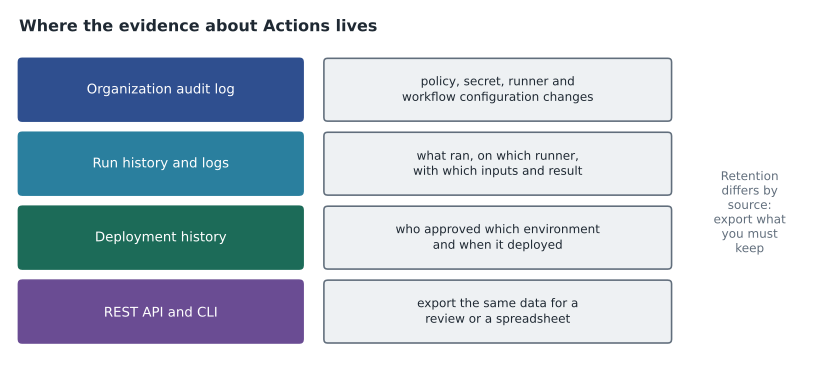
| Question | Where to look |
|---|---|
| Who changed the allowed-actions policy or token default? | Organization audit log |
| Who added, updated or removed an organization or repository secret? | Audit log (names and actors only; never values) |
| Who registered or removed a self-hosted runner, or changed a runner group? | Audit log |
| Who changed a workflow file? | Git history and the pull request that merged the change |
| What did a particular run do, and with which commit? | The run's summary and logs |
| Who approved a deployment to production, and when? | The environment's deployment history and review records |
| Who re-ran a failed job? | The run's attempts, which record who started each one |
The organization audit log
The audit log records actions taken in the organization: by members, by owners, by apps and by GitHub on their behalf. Organization owners can view it in the organization settings, search it with qualifiers such as action:, actor: and repo:, and export results. For Actions, the useful events are changes to Actions policies and settings, organization and repository secrets and variables, runner registration and removal, runner group changes, environment changes, and workflow runs themselves on plans that record them. Each entry records the actor, the action, the time, the repository and, where relevant, the source of the request.
# Searching the organization audit log (examples; check event names in the docs)
action:org.update_actions_secret
action:org.register_self_hosted_runner actor:owen-tremblay
action:environment repo:tidewater/trailcheck
created:>=2026-10-01 action:org.update_actions_settings
Two facts about the audit log shape any audit plan. First, retention: GitHub keeps most audit log events for 180 days, and Git events for a much shorter time, seven days. An auditor asking about a change made last spring will find nothing unless someone exported it. Second, secrets are never logged. The audit log records that TILES_KEY was updated and by whom, never the old or new value, which is exactly what you want and also means the log cannot prove which value a run used.
Streaming and the API
On GitHub Enterprise Cloud, enterprises can stream the audit log continuously to a storage account or a security information and event management system, where it can be kept for years and correlated with other systems. Skerry streams its audit log to its security monitoring platform and keeps thirteen months, matching its audit cycle. Enterprise Cloud also offers REST API access to the audit log for scripted reviews. On the Team plan, Tidewater exports search results from the interface on a schedule instead: Lena added a monthly reminder to export the previous month's Actions-related events and store them in a private repository that only owners can read.
Run history and logs
Each workflow run records what happened: the triggering event and actor, the commit, every job with its runner, every step with its output, annotations, artifacts and the job summary. The Set up job section of each job's log records the runner name and image, and the GITHUB_TOKEN's effective permissions. Re-runs are kept as numbered attempts, each recording who started it. Logs are kept for a configurable retention period, ninety days by default, after which they are deleted with the run's artifacts, so they are evidence for recent questions only.
Logs are also a place secrets must never appear. Masking hides exact secret values, but a careless debug step can still print a transformed value or a token returned by a tool. Part of Tidewater's monthly review became a search of recent logs for the words token, password and key, which twice found harmless matches and once found a debug line that printed a full API response containing a short-lived token. It had expired, but the line was removed.
Deployment history and approvals
Environments keep their own record. The repository's Deployments view lists every deployment to each environment with its commit, workflow run, status and time, and for environments with required reviewers it records who approved or rejected each deployment and any comment they left. That answers Ottoline's second question directly for TrailCheck, which is public, because on the Team plan required reviewers are available for public repositories. For the private guidebook repository, where the Team plan does not offer required reviewers, the evidence comes instead from the branch rules on the environment and the workflow execution protection that limits who may start the release workflow.
# Export recent deployments and approvals with the GitHub CLI and REST API
gh api repos/tidewater/trailcheck/deployments \
  --jq '.[] | {id, environment, ref, created_at, creator: .creator.login}' | head -n 40

# Runs of the deploy workflow in the last month
gh run list --repo tidewater/trailcheck --workflow deploy.yml \
  --created ">=2026-10-23" --json databaseId,headSha,event,conclusion,createdAt
Who can change the pipeline?
Ottoline's first question is answered by configuration rather than logs. The pipeline is the workflow files in .github/workflows, the reusable workflows they call, the actions they use, and the settings around them. Lena listed the controls:
| Part of the pipeline | Who can change it | Control |
|---|---|---|
| Workflow files in TrailCheck | Anyone with write access, through a pull request | Ruleset on main: pull request, one review, CODEOWNERS for .github/workflows |
| Shared reusable workflow node-ci.yml | Maintainers of the .github repository | Ruleset and CODEOWNERS; version tags created only by owners |
| Third-party actions | Organization owners, through the allow list | Allow selected, SHA pinning required, lockfile in TrailCheck |
| Secrets and environments | Repository and organization administrators | Two owners; changes recorded in the audit log |
| Runners and runner groups | Organization owners | Recorded in the audit log; reviewed monthly |
A detail auditors often miss: the CODEOWNERS file only enforces reviews if a ruleset or branch protection requires review from code owners. Lena checked that the TrailCheck ruleset had that option on, so a change to any workflow file needs approval from Priya or Dmitri, not just any reviewer.
Detecting unexpected changes
Ottoline's third question, how Tidewater would know about an unauthorized change, is about alerting rather than records. On Enterprise Cloud, streaming to a monitoring system makes alerts straightforward: a rule fires when a runner is registered outside working hours or an Actions policy is relaxed. Without streaming, Tidewater used two lighter mechanisms. A scheduled workflow in the private admin repository calls the REST API weekly with a GitHub App token, reads the organization's Actions settings, runner groups and the list of secret names with their updated dates, compares them with the expected values stored in the repository, and opens an issue if anything differs. And the monthly audit log export gives a human a reason to look.
Building an evidence pack
Auditors rarely want raw logs; they want a short explanation of each control backed by a sample of evidence. Lena organized Tidewater's answer to Ottoline as an evidence pack: for each question, a paragraph describing the control, a screenshot or export showing the setting, and a sample of records showing the control working. For approvals, that meant the environment's protection settings, the last ten deployments with their approvers, and one rejected deployment with its comment. For secrets, it meant the list of secret names with their last-updated dates, the audit entries for the last rotation, and the policy that secrets be rotated yearly.
| Control | Setting evidence | Operating evidence |
|---|---|---|
| Changes to workflows are reviewed | Ruleset requiring pull requests and code-owner review | Three merged pull requests touching .github/workflows with approvals |
| Production deployments are approved | Environment protection rules | Deployment history with approvers for the period |
| Only approved actions run | Allowed-actions policy and pinning requirement | A failed run showing an unapproved action blocked |
| Secret changes are traceable | List of secret names and owners | Audit log entries for recent updates |
| Runner access is limited | Runner group settings | Monthly review notes and drift-check issues |
The distinction between setting evidence and operating evidence comes from auditing practice. A setting shows that a control exists today; operating evidence shows it worked throughout the period under review. A ruleset screenshot proves reviews are required now, but only the history of merged pull requests proves they were required in March. That is why retention and regular exports matter: operating evidence that has expired cannot be recreated.
Investigating a suspicious run
Audit sources also support investigations. Suppose a workflow run in the guidebook repository uploaded files at an unusual time. The investigation follows the evidence in order: the run summary gives the trigger, actor, commit and workflow file; the commit and its pull request show who changed the workflow and who approved it; the Set up job log gives the runner and token permissions; the audit log shows any related setting or secret changes around that time; and the cloud provider's own logs show what the OIDC identity actually did. Lena walked through this sequence once with a harmless test run, so that the team would know where to look before they ever needed to.
Keeping personal data in mind
Audit records contain personal information: user names, sometimes IP addresses, and the times people worked. Exports should be stored with access limited to the people who need them and kept only as long as the audit purpose requires, in line with privacy law such as PIPEDA in Canada. Lena stored Tidewater's monthly exports in a private repository readable only by organization owners and set a reminder to delete exports older than two years, which covers Skerry's audit cycle with room to spare.
Finally, Lena recorded the procedure itself, so the evidence pack could be rebuilt next year by someone else: which exports to take, where they are stored, which settings to capture and who signs off. An audit procedure that lives only in one person's memory is not much better than no procedure.
Worked problem
Answering "who changed this secret?"
Rosa notices that the newsletter platform rejected a sync on November 3. Lena suspects the NEWSLETTER_KEY organization secret was changed. How can she find out who changed it and when?
Show solution
- Open the organization audit log and search for action:org.update_actions_secret, filtered to early November.
- The entry shows the actor and time of the update, but not the value.
- Ask the actor what changed, and compare with the newsletter platform's own key history to confirm which key is current.
Answer: The audit log shows who updated the secret and when; the value itself is never logged, so confirm it with the provider.
Worked problem
Planning for retention
Ottoline asks for evidence of every production deployment approval for TrailCheck over the past twelve months. Deployment records are kept, but workflow logs are kept for 90 days and audit events for 180 days. What can Lena provide, and what should change?
Show solution
- Deployment history and review records for the environment cover the full period, so approvals can be exported.
- Logs older than 90 days and audit events older than 180 days are gone unless they were exported.
- Going forward, export audit events monthly, keep release run logs or summaries as release assets, and document the procedure.
Answer: Export the deployment and approval history now; set up monthly exports so older logs and audit events are kept in future.
Common mistakes
MistakeExpecting the audit log to show secret values.
InsteadIt records who changed a secret and when, never the value.
MistakeAssuming audit events and logs are kept indefinitely.
InsteadMost audit events are kept 180 days, Git events 7 days, logs per the retention setting; export what you must keep.
MistakeAdding CODEOWNERS and assuming code-owner review is enforced.
InsteadRequire review from code owners in the ruleset or branch protection.
MistakeTreating audit evidence as a one-time project.
InsteadSchedule exports and drift checks so the evidence stays current.
Lena's answers went back to Ottoline as a two-page document with exports attached. The drift-check workflow found its first difference the following week: a runner Owen had registered for a test and forgotten. It was removed the same day, and the issue was closed with a link to the audit entry.
Summary and key terms
- Evidence lives in the audit log, run history and logs, deployment history, and the API and CLI that export them.
- The organization audit log records Actions policy, secret, variable, runner and environment changes, never secret values.
- Most audit events are kept 180 days and Git events 7 days; Enterprise Cloud can stream the audit log for longer retention.
- Run logs record runners, token permissions and attempts, and are deleted after the log retention period.
- Deployment history records approvals for environments with required reviewers.
- Rulesets, CODEOWNERS with required code-owner review, and scheduled drift checks show who can change the pipeline and detect changes.
- Audit log
- The record of actions taken in an organization or enterprise.
- Audit log streaming
- An Enterprise Cloud feature that sends audit events continuously to external storage or monitoring.
- Attempt
- One run of a workflow run's jobs; re-runs create new attempts.
- Deployment history
- The record of deployments and approvals for each environment.
- Drift check
- An automated comparison of actual settings with the expected configuration.
- Retention
- How long a record is kept before deletion.
Practice problems
Work each problem on paper first, then reveal the answer to check.
Where do you find who approved a production deployment?
Show answer
In the environment's deployment history and review records.
How long are most audit log events kept?
Show answer
180 days; Git events 7 days.
What enforces the reviews that CODEOWNERS requests?
Show answer
A ruleset or branch protection that requires review from code owners.
Lesson quiz · 5 questions
Score 60% or more to complete this lesson.
Create a free account to save your progress, take quizzes and earn a certificate.