
MSBA-302 · Lesson 3 of 12 · 21 min
Runner groups
▶ Video coming soon A video version of this lesson is on the way.
Tidewater owns exactly one machine that runs GitHub Actions jobs. It is a small computer in the print room of the Moncton office, with the licensed typesetting software that turns guidebook chapters into print-ready PDFs. Owen registered it as a self-hosted runner a year ago, at the organization level, so that any repository could send PDF jobs to it. In the third session Lena opened the organization's runner settings and asked a simple question: which repositories can send jobs to that machine today? The answer was all of them, including TrailCheck, which accepts pull requests from people Tidewater has never met. The session was about runner groups, the control that decides which repositories may use which runners.
Runners, labels and groups
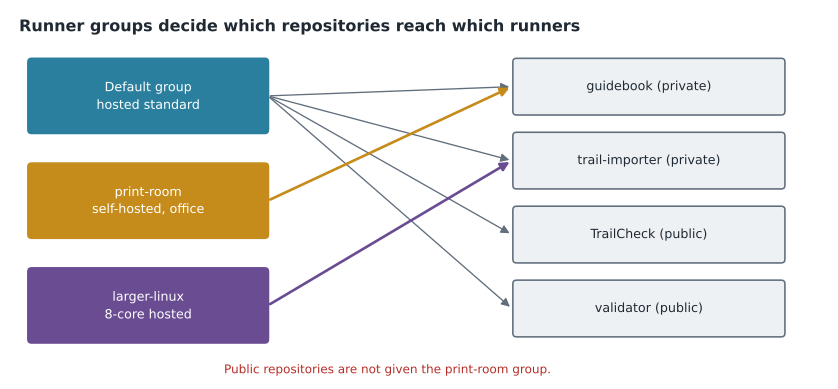
A runner is a machine that picks up jobs and runs them. GitHub-hosted runners are virtual machines that GitHub provides fresh for each job; self-hosted runners are machines you register and maintain. A job chooses a runner with runs-on, either by labels, such as ubuntu-latest or self-hosted with linux and x64, or by group. Labels describe what a runner is; groups describe who may use it.
A runner group is a named collection of runners, owned by an organization or by an enterprise, with an access policy. Every organization has a Default group, and new runners land there unless you choose otherwise. A runner belongs to exactly one group at a time, and you can move it between groups. GitHub's documentation states that organizations on the GitHub Team plan can use runner groups, so Tidewater could create its own.
What a group's policy controls
Each group has settings that limit its use. The exact options depend on whether the group belongs to an organization or an enterprise and on your plan, so check the settings page rather than assuming, but the common controls are these:
| Setting | What it controls | Tidewater's choice for print-room |
|---|---|---|
| Repository access | All repositories in the organization, or only selected ones | Selected: guidebook only |
| Public repositories | Whether public repositories may use the group at all; off by default for self-hosted groups | Off |
| Workflow access | On plans that offer it, only selected workflow files (often reusable workflows at a pinned ref) may use the group | Not used at Tidewater; used at Skerry |
| Organization access (enterprise groups) | Which organizations in an enterprise may use the group | Not applicable on Team |
Repository access is the setting that fixed Tidewater's problem. Lena created a group named print-room, moved the office machine into it, set repository access to the guidebook repository only, and left public repository access off. From then on, a workflow in TrailCheck that asked for the print-room runner would sit in the queue and never be assigned a job, because the group would not serve that repository. A job that no permitted runner can take waits for a while and then fails, which is what you want: a visible failure, not a quiet run on the wrong machine.
Workflow restrictions
Repository access answers "which repositories"; workflow restrictions answer "which workflows". With them, a group can be limited to specific workflow files, usually reusable workflows referenced at a particular ref, so that even inside an allowed repository only the approved deployment workflow can reach the deployment runners. Yevgenia uses this at Skerry for the stores-deploy group: only skerry/deploy-workflows/.github/workflows/store-release.yml at a tagged release can run on those runners, so a developer cannot write an ad hoc workflow in a store repository that deploys to tills from a laptop branch.
Routing jobs to a group
A job asks for a group with the group key under runs-on, optionally combined with labels that all must match. If a group contains runners with different capabilities, labels select among them; if it contains one kind, the group alone is enough.
jobs:
  proof:
    # only runners in the print-room group, and only those with the typesetter label
    runs-on:
      group: print-room
      labels: [self-hosted, typesetter]
    timeout-minutes: 45
    steps:
      - uses: actions/checkout@v5
      - run: ./scripts/build-proof.sh chapters/ch07-fundy-coast.md

  heavy-import:
    runs-on:
      group: larger-linux
    steps:
      - uses: actions/checkout@v5
      - run: npm ci && npm run import:full
You can also still use labels alone, such as runs-on: [self-hosted, typesetter]. That works, but it routes to any runner with those labels that the repository may use, in any group. When a repository could reach runners in several groups with similar labels, naming the group makes the intent explicit and guards against a job landing on an unexpected machine.
How GitHub assigns a job
It helps to know what happens between "run started" and "job running". When a job becomes ready, GitHub looks for an idle runner that the repository and workflow are allowed to use and whose group and labels match the job's runs-on. For GitHub-hosted runners, a matching machine is almost always available within seconds. For self-hosted runners, the job waits in the queue until a permitted runner with matching labels becomes idle. If none ever does, the job stays queued for a long time and then fails; check GitHub's current limits for how long a self-hosted job may wait. While it waits, the run page says it is waiting for a runner, which is the first clue when a job "hangs" before printing any log.
Three causes explain almost every job that never starts on a self-hosted runner. The runner is offline or busy; no runner has every label the job asks for, often because of a typo or a label that was renamed; or the group's policy does not allow the repository or workflow. Lena wrote these three checks at the top of Tidewater's troubleshooting page, in that order, because the first two are fixed in minutes and the third usually means the policy is doing its job.
| Symptom | Likely cause | Where to look |
|---|---|---|
| Queued, waiting for a runner, runner shows Offline | Machine off or runner service stopped | Runners page, then the machine |
| Queued, runner shows Idle | Labels or group do not match, or policy excludes the repository | runs-on in the workflow; group repository list |
| Queued, runner shows Active | Runner busy with another job | Add runners or wait; consider concurrency limits |
| Fails at once with a group or label error | Group name misspelled or not visible to the repository | Group name and sharing settings |
Naming and documenting groups
A group's name appears in workflow files, so choose names that describe purpose rather than hardware: print-room and stores-deploy say what the runners are for, while names like runner-group-2 or the model number of a machine force readers to look things up. Write down, next to the group list, who owns each group, why it exists and which repositories should have access. At Tidewater that is a short section in actions-inventory.md; at Skerry it is a table in the platform team's governance repository, checked nightly against the real settings through the REST API, so drift shows up as a report rather than a surprise.
Groups for GitHub-hosted larger runners
Runner groups are not only for self-hosted machines. Larger runners are GitHub-hosted runners with more processors, more memory, a GPU, Arm processors or other options, available on the Team and Enterprise Cloud plans and billed per minute even in public repositories. You create a larger runner in the organization or enterprise settings, give it a name, and assign it to a group, and the group's access policy decides who may use it. Because larger runners cost more, their groups are a spending control as well as a security one.
The full importer for TrailCheck's trail database took forty minutes on a standard runner, and Rosa Delgado wanted it faster for the spring data load. Lena created an 8-core Linux larger runner, put it in a group called larger-linux, and gave only the trail-importer repository access, so nobody would accidentally move every job in the organization onto the more expensive machine. On Enterprise Cloud, larger runners can also have static IP address ranges or connect to an Azure private network, which Yevgenia uses at Skerry for jobs that must reach systems behind a firewall.
Organization and enterprise groups
In an enterprise, runner groups can be created at the enterprise level and shared with chosen organizations, as well as at the organization level. An enterprise group appears to the organizations it is shared with, and their owners can then decide which of their repositories may use it, within what the enterprise allows. Skerry keeps its expensive and sensitive pools in enterprise groups: data-gpu for machine learning jobs, stores-lab for the till test bench, stores-deploy for store releases and azure-private for jobs that reach private networks. Each is shared with only the organizations that need it, and each organization narrows access further to particular repositories.
| Group | Runners | Shared with | Narrowed to |
|---|---|---|---|
| hosted-standard | Standard GitHub-hosted | All organizations | All repositories |
| data-gpu | GPU larger runners | skerry | Data science repositories |
| stores-lab | Self-hosted, till test bench | skerry-stores | Point-of-sale repositories |
| stores-deploy | Self-hosted, ephemeral | skerry-stores | One approved release workflow |
| azure-private | Larger runners on a private network | skerry, skerry-stores | Repositories that deploy to private services |
Repository-level runners
Self-hosted runners can also be registered directly to a single repository, which bypasses organization groups entirely. That is convenient for an experiment and hard to govern at scale, because owners of each repository can attach machines that nobody else knows about. Enterprises can turn off repository-level self-hosted runners for all organizations, so every runner must be registered through an organization or enterprise group with a visible policy. Skerry turned this off after finding that about a third of its old self-hosted machines had been attached to individual repositories by teams that had since moved on.
Auditing runner access
Runner and group changes are recorded in the organization's audit log, which the auditing lesson covers, and the runners page shows each runner's group, labels, status and the job it is running. Lena added a monthly item to Tidewater's maintenance checklist: open the runner groups page, confirm that every group's repository list still matches what the team intends, and remove runners that have been offline for more than a month. Offline runners clutter the list and, worse, can come back online months later with outdated software.
One more design choice comes up when a group holds several kinds of runner: whether to split it. A group with both Linux and Windows self-hosted runners works if jobs always add operating-system labels, but separate groups make access reviews clearer and let you share each kind with different repositories. Lena's rule of thumb was one group per purpose and access pattern, not one group per machine.
Worked problem
A job that never starts
Malik adds a job to the public validator repository with runs-on: group: print-room to render a sample PDF. The run shows the job as queued with the message that it is waiting for a runner to pick it up, and after a long wait it fails. The print-room runner is online and idle. What is happening?
Show solution
- The print-room group allows only the guidebook repository, and public repositories are off.
- GitHub will not assign the job to any runner in that group from validator, so it waits until it times out.
- The fix is not to widen the group; render the sample on a GitHub-hosted runner or have guidebook produce it.
Answer: The group policy excludes validator; the job correctly never reaches the office machine.
Worked problem
Choosing between labels and groups
Skerry has two self-hosted pools that both carry the labels linux and x64: stores-lab and azure-private. A store repository has access to both groups. A workflow uses runs-on: [self-hosted, linux, x64]. Why might its jobs land on the wrong pool, and what should it use?
Show solution
- Labels alone match any runner the repository may use whose labels include all those listed.
- Both groups match, so the job can go to either pool.
- Use runs-on: group: stores-lab (optionally with labels) so routing follows the intended group.
Answer: Name the group in runs-on; labels alone can match runners in more than one permitted group.
Common mistakes
MistakeRegistering a self-hosted runner at the organization level and leaving it in the Default group available to all repositories.
InsteadCreate a group with selected repositories and public repositories turned off.
MistakeThinking a runner can be in several groups.
InsteadA runner belongs to exactly one group at a time.
MistakeAssuming larger runners are free in public repositories like standard runners.
InsteadLarger runners are billed per minute in any repository.
MistakeRelying on labels when several permitted groups have runners with the same labels.
InsteadName the group in runs-on.
At the end of the session the print-room machine served only the guidebook repository, the larger runner served only the importer, and the Default group held nothing but the standard GitHub-hosted runners. Owen's PDF proofs still built in six minutes, from the one repository that needed them.
Summary and key terms
- Labels describe what a runner is; runner groups decide which repositories and workflows may use it.
- Every organization has a Default group; a runner belongs to one group at a time.
- Group policies can select repositories, block public repositories and, where offered, restrict to selected workflows.
- runs-on can name a group, optionally with labels, so jobs land only on intended runners.
- Larger runners are GitHub-hosted, billed per minute in any repository, and assigned to groups.
- Enterprise groups are shared with chosen organizations, and repository-level runners can be disabled by policy.
- Runner group
- A named set of runners with a policy deciding which repositories, organizations and workflows may use them.
- Default group
- The group that new runners join unless another is chosen.
- Label
- A tag on a runner, such as linux or self-hosted, that runs-on can match.
- Larger runner
- A GitHub-hosted runner with more resources or special hardware, billed per minute.
- Workflow restriction
- A runner group setting that limits use to selected workflow files.
Practice problems
Work each problem on paper first, then reveal the answer to check.
How many runner groups can a runner belong to at once?
Show answer
One.
Which group setting keeps public repositories off a self-hosted runner?
Show answer
The public repositories option, which is off by default for self-hosted groups; leave it off.
How does a job ask for a runner in a particular group?
Show answer
runs-on: with a group: key, optionally with labels.
Lesson quiz · 5 questions
Score 60% or more to complete this lesson.
Create a free account to save your progress, take quizzes and earn a certificate.