
MSBA-302 · Lesson 2 of 12 · 21 min
Workflow templates
▶ Video coming soon A video version of this lesson is on the way.
The second hardening session started with a complaint from Owen Tremblay. He had created a new repository for a guidebook to the Acadian coast, opened the Actions tab, and been offered dozens of public starter workflows for languages Tidewater does not use. "Which one is ours?" he asked. None of them were. Every new Tidewater repository began with someone copying check.yml from another repository by hand, editing it, and usually forgetting one of the improvements the team had made since. Lena's goal for the session was to make the right starting point the easiest one: Tidewater's own workflow templates, offered first on the New workflow page.
What a workflow template is
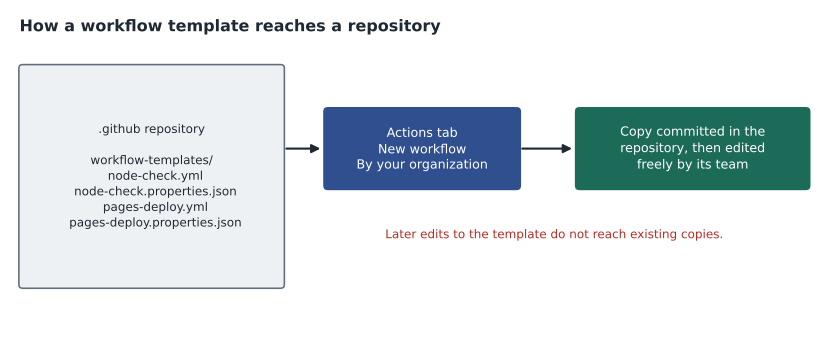
A workflow template is a workflow file that GitHub offers when someone creates a new workflow in a repository. GitHub publishes public templates for common languages, frameworks and deployment targets; an organization can publish its own. When a person chooses a template, GitHub copies its contents into a new file in that repository's .github/workflows folder, ready to edit and commit. From that moment the copy belongs to the repository. Later improvements to the template do not reach copies that already exist, which is the defining difference between a template and a reusable workflow.
That makes templates good for some jobs and poor for others. They are good for starting points that teams are expected to adapt: a check workflow whose test command differs by project, a deployment skeleton with placeholders. They are poor for anything that must stay identical everywhere, such as a security scan the organization requires. For that, the template should be a thin caller of a reusable workflow, so the copy is two dozen lines that rarely change and the real logic stays central.
Where organization templates live
Organization templates must be stored in the organization's repository named .github, in a folder called workflow-templates at the repository root. Each template is a pair of files with the same base name: the workflow itself, such as node-check.yml, and a metadata file, node-check.properties.json. A template can also have an icon, an SVG file in the same folder, or it can name a built-in icon. Templates in other folders or other repositories are not offered on the New workflow page.
Who sees the templates depends on the .github repository's visibility. If it is public, its templates appear to members of the organization. Since September 2025, templates in a .github repository that is not public, private on Team or private or internal on Enterprise Cloud, are also available to the organization's members, which lets an organization keep internal details such as server names out of public view. Tidewater's .github repository was public because it held the organization profile, so Lena wrote the templates without anything confidential in them.
The metadata file
The properties file tells GitHub how to present the template. It is a small JSON document with a few keys:
| Key | Required | Purpose |
|---|---|---|
| name | Yes | The title shown on the New workflow page |
| description | Yes | One or two sentences about what the template does |
| iconName | No | An SVG file in the folder (without .svg) or a built-in icon name |
| categories | No | Languages or topics, used to group templates and to suggest them for matching repositories |
| filePatterns | No | Patterns of files whose presence in a repository makes GitHub suggest the template |
{
  "name": "Tidewater Node check",
  "description": "Lint and test a Node project with Tidewater's shared CI workflow.",
  "iconName": "tidewater-wave",
  "categories": ["JavaScript", "Node"],
  "filePatterns": ["package.json$"]
}
Categories and file patterns make the template appear in the right places. A repository whose files match a template's filePatterns sees it suggested near the top of the page; categories group templates and match the languages GitHub detects in the repository. Neither restricts who can use a template: anyone creating a workflow can browse every template the organization offers.
Writing the template file
The template file is an ordinary workflow, with one extra feature: placeholders that GitHub replaces when it copies the file. The one you will use most is $default-branch, which becomes the repository's default branch name, so a template that triggers on pushes to the default branch works whether a repository uses main or something older. Other placeholders exist for similar values; check the documentation for the current list before relying on one.
# workflow-templates/node-check.yml (in tidewater/.github)
name: Check

on:
  push:
    branches: [ $default-branch ]
  pull_request:
    branches: [ $default-branch ]

permissions:
  contents: read

jobs:
  node:
    uses: tidewater/.github/.github/workflows/node-ci.yml@v2
    with:
      node-version: "24"
      # working-directory: change this if the project is not at the root
      working-directory: "."
Notice how little logic the template contains. It sets the triggers, restricts the token, and calls node-ci.yml by its tag. When Tidewater improves the CI steps, it changes node-ci.yml and moves the v2 tag; every repository created from the template picks up the change without anyone editing its copy. The template is still useful because the triggers, permissions and inputs are the parts people most often got wrong when copying by hand.
A second template for deployments
Lena added a second pair, pages-deploy.yml and its properties file, for repositories that publish a static site to GitHub Pages. It declares a github-pages environment, the pages and id-token permissions the deploy job needs, a concurrency group so two deploys never overlap, and comments marking the build command to change. Grace Achterberg asked for one more line at the top of every template: a comment saying which template and version the file came from, such as "# from tidewater template node-check, November 2026". Because copies never update, that comment is how someone reviewing a repository a year later can tell whether its workflow predates an important improvement.
Templates and required workflows
Templates make the right thing easy; they do not make it mandatory. A team can delete or change its copy. When an organization needs certain checks to run before every merge, whatever a repository's own workflows say, it uses a different tool: a ruleset with a rule that requires workflows to pass before merging. The ruleset names a workflow file in a central repository and targets repositories by name or property; GitHub runs that workflow on pull requests in the targeted repositories and blocks merging until it passes. Requiring workflows is covered with rulesets in the enterprise management courses. For this course, the point is the division of labour: templates for good defaults, reusable workflows for central logic, rulesets for what must not be skipped.
| Need | Best tool | Why |
|---|---|---|
| A good starting point teams will adapt | Workflow template | Copied once, then owned by the repository |
| The same jobs everywhere, updated centrally | Reusable workflow | Callers run the current version of the ref they name |
| A check that must pass before merging, regardless of repository files | Ruleset requiring a workflow | Enforced by the organization, not the repository |
| The same steps inside many different jobs | Composite action | Used as one step, runner chosen by the caller |
Enterprise considerations
Templates are offered per organization, from each organization's own .github repository. At Skerry, which has several organizations, Yevgenia keeps one source of truth in an internal repository and a small workflow copies approved templates into each organization's .github repository when they change, so the New workflow page looks the same everywhere. That synchronization is Skerry's own automation, not a GitHub feature; it is a pattern worth knowing when one organization is not enough.
Yevgenia also pointed out that templates are a good place to encode policy in a gentle way. Skerry's templates all start with a permissions block, use full commit SHAs for third-party actions, set timeout-minutes on every job, and call central reusable workflows. Developers who start from a template get those habits for free, and reviewers spend their attention on the parts that are genuinely new.
Testing a template before publishing
A broken template wastes everyone's time, because the first person to use it discovers the problem. Before merging a template change, Lena created a scratch repository, opened the template's pull request branch, and copied the file in by hand, replacing $default-branch with main, to watch a real run. She also added a check in the .github repository that parses every template file as YAML and verifies that each .yml has a matching .properties.json with name and description, so a typo in the metadata cannot slip through review.
Maintaining templates over time
Templates age like any other code. Actions release new major versions, runner images change, and the organization's own conventions improve. A template that still uses an old major version of an action, or forgets a permissions block, teaches every new repository a bad habit. Lena set three maintenance rules for Tidewater's templates.
First, one owner per template. CODEOWNERS in the .github repository names who reviews changes to each template, so no template is everyone's and therefore nobody's. Priya owns node-check and Grace owns pages-deploy, because the deploy template encodes the editorial approval rules she asked for in the previous course.
Second, Dependabot watches the templates. Dependabot version updates for the github-actions ecosystem look in .github/workflows by default; a separate entry in dependabot.yml with directory set to /workflow-templates asks it to check the templates folder too, so outdated action versions in templates get pull requests like any workflow. Lena checked the current Dependabot documentation for how directories are matched before relying on this, because the behaviour has been refined over time.
Third, retire templates deliberately. When a template is no longer recommended, removing it from workflow-templates stops new repositories from using it but does nothing to existing copies. Before removing a template, search the organization's code for its marker comment to find the repositories that still use it, and open issues or pull requests to move them. Removing a template is the start of a migration, not the end.
| Template change | Effect on new repositories | Effect on existing copies | Follow-up |
|---|---|---|---|
| Fix a typo or comment | Fixed | None | Usually none |
| Update an action version | Updated | None | Dependabot updates copies that it watches |
| Change the reusable workflow tag | Calls the new tag | Still call the old tag | Pull requests to move callers |
| Remove the template | No longer offered | Unchanged | Find and migrate copies |
Yevgenia described Skerry's version of the same idea: a weekly report lists every repository whose workflows contain an old template marker, grouped by owning team, and the platform team opens pull requests in batches. With four thousand repositories, the marker comment is what makes the report possible at all.
Worked problem
Diagnosing a template that does not appear
Owen still cannot see "Tidewater Node check" on the New workflow page of his new repository. The files are in tidewater/.github under templates/node-check.yml and templates/node-check.properties.json. What is wrong?
Show solution
- GitHub offers organization templates only from the workflow-templates folder at the root of the .github repository.
- The folder is named templates, so GitHub ignores it.
- Rename the folder to workflow-templates, keeping the two files with matching base names.
Answer: Move the files into a folder named workflow-templates; the folder name is fixed.
Worked problem
Template or reusable workflow?
Rosa wants every repository's deploy workflow to stop deploying on Saturdays and Sundays, and she wants the rule changed in one place if the team changes its mind. Should Lena put the rule in the pages-deploy template?
Show solution
- A rule in the template would only reach repositories created after the change; existing copies keep the old file.
- The rule must change centrally, so it belongs in a reusable deploy workflow that the template calls, or in an environment protection rule.
- The template stays a thin caller and needs no edit when the rule changes.
Answer: No: put the rule in central automation (a reusable workflow or an environment rule) and keep the template a thin caller.
Common mistakes
MistakeExpecting edits to a template to update repositories that used it.
InsteadCopies are independent; put logic that must change centrally in a reusable workflow.
MistakeStoring templates in any folder of the .github repository.
InsteadUse the workflow-templates folder at its root, with a matching properties file for each template.
MistakeHard-coding main as the branch in a template.
InsteadUse the $default-branch placeholder.
MistakeTreating a template as a way to enforce a required check.
InsteadUse a ruleset that requires a workflow to pass before merging.
Owen created his repository's workflow from "Tidewater Node check" the same afternoon. It was eighteen lines long, called the shared workflow, and passed on its first run.
Summary and key terms
- A workflow template is copied into a repository when someone creates a workflow; the copy is independent afterwards.
- Organization templates live in the workflow-templates folder of the .github repository, each with a .properties.json file.
- The properties file sets name, description and optionally iconName, categories and filePatterns.
- Placeholders such as $default-branch are filled in when the template is copied.
- Since September 2025, templates in a .github repository that is not public are available to organization members.
- Use templates for starting points, reusable workflows for central logic and rulesets for checks that must run.
- Workflow template
- A workflow file offered on the New workflow page and copied into a repository when chosen; also called a starter workflow.
- Properties file
- The .properties.json file that names and describes a workflow template.
- filePatterns
- Patterns of repository files that make GitHub suggest a template.
- $default-branch
- A template placeholder replaced with the repository's default branch name.
- Required workflow
- A workflow that a ruleset requires to pass before merging in targeted repositories.
Practice problems
Work each problem on paper first, then reveal the answer to check.
Which two files make up one organization template?
Show answer
The workflow .yml file and a .properties.json file with the same base name, in workflow-templates.
Why make a template a thin caller of a reusable workflow?
Show answer
So central improvements reach every repository without editing each copy.
What key in the properties file makes GitHub suggest a template for repositories containing package.json?
Show answer
filePatterns, for example "package.json$".
Lesson quiz · 5 questions
Score 60% or more to complete this lesson.
Create a free account to save your progress, take quizzes and earn a certificate.