
MSBA-302 · Lesson 1 of 12 · 21 min
Sharing actions and workflows in an organization
▶ Video coming soon A video version of this lesson is on the way.
When the Actions clinic ended, Tidewater Trail Guides in Moncton had working pipelines in four repositories and a shared reusable workflow, node-ci.yml, tagged v2 in the organization's .github repository. Lena Fischer had written most of it, and she was still studying for Exam GH-200: GitHub Actions. Priya Nair noticed a new kind of problem. Nobody could say which actions the team's workflows trusted, who could change the shared workflow, which machines ran the jobs, or what would happen if a volunteer's pull request to the public TrailCheck repository tried something clever. "We learned to write automation," Priya told the team. "Now we have to run it like a small platform." She proposed a second series, the Actions hardening sessions, again with Lena at the keyboard. Yevgenia Kowalczyk-Arce, the build infrastructure lead at Skerry Outdoor Group, the retailer that sponsors TrailCheck, offered to join a few sessions to show how the same controls look across an enterprise of more than a thousand developers.
Tidewater is a GitHub Team organization. That plan matters throughout this course, because some controls exist for every organization, some need GitHub Team, and some need GitHub Enterprise Cloud. Each lesson says which is which, and Yevgenia's examples from Skerry show the enterprise version. The GH-200 outline expects you to know the controls at every level, so the course treats both sides.
What "sharing" means in GitHub Actions
Three kinds of automation get shared between repositories. An action is a reusable step: a JavaScript, Docker or composite action that a job calls with uses. A reusable workflow is a workflow with the workflow_call trigger that other workflows call as a whole job. A workflow template, also called a starter workflow, is a file that people copy when they create a new workflow. The previous course compared the three as authoring tools. This lesson looks at them as an administrator does: where they live, who can see them, and who decides whether they may run.
Sharing inside one repository
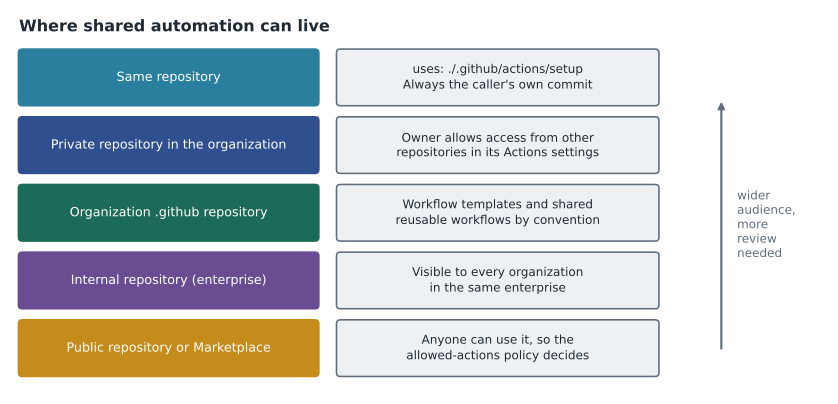
The simplest sharing needs no settings at all. A composite or JavaScript action stored in the same repository is used with a relative path, such as uses: ./.github/actions/setup-site, and a reusable workflow in the same repository is called with uses: ./.github/workflows/deploy.yml. Local references always use the files from the same commit as the calling workflow, so they cannot drift, and the allowed-actions policy does not restrict them. The cost is duplication: if three repositories each keep their own setup action, a fix has to be made three times. That was exactly the problem the shared node-ci.yml solved in the previous course.
Sharing from a private repository
By default, actions and reusable workflows in a private repository can only be used by workflows in that same repository. To share them with the rest of the organization, the owner of the private repository changes one setting: in the repository's Settings, under Actions and then General, the Access section lets you allow access from repositories in the organization. In an enterprise, the same setting can allow access from repositories in any organization of the enterprise. Nothing else in the repository becomes visible: people who cannot read the repository still cannot browse its code, but their workflows can run its actions and call its reusable workflows.
This setting is easy to forget and produces a confusing error. When Priya moved the pdf-proof action into a private repository, so that its container image could include the licensed fonts the printer requires, the guidebook workflows that used it began failing with a message that the action could not be found. The action existed and the path was right; the private repository simply had not granted access. Lena turned on organization access in the pdf-proof repository's Actions settings, and the next run passed.
| Where the action or workflow lives | Who can use it | What has to be set |
|---|---|---|
| Same repository | Workflows in that repository | Nothing; use a ./ path |
| Private repository, Team or Enterprise plan | Repositories in the organization, once allowed | Access setting in the private repository's Actions settings |
| Internal repository, Enterprise Cloud | Repositories in any organization of the enterprise, once allowed | Access setting in the internal repository |
| Public repository | Any repository on GitHub | Nothing on the publisher's side; consumers' allowed-actions policies still apply |
| GitHub Marketplace | Anyone | Publishing from a public repository with an action.yml at its root |
Internal repositories
Organizations that belong to an enterprise on GitHub Enterprise Cloud can create internal repositories, which every member of the enterprise can read but outsiders cannot. Internal repositories are a natural home for actions that the whole company shares. At Skerry, Yevgenia's team keeps a repository called skerry/actions with about twenty composite and JavaScript actions, all internal and all allowed for every organization in the enterprise. Tidewater cannot use internal visibility on its Team plan, so it uses private repositories with organization access instead.
The organization .github repository
A repository named .github in an organization has special meaning. GitHub reads several kinds of shared files from it: the organization profile README, default community health files such as a code of conduct, and, for Actions, workflow templates in a folder called workflow-templates. Many organizations also keep their shared reusable workflows there, as Tidewater did with node-ci.yml, simply because it is a well-known place. Nothing forces reusable workflows into .github; they can live in any repository the callers can reach. Workflow templates, however, must be in the .github repository's workflow-templates folder to appear on the New workflow page, which is the subject of the next lesson.
Treat the .github repository as production infrastructure. Lena protected its default branch with a ruleset requiring a pull request and one approving review, and added a CODEOWNERS file that makes Priya and Dmitri Kovac code owners of the workflows and templates folders. A careless change to node-ci.yml would otherwise reach every caller tracking its tag on their next run.
Deciding which actions may run
Sharing is one side of the coin; the other is control. Every organization has an allowed actions and reusable workflows policy, set under the organization's Settings, Actions, General. The choices are:
| Policy option | Effect |
|---|---|
| Allow all actions and reusable workflows | Any action or reusable workflow from any repository may run |
| Allow actions in this organization only (local) | Only actions and reusable workflows in the organization's own repositories, or in the enterprise, may run |
| Allow selected actions and reusable workflows | Local ones plus a chosen list: actions created by GitHub, actions from verified Marketplace creators, and named patterns such as azure/login@* |
| Disable GitHub Actions | No workflows run in the organization, or only in selected repositories |
With the selected option, the patterns are the important part. A pattern names an owner and repository and optionally a version, such as actions/checkout@v5 or docker/*, and since August 2025 a pattern can begin with an exclamation mark to block a specific action even when a broader rule would allow it. The same August 2025 change added an option to require actions to be pinned to a full-length commit SHA, which the pinning lesson covers. These settings can be made at the enterprise level and enforced on every organization, at the organization level for its repositories, or at the repository level within whatever the organization permits. A lower level can only narrow what a higher level allows, never widen it.
# Tidewater organization: allowed patterns (Selected actions)
actions/*
github/*
azure/login@*
actions/attest@*
peaceiris/actions-gh-pages@*
!peaceiris/actions-gh-pages@v2
# plus: allow actions created by GitHub
# plus: allow local actions and reusable workflows (always on)
Tidewater had been running with Allow all since the day it turned on Actions. Lena ran a quick inventory, searching the organization's code for uses: lines, and found twenty-three distinct third-party actions across four repositories. Seven were no longer needed, three were unmaintained forks of popular actions, and one was a personal account's copy of a deploy action that nobody remembered adding. The team switched to Allow selected, listed the fourteen actions it actually needed, and replaced the rest with local scripts or maintained alternatives.
Who may change shared automation
Control also means deciding who can edit the shared files. Three tools work together. Repository roles decide who can push to the repository holding the shared actions or workflows. Rulesets on the default branch and on release tags decide whether changes need pull requests, reviews and passing checks, and who may create or move tags. CODEOWNERS routes reviews to the people responsible for particular folders. Yevgenia added a fourth that matters at Skerry's scale: a tag ruleset on skerry/actions that lets only a release GitHub App create version tags, so a person cannot quietly move v3 to new code.
Moving tags deserves that attention. Consumers who use an action by its major tag, such as @v3, run whatever commit the tag points to today. If someone with push rights moves the tag to a malicious commit, every consumer runs it on its next workflow run. Protecting tags in the publishing repository is the publisher's half of the defence; pinning to full commit SHAs, covered later, is the consumer's half.
Publishing beyond the organization
Some actions are worth sharing with the world. Malik's validator, for example, could help other trail organizations that publish closure data. To publish an action on GitHub Marketplace, it must live in a public repository with its metadata file, action.yml, at the root, and each release is created from a tag. The publisher agrees to the Marketplace terms, picks categories, and from then on is responsible for the action's users in a way that private sharing never requires: breaking changes need new major versions, security fixes need prompt releases, and tags should never be moved to unrelated code. Since October 2025, repositories can also turn on immutable releases, which lock a published release's tag and assets so they cannot be changed afterwards. Building and releasing actions is the subject of the companion course on custom actions; from the administrator's side, the question is simply whether the organization wants to carry that responsibility, and who will own it.
Consumers in other organizations still decide for themselves whether to allow a published action. A Marketplace listing is not an endorsement, and a verified creator badge only confirms the publisher's identity, not the quality or safety of the code. That is why the allowed-actions policy, reviews of new uses: lines and pinning remain the consumer's job, wherever an action comes from.
A worked inventory
Worked problem
Sharing a private action with the organization
Grace Achterberg built a composite action, check-closures, in the private repository tidewater/editorial-tools. The guidebook workflow uses it with uses: tidewater/editorial-tools/check-closures@v1 and fails with "Unable to resolve action". The organization policy is Allow selected. What should Lena check, in order?
Show solution
- Confirm the path and ref: the action folder check-closures exists at the repository root of editorial-tools and the tag v1 exists.
- Open editorial-tools Settings, Actions, General, and under Access allow access from repositories in the organization; by default a private repository's actions are usable only inside it.
- Check the organization policy: actions in the organization's own repositories are always allowed under Allow selected, so no pattern is needed.
- Rerun the guidebook workflow.
Answer: The missing piece is almost always the Access setting in the private repository holding the action; organization-owned actions need no allow-list entry.
Worked problem
Choosing a policy for a public project
TrailCheck is public and receives pull requests from volunteers. Its workflows use six actions. Rosa Delgado asks whether Allow all is acceptable "because the project is public anyway". What would you tell her?
Show solution
- The policy does not protect secrecy of code; it decides which third-party code runs in Tidewater's workflows with Tidewater's token and secrets.
- A public repository is more exposed, not less, because anyone can propose changes that add new uses: lines.
- Allow selected with a short list means a pull request that adds an unknown action fails until a maintainer approves the action at the organization level.
Answer: No: use Allow selected for TrailCheck as for every repository, so new third-party actions are a deliberate decision.
Common mistakes
MistakeAssuming a private repository's actions can be used by any repository in the organization.
InsteadTurn on access from organization repositories in the private repository's Actions settings.
MistakeAdding organization-owned actions to the selected-actions pattern list.
InsteadLocal actions and reusable workflows are always allowed under the selected option.
MistakeLeaving the .github repository unprotected because it "only holds templates".
InsteadProtect it like production code: a change reaches every caller and every new workflow.
MistakeExpecting a repository to allow an action the organization blocks.
InsteadLower levels can only narrow what higher levels allow.
By the end of the first session Tidewater had a short allow list, organization access set on the two private repositories that hold shared actions, and a protected .github repository. Lena wrote the inventory into a file, actions-inventory.md, in the .github repository, so the next session could start from facts rather than memory.
Summary and key terms
- Actions, reusable workflows and workflow templates are the three kinds of shared automation.
- Local ./ references need no settings; a private repository must allow access before other repositories can use its actions and reusable workflows.
- Internal repositories in Enterprise Cloud share automation across all organizations of an enterprise.
- The organization .github repository holds workflow templates and, by convention, shared reusable workflows; protect it.
- The allowed-actions policy can allow all, local only, or selected actions with patterns, including ! blocks and required SHA pinning.
- Enterprise, organization and repository levels can each narrow, never widen, what the level above allows.
- Allowed actions policy
- The setting that decides which actions and reusable workflows may run in an enterprise, organization or repository.
- Local action
- An action stored in the same repository and referenced with a ./ path.
- Internal repository
- An Enterprise Cloud repository readable by every member of the enterprise.
- Access setting
- A private or internal repository setting that lets other repositories use its actions and reusable workflows.
- Organization .github repository
- A special repository that holds workflow templates and other shared organization files.
- Verified creator
- A Marketplace publisher whose identity GitHub has verified.
Practice problems
Work each problem on paper first, then reveal the answer to check.
Which setting lets other repositories in the organization use an action stored in a private repository?
Show answer
The Access setting under Actions, General in the private repository, allowing access from repositories in the organization.
Under Allow selected, must you list actions stored in your own organization?
Show answer
No, local actions and reusable workflows are always allowed.
What did the August 2025 policy change add?
Show answer
Blocking with ! patterns and an option to require actions to be pinned to a full-length commit SHA.
Lesson quiz · 5 questions
Score 60% or more to complete this lesson.
Create a free account to save your progress, take quizzes and earn a certificate.