
MSBA-302 · Lesson 6 of 12 · 21 min
OpenID Connect to cloud providers
▶ Video coming soon A video version of this lesson is on the way.
Tidewater keeps two things in cloud storage: the map tiles that TrailCheck's maps load, and the print files the vendor collects for each guidebook edition. Until this session, the deploy workflow reached that storage with a client secret: a password for a service principal in Microsoft Entra ID, stored as the TILES_KEY environment secret that Rosa had untangled the week before. It had an expiry date that someone had to remember, it worked from anywhere in the world, and if it leaked from a log or a laptop it would keep working until somebody noticed. Yevgenia's team at Skerry had replaced about 170 such keys with OpenID Connect, and in the sixth session she walked Lena through doing the same for Tidewater.
The idea: trust the job, not a password
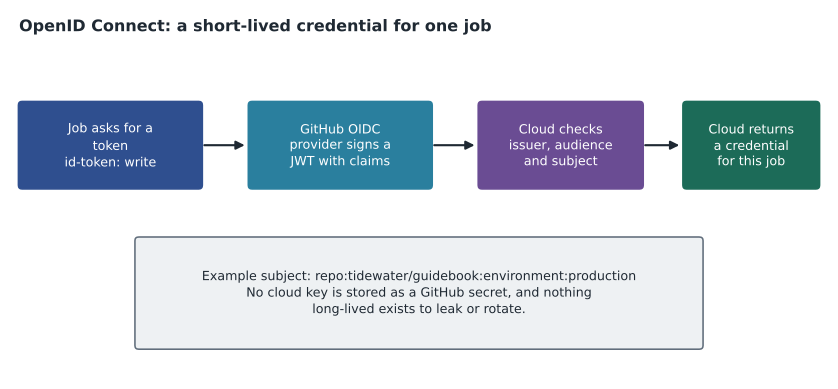
OpenID Connect, or OIDC, lets a workflow prove who it is to a cloud provider without any stored password. GitHub runs an OIDC identity provider. When a job asks, GitHub issues a signed JSON Web Token, a JWT, describing exactly which job is asking: which repository, which branch or environment, which workflow, which commit. The cloud provider has been told in advance to trust tokens from GitHub that match particular conditions. If the token matches, the provider hands the job a short-lived credential of its own, valid only for that job. Nothing long-lived is stored in GitHub, so there is nothing to rotate and nothing useful to steal from settings.
What is inside the token
The token carries claims, named facts about the job. A cloud provider's trust configuration compares some of them against the conditions you set. The most important are:
| Claim | Meaning | Example |
|---|---|---|
| iss | Issuer: who signed the token | https://token.actions.githubusercontent.com |
| aud | Audience: who the token is for | api://AzureADTokenExchange for Microsoft Entra ID |
| sub | Subject: a summary string of where the job runs | repo:tidewater/guidebook:environment:production |
| repository, repository_owner | Repository and owner names | tidewater/guidebook, tidewater |
| environment | Deployment environment, if the job has one | production |
| ref, sha | Branch or tag and commit | refs/heads/main |
| job_workflow_ref | The workflow file that defines the job, including reusable workflows | tidewater/.github/.github/workflows/deploy.yml@refs/tags/v1 |
| event_name, actor | What triggered the run and who | push, owen-tremblay |
The subject claim deserves the most attention, because most trust conditions match on it. Its default form depends on the job: for a job that targets an environment it names the repository and environment; for other jobs it names the repository and the branch, tag or pull request. A condition that matches repo:tidewater/guidebook:environment:production therefore allows only jobs in that repository that target the production environment, and since the environment has its own branch rules, only jobs from main.
Immutable subjects
Names can be reused. If an organization renames or deletes a repository and someone else later creates one with the old name, a cloud trust condition written against names alone could start trusting the newcomer. To close that gap, GitHub changed the default subject for repositories created after July 15, 2026, and for repositories renamed or transferred after that date: the owner and repository names are followed by their immutable numeric IDs, separated with an at sign, as in repo:octocat@123456/my-repo@456789:ref:refs/heads/main. Existing repositories keep the old format unless an owner opts in at the repository or organization level, and a preview shows the new subject so trust policies can be updated first. Microsoft published matching guidance for moving Entra federated credentials to the immutable form. Because Tidewater's repositories predate the change, Lena added a task to opt in after updating the Entra credential, so a future rename could not silently break or widen trust.
Setting up OIDC with Microsoft Entra ID and Azure
Every major cloud supports this pattern with its own vocabulary: Microsoft Entra ID calls the trust a federated identity credential, AWS uses an IAM OIDC identity provider and a role trust policy, and Google Cloud uses workload identity federation. Tidewater uses Azure Storage, so Lena followed the Entra steps:
| Step | Where | What Lena did |
|---|---|---|
| 1. Create an identity | Microsoft Entra ID | An app registration named tidewater-guidebook-deploy, or a user-assigned managed identity |
| 2. Add a federated credential | The app registration | Issuer GitHub, organization tidewater, repository guidebook, entity type environment, value production |
| 3. Grant access | Azure | Storage Blob Data Contributor on the tiles container only, not the whole account |
| 4. Store identifiers | GitHub environment variables | Client ID, tenant ID and subscription ID as variables, since they are not secret |
| 5. Update the workflow | Deploy job | id-token: write permission and azure/login with the identifiers |
| 6. Remove the old secret | Entra ID and GitHub | Deleted the client secret in Entra ID, then the TILES_KEY secret |
jobs:
  deploy-tiles:
    runs-on: ubuntu-latest
    environment: production
    permissions:
      id-token: write     # allow the job to request an OIDC token
      contents: read
    steps:
      - uses: actions/checkout@v5
      - name: Sign in to Azure with OIDC
        uses: azure/login@v2
        with:
          client-id: ${{ vars.AZURE_CLIENT_ID }}
          tenant-id: ${{ vars.AZURE_TENANT_ID }}
          subscription-id: ${{ vars.AZURE_SUBSCRIPTION_ID }}
      - name: Upload tiles
        run: |
          az storage blob upload-batch \
            --account-name tidewatertiles --destination tiles \
            --source build/tiles --auth-mode login --overwrite
Two lines make it work. The id-token: write permission lets the job request a token; without it, the login step fails with an error about a missing token request URL. And the job's environment: production makes the subject claim match the federated credential. Lena's first attempt failed with an error saying no matching federated credential was found, because she had set the credential's entity type to branch main while the job targeted an environment. The token's subject named the environment, the credential named the branch, and Entra correctly refused.
# AWS equivalent (for comparison)
- uses: aws-actions/configure-aws-credentials@v4
  with:
    role-to-assume: arn:aws:iam::111122223333:role/tidewater-tiles-deploy
    aws-region: ca-central-1

# Google Cloud equivalent
- uses: google-github-actions/auth@v2
  with:
    workload_identity_provider: projects/123/locations/global/workloadIdentityPools/github/providers/tidewater
    service_account: tiles-deploy@tidewater.iam.gserviceaccount.com
Writing good trust conditions
OIDC is only as strong as the conditions on the cloud side. A condition that trusts every repository in the organization, or every branch, gives any workflow there the cloud role. Yevgenia's rules for Skerry are worth copying:
| Rule | Why |
|---|---|
| Match the subject exactly, preferably on an environment | Environments carry branch rules and approvals, so the cloud inherits those protections |
| Never trust pull request subjects for deployment roles | Pull request code has not been reviewed yet |
| One identity per repository and purpose | A compromise of one workflow does not reach other systems |
| Grant the smallest cloud permission | The tile job writes one container and nothing else |
| For shared deploy workflows, match job_workflow_ref | Only the approved reusable workflow, at an approved ref, gets the role |
| Opt in to immutable subjects | Renamed or recreated repositories cannot inherit trust |
At Skerry, organization owners also add repository custom properties to tokens. Properties such as data-classification appear as claims prefixed with repo_property_, so a cloud policy can say, in effect, "only repositories classified as payments may assume the payments role", without listing every repository by name. Organizations can also customize the subject template through the API to include particular claims, which suits cloud providers that match only on the subject.
OIDC beyond the big clouds
Any service that can validate GitHub's tokens can use the same approach. Package registries, secret managers such as HashiCorp Vault, and several deployment platforms accept GitHub OIDC tokens, and GitHub itself uses an OIDC token when it creates artifact attestations, as a later lesson shows. Custom actions can request a token with the getIDToken function of the Actions toolkit, passing the audience the target service expects.
Testing a trust configuration safely
Changing a deployment from a stored key to OIDC is a change to production access, so Lena tested it the way she would test any risky change. She created the federated credential first and left the old client secret in place. She then added a temporary job that targeted the production environment, signed in with OIDC and ran a read-only command listing the container, without uploading anything. Once that job succeeded on main and a deliberately wrong job from a feature branch was refused, she switched the real upload to OIDC, watched one deployment, and only then deleted the client secret. Each step could be undone, and the refusal test proved the conditions were narrow rather than merely working.
| Test | Expected result | What it proves |
|---|---|---|
| Job on main targeting production, read-only command | Succeeds | Trust and permissions work |
| Job on a feature branch targeting no environment | Refused: no matching federated credential | Branches cannot borrow the role |
| Job from a fork pull request | Cannot request a usable token for the role | Outside code cannot reach the cloud |
| Upload with OIDC on main | Succeeds | The real task works |
| Old client secret deleted | Nothing else breaks | No hidden dependency on the old key |
Reading the token during debugging
When a trust condition fails, the fastest diagnosis is to see the claims the provider received. Cloud error messages usually quote the subject they were given, as Entra did in Lena's first failure. If they do not, a temporary debugging step can request a token and decode its payload to print the claims, never the whole signed token, and should be removed as soon as the problem is understood. Printing a complete token in a public repository's logs would let anyone reuse it until it expires, which is short but not zero.
Common causes of failure are few: the job lacks id-token: write; the job has no environment while the condition expects one, or the reverse; the audience is wrong for the provider; the repository was renamed and the subject changed; or a reusable workflow defines the job, so job_workflow_ref names the shared file rather than the caller. Each shows up in the claims, which is why reading them first saves time.
Yevgenia added one organizational point. Moving to OIDC changes who controls access. With stored keys, anyone who could edit secrets in GitHub controlled cloud access; with OIDC, the cloud administrators who write the trust conditions do. That is usually an improvement, because cloud access is then managed with the cloud's own tools and reviews, but it means the GitHub and cloud teams must talk when repositories are renamed, environments are added or deploy workflows move.
Worked problem
Diagnosing a failed OIDC login
After moving the print-file upload to OIDC, the print-release job fails in azure/login with "No matching federated identity record found for presented assertion subject repo:tidewater/guidebook:ref:refs/heads/main". The federated credential is set for the environment print-release. What is wrong?
Show solution
- The token's subject names a branch, so the job did not declare an environment.
- The federated credential expects the subject for environment print-release.
- Add environment: print-release to the job, which also applies that environment's branch rules.
Answer: The job lacks environment: print-release, so its subject is branch-based and does not match the credential.
Worked problem
Choosing a subject for a shared deploy workflow
Skerry's store repositories all deploy through one reusable workflow, skerry/deploy-workflows/.github/workflows/store-release.yml, called at tag v4. Freya Abernathy-Oduya wants the cloud role used only by that workflow, whatever store repository calls it. Which claim helps?
Show solution
- The subject names the calling repository, which differs for each store repository.
- job_workflow_ref names the reusable workflow file and ref that defines the job.
- Match job_workflow_ref to skerry/deploy-workflows/.github/workflows/store-release.yml@refs/tags/v4, plus the organization, in the trust policy.
Answer: Match job_workflow_ref (and the owner) so only the approved reusable workflow at v4 can assume the role.
Common mistakes
MistakeForgetting id-token: write on the job.
InsteadThe job must have id-token: write to request an OIDC token.
MistakeWriting a trust condition that matches any branch or any repository.
InsteadMatch the exact subject, ideally an environment, and grant the smallest cloud permission.
MistakeStoring client IDs and tenant IDs as secrets and calling it secure.
InsteadThose identifiers are not secret; security comes from the trust conditions.
MistakeLeaving the old client secret in place after moving to OIDC.
InsteadDelete the credential at the provider and the GitHub secret.
The tile upload ran with OIDC the same afternoon. Rosa removed TILES_KEY from her spreadsheet and, with some satisfaction, deleted the calendar reminder that warned her the client secret would expire in March.
Summary and key terms
- OIDC lets a job exchange a GitHub-signed token for a short-lived cloud credential, so no cloud secret is stored.
- The token's claims, especially sub, aud, environment and job_workflow_ref, describe the job.
- From July 15, 2026, new, renamed and transferred repositories get immutable subjects with owner and repository IDs; others can opt in.
- Entra ID uses federated identity credentials, AWS uses an OIDC provider and role trust, Google Cloud uses workload identity federation.
- The job needs id-token: write; environment-based subjects carry environment protections into the cloud.
- Write exact trust conditions, one identity per purpose, smallest permissions, and delete old secrets.
- OpenID Connect (OIDC)
- A standard identity layer that lets a workflow prove its identity with a signed token.
- JWT
- A JSON Web Token, the signed token that carries claims.
- Claim
- A named fact in a token, such as the repository or environment.
- Subject claim
- The sub claim summarizing where the job runs; the main thing trust conditions match.
- Federated identity credential
- Microsoft Entra ID's trust configuration for tokens from an external identity provider.
- id-token: write
- The GITHUB_TOKEN permission that allows a job to request an OIDC token.
- job_workflow_ref
- A claim naming the workflow file and ref that defined the job, including reusable workflows.
Practice problems
Work each problem on paper first, then reveal the answer to check.
Which permission must a job have to request an OIDC token?
Show answer
id-token: write.
Why are environment-based subjects useful for deployment roles?
Show answer
The environment's branch rules and approvals then apply before the cloud trusts the job.
What changed for subject claims on July 15, 2026?
Show answer
New, renamed or transferred repositories use subjects that include immutable owner and repository IDs.
Lesson quiz · 5 questions
Score 60% or more to complete this lesson.
Create a free account to save your progress, take quizzes and earn a certificate.