
MSBA-302 · Lesson 4 of 12 · 20 min
Self-hosted runner security
▶ Video coming soon A video version of this lesson is on the way.
Moving the print-room machine into its own group closed the most obvious gap, but Yevgenia was not finished with it. In the fourth session she asked Owen to describe the machine. It ran the runner service under an administrator account, so builds could install fonts. It kept a checkout of every job in its work folder. It had a saved login to the cloud storage where print files go, and it sat on the office network next to the shared drive with the guidebook manuscripts. "Imagine one workflow you did not write runs on that machine for ten minutes," Yevgenia said. "What can it reach?" The answer was nearly everything. This session was about making a self-hosted runner a place where a bad job can do little harm.
Why self-hosted runners need special care
A GitHub-hosted runner is a fresh virtual machine created for one job and destroyed afterwards. Whatever a job does to it, the next job starts clean, and the machine has no access to your network. A self-hosted runner is your machine. By default it is persistent: it runs job after job, keeping files, installed tools, caches and anything a job left behind. It sits wherever you put it, often inside a trusted network, and it runs whatever code the workflow tells it to run, with the permissions of the account running the runner service.
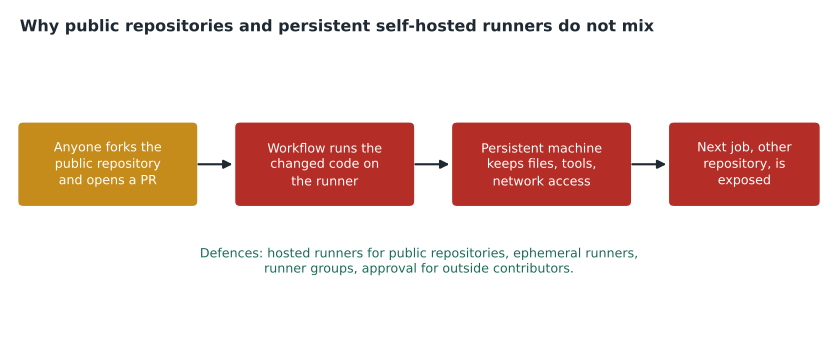
That combination is why GitHub's own guidance is blunt: do not use self-hosted runners with public repositories. In a public repository, anyone can fork the code and open a pull request that changes a workflow or a build script. Depending on your settings and trigger choices, that changed code may run on your runner. Even in private repositories, everyone with write access, and every third-party action you use, effectively gets to run code on the machine.
Controls on outside contributions
Two groups of settings decide how workflows behave for pull requests from forks. For public repositories, organization and repository settings decide when workflows from outside contributors need a maintainer's approval before they run: for example only for first-time contributors who are new to GitHub, for all first-time contributors, or for every outside contributor. Tidewater chose approval for all outside contributors on TrailCheck. It adds a click for maintainers, but no stranger's workflow runs until someone has looked at what it changes.
For private and internal repositories, fork pull request settings decide whether workflows run on fork pull requests at all, whether those runs receive a token with write permissions, whether they receive secrets, and whether they need approval. The safe defaults are off for write tokens and secrets. The pull_request trigger already gives fork runs a read-only token and no secrets, which is what keeps fork testing safe.
The pull_request_target trigger
The pull_request_target trigger runs in the context of the base repository, with its token permissions and secrets, even for pull requests from forks. It was designed for jobs like labelling pull requests, which need write access but never run the contributor's code. Workflows that combine pull_request_target with checking out and building the pull request's code have caused real compromises, because they run untrusted code with trusted credentials. GitHub announced that from December 2, 2026, pull_request_target is blocked by default in public repositories on Free, Team and Enterprise Cloud plans unless a workflow event policy explicitly allows it, with brownout days in November to warn owners. Private and internal repositories and GitHub Enterprise Server are not affected by that change.
TrailCheck had one pull_request_target workflow, which added a "closures" label when a pull request touched the closures folder. Lena confirmed it never checked out the pull request's code, then added an event policy allowing pull_request_target for that single workflow file, so it would keep working after December 2. Skerry's open-source organization does exactly the same for its one labelling workflow.
Workflow execution protections
Since September 2026, workflow execution protections have been generally available at the enterprise, organization and repository levels. They are rules about which events may start workflows and which actors may trigger them, optionally targeted at particular workflow files, with an evaluate mode that reports what would be blocked before you enforce anything. The pull_request_target event policy above is one use. Others include blocking workflows triggered by bot accounts in sensitive repositories, or allowing workflow_dispatch only for members of a release team.
Hardening the runner machine
Settings decide which jobs reach a runner; the machine itself decides what a job can do once it arrives. GitHub publishes hardening guidance for self-hosted runners, and Yevgenia summarized it as a checklist:
| Control | Why it matters | Print-room change |
|---|---|---|
| Run the runner service as an unprivileged account | A job gets the service account's rights | New local account with no administrator rights; fonts preinstalled by Owen |
| No stored credentials on the machine | Any job could read saved logins and keys | Saved cloud login removed; uploads use OpenID Connect from the workflow |
| Separate network segment | Limits what a compromised job can reach | Moved to a separate network with access only to GitHub and the print vendor |
| Clean between jobs | Leftover files leak data and poison later builds | Work folder wiped by a job hook; ephemeral mode planned |
| Keep the runner and operating system updated | Old versions miss security fixes and eventually stop receiving jobs | Automatic updates left on; monthly patch check |
| Least access in the group policy | Fewer repositories means fewer people who can run code there | Guidebook only, public repositories off |
A detail that surprises people: the runner only needs outbound connections. It polls GitHub over HTTPS for work and reports results back, so no inbound port has to be opened from the internet. That makes it possible to place a runner on a tightly restricted network segment, allowing outbound traffic only to GitHub's service addresses and the few systems the builds genuinely need.
Ephemeral runners
The strongest fix for leftovers is not cleaning but replacing. An ephemeral runner is registered to take a single job; after that job it unregisters and its machine is destroyed or reset. Every job starts on a clean machine, as on GitHub-hosted runners. You can start the runner application with an ephemeral option, or create a just-in-time runner configuration through the REST API, which registers a runner for one job without a long-lived registration token sitting on disk.
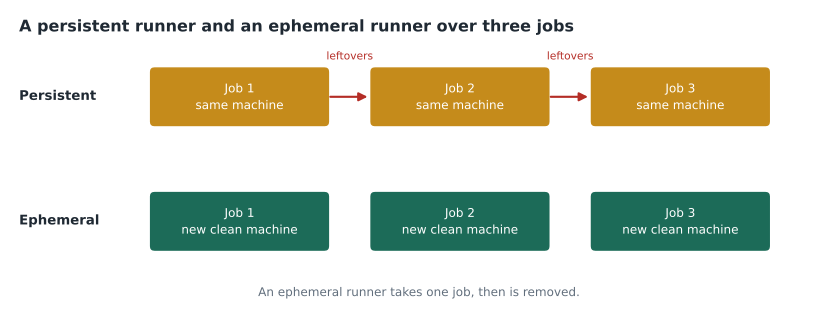
Ephemeral runners need automation to create machines on demand. For a single office machine, the practical version is a virtual machine snapshot restored after each job. At larger scale, the usual tool is Actions Runner Controller, an open-source Kubernetes operator maintained with GitHub that creates runner pods in runner scale sets as jobs arrive and removes them afterwards. Skerry replaced about 140 long-lived virtual machines with scale sets in this way; each job gets a new pod, and nothing survives between jobs.
# Print-room machine: register an ephemeral runner (illustrative)
# Token from: Settings > Actions > Runners > New self-hosted runner
./config.sh --url https://github.com/tidewater \
  --token REGISTRATION_TOKEN \
  --runnergroup print-room \
  --labels typesetter \
  --ephemeral \
  --unattended
./run.sh   # takes one job, then exits; a scheduled task restores the VM snapshot
Containers and job isolation
Running a job inside a container on the runner, with the container key, isolates the job's files and tools from the host to a degree, and makes builds more repeatable. It is not a full security boundary by itself, especially if the runner service account can control the container engine. Treat containers as a convenience that helps cleanliness, and rely on ephemeral machines, network separation and least-privileged accounts for security.
Secrets and self-hosted runners
Secrets are delivered to a job when it runs, masked in logs, and should never be written to the runner's disk. A persistent runner makes that rule harder to keep, because tools sometimes cache credentials in a home folder: package managers, cloud command-line tools and Git credential helpers all do. The cleanest approach is to give the machine no long-lived credentials of its own, use OpenID Connect for cloud access, and let ephemeral machines take any cached tokens with them when they are destroyed.
Updates and the life of a runner
A runner is software as well as a machine. The runner application updates itself automatically when GitHub releases a new version, unless you turn that off, and GitHub stops sending jobs to runner versions that fall too far behind. Teams that disable automatic updates, usually to bake the runner into a fixed machine image, take on the job of rebuilding those images promptly; otherwise their runners quietly stop picking up work one day. The operating system, language runtimes and build tools on the machine need patching on the same rhythm as any server. Ephemeral runners built from an image make this easier, because patching means rebuilding one image rather than visiting every machine.
Runners also have a life cycle that should end deliberately. When a runner is no longer needed, remove it in the settings and then delete the runner service and its working folder from the machine. A runner that is merely switched off stays registered, appears as offline, and can return months later with outdated software and old credentials in its work folder. Lena added the print-room runner to Tidewater's asset list with an owner, Owen, and a review date, so it is treated as infrastructure rather than as a desk computer that happens to run builds.
| Stage | Good practice |
|---|---|
| Register | Into a named group with selected repositories; labels that describe capability |
| Operate | Unprivileged account, segmented network, automatic or image-based updates, no stored credentials |
| Review | Monthly check of group access, status and software versions |
| Retire | Remove in settings, then delete the service, work folder and any caches from the machine |
Worked problem
Deciding where TrailCheck jobs run
Malik suggests moving TrailCheck's slow link checker onto the print-room machine, which is faster than a hosted runner. TrailCheck is public and receives fork pull requests. What should Lena answer?
Show solution
- Public repositories should not use self-hosted runners, because fork contributors could run code on them.
- The print-room group already excludes public repositories, so the job would never start.
- If the link checker is too slow, options are caching, splitting the job, running it only on changed files, or a larger GitHub-hosted runner, which is still a fresh machine per job.
Answer: No: keep public repositories on GitHub-hosted runners and speed up the job another way.
Worked problem
Reviewing a pull_request_target workflow
A volunteer proposes a workflow for TrailCheck that uses pull_request_target, checks out github.event.pull_request.head.sha and runs npm test, "so tests can post results with write access". What is the risk, and what should be done instead?
Show solution
- pull_request_target runs with the base repository's token and secrets.
- Checking out and running the pull request's code runs untrusted code with those credentials.
- Run tests with pull_request, which gives a read-only token and no secrets, and if results must be posted, use a separate workflow_run workflow that reads the test results as data without running contributed code.
Answer: Reject it: test with pull_request and post results from a separate trusted workflow that never executes the contributor's code.
Common mistakes
MistakeUsing a persistent self-hosted runner for a public repository.
InsteadUse GitHub-hosted runners for public repositories.
MistakeRunning the runner service as an administrator so builds can install software.
InsteadPreinstall tools and run the service as an unprivileged account.
MistakeLeaving cloud credentials saved on the runner machine.
InsteadUse OpenID Connect from the workflow and keep no long-lived credentials on the host.
MistakeTreating a container job as a complete security boundary.
InsteadUse ephemeral machines, network separation and least privilege as the real controls.
By the end of the session the print-room machine ran under an ordinary account, on its own network segment, with no saved credentials. Owen agreed to move it to ephemeral mode with a snapshot restore before the busy spring printing season.
Summary and key terms
- Self-hosted runners are persistent by default and run any code a workflow gives them, with the service account's rights.
- Do not use self-hosted runners with public repositories; use approval and fork settings to control outside contributions.
- pull_request_target runs with trusted credentials; from December 2, 2026 it is blocked by default in public repositories unless an event policy allows it.
- Workflow execution protections control which events and actors may start workflows.
- Harden runners: unprivileged account, no stored credentials, separate network, updates, clean or ephemeral machines.
- Ephemeral and just-in-time runners take one job; Actions Runner Controller provides them at scale on Kubernetes.
- Self-hosted runner
- A machine you register and maintain to run GitHub Actions jobs.
- Persistent runner
- A runner that runs many jobs on the same machine, keeping state between them.
- Ephemeral runner
- A runner registered for a single job and removed afterwards.
- Just-in-time runner
- A runner configuration created through the API for one job, without a long-lived registration token.
- Actions Runner Controller
- A Kubernetes operator that creates and removes runner pods in scale sets as jobs arrive.
- pull_request_target
- A trigger that runs in the base repository's context, with its token and secrets, for pull requests including forks.
- Workflow execution protections
- Rules that control which events and actors may start workflows.
Practice problems
Work each problem on paper first, then reveal the answer to check.
Why do self-hosted runners need no inbound firewall ports?
Show answer
The runner makes outbound HTTPS connections to GitHub to fetch jobs and report results.
What changes for pull_request_target on December 2, 2026?
Show answer
It is blocked by default in public repositories on Free, Team and Enterprise Cloud unless an event policy allows it.
What makes an ephemeral runner safer than a persistent one?
Show answer
Each job starts on a clean machine, so nothing left by one job affects the next.
Lesson quiz · 5 questions
Score 60% or more to complete this lesson.
Create a free account to save your progress, take quizzes and earn a certificate.