
MSBA-301 · Lesson 8 of 12 · 20 min
Testing actions
▶ Video coming soon A video version of this lesson is on the way.
Lena's Tuesday mistake had one more lesson in it. Even if the guidebook workflow had been pinned to a release, the broken change would have reached a release sooner or later unless something stopped it before it merged. Priya wanted every action to be tested the way the TrailCheck site was: automatically, on every pull request, on every operating system it claimed to support. "An action is software that other people run inside their jobs," she said. "If we would not ship it in the site, we do not ship it in an action."
This lesson covers how to test actions at three levels: unit tests of the code inside JavaScript actions, running an action locally, and integration tests in a workflow that calls the action from its own repository. It also covers checking that a JavaScript action's bundle is current and troubleshooting actions that fail, which the GH-200 outline lists as an objective of its own.
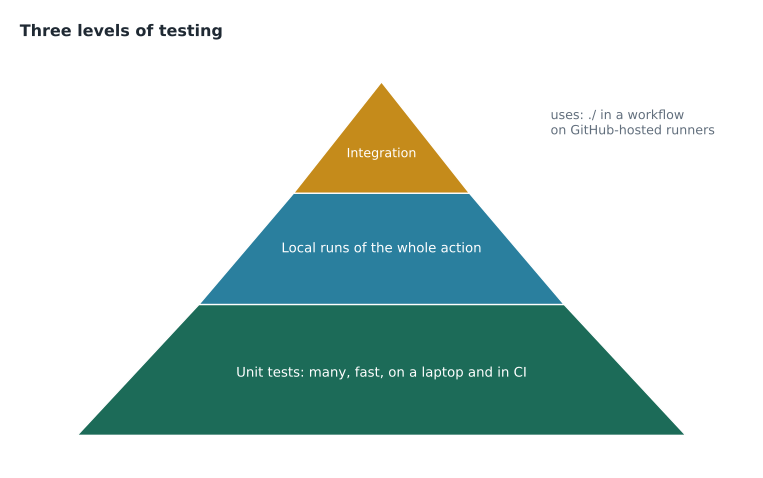
Three levels of testing
Unit tests check small pieces of an action's code in isolation: the function that checks a trail segment, the code that formats a report. They run in seconds on a developer's laptop and in continuous integration, and they need no runner. Local runs start the whole action on a developer's machine, with inputs supplied by hand, to see how it behaves end to end before pushing. Integration tests run the action for real, in a workflow on GitHub's runners, against test files kept in the action's repository, and check its outputs and side effects. Each level catches different mistakes, and a well-tested action has all three.
Unit tests for JavaScript actions
A JavaScript action is a Node.js program, so it can be tested with any Node.js test framework. GitHub's action templates use Jest; Dmitri used the test runner built into Node.js because trail-units had so little code. The trick that makes unit tests easy is to keep the action's logic in plain functions that take arguments and return results, and to keep the code that reads inputs and writes outputs thin. Then the tests can call the functions directly without pretending to be a runner.
// src/check.js: pure logic, no toolkit calls
export function checkSegment(seg, maxRatio) {
  const problems = [];
  if (seg.unit !== 'km') problems.push({ level: 'error', title: 'Wrong unit' });
  if (seg.gain_m / (seg.length_km * 1000) > maxRatio) problems.push({ level: 'warning', title: 'Check elevation' });
  return problems;
}

// test/check.test.js
import { test } from 'node:test';
import assert from 'node:assert/strict';
import { checkSegment } from '../src/check.js';

test('flags miles', () => {
  const p = checkSegment({ unit: 'mi', length_km: 5, gain_m: 100 }, 0.25);
  assert.equal(p[0].title, 'Wrong unit');
});

test('accepts a gentle climb', () => {
  assert.deepEqual(checkSegment({ unit: 'km', length_km: 4, gain_m: 300 }, 0.25), []);
});
When the code under test does call the toolkit, tests can replace the toolkit's functions with stand-ins that record what was called. The typescript-action template shows this with Jest's mocking features: getInput is replaced with a function that returns test values, and setOutput and setFailed with functions whose calls the test can inspect. That lets a test confirm, for example, that a missing required input leads to setFailed with the expected message.
Running an action locally
Pushing a change and waiting for a workflow just to see whether an action starts is slow. Two approaches run an action on a developer's machine. For a JavaScript action, GitHub publishes a command-line tool, @github/local-action, that runs the action's code with inputs read from a local environment file, imitating how the runner supplies inputs and collects outputs. For a container action, building the image and running it with docker run, with the INPUT_ variables and a mounted folder set by hand, reproduces most of what the runner does.
Community tools also run whole workflows locally in containers. They are useful for quick experiments, but they imitate GitHub's runners rather than being them, and differences in images, contexts and services mean a workflow that passes locally can still fail on GitHub. Priya treated local runs as a way to fail fast, never as proof that an action worked.
Integration tests in the action's own repository
The test that matters most runs the action the way callers will: from a workflow, on GitHub's runners. In the action's own repository, a workflow can call the action with uses: ./ after checking out the repository, which runs the version of the action in that commit. Running that workflow on every pull request means no change merges without the action having started and worked on a real runner.
Good integration tests do more than run the action. They give it known inputs, kept as fixtures in a test folder, and then check its outputs and side effects in later steps. markdown-guard's test workflow ran the action twice: once on a folder of clean chapters, expecting zero problems and success, and once on a folder of deliberately broken chapters with continue-on-error set, expecting failure and a specific problem count.
name: Test markdown-guard
on:
  pull_request:
  push:
    branches: [main]
permissions:
  contents: read
jobs:
  test:
    strategy:
      matrix:
        os: [ubuntu-latest, windows-latest, macos-latest]
    runs-on: ${{ matrix.os }}
    steps:
      - uses: actions/checkout@v5
      - id: clean
        uses: ./
        with:
          path: test/fixtures/clean
      - name: Clean chapters pass with no problems
        shell: bash
        run: test "${{ steps.clean.outputs.problems }}" = "0"
      - id: broken
        uses: ./
        continue-on-error: true
        with:
          path: test/fixtures/broken
      - name: Broken chapters fail with three problems
        shell: bash
        run: |
          test "${{ steps.broken.outcome }}" = "failure"
          test "${{ steps.broken.outputs.problems }}" = "3"
The matrix across operating systems matters for composite and JavaScript actions, which claim to work everywhere. It is how Lena found that her first version failed on Windows. A container action needs only Linux in its matrix, but should be tested on the runner image its users are likely to use. An action that depends on a tool from the runner image should also be tested against the newer runner images GitHub announces in preview, since image migrations, such as a new ubuntu-latest, change what is installed.
Outcome versus conclusion is a detail worth knowing. When a step has continue-on-error set, its conclusion is success even if it failed, so the job can carry on, while its outcome records what actually happened. Tests that expect a failure check outcome, as the broken-chapters test does.
Checking the bundle is current
For a JavaScript action, one more check belongs in the test workflow: rebuilding dist and comparing it with the committed bundle. If they differ, someone changed the source without rebuilding, and the pull request should fail with a message saying so. GitHub's action templates include exactly this check. Dmitri's version ran npm ci, npm run build, and then git diff with the exit-code option on the dist folder, which makes the step fail if there is any difference.
- uses: actions/setup-node@v4
  with:
    node-version: 24
    cache: npm
- run: npm ci
- run: npm run build
- name: Fail if dist is out of date
  run: |
    if ! git diff --exit-code --stat dist/; then
      echo "::error::dist/ does not match the source. Run npm run build and commit the result."
      exit 1
fi| Check | Catches | Where it runs |
|---|---|---|
| Unit tests | Logic errors in functions | Laptop and CI |
| Metadata validation | Missing keys, wrong runs form | Editor, CI |
| Bundle check | Source changed without rebuilding dist | CI |
| Integration test with uses: ./ | Action fails to start or misbehaves on a real runner | CI on GitHub-hosted runners |
| Operating system matrix | Platform-specific failures | CI |
| Linting the action's own code | Style problems and suspicious patterns | Laptop and CI |
Troubleshooting a failing action
When an action fails in a caller's workflow, the first source of information is the log of the step. Composite actions show their inner steps grouped inside it. JavaScript actions show whatever the action logged and the message passed to setFailed. Container actions show the image build at the start of the job and then the container's output in the step.
When the normal log is not enough, two settings add detail. Step debug logging, turned on by setting a repository secret or variable named ACTIONS_STEP_DEBUG to true, shows debug messages, including those an action writes with core.debug or the debug command, and more detail about each step. Runner diagnostic logging, turned on with ACTIONS_RUNNER_DEBUG, adds the runner's own logs to the run's downloadable log archive. Re-running a failed job with debug logging enabled, an option on the re-run menu, does the same for one attempt without changing repository settings.
| Symptom | Likely cause | First check |
|---|---|---|
| Step fails immediately mentioning action.yml | Invalid metadata or wrong path in uses | Validate the metadata; check the ref and path exist |
| Old behaviour after a change | Stale dist, or caller uses an old ref | Run the bundle check; confirm which ref the caller uses |
| Works on Linux, fails on Windows | Shell or command not available | Use bash or pwsh and cross-platform commands; add Windows to the matrix |
| Output is empty in the caller | Output not written, or wrong step id | Check GITHUB_OUTPUT writes and the ids in value expressions |
| Permission denied calling the API | Token lacks permissions | Check the workflow's permissions block and the token input |
| Container action fails before steps start | Image build or pull failed | Read the job set-up log; pin and test the Dockerfile |
Worked problem
Finding why trail-report posted nothing
A hiking club using Malik's trail-report action reported that it ran successfully but never posted its comment on pull requests from forks of their repository. Same-repository pull requests worked. What should Malik check?
Show solution
- Look at what token the action used: by default the job's GITHUB_TOKEN.
- For pull requests from forks, workflows triggered by pull_request get a read-only token, so commenting is not permitted.
- Turn on step debug logging in a test fork to confirm the API call returned a permissions error that the action was swallowing.
- Change the action to report a failed comment clearly with a warning, and document in the README that comments on fork pull requests need a different workflow design.
Answer: The read-only token on fork pull requests blocked the comment. The action should surface the error, and the README should explain the limitation.
Malik's case shows a testing gap as much as a bug. trail-report's test workflow had tested only pull requests from the same repository. He added a test that runs the comment step with a read-only token and checks that the action logs a clear warning and still writes the report to the job summary.
Testing the error paths
Most actions are tested on the happy path: good input, expected output. The failures users actually hit come from the other paths: a missing required input, an empty folder, a file the action cannot parse, a network call that times out, a token without permission. Each deserves a test. For trail-units, Dmitri added fixtures for an empty data folder, which should succeed with zero files and a notice rather than fail, a file with invalid JSON, which should fail with an annotation naming the file rather than a stack trace, and a run without the path input, which should fail with the toolkit's clear message about a missing input. Each case became a step in the integration workflow with continue-on-error and an assertion on the outcome and the log.
Checking the log is harder than checking outputs, because the log is not exposed to later steps. Two approaches work. The action can write a summary or an output that describes what went wrong, which later steps can check. Or the test can run the action's code directly in a run step, capture its standard output to a file and search the file for the expected message. Dmitri used the first approach for user-facing behaviour and the second for detailed checks of annotation text.
Testing with different permissions and events
Actions that call the GitHub API behave differently depending on the token's permissions and the event that triggered the workflow. A test matrix can include those dimensions too: a job with a read-only permissions block to confirm the action degrades gracefully, a job on a pull_request event and one on push to confirm that the action reads the right fields from the event payload. Malik's trail-report tests ended up with four jobs: same-repository pull request with write access, read-only token, push to main, and a manual run with workflow_dispatch that uses a fixture event file. That matrix took ten minutes to write and caught two bugs before any club saw them.
Keeping tests fast
Tests that take twenty minutes are skipped by tired people. Unit tests should run in seconds, integration jobs in a minute or two. Caching npm dependencies in the test workflow, keeping fixtures small and running the operating system matrix in parallel all help. Priya set a budget for every action repository: the whole test workflow finishes in under five minutes, or someone looks at why.
Common mistakes
MistakeTesting an action only by using it in a real project.
InsteadTest it in its own repository with uses: ./, fixtures and checks on outputs, on every pull request.
MistakeChecking a deliberately failing step's conclusion when it has continue-on-error.
InsteadCheck its outcome, which records what actually happened.
MistakeTrusting a local workflow runner as proof the action works.
InsteadUse local runs to fail fast, and rely on tests on GitHub's runners.
MistakeLeaving step debug logging on permanently.
InsteadTurn it on, or re-run with debug logging, while investigating, then turn it off.
Summary and key terms
- Test actions with unit tests, local runs and integration tests in a workflow.
- Keep JavaScript logic in pure functions so it can be unit tested without the toolkit.
- Integration tests call the action with uses: ./ in its own repository and check outputs against fixtures, on every operating system the action supports.
- JavaScript actions should fail a pull request when the committed dist differs from a fresh build.
- Step debug logging (ACTIONS_STEP_DEBUG) and runner diagnostic logging (ACTIONS_RUNNER_DEBUG) add detail when troubleshooting.
- Unit test
- A test of a small piece of code in isolation.
- Integration test
- A test that runs the whole action in a workflow on a real runner.
- Fixture
- Test input kept in the repository, such as sample files with known problems.
- Outcome
- The actual result of a step before continue-on-error is applied.
- Conclusion
- The result of a step after continue-on-error is applied.
- Step debug logging
- Extra log detail turned on by ACTIONS_STEP_DEBUG or a debug re-run.
Practice problems
Work each problem on paper first, then reveal the answer to check.
How does a workflow in an action's own repository run the version of the action in the current commit?
Show answer
It checks out the repository and uses the action with uses: ./.
Which step property shows that a step with continue-on-error actually failed?
Show answer
Its outcome.
What does setting ACTIONS_STEP_DEBUG to true do?
Show answer
It turns on step debug logging, showing debug messages and extra step detail.
Lesson quiz · 5 questions
Score 60% or more to complete this lesson.
Create a free account to save your progress, take quizzes and earn a certificate.