
MSBA-301 · Lesson 1 of 12 · 20 min
Types of actions
▶ Video coming soon A video version of this lesson is on the way.
The web team at Tidewater Trail Guides had spent the late summer of 2026 writing workflows. The TrailCheck site now built and tested itself on every pull request, the guidebook repository ran a spelling and link check, and Malik Osei's open-trail-report project, the small open source tool that turns hiking logs into condition reports, ran its tests on three operating systems. By September the team had nine workflows across five repositories, and Priya Nair, who leads the team, noticed something she did not like. The same eleven lines that installed the Markdown tools, checked the chapter files and posted a summary appeared, with small differences, in four different workflows.
"Every time we fix one of these, we forget the other three," she said at the first of the team's Thursday afternoon sessions. Dmitri Kovac, the other web developer, had already found one copy still using a version of the link checker that the others had stopped using in July. Lena Fischer, the co-op student who had joined for the autumn term, asked the question that framed the whole course: when should a block of workflow steps become something you can reuse by name?
The answer is a custom action. This course follows the Tidewater team through the autumn as it turns its repeated steps into actions, tests them, versions them, documents them and publishes one of them to GitHub Marketplace. It also covers what the GH-200 GitHub Actions exam expects you to know about building and maintaining actions, which is one of the five domains in the outline that took effect in January 2026. The workflows themselves, with their triggers, jobs and expressions, were the subject of MSBA-300; here the focus is the reusable unit that a workflow step calls with the uses keyword.
What an action is
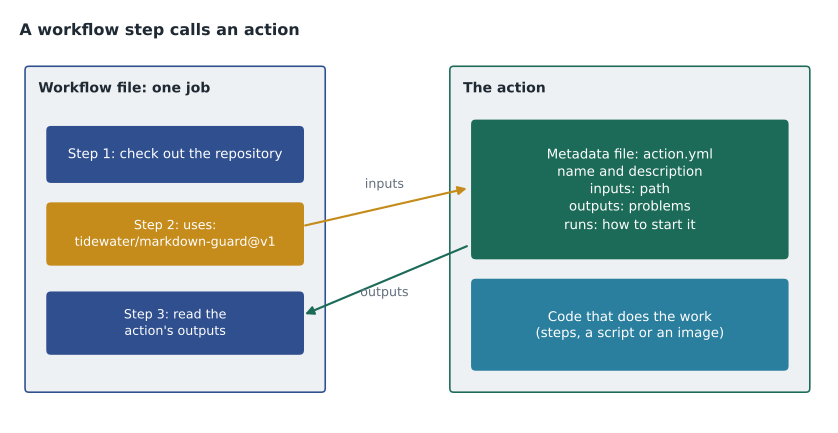
An action is a packaged, reusable unit of work that a workflow step runs. A workflow file describes when automation runs and which jobs it contains. Each job is a list of steps, and each step either runs commands directly with the run keyword or calls an action with the uses keyword. An action has a name, a defined set of inputs it accepts, a defined set of outputs it produces and some code that does the work. The workflow does not need to know how the action does its job; it passes inputs and reads outputs.
That separation is the whole point. The caller of actions/checkout does not need to know how it authenticates, fetches history or configures Git. It writes one line and, if needed, a few inputs such as fetch-depth. When the maintainers of checkout fix a bug or support a new Git feature, every workflow that uses the new version benefits without anyone editing their files. The Tidewater team wanted the same thing for its Markdown checks: one place where the logic lives, and many workflows that call it.
Every action is defined by a metadata file named action.yml or action.yaml. The metadata file names the action, describes its inputs and outputs, and says how the action runs. Lesson 2 covers the file in detail. For now the important line is the one under runs that says which kind of action this is.
The three types of action
GitHub Actions supports three types of custom action. The GH-200 study guide names all three and expects you to choose between them.
A composite action bundles a series of workflow steps into one action. The steps can run shell commands or call other actions. Composite actions are written entirely in YAML, run directly on the runner like the workflow's own steps, and work on Linux, Windows and macOS as long as the commands they run do. They are the natural first step when a block of steps is being copied between workflows, because the steps can usually be moved into the action almost unchanged.
A JavaScript action runs a JavaScript program with the Node.js runtime that ships with the runner. Since June 2026 that runtime is Node 24; Node 20 was removed from GitHub's runners in September 2026. JavaScript actions start quickly, because there is nothing to build or download beyond the action's own files, and they run on every hosted runner operating system. They can use the actions toolkit, a set of npm packages that handle inputs, outputs, logging, the GitHub API and more. They suit logic that is more than a few commands: parsing files, calling APIs, deciding things and reporting results clearly.
A Docker container action packages its code and everything it needs inside a container image. The runner builds or pulls the image and runs it, passing inputs as environment variables. Container actions give complete control over the environment: a specific version of a command-line tool, an unusual language runtime, system libraries that are hard to install. The price is speed and portability. Building or pulling an image takes time on every run, and Docker container actions run only on Linux runners.
| Type | Written in | Runs on | Start-up time | Best for |
|---|---|---|---|---|
| Composite | YAML steps that run commands or call other actions | Linux, Windows, macOS (if the commands do) | Fast | Reusing a sequence of existing steps |
| JavaScript | JavaScript or TypeScript compiled to JavaScript, run by Node.js | Linux, Windows, macOS | Fast | Logic, API calls, parsing and clear reporting |
| Docker container | Any language, inside a container image | Linux runners only | Slower: build or pull the image | Tools that need a fixed environment |
Actions, reusable workflows and plain run steps
Custom actions are not the only way to reuse automation, and part of choosing well is knowing when an action is the wrong tool. MSBA-300 introduced reusable workflows, which are whole workflows that another workflow calls at the job level with uses. A reusable workflow can contain several jobs, choose its own runners, use environments with protection rules and receive secrets explicitly. An action, by contrast, is a single step inside a job that someone else has already started on a runner they chose.
The difference matters in practice. If the thing to reuse is a whole pipeline, with a build job, a test job on several operating systems and a deployment job that waits for approval, it belongs in a reusable workflow. If it is a task within a job, such as checking files, uploading results or calling an API, it belongs in an action. Many teams use both: a reusable workflow for the overall shape of their deployment pipeline, calling a handful of small actions inside its steps.
Sometimes neither is needed. A two-line run step that appears in two workflows is not worth packaging; the overhead of an action, with its own versioning and documentation, outweighs the benefit. Priya's rule for the team was simple: package something when it is copied into a third place, when it contains logic that people get wrong, or when another team or the public will use it.
| Reuse need | Best tool | Why |
|---|---|---|
| A sequence of steps copied into several jobs | Composite action | Moves the steps into one place with almost no rewriting |
| Logic with branching, parsing or API calls | JavaScript action | A real programming language with tests and the toolkit |
| A tool that needs its own operating system packages | Docker container action | The image carries the whole environment |
| A whole pipeline with several jobs, runners or environments | Reusable workflow | Actions run inside one job; reusable workflows define jobs |
| A short command used in one or two places | A plain run step | Packaging would cost more than it saves |
How a step refers to an action
A workflow step calls an action with uses, followed by a reference. There are three forms, and the exam expects you to read each one.
The first form names a public or shared repository: owner, repository name and a ref, which can be a tag, a branch or a full commit SHA. For example, actions/checkout followed by an at sign and v5 refers to the v5 tag of the checkout repository. If the action lives in a subdirectory of the repository, the path goes between the repository name and the at sign. The second form is a local path, written as a dot and a slash followed by the directory, such as ./.github/actions/markdown-guard. It refers to an action stored in the same repository as the workflow, which must have been checked out first. The third form, starting with docker://, runs a published container image directly as a step, without any action metadata file.
steps:
  # 1. An action in another repository, pinned to a tag
  - uses: actions/checkout@v5

  # 2. An action in this repository (the repository must be checked out first)
  - uses: ./.github/actions/markdown-guard
    with:
      path: chapters

  # 3. A container image run directly as a step
  - uses: docker://ghcr.io/tidewater/pdf-proof:1.4.2
    with:
      args: chapters/fundy-coast.md
Where an action is stored also decides who can use it. An action in a public repository can be used by any workflow on GitHub. An action in a private or internal repository can be shared with other repositories in the same organization or enterprise if the action repository's settings allow it, which lesson 9 covers alongside Marketplace publishing. An action kept in the same repository as the workflow, under .github/actions, is private to that repository and needs no sharing at all.
Worked problem
Inventorying Tidewater's repeated steps
Priya listed the repeated blocks across the team's nine workflows: an 11-line Markdown check used in four workflows; a script that validates the distances and elevations in trail data files, used in two; a PDF proof build that needs a specific typesetting tool with its fonts, used in two; and a deployment of the TrailCheck map data that differs slightly between staging and production. Which type of reuse suits each?
Show solution
- The Markdown check is a sequence of existing steps copied into four places: a composite action.
- The trail data validation contains real logic and should report each bad value clearly in the pull request: a JavaScript action.
- The PDF proof build depends on a typesetting tool and fonts that are slow and fragile to install on every run: a Docker container action with the tools inside the image.
- The map deployment involves building, waiting for approval in a protected environment and deploying: the pipeline belongs in a reusable workflow, and the deployment step itself can become an action, which is the case study in lesson 12.
Answer: Composite for the Markdown check, JavaScript for the data validation, Docker for the PDF proof, and a reusable workflow that calls a deployment action for the site.
Where actions run and what they can reach
An action runs on the runner that its job chose, with the same access as any other step in that job. It can read and write the files in the workspace, use the network, run programs and read environment variables. It receives the job's GITHUB_TOKEN only if the workflow passes it in, usually as an input, although many actions default to the token automatically through the github.token expression in their metadata. The permissions block of the workflow controls what that token can do.
This has an uncomfortable consequence. An action you call from a public repository is code written by someone else running inside your job, with access to whatever that job can reach. That is why lesson 7 spends time on pinning versions, why the enterprise policies in MSBA-291 let administrators restrict which actions can run, and why GitHub made Actions lockfiles generally available in October 2026. It is also why the Tidewater team decided early that its own actions would ask for the smallest permissions they could, and would say in their documentation exactly what they needed.
Lena asked whether an action could see the workflow's secrets. The answer is no, not directly. An action sees only what it is given: its inputs, the environment variables of the step and job, and the files on the runner. A secret reaches an action only when the workflow passes it in, for example as an input or an environment variable. A composite action cannot read the secrets context of the calling workflow at all; it must receive secrets through inputs. That design keeps the decision about what an action may see with the person writing the workflow.
The actions the team planned
By the end of the first session the team had a plan, written on the whiteboard and later turned into issues on a project board. Each action would live in its own repository in the tidewater organization, except the Markdown check, which would start life as a local composite action inside the guidebook repository and move out once it had settled.
| Action | Type | Owner | Who uses it |
|---|---|---|---|
| markdown-guard | Composite | Lena, with Priya reviewing | Guidebook and TrailCheck repositories |
| trail-units | JavaScript | Dmitri | TrailCheck data repository and open-trail-report |
| pdf-proof | Docker container | Priya | Guidebook repository |
| trail-report | JavaScript, public | Malik | Anyone, through GitHub Marketplace |
| trailcheck-deploy | Composite, decided in lesson 12 | Dmitri and Priya | The TrailCheck map deployment workflows |
Malik's trail-report action was the odd one out. His open-trail-report project already had a small following among hiking clubs, and two club maintainers had asked whether they could run the report generator in their own workflows. Publishing an action to GitHub Marketplace, which is lesson 9, would let them do that with one line, and it would give the team a reason to take versioning, documentation and maintenance seriously from the start.
Common mistakes
MistakeUsing a Docker container action for a task that only needs a few shell commands.
InsteadUse a composite action; container actions are slower and run only on Linux.
MistakePackaging a whole multi-job pipeline as an action.
InsteadUse a reusable workflow for jobs, runners and environments, and actions for steps within a job.
MistakeAssuming an action can read the workflow's secrets.
InsteadAn action sees only what it is given; pass secrets in explicitly as inputs or environment variables.
MistakeCalling a local action with uses: ./path before checking out the repository.
InsteadCheck out the repository first; a local path refers to files in the workspace.
Summary and key terms
- An action is a reusable step with defined inputs, outputs and code, described by an action.yml or action.yaml metadata file.
- Composite actions bundle existing steps in YAML; JavaScript actions run Node.js code; Docker container actions run inside an image and only on Linux runners.
- Reusable workflows reuse whole jobs; actions reuse steps within a job.
- A step refers to an action by owner/repository@ref, by a local path such as ./.github/actions/name, or by docker:// and an image.
- An action runs with the access of its job and sees secrets only when the workflow passes them in.
- Action
- A packaged, reusable unit of work that a workflow step calls with uses.
- Composite action
- An action made of workflow steps written in YAML.
- JavaScript action
- An action that runs a JavaScript program with the runner's Node.js runtime.
- Docker container action
- An action that runs its code inside a container image on a Linux runner.
- Metadata file
- The action.yml or action.yaml file that defines an action's name, inputs, outputs and how it runs.
- Ref
- The tag, branch or commit SHA that selects which version of an action a step uses.
- Reusable workflow
- A workflow that another workflow calls at the job level.
Practice problems
Work each problem on paper first, then reveal the answer to check.
Which type of action runs only on Linux runners?
Show answer
Docker container actions.
What must a job do before a step can use an action by a local path?
Show answer
Check out the repository, so the action's files are in the workspace.
When is a reusable workflow a better choice than an action?
Show answer
When the thing to reuse includes several jobs, its own runners or environments with protection rules.
Lesson quiz · 5 questions
Score 60% or more to complete this lesson.
Create a free account to save your progress, take quizzes and earn a certificate.