
MSBA-301 · Lesson 12 of 12 · 21 min
Case study: a deployment helper action
▶ Video coming soon A video version of this lesson is on the way.
The last action of the autumn was the one Priya had been putting off. The TrailCheck site itself is published with GitHub Pages, as the team set up in MSBA-300. Its trail map is not: the map tiles and condition data the site loads are far too large for Pages, so they live as a separate static map site in a cloud storage bucket behind a content delivery network. That map site was deployed by two workflows, one for staging and one for production, that had drifted apart. Both built the map site, signed in to the cloud account that hosts it, copied the files to storage, cleared the content delivery network's cache and checked that the home page loaded. The production version waited for approval in a protected environment; the staging one did not. In September a fix to the cache-clearing step had gone into staging and not production, and readers saw an old version of a trail closure notice for most of a day.
This lesson brings the whole course together by following the team as it designs, builds, tests, releases and documents trailcheck-deploy, a deployment helper action, during the first three weeks of November 2026. Each section refers back to the lesson that covered the topic, and the questions at the end ask you to make the same decisions for a different organization.
The requirements
Priya and Dmitri wrote the requirements as a list before writing any code.
| Requirement | Why |
|---|---|
| Deploy the built map site folder to the storage bucket for a given environment | One place for the deployment logic, used by staging and production |
| Sign in with OpenID Connect, no stored cloud keys | Short-lived credentials; nothing long-lived to leak |
| Clear the CDN cache only for changed paths | Fast and cheap; the September bug came from a full-cache step that differed |
| Check that the site responds after deployment | Fail loudly if the deployment broke the site |
| Report the URL, number of files changed and commit deployed | Outputs for later steps; a summary for Owen |
| Run on Linux GitHub-hosted runners | The map build already runs there |
| Leave no credentials on the runner | Defence in depth if a later step is compromised |
Some things were deliberately not requirements. Approval for production stayed where it belonged, in the workflow's environment protection rules, which an action cannot and should not control. Building the site stayed a separate step, so the action deploys whatever folder it is given. And the action would live in a public repository in the tidewater organization, though it would not be listed on Marketplace. The deployment workflows are in the TrailCheck repository, which is public so that volunteers can contribute from forks, and GitHub documents sharing a private repository's actions only with other private repositories. Nothing in the action is secret: the real protection, as the trust policy section below explains, lives in the cloud account.
Choosing the type of action
Lesson 1 laid out the choice. A Docker container action was ruled out at once: it would add start-up time, and nothing in the task needed a special environment. The real choice was between a composite action and a JavaScript action.
Dmitri argued for JavaScript. A post script, which lesson 4 covered, would guarantee that credentials were removed at the end of the job even if a later step failed, and the logic for working out changed paths was easier to test in code. Priya argued for composite. Most of the work was calling an existing, well-maintained sign-in action from the cloud provider and the provider's command-line tool, which a composite action does with almost no code. The provider's sign-in action already has its own post step that clears the credentials it set, and the few credentials trailcheck-deploy handled itself could live in RUNNER_TEMP and be removed in a final step that always runs.
They chose composite, with one condition from Dmitri: the changed-paths logic would be a small script with its own unit tests, shipped inside the action and called through github.action_path, as lesson 3 recommended.
The metadata file
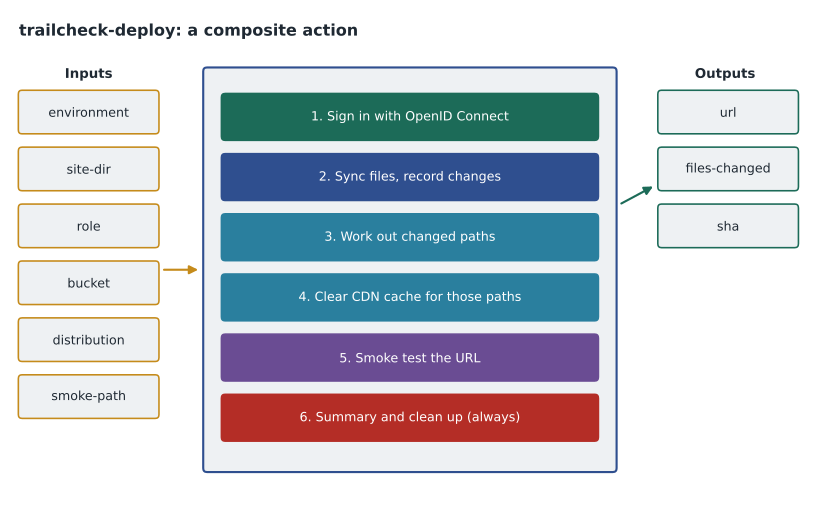
The inputs cover the facts that differ between environments: the environment name, the folder to deploy, the cloud role to assume, the bucket and the CDN distribution, plus the path to smoke-test. Outputs report the URL, the number of files changed and the commit deployed. Lesson 2 shaped the details: descriptions for everything, defaults where a safe one exists, string comparisons for the dry-run switch.
name: TrailCheck deploy
description: Deploy a built TrailCheck site folder to an environment, clear changed CDN paths and smoke-test it
author: Tidewater Trail Guides
inputs:
  environment:
    description: Environment name, staging or production
    required: true
  site-dir:
    description: Folder containing the built site
    default: dist-site
  role:
    description: Cloud role to assume with OpenID Connect
    required: true
  bucket:
    description: Storage bucket for this environment
    required: true
  distribution:
    description: CDN distribution id for this environment
    required: true
  smoke-path:
    description: Path that must return HTTP 200 after deployment
    default: /
  dry-run:
    description: Show what would change without uploading
    default: "false"
outputs:
  url:
    description: Base URL of the deployed site
    value: ${{ steps.smoke.outputs.url }}
  files-changed:
    description: Number of files uploaded or deleted
    value: ${{ steps.sync.outputs.changed }}
  sha:
    description: Commit that was deployed
    value: ${{ github.sha }}
runs:
  using: composite
  steps:
    - uses: aws-actions/configure-aws-credentials@<sha-of-reviewed-release>  # v5.x
      with:
        role-to-assume: ${{ inputs.role }}
        aws-region: ca-central-1
    - id: sync
      shell: bash
      env:
        SITE_DIR: ${{ inputs.site-dir }}
        BUCKET: ${{ inputs.bucket }}
        DRY_RUN: ${{ inputs.dry-run }}
      run: ${{ github.action_path }}/scripts/sync.sh
    - id: paths
      shell: bash
      run: node "${{ github.action_path }}/scripts/changed-paths.mjs" "$RUNNER_TEMP/sync.log"
    - if: ${{ inputs.dry-run != 'true' }}
      shell: bash
      env:
        DIST: ${{ inputs.distribution }}
        PATHS: ${{ steps.paths.outputs.paths }}
      run: ${{ github.action_path }}/scripts/invalidate.sh
    - id: smoke
      if: ${{ inputs.dry-run != 'true' }}
      shell: bash
      env:
        ENVIRONMENT: ${{ inputs.environment }}
        SMOKE_PATH: ${{ inputs.smoke-path }}
      run: ${{ github.action_path }}/scripts/smoke.sh
    - if: ${{ always() }}
      shell: bash
      run: rm -f "$RUNNER_TEMP"/sync.log "$RUNNER_TEMP"/trailcheck-*
Every input reaches the scripts through environment variables rather than being substituted into commands, following lesson 3's advice on script injection. The sign-in action is pinned by SHA with a version comment, following lesson 7. The node command in the paths step uses the Node.js that GitHub's Ubuntu runners have installed for running commands, which is separate from the runtime the runner uses for JavaScript actions; the README lists that as a requirement.
Inside the scripts
sync.sh uploads changed files with the provider's sync command, deleting files that no longer exist in the site folder, and writes the command's output to a log in RUNNER_TEMP. It counts uploaded and deleted files and writes the count to GITHUB_OUTPUT. In dry-run mode it passes the provider's option that shows changes without making them. changed-paths.mjs reads the log, converts file names to URL paths, collapses them into a short list with wildcards when there are many, and writes the list as a multi-line output using a random delimiter, as lesson 6 showed. invalidate.sh asks the CDN to clear those paths. smoke.sh requests the smoke path, retrying a few times while the CDN catches up, sets the url output and writes a line to the job summary.
The summary followed Priya's rule from lesson 6: something Owen could read. It gives the environment, the URL as a link, the commit, the number of files changed, the paths cleared and the smoke test result, in a short table.
The calling workflow
The action does one deployment. The pipeline around it, with build, approval and the choice of environment, stays in a reusable workflow, as lesson 1 recommended. Both the staging and production workflows now call the same reusable workflow with different inputs, and it calls trailcheck-deploy. The id-token permission is what lets the job request an OpenID Connect token; without it, the sign-in step fails.
on:
  workflow_call:
    inputs:
      environment:
        type: string
        required: true
jobs:
  deploy:
    runs-on: ubuntu-latest
    environment: ${{ inputs.environment }}   # production has required reviewers
    permissions:
      contents: read
      id-token: write                        # needed for OpenID Connect sign-in
    steps:
      - uses: actions/checkout@v5
      - run: npm ci && npm run build
      - id: deploy
        uses: tidewater/trailcheck-deploy@v1
        with:
          environment: ${{ inputs.environment }}
          role: ${{ vars.DEPLOY_ROLE }}
          bucket: ${{ vars.SITE_BUCKET }}
          distribution: ${{ vars.CDN_DISTRIBUTION }}
      - run: echo "Deployed ${{ steps.deploy.outputs.files-changed }} files to ${{ steps.deploy.outputs.url }}"
Using environment variables, set in each GitHub environment's configuration, for the role, bucket and distribution meant the same workflow and action served both environments with no environment-specific code. The difference that caused the September incident, two copies of the cache step, could no longer happen, because there was one copy.
Testing
Lesson 8's three levels applied. changed-paths.mjs got unit tests with the Node.js test runner, including a case for a deployment that changes several hundred files and must collapse to a short list of wildcard paths. The action's own repository got an integration test workflow that runs the action with uses: ./ in dry-run mode against a fixture site folder and a test bucket, and checks that files-changed matches the fixture's expected count. A second test job, run only on the main branch, deploys the fixture site for real to a small test environment and runs the smoke test, so the sign-in, cache-clearing and smoke steps are exercised on a real runner before any release.
| Test | What it proves | When it runs |
|---|---|---|
| Unit tests of changed-paths.mjs | Path conversion and collapsing are correct | Every pull request |
| Dry-run integration test | The action starts, signs in and computes changes against the fixture | Every pull request |
| Real deployment to the test environment | Upload, cache clearing and smoke test work end to end | Pushes to main |
| README examples | The documented usage still works | Every pull request |
Worked problem
A failing dry run in a pull request
Lena's pull request to trailcheck-deploy added an exclude input. Its dry-run integration test failed with an error from the sign-in step about being unable to request an OpenID Connect token. Her change had not touched sign-in. What happened, and what should change?
Show solution
- The sign-in step requests a token, which requires the job to have id-token write permission.
- Lena had copied the test workflow from markdown-guard to start a new test job, and its permissions block granted only contents read.
- Add id-token write to the new test job's permissions, as the existing test jobs have.
- Add a line to the README's requirements, and a troubleshooting entry for this error, since users will hit it too.
Answer: The new test job lacked id-token write. Add the permission to the job and document the error and the fix.
Releasing and sharing
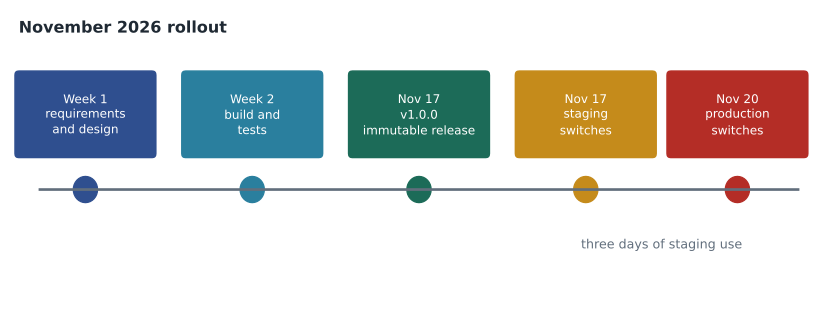
Following lesson 7, the trailcheck-deploy repository had immutable releases turned on before its first release. v1.0.0 was published on November 17, 2026, as an immutable release with release notes, and the release workflow moved the plain v1 tag to it. Following lesson 9, the repository's Access setting allowed repositories in the tidewater organization to use it. The staging workflow moved to the new reusable workflow first, ran for three days, and then production followed on November 20.
Documentation and maintenance
The README followed lesson 10's structure. Its requirements section stated the platform (Linux GitHub-hosted runners), the permissions (contents read and id-token write), what the cloud side must trust (a role whose trust policy accepts OpenID Connect tokens from the tidewater organization's deployment workflow in the named environments only) and the network destinations (the provider's storage and CDN endpoints). Its troubleshooting section started with the id-token error Lena had hit. CODEOWNERS named Dmitri as owner and Priya as backup, and Dependabot watched the github-actions ecosystem for the sign-in action, following lesson 11.
Lena asked what would happen when the cloud provider's sign-in action released a new major version. The answer was the maintenance routine from lesson 11: Dependabot would open a pull request updating the SHA and comment, the integration tests would run, and if they passed and the release notes showed nothing that changed behaviour, the team would merge it and publish a patch or minor release of trailcheck-deploy. Callers using v1 would get the update with no change to their workflows.
What the team learned
At the last Thursday session of November, Priya asked each person for one lesson from the autumn. Lena's was to write the metadata file first. Dmitri's was that tests in the action's own repository are worth more than any amount of care in the calling repositories. Malik's was that publishing is the start of the work, not the end. Priya's was the one she had started with: put each piece of logic in one place, give it a version, and never run whatever happens to be on main.
Writing the trust policy with the cloud team
OpenID Connect sign-in only works if the cloud side trusts tokens from GitHub, and how narrowly it trusts them decides the risk. Every token GitHub issues to a job carries claims: the repository, the workflow, the branch or environment, the event and more. The cloud role's trust policy should accept only the claims it needs. Priya and the person who managed Tidewater's cloud account wrote two roles, one per environment. The staging role accepted tokens only from the TrailCheck repository's deployment workflow running in the staging environment; the production role accepted tokens only from the same workflow running in the production environment. A token from any other repository, workflow or environment, including a pull request from a fork, would be refused by the cloud provider before the action could do anything.
That design meant the most important security control was outside the action entirely. trailcheck-deploy could be shared across the organization safely, because using it from the wrong place would simply fail to sign in. The README's requirements section described the trust policy so that any future repository wanting to use the action would know what to ask the cloud team for.
Applying the design elsewhere
The same pattern fits most deployment helpers: a small composite or JavaScript action that does the deployment step, a reusable workflow that owns the pipeline and approvals, short-lived credentials through OpenID Connect with a tightly scoped trust policy, outputs that later steps and people can use, tests that include a dry run on every pull request, and immutable releases with a movable major tag. What changes from one organization to the next is the platform being deployed to and the checks that prove a deployment worked.
Common mistakes
MistakePutting approval logic for production inside the deployment action.
InsteadKeep approval in the environment's protection rules, which the workflow controls.
MistakeForgetting id-token write on a job that signs in with OpenID Connect.
InsteadGrant id-token write to every job, including test jobs, that requests a token.
MistakeLeaving credentials files in the workspace or RUNNER_TEMP after the action finishes.
InsteadRemove them in a final step that always runs, or rely on a sign-in action's post step.
MistakeKeeping separate copies of deployment steps for each environment.
InsteadUse one action and one reusable workflow, with environment variables for the differences.
Summary and key terms
- Write requirements first, including what the action deliberately does not do.
- Choose the type of action from the work: here, a composite action wrapping a maintained sign-in action and small tested scripts.
- Pass inputs through environment variables, pin inner actions by SHA, and clean up credentials in a step that always runs.
- Keep the pipeline, approval and environments in a reusable workflow that calls the action.
- Test at three levels, including a dry run on every pull request and a real deployment to a test environment.
- Release immutable versions, move the major tag, share the action inside the organization, and document permissions, trust and troubleshooting.
- Deployment helper action
- An action that performs the deployment step itself, called from a pipeline that controls approvals and environments.
- OpenID Connect
- A standard that lets a workflow exchange a short-lived GitHub-issued token for cloud credentials without stored keys.
- id-token write
- The job permission that allows a workflow to request an OpenID Connect token.
- Environment protection rules
- Rules on a GitHub environment, such as required reviewers, that a job must satisfy before it runs.
- Smoke test
- A quick check that the deployed site responds as expected.
- Dry run
- A mode that reports what would change without making changes.
Practice problems
Work each problem on paper first, then reveal the answer to check.
Why did the team choose a composite action for trailcheck-deploy?
Show answer
Most of the work was calling an existing sign-in action and command-line tools, and cleanup could be handled by the sign-in action's post step and a final step that always runs.
Where does approval for production deployments live?
Show answer
In the production environment's protection rules, enforced by the calling workflow.
What permission must a job have to sign in to a cloud provider with OpenID Connect?
Show answer
id-token write.
Lesson quiz · 5 questions
Score 60% or more to complete this lesson.
Create a free account to save your progress, take quizzes and earn a certificate.