
MSBA-301 · Lesson 7 of 12 · 19 min
Versioning and releases
▶ Video coming soon A video version of this lesson is on the way.
Until mid-October, the guidebook workflow called markdown-guard by its main branch. That worked while Lena was the only person changing the action, and stopped working on the Tuesday she pushed an unfinished change to main by mistake. Every guidebook pull request that afternoon failed with an error nobody understood, and Owen spent an hour thinking the chapters were broken. Priya's verdict was short: "Nobody should ever run whatever happens to be on main. Actions get versions."
This lesson covers how actions are versioned and released: semantic versions and the major version tags that most callers use, GitHub releases, immutable releases, how callers choose between tags and commit SHAs, and how lockfiles changed the picture in October 2026. The GH-200 outline asks candidates to apply versioning and release strategies and to understand the implications of immutable actions for version pinning, and both sides matter: the maintainer publishing a version and the caller choosing one.
Semantic versions for actions
Most actions follow semantic versioning: a version number of three parts, major, minor and patch, such as 1.4.2. The patch number increases for backward-compatible bug fixes, the minor number for backward-compatible new features, and the major number for changes that can break existing callers. For an action, a breaking change means anything a workflow author would have to change their workflow for: removing or renaming an input or output, changing a default in a way that changes behaviour, dropping support for an operating system, or requiring new permissions.
Each release is marked with a Git tag, conventionally the version with a v in front, such as v1.4.2. A tag is a name attached to a commit. A step that uses tidewater/markdown-guard at v1.4.2 gets the action exactly as it was at the commit that tag points to.
| Change | Example in markdown-guard | Version bump |
|---|---|---|
| Bug fix that changes nothing callers rely on | Fix a false alarm on distances written with a thin space | Patch: 1.4.1 to 1.4.2 |
| New optional input or output with a safe default | Add an exclude input defaulting to nothing | Minor: 1.4.2 to 1.5.0 |
| Removed or renamed input, changed default behaviour | Remove the deprecated link-check input | Major: 1.5.0 to 2.0.0 |
| Needs new token permissions | Start commenting on pull requests | Major |
Major version tags
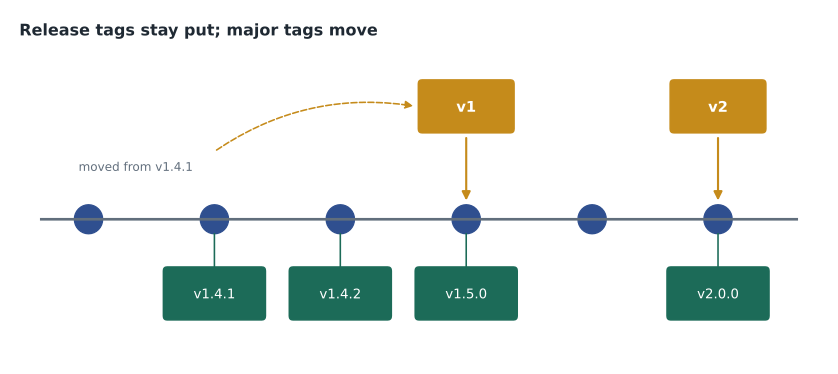
Callers rarely want to pin a full version and update it by hand every week. The convention across GitHub Actions is a major version tag, such as v1, that the maintainer moves forward to the newest release in that major version. A workflow that uses markdown-guard at v1 gets every bug fix and new feature in version 1 automatically, and never gets version 2 by surprise. This is how most people use actions/checkout, actions/setup-node and the rest of GitHub's own actions.
Moving a major tag means pointing an existing tag name at a new commit and force-pushing the tag. Some teams also keep minor tags, such as v1.5, that move forward to the newest patch. The maintainer's promise is the important part: anything published under v1 stays backward compatible with what v1 users already wrote.
Releases and release notes
A GitHub release is a record attached to a tag that adds a title, release notes and optional files called assets. For an action, the release notes are where callers learn what changed: new inputs, fixed bugs, deprecations and anything they need to do. GitHub can generate draft release notes from the pull requests merged since the previous release, which the team then edits. A release is also the step at which an action is published to Marketplace, which lesson 9 covers.
Tidewater adopted a release routine for every action. Changes merge to main through pull requests that must pass the action's tests. When enough changes have accumulated, the maintainer drafts a release with a new version tag, edits the generated notes, publishes it, and then moves the major tag. A short workflow triggered by publishing a release does the last step automatically, so nobody forgets.
name: Move major version tag
on:
  release:
    types: [published]
permissions:
  contents: write
jobs:
  move-tag:
    runs-on: ubuntu-latest
    steps:
      - uses: actions/checkout@v5
      - name: Point the major tag at this release
        env:
          TAG: ${{ github.event.release.tag_name }}
        run: |
          major="${TAG%%.*}"
          git tag -f "$major" "$TAG"
          git push -f origin "$major"
Immutable releases
A tag in Git can be moved or deleted by anyone with write access to the repository. That is what makes major tags convenient, and it is also a risk: an attacker who gains write access to an action's repository could move an existing release tag, such as v1.4.2, to malicious code, and every workflow pinned to that tag would run it. Several real supply chain incidents in 2025 worked this way.
GitHub's answer is immutable releases, released in public preview in August 2025 and generally available on October 28, 2025. When immutable releases are turned on for a repository or organization, publishing a release locks it. Its tag is fixed to its commit and cannot be moved, and cannot be deleted while the release exists; even if the release is deleted, the tag name cannot be reused. Its assets cannot be changed or removed. The title, release notes and whether it is a pre-release can still be edited. Each immutable release also gets a release attestation, a signed record of the tag, commit and assets that consumers can verify.
Immutable releases change the maintainer's routine in one way. A tag attached to an immutable release cannot move, so the major tag cannot itself be a release. GitHub's guidance for actions is to create a release, and so an immutable version, for each full version such as v1.5.0, and to keep the major and minor tags, v1 and v1.5, as plain Git tags without releases, which can still be moved forward. Callers who want an unchangeable reference use the full version; callers who want automatic compatible updates use the major tag.
| Reference | With immutable releases on | Who should use it |
|---|---|---|
| v1.5.0, a published release | Cannot move or be deleted; assets locked; attested | Callers who want a fixed, verifiable version |
| v1, a plain tag | Maintainer can move it forward | Callers who accept automatic compatible updates |
| A full commit SHA | Cannot change by its nature | Security-sensitive workflows and policies that require pinning |
| main or another branch | Changes with every push | Only the action's own tests |
Priya turned on immutable releases for every action repository in the tidewater organization, and for Malik's public trail-report repository, before the first real release of each. Turning it on before the first release meant every published version of Tidewater's actions was locked from the start, with no question about which older releases were covered.
Immutable actions and where the runner fetches actions
The GH-200 outline also mentions the rollout of immutable actions on hosted runners. The idea is the same as immutable releases, applied to how the runner gets an action: instead of downloading whatever the Git ref currently points to, the runner fetches a published, unchangeable package of a particular release of the action. Where an action is published that way, a version reference resolves to one fixed package, and the source the runner downloads from is GitHub's package service rather than the repository itself. Organizations that restrict network access from self-hosted runners need to allow that source, and policies that require pinning still apply. GitHub has said it intends to move action publishing further towards immutable releases, so maintainers should expect stricter requirements over time; check GitHub's current documentation for the exact state of the rollout.
The caller's choice: tag or SHA
From the caller's side, the question is how much trust to place in the action's maintainer. A major tag trusts the maintainer to move it only to compatible, safe releases. A full release version trusts that the release is immutable, which is true only if the maintainer turned immutable releases on. A full 40-character commit SHA trusts nothing beyond the code you reviewed, because a commit's contents cannot change without its SHA changing.
GitHub's security guidance recommends pinning third-party actions to a full commit SHA, with a comment naming the version for readability. Since August 2025 organization and enterprise administrators can enforce that with a policy that requires SHA pinning, which MSBA-291 covered. Dependabot understands SHA pins with version comments and proposes pull requests that update both when a new release appears, so pinning does not mean falling behind.
steps:
  # Trusts the maintainer to move v5 safely
  - uses: actions/checkout@v5
  # Fixed to reviewed code; Dependabot updates the SHA and the comment
  - uses: actions/checkout@08c6903cd8c0fde910a37f88322edcfb5dd907a8  # v5.0.0
  # Tidewater's own action, by major version
  - uses: tidewater/markdown-guard@v1
SHA pinning has a gap. If you pin a composite action to a SHA, the actions it calls inside are whatever that version of the composite action refers to, which may be moving tags. Pinning the outer action does not pin its dependencies. That gap is why Tidewater pinned the actions called inside its own actions by SHA, as lesson 3 showed, and why lockfiles mattered.
Lockfiles
Actions lockfiles became generally available on October 28, 2026. A lockfile records the exact commit of every action a workflow uses, including the actions those actions call, so the whole tree is fixed. The lock is generated with the GitHub CLI and committed to the repository, and updating it means regenerating it and reviewing the changes in a pull request. If an action's resolved commit does not match the lockfile, the run stops before any job starts. Administrators can require lockfiles through Actions policy, as MSBA-291 described.
For an action maintainer, lockfiles change the incentive. Callers who lock their workflows will see every change in the actions your action calls as a diff in their lock update, so an action with many moving dependencies creates noise for every user. Fewer, well-pinned dependencies make an action easier to adopt in a locked-down organization. Dmitri trimmed trail-units to depend on nothing but @actions/core for exactly that reason.
Worked problem
Recovering from the Tuesday failure
Lena's unfinished change to markdown-guard broke every guidebook pull request because the guidebook workflow used the action at main. Design the versioning that prevents this.
Show solution
- Develop on branches and merge to main only through pull requests that pass the action's own tests.
- Publish releases as v1.0.0, v1.0.1 and so on, with immutable releases turned on so released versions cannot change.
- Keep a plain v1 tag, moved forward by the release workflow after each compatible release.
- Change the guidebook workflow to use markdown-guard at v1, or at the SHA of a reviewed release if it wants no automatic updates.
Answer: Callers use a release or the major tag, never a branch, and only tested, released code reaches them.
Breaking changes and major versions
Sometimes a breaking change is the right thing to do. When markdown-guard's deprecated link-check input had been warning callers for two months, Lena removed it, which made version 2.0.0. The release notes said what had changed and what callers needed to do. A new v2 tag started from that release, and the v1 tag stayed where it was, pointing at the last version 1 release, so nobody using v1 was affected until they chose to move.
Maintainers of popular actions often keep fixing security problems in the previous major version for a while after a new one ships, and announce when they will stop. Lesson 11 covers that kind of maintenance commitment.
Pre-releases and release candidates
Some changes deserve a trial before they become the version everyone gets. A GitHub release can be marked as a pre-release, and its tag can carry a suffix such as v2.0.0-rc.1, which semantic versioning treats as earlier than v2.0.0. A pre-release does not move the major tag, so callers on v1 or v2 are unaffected, while volunteers can try the candidate by referring to its tag. Before markdown-guard 2.0.0, Lena published v2.0.0-rc.1 and asked Owen to point the guidebook's preview workflow at it for a week. He found one chapter layout that the new default path missed, which was fixed before the real release.
Common mistakes
MistakeCalling an action at main from production workflows.
InsteadUse a released version, a major tag or a full commit SHA.
MistakeCreating a release for the major tag v1 when immutable releases are on.
InsteadRelease full versions; keep major and minor tags as plain, movable tags.
MistakeAssuming a SHA pin on a composite action pins the actions it calls.
InsteadPin inner dependencies too, or use a lockfile.
MistakeShipping a removed input in a minor release.
InsteadRemoving or renaming an input is a breaking change and needs a new major version.
Summary and key terms
- Actions use semantic versions: patch for fixes, minor for compatible features, major for breaking changes.
- Callers commonly use a movable major tag such as v1, which the maintainer moves to each compatible release.
- Immutable releases, generally available since October 28, 2025, lock a release's tag and assets and add a release attestation.
- With immutable releases, publish full versions as releases and keep major and minor tags as plain movable tags.
- Full commit SHAs are the strongest pin; Dependabot keeps SHA pins current.
- Lockfiles, generally available since October 28, 2026, fix every action in a workflow's dependency tree.
- Semantic versioning
- A major.minor.patch version scheme that signals the kind of change.
- Major version tag
- A tag such as v1 that the maintainer moves to the newest compatible release.
- GitHub release
- A record attached to a tag with a title, notes and optional assets.
- Immutable release
- A release whose tag and assets cannot be changed after it is published.
- Release attestation
- A signed record of an immutable release's tag, commit and assets.
- SHA pinning
- Referring to an action by its full commit SHA so the code cannot change.
- Actions lockfile
- A committed file recording the exact commits of all actions a workflow uses, including nested ones.
Practice problems
Work each problem on paper first, then reveal the answer to check.
Which version number changes when an action removes an input?
Show answer
The major version, because removing an input is a breaking change.
Why are major tags kept as plain tags when immutable releases are on?
Show answer
A tag attached to an immutable release cannot move, and the major tag must move forward.
What does a lockfile fix that a SHA pin on a composite action does not?
Show answer
The versions of the actions that the composite action calls inside it.
Lesson quiz · 5 questions
Score 60% or more to complete this lesson.
Create a free account to save your progress, take quizzes and earn a certificate.