
MSBA-301 · Lesson 3 of 12 · 19 min
Composite actions
▶ Video coming soon A video version of this lesson is on the way.
Lena's markdown-guard action started as the eleven lines Priya had found copied into four workflows. Those lines installed a Markdown linter, ran it over the chapter files, ran a link checker, checked that every trail distance was written in the house style, and wrote a short summary for the pull request. None of it was complicated. The problem was only that it lived in four places. A composite action was the obvious tool, because the steps could move into the action almost exactly as they were.
This lesson covers composite actions from the inside: how their steps run, how they read inputs and produce outputs, how they call other actions, how they find their own files, and the limits that catch people out. It ends with the version of markdown-guard that the team adopted in October 2026.
How a composite action runs
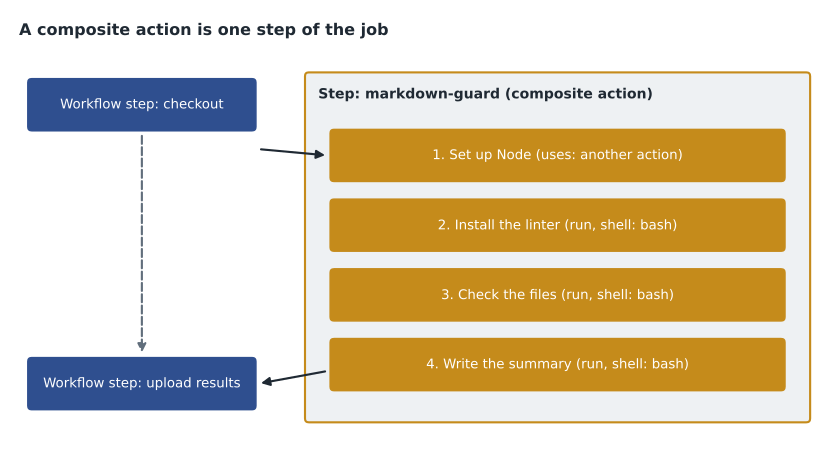
A composite action is a list of steps defined in the action's metadata file under runs, with using set to composite. When a workflow step calls the action, the runner runs those steps in order, on the same runner, in the same workspace, as part of the calling job. Each composite step can run a shell command with run or call another action with uses. From the workflow's point of view the whole composite action is one step: it starts, it finishes, and it succeeds or fails. In the log its own steps appear grouped inside that one step, which makes troubleshooting readable.
Because composite steps run directly on the runner, they behave like the workflow's own steps. Files they create are in the workspace afterwards, tools they install stay installed for the rest of the job, and environment changes they make through the GITHUB_ENV file affect later steps in the job. That is usually what you want from a setup action, and occasionally a surprise in an action that should have cleaned up after itself.
Every run step needs a shell
In a workflow, a run step can rely on a default shell, set for the job or the whole workflow, or on the runner's default. Inside a composite action there is no such default, so every step that uses run must set shell explicitly. Leaving it out is one of the most common errors in a first composite action, and the runner refuses to start the action with an error naming the missing property.
The choice of shell decides where the action can run. bash is available on all GitHub-hosted runners, including Windows, where it is provided by Git Bash. pwsh, PowerShell 7, is also available on all of them. sh exists on Linux and macOS but not on standard Windows runners, and cmd and powershell exist only on Windows. A composite action meant for any operating system should use bash or pwsh throughout and avoid commands that exist on only one platform.
| shell value | Available on GitHub-hosted runners | Notes |
|---|---|---|
| bash | Linux, macOS, Windows (Git Bash) | Fails the step on the first failing command |
| pwsh | Linux, macOS, Windows | PowerShell 7; good for cross-platform scripts |
| sh | Linux, macOS | Not on standard Windows runners |
| powershell | Windows | Windows PowerShell 5.1 |
| cmd | Windows | Windows command prompt |
Reading inputs and the action's own files
Composite steps read the action's inputs through the inputs context, so the path input of markdown-guard is written as inputs.path inside an expression. It is good practice not to put an input expression directly inside a run command. If a caller passes a value containing shell metacharacters, an expression substituted straight into the script becomes part of the command. The safer pattern, and the one GitHub's security guidance recommends, is to pass the input into an environment variable on the step and refer to that variable in the script, so the shell treats the value as data.
A composite action often needs files of its own: a script, a configuration file, a list of words the spelling check should accept. Those files live in the action's repository, which the runner downloads separately from the workspace. The github.action_path context, also available as the GITHUB_ACTION_PATH environment variable, gives the directory where the action's files are. A step that runs a script shipped with the action refers to it through that path, never through a path relative to the workspace, which belongs to the calling repository.
- id: check
  shell: bash
  env:
    CHECK_PATH: ${{ inputs.path }}
    CONFIG: ${{ github.action_path }}/markdownlint.json
  run: |
    files=$(find "$CHECK_PATH" -name '*.md' | wc -l)
    npx --yes markdownlint-cli2 --config "$CONFIG" "$CHECK_PATH/**/*.md" || status=$?
    echo "files=$files" >> "$GITHUB_OUTPUT"
    exit "${status:-0}"
Producing outputs
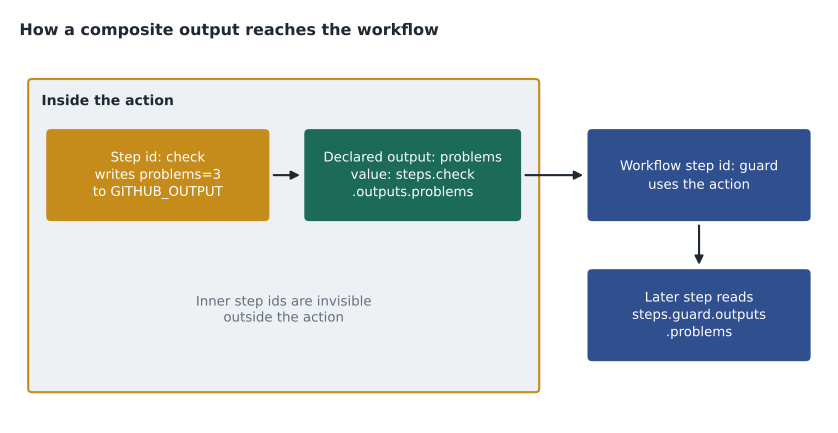
A composite action's outputs are declared in the metadata file with a value expression, as lesson 2 showed. The value usually reads the output of one of the action's own steps, so that step needs an id and must write its result to the file named by GITHUB_OUTPUT, one name=value line per output. The composite output then passes that value up to the calling workflow, which reads it through its own steps context and the id it gave the step that called the action.
This two-level naming confuses people at first. Inside the action, Lena's step has the id check and writes files and problems. The action declares outputs named files-checked and problems, mapped to steps.check.outputs.files and steps.check.outputs.problems. In the calling workflow, the step that uses markdown-guard has whatever id the workflow author chose, perhaps guard, and later steps read steps.guard.outputs.problems. The inner step ids are invisible outside the action.
Calling other actions from inside
Composite steps can call other actions with uses, with inputs passed by with, exactly as in a workflow. That makes composite actions a good way to wrap a common combination, such as setting up a language runtime, restoring a cache and installing dependencies, into one step with sensible defaults. markdown-guard calls actions/setup-node to make sure the Node.js version it needs is present before running the linter.
The actions a composite action calls are dependencies, and they bring the same supply chain questions as dependencies anywhere. If markdown-guard refers to another action by a moving tag, then a change in that action changes markdown-guard's behaviour for every caller without anyone touching markdown-guard. Tidewater's rule, which lesson 7 explains, was to pin the actions it called from inside its own actions to full commit SHAs, with a comment giving the version, and let Dependabot propose updates.
A composite action can call another composite action. That nesting is supported, but it should stay shallow. Each layer hides its steps from the one above, and a failure three levels down is much harder to trace in the log than a failure in a flat list of steps.
Conditions, errors and working directories
Composite steps support if conditions, so a step can run only when an input asks for it, such as the link check when check-links is true. They support continue-on-error for steps whose failure should not fail the action, and working-directory to run a command somewhere other than the workspace root. Each step can also set env and a name that appears in the log.
By default a composite action fails as soon as one of its steps fails, and the calling step fails with it. Lena wanted markdown-guard to check everything before deciding whether to fail, so that a pull request showed all its problems at once. Her solution was the one in the code above: the check step records the linter's exit status instead of stopping, writes its outputs, and only then exits with that status. A final step, guarded by an if condition that reads the problem count, writes the summary whether or not problems were found.
runs:
  using: composite
  steps:
    - uses: actions/setup-node@49933ea5288caeca8642d1e84afbd3f7d6820020  # v4.4.0
      with:
        node-version: 24
    - id: check
      shell: bash
      env:
        CHECK_PATH: ${{ inputs.path }}
      run: ${{ github.action_path }}/check.sh
    - if: ${{ inputs.check-links == 'true' }}
      shell: bash
      env:
        CHECK_PATH: ${{ inputs.path }}
      run: ${{ github.action_path }}/links.sh
    - if: ${{ always() }}
      shell: bash
      env:
        PROBLEMS: ${{ steps.check.outputs.problems }}
      run: echo "### Markdown guard found $PROBLEMS problem(s)" >> "$GITHUB_STEP_SUMMARY"
What composite actions cannot do
A composite action runs inside someone else's job, so it cannot change anything the job decided. It cannot choose a runner, set job-level permissions, use services containers, define a matrix or set a job timeout. It cannot read the calling workflow's secrets context; a secret reaches a composite action only when the caller passes it as an input or sets it as an environment variable. Those limits are features: the person who writes the workflow keeps control of where the code runs and what it can reach.
Composite actions also have no equivalent of a JavaScript action's post script. If an action must clean up at the end of the job, such as removing credentials it wrote to disk, a composite action can only do so in its own last step, which runs before later steps of the job. Lesson 12 returns to this when the team decides how to build its deployment action.
| Feature | In a workflow job | In a composite action |
|---|---|---|
| Default shell for run steps | Yes | No; each run step names its shell |
| Choose the runner, matrix or services | Yes | No; it inherits the job's |
| Read the secrets context | Yes | No; secrets must be passed in as inputs or environment variables |
| Call other actions with uses | Yes | Yes |
| if, env, working-directory, continue-on-error on steps | Yes | Yes |
| Run cleanup after the whole job | Not applicable | No; JavaScript actions can, with post |
Worked problem
Making markdown-guard work on Windows
The TrailCheck repository ran markdown-guard on a Windows runner as well as Linux, because some authors edited on Windows. The first version failed on Windows with a message that sh was not found. Lena's steps used shell: sh and the find command. What should change?
Show solution
- sh is not available on standard Windows runners, so change every run step to shell: bash, which Git Bash provides on Windows.
- Check the commands: find and wc exist in Git Bash, but paths written with backslashes or tools installed only on Linux would still fail.
- Add Windows to the test matrix in the action's own repository, so a future change that breaks Windows fails before release.
Answer: Use bash on every run step, keep to commands that Git Bash provides, and test on Windows in the action's own workflow.
Moving a local action into its own repository
markdown-guard began under .github/actions in the guidebook repository, where the guidebook's workflow called it by local path. In October, when the TrailCheck repository needed it too, the team moved it into a repository of its own, tidewater/markdown-guard, with the metadata file at the root. The guidebook and TrailCheck workflows then referred to it as tidewater/markdown-guard with a version, and the old folder was deleted. The new repository was public. The guidebook repository is private, but TrailCheck is public so that volunteers can contribute from forks, and GitHub's documentation describes sharing a private repository's actions only with other private repositories. markdown-guard contained nothing confidential, so making it public was the simple answer; lesson 9 covers the options for actions that must stay private.
The move changed one detail inside the action. Scripts that had been referred to by a path relative to the workspace, which worked while the action lived in the same repository, broke as soon as it moved. Every script had to be referred to through github.action_path. Lena added that to the team's checklist for any action that might one day leave its home repository: refer to your own files through the action path from the first day.
Composite actions versus reusable workflows, revisited
Lena asked, after finishing markdown-guard, why the team had not simply made the Markdown check a reusable workflow. The answer came down to where the check ran. The guidebook workflow ran the check as one step in a job that also built the site and uploaded a preview, and those later steps needed the files the check produced. A reusable workflow would have been a separate job on a separate runner, with its own checkout and no access to the first job's workspace unless files were passed through artifacts. A composite action runs in the caller's job, shares its workspace and adds no new runner start-up. For a check that is one part of a longer job, that is the right shape. For a whole pipeline, with its own runners and approvals, the reusable workflow is.
Common mistakes
MistakeLeaving shell off a run step inside a composite action.
InsteadSet shell on every run step; there is no default inside a composite action.
MistakeSubstituting an input expression directly into a run script.
InsteadPass the input through an environment variable and use the variable in the script.
MistakeReferring to the action's own scripts by a path relative to the workspace.
InsteadUse github.action_path, which points to the action's files.
MistakeExpecting a composite action to read the caller's secrets.
InsteadHave the caller pass the secret in as an input or environment variable.
Summary and key terms
- A composite action runs its steps on the caller's runner as one step of the calling job.
- Every run step in a composite action must set shell; bash and pwsh work on all hosted runners.
- Inputs are read through the inputs context and are safest passed to scripts through environment variables.
- github.action_path points to the action's own files.
- Composite outputs map the outputs of inner steps to declared outputs with value expressions.
- Composite actions can call other actions and use if, env and continue-on-error, but cannot choose runners, read the secrets context or run post-job cleanup.
- inputs context
- The context composite steps use to read the action's inputs.
- github.action_path
- The directory containing the action's own files, also available as GITHUB_ACTION_PATH.
- GITHUB_OUTPUT
- The file a step writes name=value lines to in order to set its outputs.
- continue-on-error
- A step setting that lets the job or action continue when that step fails.
- Script injection
- An attack in which untrusted input substituted into a script becomes part of the command.
Practice problems
Work each problem on paper first, then reveal the answer to check.
Why must every run step in a composite action set shell?
Show answer
A composite action has no default shell to fall back on.
How does a composite action find a script stored in its own repository?
Show answer
Through github.action_path or the GITHUB_ACTION_PATH variable.
How can a composite action receive a secret?
Show answer
Only if the caller passes it as an input or sets it as an environment variable.
Lesson quiz · 5 questions
Score 60% or more to complete this lesson.
Create a free account to save your progress, take quizzes and earn a certificate.