
MSBA-280 · Lesson 8 of 12 · 18 min
Predictive lead and opportunity scoring
▶ Video coming soon A video version of this lesson is on the way.
With the work list running, the inside sellers had a new question. "It tells me what is due," said one of them, "but not which lead is worth my best hour." Ottilie had the same question about opportunities. Twenty deals sat in Develop, and her instinct said six of them would close. She wanted a second opinion that came from Kestrelbay's own history rather than from whoever argued loudest in the Friday review.
That second opinion is predictive scoring. Dynamics 365 Sales can train a machine learning model on a company's past leads and opportunities and give each open record a score from 0 to 100 that estimates how likely it is to convert or win. The AB-210 outline lists configuring predictive scoring in the second domain and fine-tuning the predictive scoring model in the third. This lesson covers both: switching scoring on, reading scores, and improving the model over time.
How predictive scoring works
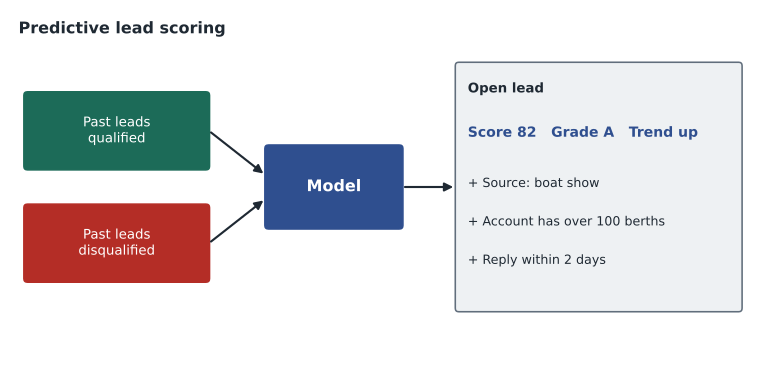
A predictive lead scoring model learns from leads that were qualified and leads that were disqualified. A predictive opportunity scoring model learns from opportunities that were won and lost. Each model looks at columns on the records and related activity, finds the patterns that separated good outcomes from bad ones, and applies them to open records. The result is a score on each open record, a grade band such as A to D, a trend showing whether the score is improving or declining, and a list of the top factors pushing the score up or down.
Requirements and licensing
Microsoft's documentation sets minimum data requirements. A lead scoring model needs at least 40 qualified and 40 disqualified leads created within the past two years. An opportunity scoring model needs at least 40 won and 40 lost opportunities created in the same period. More history and more consistent data give better models. Sales Enterprise includes scoring for up to 1,500 records a month; Sales Premium has no limit and opens advanced configuration, such as filtering a model by business unit or adding custom attributes.
Lesson 2 checked Kestrelbay's numbers: 220 qualified and 95 disqualified leads, 70 won and 52 lost opportunities. Enough to train both, with the warning that migrated lost deals had poor close reasons.
Turning scoring on
The fastest route is quick setup: in Sales settings, select Lead + opportunity scoring, then Quick setup, and select Create and publish for each model. Training takes a few minutes. When the models are published, a score widget appears on lead and opportunity forms and a score column can be added to views. Mirela ran quick setup in Kestrelbay-Test first, checked that the scores looked sensible on a sample of deals she knew, then repeated it in production.
For more control, the Predictive models area of Sales Insights settings lets an administrator edit a model: choose which columns it may use, view its accuracy, retrain it, and with Premium create more than one model for different parts of the business. Mirela opened it the week after go-live to see what the first models had learned.
| Setting | Where | Purpose |
|---|---|---|
| Quick setup, create and publish | Sales settings, Lead + opportunity scoring | Train and publish default models fast |
| Attributes used by the model | Sales Insights settings, Predictive models | Include or exclude columns |
| Model accuracy and performance | Predictive models, model details | Judge whether the model is useful |
| Retrain | Predictive models | Update the model with new history |
| Additional models by business unit or condition | Predictive models (advanced) | Separate patterns for different parts of the business |
Reading a score
A score is a probability estimate, not a promise. A lead scoring 82 is not 82 percent certain to qualify; it ranks among the leads the model thinks most likely to. The grade groups scores into bands that sellers can scan quickly. The trend shows movement since the last calculation. The factors explain the score in plain terms, for example "Source is Boat show", "Account has more than 100 berths" or "No activity in the last 14 days". Sellers trusted the scores much more once they could see the factors.
Worked problem
Using scores to plan an hour
An inside seller has one hour and five new leads: two grade A (scores 86 and 81), two grade B (64 and 59) and one grade C (33). The grade C lead is from a yacht club that Ottilie wants to win for strategic reasons. How should the seller use the scores?
Show solution
- Start with the two grade A leads: highest expected return for the time.
- Read the factors on the grade B leads; if a negative factor is easily fixed (for example no contact phone), fix it and call.
- Treat the grade C yacht club as a judgement call: the score reflects patterns, not strategy.
- Log outcomes honestly so the model learns from this week.
Answer: Call the two A leads first, then the yacht club because of the strategic reason, then the B leads as time allows. Scores guide priority; they do not replace judgement.
Model accuracy
Each model shows an accuracy measure that compares its predictions with actual outcomes on held-back data. Microsoft uses a standard measure of how well the model separates good from bad outcomes; higher is better, and a value close to random guessing means the model is not yet useful. The first Kestrelbay opportunity model was modest, which matched Mirela's expectation given the migrated lost deals. The lead model was better, because lead sources and statuses had been recorded consistently in the old system.
Fine-tuning the model
Fine-tuning means improving what the model learns from. The main levers are data quality, attribute selection and retraining.
| Lever | What Mirela did | Why |
|---|---|---|
| Data quality | Made close reasons required; cleaned 60 migrated lost deals with real reasons | The model learns from outcomes and reasons |
| Include useful attributes | Added Deal type and account Berths | Business knowledge the default model lacked |
| Exclude misleading attributes | Removed Created by, which reflected the import account | An artefact of migration, not a buying signal |
| Exclude sensitive attributes | Kept personal characteristics out of the model | Fairness and policy |
| Retrain on a schedule | Retrained after each quarter | New outcomes improve the model |
Excluding attributes deserves care. A model can pick up patterns that are real in the data but wrong to act on. At Kestrelbay the obvious example was the Created by column: every migrated lead had been created by the import account, and most of them were old and lost, so the model briefly learned that "created by the import account" predicted failure. Removing that column fixed it. Mirela also reviewed the attributes against Kestrelbay's responsible AI note: no attribute that described personal characteristics of contacts would be used for scoring.
Using scores in the sales process
Scores become useful when they appear where decisions are made. Mirela added the score column to the sellers' main lead and opportunity views and sorted them by score. The sales accelerator work list already ordered by priority, and with scoring on, higher-scored records rose to the top. She added a chart to Ottilie's dashboard showing open pipeline by grade, so the Friday review started with grade A deals in Propose. And in the forecast, managers compared sellers' Committed deals with their scores: a Committed deal with a falling grade C score was a conversation to have.
Two months in, the inside team's conversion rate from new lead to qualified rose, though Mirela was careful in her report to the owners. Several changes had arrived together: the work list, faster first contact and scoring. She could not say how much came from scoring alone, and she said so.
Scores and the Sales agents
Predictive scoring is a classic machine learning feature, separate from Copilot and agents. The two work well together. The Sales Qualification Agent in the next course can research and engage leads; its results change the activity on a lead, which changes the score. Mirela made one rule for phase three: agent activity would be tracked like any other activity, so that the model learned from what really happened.
How scores stay current
Scores are recalculated as records change, so a lead that replies to an email or gains a phone number can move up a grade. The model itself, the set of patterns learned from history, changes only when it is retrained. Microsoft provides options to retrain models, and Mirela set Kestrelbay's routine as a quarterly retrain after cleaning close reasons, with an extra retrain after the spring boat show season, when lead sources shifted sharply. She kept a simple log: date, accuracy before and after, attributes changed and why.
| Quarter | Model | Change | Result |
|---|---|---|---|
| First | Lead | Default attributes | Baseline |
| First | Opportunity | Default attributes | Modest accuracy |
| Second | Opportunity | Removed Created by; added Deal type and Berths; cleaned 60 lost deals | Accuracy improved |
| Second | Lead | Added Boat show source value | Small improvement |
Explaining scores to sellers
Sellers adopt scores when they understand them. Mirela trained the inside team with three rules. First, compare scores within the same kind of record: a lead score and an opportunity score come from different models. Second, read the factors before acting; a low score caused by missing data is fixed by finding the data, not by ignoring the lead. Third, scores describe the past; a new product line or a new kind of customer will not be scored well until the model has seen outcomes for it.
Grades and thresholds
Grades group scores into bands so that a work list can be read at a glance. The thresholds between grades can be adjusted for the lead model, so that, for example, grade A covers the top tenth of scores rather than a fixed number. Mirela left the defaults for the first quarter and adjusted them only after she could see the actual distribution of scores, so that grade A meant something rare enough to act on first.
A fairness review
Before publishing the retrained opportunity model, Mirela ran a simple fairness review with Ravi and Ottilie. They looked at the attributes the model used and asked of each one: would we be comfortable telling a customer this affected how quickly we called them back? Account size, deal type and past purchasing passed easily. Location was discussed: it reflected travel time for field reps, which was legitimate, so it stayed, with a note explaining why. The review took an hour and was recorded in the project log next to the model change.
When not to rely on scores
Mirela also wrote down when scores should be ignored. New kinds of business, such as the first commercial fishing fleet contract in a new region, had no history and would score poorly regardless of merit. Strategic accounts that Ottilie chose to pursue for reasons outside the data would always be worked. And during the first weeks after a big change to the sales process, the model would be learning from a past that no longer matched. In those cases sellers used judgement, and the reason was noted on the record so that later reviews could tell the difference between a weak model and a deliberate choice.
| Situation | Use the score? |
|---|---|
| Routine web and boat show leads | Yes, as the main priority signal |
| New product line or new region | With caution; little history |
| Strategic target accounts | No; strategy decides |
| Right after a process change | With caution until retrained |
Mirela kept the owners informed with a short monthly note: how many leads and opportunities were scored, how the share of grade A records converted compared with the rest, and any changes made to the model. Keeping the note plain made it easy for Ottilie to challenge. When grade A leads converted at roughly twice the rate of grade C leads in the second month, the owners accepted that scoring was worth keeping, while agreeing that the comparison was only an indication and not a controlled test.
Common mistakes
MistakeTreating a score as a probability guarantee.
InsteadUse scores to rank and prioritize, and read the factors behind them.
MistakeTraining once and forgetting the model.
InsteadRetrain on a schedule as new outcomes arrive.
MistakeLeaving migration artefacts such as Created by in the model.
InsteadExclude columns that reflect how data was loaded rather than how customers behave.
MistakeUsing personal characteristics as attributes.
InsteadExclude sensitive attributes and document the choice.
Summary and key terms
- Predictive scoring trains models on past leads and opportunities and scores open records from 0 to 100, with grades, trends and factors.
- Each model needs at least 40 positive and 40 negative outcomes from the past two years.
- Quick setup creates and publishes models; Sales Insights settings hold advanced model settings.
- Fine-tuning relies on data quality, attribute selection, exclusion of misleading or sensitive attributes, and retraining.
- Scores are most useful in views, the work list, dashboards and forecast reviews.
- Predictive lead scoring
- A model that scores open leads on likelihood to qualify, trained on past qualified and disqualified leads.
- Predictive opportunity scoring
- A model that scores open opportunities on likelihood to win, trained on past won and lost deals.
- Grade
- A band, such as A to D, grouping scores for quick reading.
- Factor
- A reason shown with a score, describing what raised or lowered it.
- Retrain
- Train the model again on newer data and publish the result.
- Score widget
- The form component showing a record's score, grade, trend and factors.
Practice problems
Work each problem on paper first, then reveal the answer to check.
What data does a predictive opportunity scoring model learn from?
Show answer
Past opportunities that were won and lost, with their columns and activity.
Why did Mirela exclude the Created by column?
Show answer
It reflected the import account used for migration, not customer behaviour.
Name two places where scores were made visible to sellers and managers.
Show answer
For example: lead and opportunity views sorted by score, the sales accelerator work list, a pipeline-by-grade chart.
Lesson quiz · 5 questions
Score 60% or more to complete this lesson.
Create a free account to save your progress, take quizzes and earn a certificate.