
MSBA-280 · Lesson 7 of 12 · 18 min
Sales accelerator and work assignment
▶ Video coming soon A video version of this lesson is on the way.
Kestrelbay's six inside sellers started each day the same way: they opened their email, scrolled through yesterday's leads, and guessed who to call first. Two of them were good at it and four were not. New web leads sometimes sat for two days because each seller assumed another had taken them. Ottilie wanted a single list each morning that told every seller what to do next, and a fair, automatic way to hand out new leads.
Dynamics 365 Sales has two features for exactly that. The sales accelerator gives each seller a prioritized work list and lets managers define sequences, which are planned series of activities. Work assignment, configured through segments and assignment rules, distributes new leads and opportunities to the right sellers automatically. The AB-210 outline lists configuring the sales accelerator and configuring work assignment and distribution among the AI-powered intelligence features of its second domain.
What the sales accelerator does
The sales accelerator workspace shows a seller a work list of records and activities, ordered by priority, with a card for each item showing the record, its score where predictive scoring is on, and the next activity due. Selecting an item opens the record with the activity ready: an email to send, a call to make or a task to complete. When the seller finishes, the list moves to the next item. The aim is simple: less time deciding what to do, more time doing it.
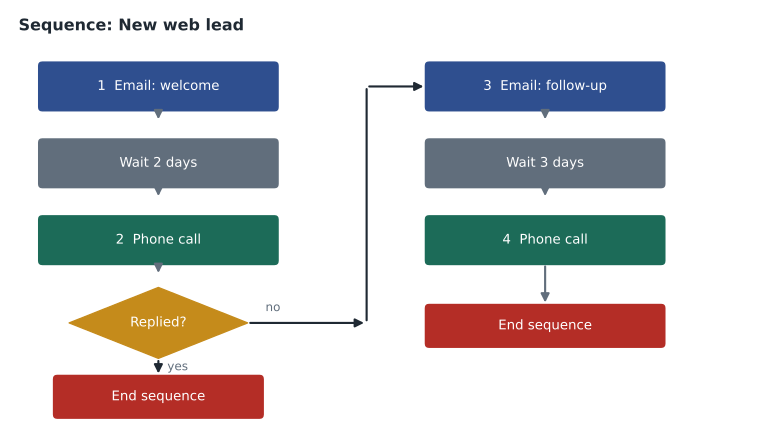
A sequence is a series of steps a manager designs for a type of record: for example, email on day one, call on day three, another email on day five, and another call on day eight. Steps can be emails (with templates), phone calls, tasks or waits, and a sequence can branch on conditions such as whether the customer opened or replied to an email. When a record is connected to a sequence, its steps appear on the owner's work list as they fall due.
Licensing and setup
Microsoft's documentation states that Sales Enterprise includes the sales accelerator for up to 1,500 sequence-connected records a month, and Sales Premium has no limit. Kestrelbay's inside team handled about 300 new leads a month, so Enterprise was plenty. Setup starts in Sales Hub settings with a quick setup that turns on the sales accelerator, chooses which security roles get it, and sets the default content of the work list. Further settings control the card layout, filters and sorting, and whether the next item opens automatically.
Mirela enabled the sales accelerator for the inside seller and sales manager roles only. Field reps like Joaquim worked from the Sales mobile app and their own route plans; adding a work list for them would have been noise. That choice also kept the number of sequence-connected records within the Enterprise limit.
Designing sequences
Mirela and Ottilie designed three sequences. New web lead handled leads from the website form, with a fast first email and call. Boat show follow-up handled the burst of leads after each spring show, with a slower rhythm and a brochure email. Quote chase connected to opportunities in the Propose stage and reminded sellers to call three days after a quote went out and again a week later.
| Sequence | Record type | Steps | Ends when |
|---|---|---|---|
| New web lead | Lead | Email, wait 2 days, call, email if no reply, wait 3 days, call | Lead replies, is qualified or disqualified |
| Boat show follow-up | Lead | Email with brochure, wait 5 days, call, wait 10 days, email | Lead qualified or disqualified |
| Quote chase | Opportunity | Wait 3 days after quote, call, wait 7 days, call | Opportunity won or lost |
Email steps used email templates with dynamic values such as the contact's first name and the seller's signature. Mirela insisted that every template be read aloud by Ottilie before going live. Automated email that sounds like a robot loses customers faster than no email at all, and the sequence would send hundreds of them.
Segments and connecting records
Records can be connected to a sequence by hand from the record or the work list, but the more powerful way is a segment. A segment is a dynamic group of records defined by conditions, for example all leads where Source is Web and Status is New. A segment can have a sequence attached, so that every record entering the segment is connected to the sequence automatically. Segments are evaluated in priority order, and a record joins the first segment whose conditions it meets.
| Priority | Segment | Conditions | Sequence |
|---|---|---|---|
| 1 | Cross-border web leads | Source is Web, country is outside the home country | New web lead |
| 2 | Domestic web leads | Source is Web | New web lead |
| 3 | Boat show leads | Source is Boat show, created in the last 30 days | Boat show follow-up |
| 4 | Open quotes | Opportunity in Propose stage with an active quote | Quote chase |
Work assignment and distribution
Segments decide what happens to a record; assignment rules decide who owns it. An assignment rule applies to a segment and chooses a seller or team based on conditions about the sellers, such as their seller attributes (for example language, territory or product skill), and a distribution method. Round robin hands records out in turn. Load balancing gives the next record to the eligible seller with the fewest open records of that kind. Rules can also respect seller availability (working hours and time off) and a capacity limit on how many records a seller can hold.
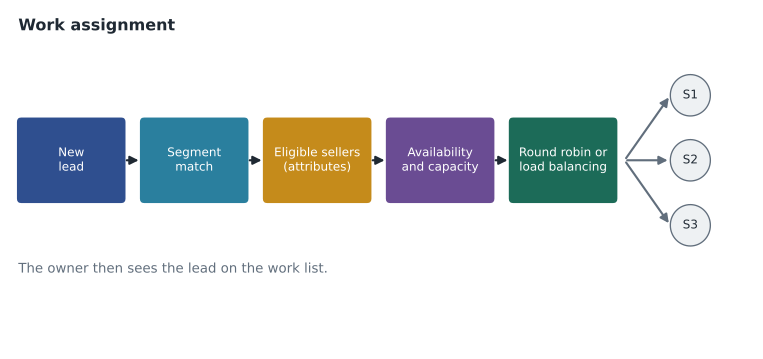
Kestrelbay's rules were straightforward. Cross-border web leads went to the two inside sellers who handled cross-border accounts, by round robin. Domestic web leads went to all six inside sellers by load balancing, so a seller back from holiday did not receive a flood. Boat show leads were assigned to the field rep whose territory matched the lead's postal code region, using a territory seller attribute. Every rule respected working hours, so a lead arriving at 9 p.m. went to someone who would be at work first the next morning.
Worked problem
Predicting who gets the next lead
Three inside sellers are eligible for domestic web leads under load balancing. Bronagh has 18 open web leads, Callan has 11 and Lucasta has 14. Callan is on leave today and the rule respects availability. Who receives the next domestic web lead?
Show solution
- Availability first: Callan is unavailable, so he is excluded.
- Load balancing then picks the eligible seller with the fewest open records.
- Lucasta has 14 and Bronagh has 18, so Lucasta has fewer.
Answer: Lucasta receives the lead. When Callan returns, load balancing will favour him until his count catches up.
The seller's day
After two weeks, the inside sellers' mornings looked different. Each opened the sales accelerator and saw a list that put overdue steps first, then the highest-scoring new leads, then today's sequence calls. One click opened the email draft from the template, another logged the call outcome, and the list moved on. Leads no longer waited unclaimed, because each had an owner within minutes of arriving. The average time from web form to first contact fell from about a day and a half to under three hours.
Ottilie asked for one more thing: to see whether sequences worked. Sequence statistics show, for each sequence, how many records are connected, how many steps have been completed, skipped or are overdue, and how many records ended with a positive outcome. She found that the third step of Boat show follow-up was skipped more than half the time, because sellers had usually spoken to the lead by then. Mirela removed it.
Governance
Mirela set three rules for sequences and assignment. Only sales managers could create or edit sequences, segments and assignment rules, through their security role. Every new sequence was tested in Kestrelbay-Test with test leads before going live. And segments were reviewed each quarter, because conditions written for one boat show season might pick up the wrong leads in the next. She also recorded which segments existed and their priorities in the project log, since a new segment inserted at the wrong priority can quietly capture records meant for another.
The new Sales agents in the next course can also take part in this work. The Sales Qualification Agent can research leads before they reach the work list, and its output can change which segment a lead falls into. Mirela noted that interaction in the log for phase three.
Work list settings
Administrators set defaults for the work list, and sellers can personalize within them. Settings include which record types appear, how items are sorted (for example by due date, score or sequence step), which filters are available, what fields each card shows, and whether the next item opens automatically after one is completed. Mirela kept the card simple: record name, account, score and grade, next step and due date. Sellers could add a filter for their own territory, which the field-adjacent inside sellers liked.
| Work list setting | Kestrelbay choice |
|---|---|
| Record types | Leads and opportunities |
| Default sort | Overdue first, then score, then due date |
| Card fields | Name, account, score and grade, next step, due date |
| Auto-advance to next item | On |
| Seller filters | Territory, sequence, record type |
Email in sequences and customer consent
Sequences send email in the seller's name, so they carry the same obligations as any commercial email. Customers who opt out must not receive further messages, and many jurisdictions require consent or an existing business relationship before commercial email is sent. Dynamics 365 records contact preferences such as Do not allow email, and sequence steps should respect them. Mirela checked that the New web lead sequence only targeted people who had submitted the website form, which included a consent checkbox, and that boat show leads had given their details for follow-up.
She also set a rule for sequence content: every email had to make sense if it arrived on a phone without images, include the seller's direct phone number, and offer a way to stop further emails. Ottilie added her own rule: no email could promise a delivery date, because delivery was the most common complaint in the call insights from lesson 9.
When to stop a sequence
A sequence that runs too long annoys customers. Each Kestrelbay sequence had exit conditions: the lead replied, the lead was qualified or disqualified, or the opportunity was won or lost. Sellers could also disconnect a record manually with a reason. Sequence statistics showed how often each exit happened, and Mirela reviewed them monthly with Ottilie alongside the skipped-step counts.
The sales accelerator for opportunities
The work list is not only for leads. The Quote chase sequence connected opportunities in Propose to call steps, and opportunities appeared on the work list alongside leads. Mirela set opportunity cards to show estimated revenue and close date as well as the score, because a seller deciding between a new lead and a large open quote needed both. Ottilie asked that opportunities above 50,000 always appear before leads on the same day, which the sort settings allowed by ordering on estimated revenue within the due items.
Measuring the effect
Mirela measured two numbers before and after the sales accelerator went live: the time from a web lead's creation to the first completed activity, and the share of web leads with any activity within one working day. Both came from simple views on lead and activity tables, with no special reporting tool. The first fell from about a day and a half to under three hours; the second rose from roughly half to almost all web leads. She showed the numbers to the inside team as well as to Ottilie, because the improvement was theirs.
Common mistakes
MistakeGiving the work list to every seller.
InsteadEnable the sales accelerator for the roles that work a queue of records; field reps may not need it.
MistakeWriting sequence emails nobody has read aloud.
InsteadReview every template; automated email multiplies a bad message.
MistakeAdding segments without checking priority order.
InsteadRemember that records join the first matching segment; review priorities when adding one.
MistakeIgnoring availability in assignment rules.
InsteadRespect working hours and leave so new leads go to someone who can act.
Summary and key terms
- The sales accelerator gives sellers a prioritized work list and runs sequences of emails, calls, tasks and waits.
- Sales Enterprise includes up to 1,500 sequence-connected records a month; Premium has no limit.
- Segments are dynamic groups of records evaluated in priority order and can connect records to a sequence automatically.
- Assignment rules choose an owner using seller attributes, availability, capacity and round robin or load balancing.
- Sequence statistics show which steps work, so sequences can be improved.
- Sales accelerator
- The Sales workspace that shows a prioritized work list and runs sequences.
- Work list
- The seller's ordered list of records and activities due.
- Sequence
- A planned series of activities, with waits and branches, connected to a record.
- Segment
- A dynamic, prioritized group of records defined by conditions.
- Assignment rule
- A rule that chooses an owner for records in a segment.
- Load balancing
- A distribution method that assigns the next record to the eligible seller with the fewest open records.
Practice problems
Work each problem on paper first, then reveal the answer to check.
What is the difference between a segment and an assignment rule?
Show answer
A segment groups records and can attach a sequence; an assignment rule chooses who owns records in a segment.
Why did Mirela not enable the sales accelerator for field reps?
Show answer
They work from route plans and the mobile app, and it kept sequence volume within the Enterprise limit.
How can a sequence end early when a lead replies?
Show answer
With a condition step that checks for a reply and ends the sequence.
Lesson quiz · 5 questions
Score 60% or more to complete this lesson.
Create a free account to save your progress, take quizzes and earn a certificate.