
MSBA-210 · Lesson 8 of 12 · 23 min
Activation and subscription upgrades
▶ Video coming soon A video version of this lesson is on the way.
A week into the early adopter ring, a scheduler at the north branch sent the help desk a screenshot: her new laptop said "Windows 11 Pro" in Settings, while the laptop on the next desk said "Windows 11 Enterprise". Both had been set up the same way on the same day. The help desk ticket landed with Teodor, because the answer lay in licensing rather than in the device. This lesson explains how Windows is activated, how subscription activation upgrades Pro to Enterprise without reinstalling anything, and what can stop it.
What activation is
Activation confirms that a copy of Windows is genuine and licensed for that device. An activated device has full use of Windows; an unactivated one shows reminders and limits personalization. Activation is tied to the edition: a device can be activated as Pro and, separately, entitled to Enterprise through a subscription.
| Activation method | How it works | Typical use |
|---|---|---|
| Digital licence or firmware-embedded key | The manufacturer stores a key for the edition, usually Pro, in the device firmware; Windows activates automatically online | New business laptops |
| Retail or OEM product key | A key entered during or after setup | Single devices, small shops |
| Multiple Activation Key (MAK) | A volume licensing key activated once per device against Microsoft's servers | Volume-licensed devices that rarely connect to the corporate network |
| Key Management Service (KMS) | An on-premises KMS host activates volume-licensed devices on the network; devices reactivate every 180 days | Large on-premises estates |
| Active Directory-based activation | Activation objects stored in Active Directory activate domain-joined devices | Domain-joined estates with volume licences |
| Subscription activation | A user's cloud licence steps the device up from Pro to Enterprise, or from Pro Education to Education | Entra joined or hybrid joined devices with Microsoft 365 or Windows Enterprise subscriptions |
A command-line tool, slmgr, shows and changes activation. It is a script that runs through the Windows Script Host and still works on Windows 11.
REM Show the edition and licence status:
slmgr /dlv
REM Show only whether Windows is activated:
slmgr /xpr
REM Check the edition from PowerShell:
(Get-CimInstance Win32_OperatingSystem).Caption
Subscription activation
Windows subscription activation lets an organization move devices from Windows 11 Pro to Windows 11 Enterprise, or from Pro Education to Education, simply by assigning a subscription licence to the user. Nothing is reinstalled, no product key is typed and no restart is required in most cases. When a licensed user signs in, Windows receives the entitlement from the cloud and changes the edition. If the licence is later removed or lapses, the device returns to the edition its firmware key activates, typically Pro.
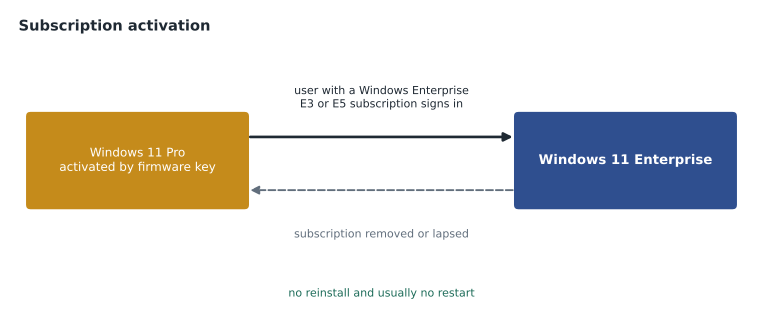
Several licences include the Windows Enterprise entitlement used by subscription activation: Windows Enterprise E3 and E5, Microsoft 365 E3 and E5, Microsoft 365 F3, and Windows Enterprise E3 in a Cloud Solution Provider subscription. Education licences such as Microsoft 365 A3 and A5 step devices up to Education. Microsoft 365 Business Premium includes Windows Business rights for upgrading older Pro devices, but it does not include the Enterprise edition step-up. Because licence names and bundles change, Teodor checks Microsoft's current subscription activation documentation when Corvallin renews.
Requirements
Subscription activation has a short list of requirements, and nearly every failure comes from missing one of them.
The scheduler's laptop failed on the third step. Teodor found that her account had been created by the branch manager the week before, using a group-based licence that added Exchange Online and Teams but not the full Microsoft 365 E3. Once she was added to the right licensing group and signed out and back in, Settings showed Windows 11 Enterprise.
Worked problem
Pro or Enterprise?
Four devices at the north branch show these situations. Which will step up to Enterprise? (A) Entra joined, Windows 11 Pro, user licensed for Microsoft 365 E3. (B) Entra joined, Windows 11 Home, user licensed for Microsoft 365 E3. (C) Entra registered only, Windows 11 Pro, user licensed for Microsoft 365 E3. (D) Hybrid joined, Windows 11 Pro, user licensed for Microsoft 365 E3.
Show solution
- A meets every requirement.
- B runs Home; subscription activation upgrades Pro, not Home. The device needs a Pro upgrade first.
- C is only registered with Entra ID, not joined, so the step-up does not apply.
- D is hybrid joined, which is supported.
Answer: A and D step up to Enterprise. B needs an edition upgrade to Pro, and C needs to be Entra joined.
Shared devices and multiple users
Because the entitlement comes from the user, a shared device steps up while a licensed user is signed in. Microsoft designed subscription activation so that a device used by several people stays on Enterprise as long as licensed users keep signing in. For devices with no user licence at all, such as the lobby kiosk deployed in self-deploying mode, the device stays on Pro unless it is licensed another way, for example with a device-based Windows Enterprise licence or volume activation. Corvallin's kiosk did not need Enterprise features, so it stayed on Pro.
Other edition changes
Subscription activation is not the only way to change an edition. An Intune edition upgrade policy can apply a product key to move devices from one edition to another, for example from Windows 11 Pro to Enterprise with a volume licence key, or from Home to Pro. It is useful for devices that cannot use subscription activation. Corvallin used an edition upgrade policy once, for five laptops a branch manager had bought on sale with Windows 11 Home, moving them to Pro with keys bought through the reseller before they could join Entra ID.
Extended Security Updates keys
Devices still on Windows 10 need their ESU year activated separately. Organizations that buy commercial ESU through volume licensing receive a MAK-style key for each year, which administrators install and activate on each device with a script or through their management tool. Windows 10 devices running in Windows 365 or Azure Virtual Desktop are covered automatically. Corvallin's remaining Windows 10 laptops had their second-year key installed through an Intune remediation script before the first year expired on October 13, 2026.
Worked problem
How long can a KMS client go unseen?
A volume-licensed laptop activated by KMS last contacted the KMS host on March 3. KMS clients reactivate every 180 days. Roughly how many months can the laptop stay away from the office network before its activation lapses?
Show solution
- 180 days is about 6 months.
- March 3 plus about six months is early September.
- The client tries to renew every 7 days while it can reach the host, which resets the 180 days.
Answer: About six months, until early September. This is why remote laptops are better served by a firmware key and subscription activation than by KMS.
Troubleshooting activation
When a device shows the wrong edition, Teodor works through a fixed order: confirm the device's current edition and activation with slmgr; confirm the join type with dsregcmd /status, covered in lesson 9; confirm in the Microsoft 365 admin centre that the signed-in user has an eligible licence; and confirm that the user signed in with the work account. In Intune, the device's hardware details show the operating system edition, and a device compliance policy can require a minimum edition, which makes it easy to report on devices that have not stepped up.
Activation and the firmware key
Business laptops sold with Windows 11 Pro carry a key for that edition in their firmware, in a table the manufacturer writes at the factory. When Windows is installed, or reinstalled from Microsoft's media, it reads the key and activates automatically once online. That is why a laptop wiped through Intune or reinstalled with Reset this PC comes back activated without anyone typing a key, and why subscription activation always starts from Pro: the firmware key provides the base edition and the subscription provides the step-up.
Devices bought without Windows, or with an edition that does not suit, need a key from somewhere else. Organizations that buy Windows licences through volume licensing may use Windows Enterprise upgrade rights, which upgrade an existing Pro licence, or MAK and KMS keys for volume editions. LTSC editions, such as Corvallin's two pharmacy devices, are always activated through volume licensing, usually with MAK keys, because LTSC is not available through subscription activation.
| Device | Base activation | Enterprise features from |
|---|---|---|
| Staff laptop | Firmware key for Windows 11 Pro | Subscription activation (Microsoft 365 E3 or F3) |
| Lobby kiosk | Firmware key for Windows 11 Pro | Not needed |
| Pharmacy controller | MAK key for Windows 11 Enterprise LTSC 2024 | The LTSC edition itself |
| Contract therapist Cloud PC | Windows 365 licence | Windows 365 includes Enterprise |
Virtual desktops and VDA
Virtual machines bring their own activation questions. Windows 365 Cloud PCs are licensed per user and run Windows 11 Enterprise as part of the service, so they need no separate activation. For virtual machines run in other ways, Microsoft offers Virtual Desktop Access (VDA) rights, included in Windows Enterprise E3 and E5 and in Microsoft 365 E3 and E5, which let licensed users access virtual Windows desktops. Subscription activation can also apply inside some virtual machines. These details change with Microsoft's licensing terms, which Teodor checks in the product terms rather than from memory.
Reporting on editions
With hundreds of devices, nobody checks Settings on each one. Intune reports the operating system edition for every enrolled device, and Teodor built a compliance policy that marked a device non-compliant if it was not running Enterprise after it had been set up for a day. Non-compliant devices appear in a report, so that any device still on Pro is found without waiting for a user to notice.
Worked problem
Finding the step-up failures
After the early adopter ring, Intune showed 86 devices enrolled, of which 82 ran Windows 11 Enterprise, 3 ran Pro and 1 ran Enterprise LTSC (a test device mistakenly included). Which devices need attention, and what is the most likely cause for each?
Show solution
- The 3 Pro devices: most likely the users' licences do not include Windows Enterprise, or the users signed in with the wrong account.
- The LTSC device: it should not be in the ring at all; remove it from the deployment group.
- The 82 Enterprise devices need nothing.
Answer: Four devices need attention: three for licensing checks and one to be taken out of scope. The compliance report found all four within a day.
Common misunderstandings
Subscription activation is easy to explain and easy to misread. Three misunderstandings came up during Corvallin's project.
| What people assumed | What actually happens |
|---|---|
| The device needs to restart to become Enterprise | The edition changes when the licensed user signs in, usually without a restart |
| Enterprise features are lost the moment a licence is removed | The device returns to Pro after the entitlement can no longer be renewed, not instantly |
| Each device needs its own Enterprise licence | The licence is per user; a user can step up the devices they sign in to, within the licence terms |
Each misunderstanding led to a wasted step: a scheduler restarted her laptop three times waiting for Enterprise to appear, a branch manager asked IT to buy separate licences for shared devices, and a finance clerk worried that removing a departing employee's licence would break the laptop for the next person. Teodor added a short subscription activation section to the help desk knowledge base to answer all three.
Licence assignment through groups
Corvallin assigns licences with group-based licensing in Microsoft Entra ID: users are added to a group, and the group carries the licences. That makes onboarding predictable, but it also makes mistakes systematic. When the branch manager created a new user in the wrong group, the user got the wrong licence set and her laptop stayed on Pro. Teodor fixed the problem at the source by making HR's new-starter form choose the group automatically from the job title, so the licence was right before the laptop arrived. Licensing problems that look like device problems are common enough that the help desk now checks the user's group membership before anything else when a device shows the wrong edition.
Teodor also documented how to prove a device's licence status during an audit. Intune's device inventory shows the edition, the Microsoft 365 admin centre shows each user's licences, and the slmgr output on a sample device shows the activation channel. Together they answered the software licensing auditor's questions in an afternoon.
Common mistakes
MistakeInstalling Enterprise media on every laptop to get Enterprise features.
InsteadDeploy the Pro installation the device shipped with and let subscription activation step it up.
MistakeExpecting subscription activation to upgrade Windows 11 Home.
InsteadIt steps Pro up to Enterprise and Pro Education up to Education; Home needs an edition upgrade first.
MistakeAssuming every Microsoft 365 licence includes the Enterprise step-up.
InsteadCheck that the user's licence includes Windows Enterprise; Business Premium, for example, does not.
MistakeRelying on KMS for laptops that rarely visit the office.
InsteadUse firmware keys and subscription activation for remote devices.
Summary and key terms
- Activation confirms a genuine, licensed copy of Windows; methods include firmware keys, MAK, KMS, Active Directory-based activation and subscription activation.
- Subscription activation steps Pro up to Enterprise, or Pro Education up to Education, when a licensed user signs in, without reinstalling.
- It needs an activated Pro device, Entra join or hybrid join, an eligible user licence and a work-account sign-in.
- If the licence lapses, the device returns to the edition its firmware key activates.
- Intune edition upgrade policies and ESU keys handle cases subscription activation does not cover.
- Activation
- Confirmation that a copy of Windows is genuine and licensed.
- Firmware-embedded key
- A product key stored by the manufacturer in the device firmware.
- Key Management Service (KMS)
- An on-premises service that activates volume-licensed devices on the network.
- Subscription activation
- Stepping a device up to Enterprise or Education through a user's cloud licence.
- Edition upgrade policy
- An Intune policy that changes a device's edition with a product key.
Practice problems
Work each problem on paper first, then reveal the answer to check.
Which edition does a device return to when the user's Enterprise licence lapses?
Show answer
The edition activated by its firmware key, usually Windows 11 Pro.
Does subscription activation work on hybrid joined devices?
Show answer
Yes. Entra joined and hybrid joined devices are both supported.
What slmgr option shows detailed licence information?
Show answer
slmgr /dlv.
Lesson quiz · 5 questions
Score 60% or more to complete this lesson.
Create a free account to save your progress, take quizzes and earn a certificate.