
MSBA-210 · Lesson 6 of 12 · 22 min
Imaging with deployment tools
▶ Video coming soon A video version of this lesson is on the way.
Felix Okonkwo-Reyes had worked in IT for twenty years, and when he heard that Corvallin was deploying 44 laptops he offered to "throw together an image". For most of his career that was how Windows deployment worked: build one perfect machine, capture its disk, and copy the copy to every other machine. Ama asked him to hold off, and to help her write down when imaging still made sense in 2026 and which tools were still supported. The answer had changed a great deal in a year.
How imaging works
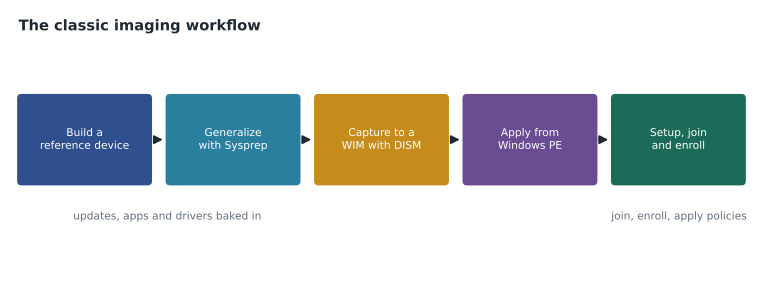
Imaging, also called wipe and load, replaces whatever is on a device's disk with a Windows installation the organization controls. The classic workflow has five stages.
REM On the reference device, from an elevated prompt:
C:\Windows\System32\Sysprep\sysprep.exe /generalize /oobe /shutdown

REM Later, from Windows PE, capture the Windows partition to a WIM file:
dism /Capture-Image /ImageFile:E:\Images\CHC-Win11.wim /CaptureDir:C:\ /Name:"CHC Windows 11 Enterprise"

REM On a target device, from Windows PE, after partitioning the disk:
dism /Apply-Image /ImageFile:E:\Images\CHC-Win11.wim /Index:1 /ApplyDir:W:\
bcdboot W:\Windows
The tools
Four tools appear in almost every imaging discussion, and their status changed through 2025 and 2026.
| Tool | What it does | Status in late 2026 |
|---|---|---|
| Windows Assessment and Deployment Kit (ADK) and Windows PE add-on | DISM, Sysprep, Windows System Image Manager, USMT, Windows Configuration Designer and the Windows PE boot environment | Supported; a new ADK is released for major Windows versions |
| Configuration Manager operating system deployment (OSD) | Task sequences that partition, apply images, add drivers, install apps and migrate user data, at scale and over the network | Fully supported; Microsoft's recommended on-premises imaging tool |
| Microsoft Deployment Toolkit (MDT) | Free task-sequence tool built on the ADK, popular for small and medium deployments | Retired: Microsoft announced its immediate retirement in January 2026; no fixes, security updates or support for new Windows releases |
| Windows Deployment Services (WDS) | Server role that starts devices over the network with PXE and serves boot images | Partly deprecated: installing Windows 11 using boot.wim from installation media is blocked; PXE with custom boot images still works; full deprecation is planned after Windows Server 2025 |
The retirement of MDT surprised many administrators, because it had been the default free imaging tool for twenty years. Microsoft's retirement notice, last updated on January 6, 2026, says existing installations keep working as they are, but MDT receives no further fixes, security updates or compatibility updates, may be removed from download, and has no direct upgrade path. Microsoft points cloud-first organizations to Windows Autopilot and on-premises organizations to Configuration Manager OSD.
WDS changed in stages. Microsoft's WDS boot.wim support page, updated in September 2026, says that deploying Windows 11 by booting the boot.wim file from installation media through WDS is blocked, whichever boot image is used. PXE booting with custom boot images, as Configuration Manager and MDT use, still works, as does running Windows Setup from a network share. From the April 2026 Windows release, the hands-free WDS deployment option is no longer supported by default because of a security issue Microsoft tracks as CVE-2026-0386. Full deprecation of the WDS role, including its PXE service, is planned starting with the Windows Server release after Windows Server 2025.
Felix realized his old approach, WDS serving a captured image, was exactly the workflow Microsoft had blocked for Windows 11.
Answer files
An answer file, usually named unattend.xml, automates the questions Windows Setup and OOBE would otherwise ask: language, time zone, licence terms, the local administrator account, the computer name. Answer files are built with Windows System Image Manager, part of the ADK, against the catalog of settings for the Windows image being deployed. In a cloud-first deployment the answer file's job is taken over by the Autopilot profile, which is one reason imaging and Autopilot are rarely combined.
Drivers and Secure Boot
Imaging makes the organization responsible for drivers. A manufacturer's factory image already contains the right drivers for that model; a custom image does not. Configuration Manager task sequences add driver packages for each model during deployment, and manufacturers publish driver packs for this purpose. Getting drivers wrong is the most common reason an imaged laptop arrives without working Wi-Fi or a touchpad.
Boot media must also respect Secure Boot, the firmware feature that allows only signed boot loaders to run. Microsoft's original Secure Boot certificates from 2011 began to expire in 2026, and Microsoft has been moving devices and boot media to newer certificates. Organizations that maintain their own boot images, such as Configuration Manager boot images, need to keep them updated so that devices with updated firmware still trust them. This is another maintenance task that disappears when the manufacturer's installation is provisioned instead of replaced.
When imaging still makes sense
Microsoft's guidance and Ama's experience agreed on a short list of cases where imaging is still the better tool.
| Case | Why imaging helps | Corvallin example |
|---|---|---|
| Vendor-certified builds | The device must run an exact build the vendor tested | The two pharmacy LTSC devices, rebuilt from the cabinet vendor's image |
| Repurposing old hardware | The disk holds an unknown or damaged installation that a reset cannot fix | Laptops returned from a closed branch with corrupted Windows |
| Isolated networks | Devices cannot reach the cloud services Autopilot needs | None at Corvallin; common in labs and manufacturing |
| Large on-premises fleets already using Configuration Manager | Task sequences are established and fast on the local network | Not Corvallin; typical in large hospitals and universities |
For a damaged installation there is often a lighter alternative. Intune's Fresh Start and Wipe actions, and the Windows "Reset this PC" option with cloud download, reinstall Windows from Microsoft's servers without any image the organization maintains. A wiped device that is registered for Autopilot then goes through OOBE again and comes back fully managed. Ama used that for the returned laptops, and only one, whose disk had failed, needed physical repair.
Worked problem
Counting the cost of an image
Felix estimated that maintaining one image would take 6 hours a month: monthly updates, app updates and testing. Corvallin buys three laptop models, and each needs its own driver package tested every quarter for 4 hours. How many hours a year would imaging cost before a single device is deployed?
Show solution
- Image upkeep: 6 hours x 12 months = 72 hours.
- Driver testing: 3 models x 4 hours x 4 quarters = 48 hours.
- Total: 72 + 48 = 120 hours a year.
Answer: About 120 hours a year, roughly three working weeks. Provisioning the factory installation with Autopilot avoids almost all of it, which is why Ines approved Ama's plan rather than Felix's.
Imaging and the cloud together
Imaging does not exclude modern management. A Configuration Manager task sequence can apply an image and then install the Configuration Manager client, enroll the device in Intune for co-management (lesson 10) or apply the JSON file for Windows Autopilot for existing devices (lesson 3), so that the device finishes setup through Autopilot. Organizations moving from on-premises to the cloud often use exactly that path, one hardware refresh at a time.
Windows PE and boot media
Windows PE is a small version of Windows used only to prepare a device: partition disks, apply images, run diagnostics. It is installed with the Windows PE add-on to the ADK and turned into bootable media with the MakeWinPEMedia command or used as the boot image of a Configuration Manager site. Windows PE runs from memory, restarts itself after 72 hours, and is licensed only for deployment and recovery, not for daily use.
REM From the Deployment and Imaging Tools Environment, as an administrator:
copype amd64 C:\WinPE_amd64
MakeWinPEMedia /UFD C:\WinPE_amd64 F:
Images can also be serviced without starting them. DISM can mount a WIM file to a folder, add drivers or updates to it, and commit the changes, a process called offline servicing. It keeps an image current between rebuilds, though large organizations usually rebuild images regularly rather than layering update on update.
dism /Mount-Image /ImageFile:E:\Images\CHC-Win11.wim /Index:1 /MountDir:C:\Mount
dism /Image:C:\Mount /Add-Driver /Driver:E:\Drivers\Model-X /Recurse
dism /Image:C:\Mount /Add-Package /PackagePath:E:\Updates\windows11-kb.msu
dism /Unmount-Image /MountDir:C:\Mount /Commit
Configuration Manager task sequences
In organizations that image at scale, the work is done by task sequences in Configuration Manager. A task sequence is an ordered list of steps that runs on the device, partly in Windows PE and partly in the new Windows installation. A typical sequence for a bare-metal deployment restarts into Windows PE, partitions the disk, applies the operating system image, applies the driver package for the model, applies Windows settings and joins the domain, installs the Configuration Manager client, installs updates and applications, and restores user state if USMT captured it earlier. Task sequences can be started by network boot with PXE, from bootable media, or as an offer to devices already running Windows.
| Task sequence step | Runs in | Purpose |
|---|---|---|
| Restart in Windows PE | Current Windows | Move to the preparation environment |
| Format and partition disk | Windows PE | Create the boot and Windows partitions |
| Apply operating system | Windows PE | Apply the WIM image |
| Apply driver package | Windows PE | Add drivers for the device model |
| Setup Windows and Configuration Manager | New Windows | Finish setup and install the client |
| Install applications and updates | New Windows | Bring the device to the target state |
| Restore user state | New Windows | Run USMT LoadState if state was captured |
Felix had used task sequences at a previous employer and liked them. He agreed, though, that for 520 devices, most of them laptops in homes and cars, a Configuration Manager site with distribution points at each branch would cost more to run than the whole deployment project. Imaging at scale makes sense when there is already an on-premises estate to support it.
Reset as a lighter rebuild
Intune offers three remote actions that cover most of the cases where Felix would once have reimaged a device. Wipe returns the device to factory settings; with the option to keep enrollment state and user account turned off, it removes everything. Fresh Start removes apps the manufacturer installed and reinstalls Windows while optionally keeping user data. Autopilot Reset keeps the device's enrollment and returns it to a business-ready state. All three use the Windows installation already on the device or download a fresh one, so no image needs maintaining.
A decision record for imaging
Ama wrote the imaging decision down in the same format the team used for every significant choice, so that nobody would have to reargue it a year later.
Decision: No organization-maintained Windows images

Date: 2026-10-05
Owner: Ama Owusu-Pratt

Context
- 520 devices, mostly laptops used away from offices
- MDT retired (January 2026); WDS cannot install Windows 11 from media boot.wim
- No Configuration Manager distribution points at branches

Decision
- New and replaced devices: Windows Autopilot from the factory installation
- Damaged devices: Intune Wipe or Fresh Start, then Autopilot again
- Pharmacy LTSC devices: vendor-supplied certified image, rebuilt by the vendor

Revisit if
- A device model cannot be provisioned from its factory installation
- An isolated network site is opened
Felix read it and added one line under "Revisit if": a manufacturer stops shipping a clean factory installation. Some consumer laptops arrive with trial software that takes up space and slows setup. Business models from major manufacturers ship with cleaner installations, and the Autopilot profile or a removal policy in Intune can remove what remains, but it was a fair point to record.
What the exam expects
The MD-102 skills outline updated on October 27, 2026 no longer lists imaging, answer files or the ADK tools as skills. Its deployment skills are about Autopilot, the Enrollment Status Page, Windows 11 upgrades through Intune, Windows 365 Cloud PCs and Windows Backup. Imaging knowledge still matters in practice, especially when an organization moves from an older estate, and many administrators meet task sequences, Sysprep and DISM long after the exam. Expect exam questions to treat imaging as something to replace, not something to build: for example, a scenario in which an organization still uses MDT and must choose a supported way forward.
Moving an estate off imaging
Organizations that have imaged for years usually move in steps rather than all at once. The first step is to stop building custom images for new hardware and let new devices use the factory installation with Autopilot. The second is to deal with existing devices as they are replaced or reset: a device that needs rebuilding goes through Wipe or Autopilot Reset instead of reimaging. The third is to retire the infrastructure: WDS servers, MDT deployment shares and, eventually, distribution points that served images. Each step removes work, and none of them requires a single risky changeover. Felix, who had argued for an image at the start of the project, ended it by deleting the folder of old Windows 10 images that had sat untouched in an archive folder since the move to the cloud.
Worked problem
How long until the images are gone?
An organization replaces about a quarter of its 2,000 imaged devices each year and resets about 10 percent of the rest each year for repairs. If every replacement and reset moves a device to Autopilot, roughly how many imaged devices remain after the first year?
Show solution
- Replaced in year one: 2,000 x 0.25 = 500.
- Remaining imaged devices before resets: 2,000 - 500 = 1,500.
- Reset in year one: 1,500 x 0.10 = 150.
- Imaged devices left: 1,500 - 150 = 1,350.
Answer: About 1,350 imaged devices remain after one year, and the number keeps falling each year without a big-bang migration.
Common mistakes
MistakeBuilding a new imaging process on MDT in 2026.
InsteadMDT is retired; use Autopilot for cloud-first deployment or Configuration Manager OSD on premises.
MistakeExpecting WDS to install Windows 11 from the boot.wim on the installation media.
InsteadThat workflow is blocked; use custom boot images with Configuration Manager or move to provisioning.
MistakeCapturing an image without running Sysprep with /generalize.
InsteadGeneralize the reference device so each copy gets unique identifiers.
MistakeImaging a device just to fix a damaged installation.
InsteadTry Fresh Start, Wipe or Reset this PC with cloud download first.
Summary and key terms
- Imaging replaces the disk with an organization's image: build a reference device, Sysprep, capture with DISM, apply from Windows PE.
- The Windows ADK and Configuration Manager OSD remain supported; MDT was retired in January 2026.
- WDS can no longer install Windows 11 from installation-media boot.wim; full WDS deprecation is planned after Windows Server 2025.
- Imaging makes the organization responsible for drivers, boot media and Secure Boot certificates.
- Use imaging for vendor-certified builds, damaged devices, isolated networks and established Configuration Manager estates.
- Wipe and load
- Replacing a device's installation with an organization-built image.
- Sysprep
- The tool that generalizes a Windows installation before capture.
- Windows PE
- A small preinstallation environment used to capture and apply images.
- WIM file
- The Windows Imaging Format file that stores a captured image.
- Answer file
- An unattend.xml file that automates Windows Setup and OOBE choices.
- Task sequence
- An ordered set of deployment steps run by Configuration Manager.
Practice problems
Work each problem on paper first, then reveal the answer to check.
Which Sysprep switch removes machine-specific information before capture?
Show answer
/generalize.
What does Microsoft recommend instead of MDT for on-premises imaging?
Show answer
Configuration Manager operating system deployment.
Name a lighter alternative to imaging for a device whose Windows installation is damaged.
Show answer
Intune Fresh Start or Wipe, or Reset this PC with cloud download.
Lesson quiz · 5 questions
Score 60% or more to complete this lesson.
Create a free account to save your progress, take quizzes and earn a certificate.