
MSBA-210 · Lesson 12 of 12 · 32 min
Case study: deploying laptops to a remote workforce
▶ Video coming soon A video version of this lesson is on the way.
This lesson brings the course together in one problem. It follows an earlier Corvallin Home Care project, in the spring of 2026, in which Ama, Teodor and the help desk deployed new laptops to the agency's mobile clinical staff, the people who almost never come to an office. Treat it as a separate problem from the branch office project in the earlier lessons. Read each part, decide what you would do, and then compare your answer with the team's decisions. Every decision draws on an earlier lesson.
The situation
Corvallin employs 210 mobile clinical staff: nurses, personal support workers, occupational therapists and physiotherapists. They visit clients at home, record visits in an electronic visit verification app and the clinical record system, and work from their cars and their own homes. In March 2026 the agency agreed to replace their mixed fleet of tablets and old laptops with a single model of lightweight laptop with built-in LTE, bought from the manufacturer that already supplied head office.
| Fact | Detail |
|---|---|
| Devices | 210 new laptops, Windows 11 Pro version 25H2 preinstalled, TPM 2.0, built-in LTE |
| Supplier | Manufacturer that registers hardware hashes for Corvallin and applies the group tag MOBILE |
| Users | 210 mobile staff, all licensed for Microsoft 365 F3, all in the MDM user scope |
| Required on day one | Microsoft 365 Apps, visit verification app, clinical record app, VPN client |
| Old devices | 150 tablets and 60 old laptops, some with local files |
| Constraints | No IT staff at the branches; many staff live in rural areas with slow home internet; shipping to homes |
| Deadline | All staff on new laptops by the end of June 2026 |
Part 1: Which deployment method?
The laptops ship straight from the manufacturer, which registers their hardware hashes. The users need their own personal work devices. There is no hybrid join requirement and no shared use.
Worked problem
Decision 1
Should the team use Autopilot deployment profiles or Autopilot device preparation, and which mode?
Show solution
- The devices are registered by the supplier, so deployment profiles are available.
- Some staff live in rural areas with slow internet, and the day-one apps are large.
- Pre-provisioning, which needs a profile and TPM 2.0 attestation, would move the device phase, including large apps, to before shipping.
- Device preparation would also work, but it does not support pre-provisioning.
Answer: The team chose Autopilot deployment profiles with pre-provisioning. The manufacturer offered to run the technician phase at its depot before shipping to homes, so users would only wait for the user phase. A dynamic device group based on the MOBILE group tag received the profile.
Part 2: The profile and the Enrollment Status Page
Teodor built the deployment profile and the ESP profile for the MOBILE group.
Worked problem
Decision 2
Choose the main settings for the deployment profile and the ESP. Consider join type, user account type, device name, and which apps should block the ESP.
Show solution
- Join type: Microsoft Entra joined, the agency's standard.
- User account type: standard user, so staff cannot install unapproved software.
- Name template: MOB- followed by the serial number; the manufacturer's serials are 10 characters, so names are 14 characters.
- Allow pre-provisioned deployment: yes.
- ESP: block only on Microsoft 365 Apps, the visit verification app and the VPN client; let the clinical record app install after setup because it updates itself on first launch.
- ESP timeout: 90 minutes for the user phase, to allow for slow home connections.
Answer: The profile used Entra join, standard users, the MOB- plus serial number template and pre-provisioning. The ESP blocked on three apps with a 90-minute timeout and allowed users to collect logs on error.
Part 3: Licensing and edition
The laptops arrive with Windows 11 Pro. The agency's clinical policies require Credential Guard and other features Corvallin configures for Enterprise.
Worked problem
Decision 3
How will the laptops become Windows 11 Enterprise, and what must be true for it to happen?
Show solution
- Use subscription activation: no Enterprise media, no product keys.
- The laptop runs activated Windows 11 Pro from its firmware key.
- It is Microsoft Entra joined through Autopilot.
- Each user has Microsoft 365 F3, which includes Windows Enterprise rights, and signs in with the work account.
Answer: Subscription activation steps each laptop up to Enterprise at the user's first sign-in. Teodor added a compliance report of devices still on Pro after 24 hours, which caught three staff whose licences had been assigned late.
Part 4: User state and the old devices
Sixty of the old laptops had local files, and some tablets had photos of client home layouts taken for safety assessments, which the policy says must be stored in the clinical record system, not on the device.
Worked problem
Decision 4
How should files and settings move, and how should the old devices be retired?
Show solution
- Check folder sizes first: the staff are licensed for Microsoft 365 F3, whose OneDrive allowance is 2 GB per user, so Known Folder Move suits small folders; larger work files go to the branch team sites a month ahead.
- Turn on Windows Backup for Organizations, with the restore page shown during setup, so settings come across.
- Ask staff with tablet photos to upload them to the clinical record system through the approved app before the swap, and confirm with their manager.
- Keep each old device for two weeks after the new one is confirmed, then wipe it from Intune, delete its records and send it for certified disk destruction.
Answer: The team used cloud migration rather than USMT, because the old devices were already Entra joined and users' files were mostly in OneDrive. Every old device went through the retirement checklist from lesson 7.
Part 5: Rings and measures
Worked problem
Decision 5
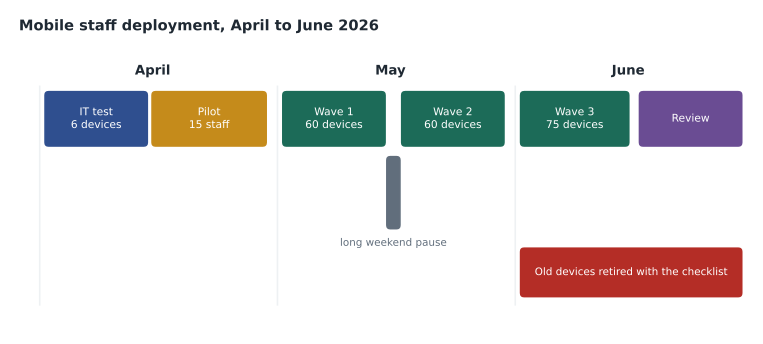
Plan the rings for 210 devices with the deadline of the end of June, and choose exit criteria. The team already has 6 IT test devices.
Show solution
- Ring 0: 6 IT devices to test the profile, ESP and pre-provisioning at the manufacturer's depot.
- Ring 1 (pilot): 15 staff chosen for variety: rural and urban, LTE-only and home Wi-Fi, two staff using screen readers.
- Rings 2 to 4: 60, 60 and 75 devices, totalling 15 + 60 + 60 + 75 = 210.
- Exit criteria for each ring: at least 95 percent of devices complete setup without a help desk call, and no open problem at severity two or higher.
Answer: Four rings after the IT test, with a pause over the Victoria Day long weekend planned in. The team measured setup success from the Autopilot deployments report and help desk calls per hundred devices from the ticket system.
Part 6: Something goes wrong
In ring 2, eleven devices stopped at the ESP with a timeout. All eleven belonged to staff who had set up their laptops on the same Saturday morning. The Autopilot deployments report showed the user phase failing on the VPN client.
Worked problem
Decision 6
Using the method from lesson 11, what would you check, and what is the likely cause?
Show solution
- Stage: the progress page, during the user phase, on one app.
- Report: the same app failed on all eleven devices at the same time of day.
- Device logs: the Intune Management Extension log on one laptop showed the VPN client download stalling.
- Service health: an advisory for degraded content delivery in the region that Saturday morning.
Answer: A temporary content delivery problem, not a configuration fault. The devices were reset from the ESP error screen and completed setup that afternoon. To reduce the risk, Teodor asked the manufacturer to add the VPN client to the pre-provisioning phase, where it installs on the depot's fast network.
Part 7: The review
The project finished on June 19, 2026, ahead of the deadline. In this case study's numbers, 201 of the 210 devices completed setup without a help desk call.
Worked problem
Decision 7
What was the overall first-time success rate, and did the project meet the 95 percent criterion overall?
Show solution
- Success rate: 201 / 210 = 0.957.
- As a percentage: about 95.7 percent.
- The criterion was at least 95 percent.
Answer: About 95.7 percent, which meets the criterion. Ring 2 alone fell below it because of the content delivery problem, which is why the review recommended moving more apps into pre-provisioning.
What the team kept
The project left Corvallin with a repeatable process. New hires and replacement laptops follow the same profile. The supplier registers and tags every device it ships. The ESP blocks on three apps. Old devices go through the retirement checklist. And every feature update from now on will follow the ring plan and exit criteria from lesson 2. Ines's summary for the leadership team was a single sentence: the agency now buys a laptop, ships it to a nurse's home and has it working, secured and licensed, without anyone from IT touching it.
| Course lesson | Where it appeared in the case study |
|---|---|
| 1. Editions, servicing and lifecycle | Pro preinstalled, Enterprise through licensing, 25H2 as the shipped version |
| 2. Planning | Rings, exit criteria, measures, communication |
| 3 and 4. Autopilot and device preparation | Choosing profiles with pre-provisioning over device preparation |
| 5 and 6. Packages and imaging | Not needed for this project, a sign of a cloud-first design |
| 7. User state | Known Folder Move, Windows Backup, retirement checklist |
| 8. Activation | Subscription activation and the Pro-after-24-hours report |
| 9 and 10. Join types and co-management | Entra join; no hybrid or co-management needed |
| 11. Troubleshooting | Finding the content delivery problem in ring 2 |
Communication during the project
The case study's technical decisions mattered less to the staff than how the change was explained to them. Ama's team sent each mobile staff member three messages: an email two weeks before delivery explaining what would arrive and why, a text message the day the laptop shipped with the delivery date, and the printed setup leaflet in the box. Branch managers received a weekly summary of who had received a laptop and who still needed one. Help desk staff had a script for the most common questions, from "can I keep my old tablet?" (no) to "what do I do with the box?" (keep it for two weeks in case the laptop must go back).
| When | Message | Channel |
|---|---|---|
| Two weeks before delivery | What is coming, why, and what to prepare (files in OneDrive, safety photos uploaded) | |
| Shipping day | Delivery date and the help desk number | Text message |
| In the box | Step-by-step setup with screenshots and network advice | Printed leaflet |
| Weekly | Progress by branch | Email to branch managers |
| Two weeks after setup | Reminder to return the old device | Email and text message |
Costs and benefits
Ines presented the result to Corvallin's leadership with a simple comparison of effort. Under the old approach, every laptop had come to head office to be imaged and then gone back out by courier, at two courier trips and about an hour of technician time per device. Under the new approach, the manufacturer shipped directly to homes and pre-provisioned at its depot.
Worked problem
What did the new approach save?
For 210 laptops, the old approach would have needed 2 courier trips at 35 dollars each and 1 hour of technician time per device. The new approach needed no courier trips paid by Corvallin and, on average, 15 minutes of help desk time per device. How many courier dollars and technician hours did the new approach save?
Show solution
- Courier costs avoided: 210 x 2 x 35 = 14,700 dollars.
- Old technician time: 210 x 1 = 210 hours.
- New help desk time: 210 x 0.25 = 52.5 hours.
- Hours saved: 210 - 52.5 = 157.5 hours.
Answer: About 14,700 dollars in courier costs and about 158 hours of IT time, roughly a month of one person's work, before counting the time staff did not spend without a working laptop.
The leadership team's question was what would happen next year. Ama's answer was that the process was now repeatable: new hires, replacements and the next hardware refresh would all follow the same profile, rings and checklist, and the yearly feature updates would follow the ring plan from lesson 2 through Intune feature update policies.
Questions for discussion
Before moving on, consider how the decisions would change under different facts. If the supplier did not register devices, would device preparation have been enough, given the slow rural connections? If Corvallin had kept Configuration Manager, would co-management have helped the mobile staff, who never visit an office? And if the agency had bought laptops without TPM 2.0, which parts of the plan would fail first? Working through these questions is good practice for the scenario questions on the MD-102 exam.
Common mistakes
MistakeChoosing device preparation when pre-provisioning is needed.
InsteadPre-provisioning requires Autopilot deployment profiles.
MistakePlanning rings without allowing for holidays and staff schedules.
InsteadBuild pauses into the timeline and keep the exit criteria.
MistakeTreating a burst of identical failures as a configuration fault without checking service health.
InsteadCheck service health and timing; identical failures at the same time often point to a service problem.
MistakeEnding the project without a review.
InsteadReview the measures and change the process, as the team did with pre-provisioning.
Summary and key terms
- Choose the deployment method from the device facts: supplier registration, network quality, join type and user type.
- Keep the ESP blocking list short and set a timeout that suits the slowest realistic network.
- Use subscription activation for Enterprise and report on devices that do not step up.
- Move user state through cloud services ahead of replacement and retire old devices with a checklist.
- Roll out in rings with exit criteria, troubleshoot by stage, and review the result to improve the process.
- Group tag
- A value on a registered device that the supplier can set, used here to target the MOBILE devices.
- Pre-provisioning
- Completing the device phase before shipping, so the user waits only for the user phase.
- Exit criteria
- The measurable conditions for moving from one ring to the next.
- First-time success rate
- The share of devices that complete setup without a help desk call.
Practice problems
Work each problem on paper first, then reveal the answer to check.
Why did the team choose deployment profiles over device preparation for the mobile laptops?
Show answer
They needed pre-provisioning, which only deployment profiles support.
What report caught the three laptops still on Pro?
Show answer
A compliance report of devices not on Enterprise 24 hours after setup.
What change did the review recommend after ring 2?
Show answer
Moving more apps, such as the VPN client, into the pre-provisioning phase.
Lesson quiz · 5 questions
Score 60% or more to complete this lesson.
Create a free account to save your progress, take quizzes and earn a certificate.