
MSBA-205 · Lesson 9 of 12 · 19 min
Cost management for pay-as-you-go agents
▶ Video coming soon A video version of this lesson is on the way.
Per-user Copilot licences are easy to budget: 44 licences cost the same every month whether people use them or not. Agents and the newer Copilot services are different. Many are billed by use, in Copilot Credits, and an agent that becomes popular, or one that gets stuck in a loop, can cost far more than anyone expected. Lorna Fitch-Adeyemi, Corvallin's finance manager, asked for this chapter of the runbook before she would approve any more pay-as-you-go services.
AB-650 asks administrators to 'manage and monitor costs for AI services in Microsoft 365'. The MSBA-103 course set up Corvallin's first pay-as-you-go billing policy for the schedulers' Procedures Helper agent. This lesson covers the whole cost model: how usage-based billing works, the controls that alert and the controls that stop, how to estimate, and how to read the bill.
What is billed by use
Microsoft's model in late 2026 separates everyday AI, included in the per-user Microsoft 365 Copilot licence, from advanced AI, billed by consumption in Copilot Credits. Microsoft's usage-based billing documentation lists the services that consume credits, and the list grows. In November 2026 it included, among others:
- Copilot Chat agents for unlicensed users that ground on shared tenant data, such as SharePoint agents used by staff without a Copilot licence.
- Copilot Studio agents, billed by the actions they take, such as generative answers, tool calls and autonomous triggers.
- Microsoft 365 Copilot Cowork, where model responses, tool and skill calls, image generation and browser tasks all count toward consumption.
- Other services such as advanced work in SharePoint and OneDrive and API access to Copilot capabilities.
A licensed Microsoft 365 Copilot user's use of agents is largely included in the licence; the exact boundaries are in Microsoft's billing documentation and change from time to time, so the runbook links to the page rather than copying it.
Ways to pay
Copilot Credits can be bought in three ways, and an organization can combine them.
| Option | How it works | Fits |
|---|---|---|
| Pay-as-you-go | Credits used are billed afterwards to an Azure subscription | Uncertain or low usage; pilots |
| Prepaid capacity packs | A monthly pack of credits, such as Copilot Studio's 25,000-credit pack at 200 US dollars a month in 2026 | Steady, predictable agent use |
| Pre-purchase plans | Credits committed in advance at a discount | Large, well-understood consumption |
Corvallin uses pay-as-you-go for the pilot, because nobody yet knows how much the schedulers and pilot users will use agents. If usage settles at a predictable level, Lorna's plan is to compare the pay-as-you-go cost with a capacity pack in the second half of 2027.
Billing policies: who pays for what
Pay-as-you-go services are connected in the Microsoft 365 admin center, under Copilot, through billing policies. Each policy links an Azure subscription (which receives the charges) to a set of users or groups and a set of services. The MSBA-103 course recorded the key rules from Microsoft's documentation: a tenant can have up to 50 billing policies, a policy that applies to all users must be disconnected before user-specific policies take effect, pay-as-you-go services are off by default, and turning a service off can take up to two hours. Billing Administrators manage the policies; AI Administrators can manage the Copilot side; Global Readers can view them.
Corvallin's policy for the schedulers links the subscription Corvallin-Operations, resource group rg-copilot-payg-schedulers, to the Schedulers group (about 30 people) for SharePoint agents. Teodor's runbook adds a second, separate policy for the pilot's Copilot Studio agents, so that their costs appear separately on the Azure bill.
Controls that alert and controls that stop
This is the single most important distinction in AI cost management, and it is easy to get wrong.
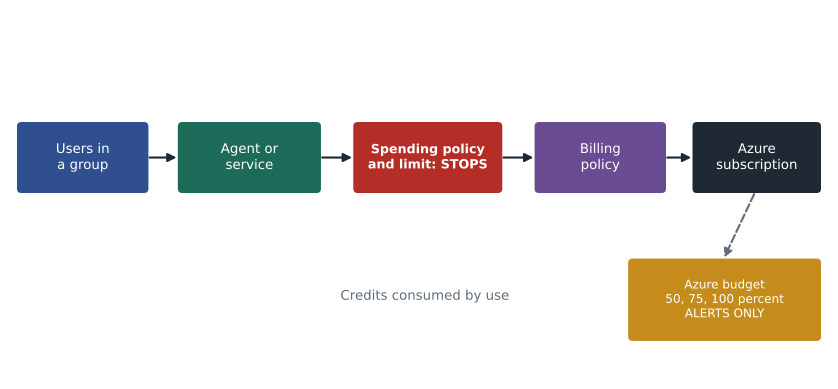
Azure budgets on the subscription or resource group send alerts when spending reaches set thresholds. Microsoft documents that budgets alert but do not cap: when a budget is exceeded, the services keep running and the charges keep coming. Corvallin's budget for the schedulers is a 400-dollar monthly planning figure with alerts at 50, 75 and 100 percent, sent to Teodor and Lorna.
Spending policies and spending limits, managed in the Microsoft 365 admin center's cost management pages, are the controls that actually limit consumption. A spending policy decides which users or groups can use which usage-billed services, and a spending limit caps credits for a user, group or service over a period. For Cowork, a spending policy is also the access control: Microsoft documents that users get Cowork only through a spending policy that includes them and selects Cowork, and that removing them from every such policy is how access is removed. Microsoft also notes that a low credit limit does not by itself remove access to Cowork, so limits and access are separate settings.
Microsoft's documentation also describes an Auto-apply new services option that is on by default, which adds newly released usage-billed services to existing policies. Teodor turned it off, so that every new service goes through the same decision as the first ones.
Cost visibility
The Microsoft 365 admin center's cost management dashboard shows Copilot Credit consumption by service, user, group and agent. Agent 365, where licensed, adds cost views by agent and lets administrators set spending limits per group or user from the same place. The Azure portal's Cost Management shows the same charges from the billing side, with the resource group and tags. The API and reports show credits consumed, not prices, so converting to dollars needs the organization's rate.
Teodor's monthly cost task compares three numbers: credits consumed by agent from the admin center, charges in the Azure resource group, and the estimate made when the agent was approved. A gap of more than 25 percent between estimate and actual triggers a review of the agent.
Estimating before approving
Lesson 4's review checklist asks how each agent will be billed and monitored. That needs an estimate, and an estimate needs three numbers: how many people will use the agent, how often, and how many credits each use consumes. Microsoft publishes billing rates for each kind of action and provides an estimator; the MSBA-103 course estimated about 3,200 billable messages a month for the Help Desk Triage agent.
Worked problem
Estimating the Help Desk Triage agent
Help Desk Triage will be used by all 460 staff through Copilot Chat. Ama expects about 400 conversations a month. Each conversation averages eight billable actions, and Teodor's planning rate (illustrative, from Microsoft's published rates at the time) is 2 credits per generative answer and 5 credits per ticket-creating tool call; about two of the eight actions are tool calls. At the 2026 capacity-pack rate of 0.008 US dollars per credit, what is the monthly estimate, and what controls should be set?
Show solution
- Per conversation: 6 generative answers times 2 credits is 12 credits, plus 2 tool calls times 5 credits is 10 credits, for 22 credits.
- Per month: 400 conversations times 22 credits is 8,800 credits.
- Cost: 8,800 times 0.008 is about 70 US dollars a month at the capacity-pack rate; pay-as-you-go rates are higher, so the planning figure should allow for that.
- Controls: a separate billing policy and resource group, an Azure budget with alerts, a spending limit for the agent at roughly twice the estimate, and a monthly comparison of estimate and actual.
Answer: About 8,800 credits a month, roughly 70 US dollars at the capacity-pack rate and more on pay-as-you-go. Set a spending limit as the hard stop and a budget for alerts, and review after the first month.
The figures in the example are illustrative planning numbers, not Microsoft's current rates. The point is the method: multiply people, frequency and credits per use, compare to the pricing option, and set both an alert and a limit.
Runaway costs
Usage-billed services have a failure mode that licences do not: the runaway agent. An autonomous agent triggered by every new email can, through a misconfigured trigger, call itself repeatedly or process thousands of items in an hour. Microsoft builds some protections into newer services; for example, Cowork's automated tasks have run-frequency limits and guard against self-triggering loops. Administrators add their own:
- Spending limits on every usage-billed agent and service, so a runaway stops at a known cost.
- Monitoring run time in the agents overview, where a sudden jump with no change in users is a warning sign.
- Testing triggers in the development environment with a small mailbox or list before publishing.
- A named owner who receives alerts, so that someone acts within hours, not at month end.
| Service | Billing | Policy | Hard stop | Alert |
|---|---|---|---|---|
| Procedures Helper (SharePoint agent) | Pay-as-you-go | Schedulers group | Spending limit, 600 dollars a month | Azure budget, 400 dollars; 50, 75, 100 percent |
| Help Desk Triage (Copilot Studio) | Pay-as-you-go during pilot | All staff via Copilot Chat | Spending limit at twice the estimate | Azure budget; owner Ama |
| Cowork | Usage-based | No policy: not enabled | Not applicable | Not applicable |
| Licensed users' agent use | Included in licence | Copilot-Pilot and Copilot-IT | Licence count | Monthly licence report |
Licence versus pay-as-you-go: a worked comparison
The schedulers raise a common decision. About 30 schedulers use the Procedures Helper agent through Copilot Chat, billed by use. The alternative would be to give them Microsoft 365 Copilot licences, which include agent use. Teodor's comparison for Lorna used the same structure as the estimate in the worked example.
If the schedulers' pay-as-you-go cost settles at the 400-dollar monthly planning figure, it is far below the cost of 30 per-user licences at Microsoft's list prices. The licence would add Copilot in the Office apps and Teams, which schedulers rarely use in their work, and Graph grounding on their own mail and files, which they do not need for the procedures questions. So pay-as-you-go is the better fit for this group. The comparison would change if schedulers began using many usage-billed services, or if the agent's usage rose several times over; the monthly cost task would show that.
The general rule in the runbook: give licences to people whose work benefits from Copilot across their apps and data, and use pay-as-you-go for groups who need one or two agents. Review the split every six months, because both prices and usage change.
Chargeback and showback
Large organizations often charge AI costs back to the departments that use them (chargeback) or at least report costs by department (showback). Corvallin is too small for formal chargeback, but separate billing policies and resource groups make showback easy: the monthly cost summary lists AI spending by team. Lorna found it useful in budget conversations, because the teams asking for new agents could see what existing agents cost.
Who approves new spending
The runbook sets a simple rule: any new usage-billed service, or any increase in a spending limit above the original estimate by more than half, needs approval from Ines and Lorna together. The rule exists because the people who notice an agent's value (its users) are rarely the people who see its bill, and both perspectives are needed for a good decision.
Reading the first bill
The first month of any usage-billed service is a learning exercise. Teodor's runbook tells the reader to expect three surprises: credits consumed during testing and setup, which count like any other use; a higher cost per conversation than estimated, because early users explore and ask follow-up questions; and a lag between use and billing, so the admin center and the Azure bill may not match on the same day. None of these is a reason to panic, but each is a reason to wait for a full month before judging an estimate.
Common mistakes
MistakeRelying on an Azure budget to cap agent spending.
InsteadBudgets only alert; set spending limits to stop consumption.
MistakeLeaving Auto-apply new services on by default.
InsteadTurn it off so each new usage-billed service is a deliberate decision.
MistakeApproving an agent without a usage estimate.
InsteadEstimate users, frequency and credits per use, and compare with actual after a month.
MistakePutting all AI charges in one resource group.
InsteadUse separate billing policies and resource groups so costs can be traced to each agent or service.
Summary and key terms
- Everyday AI is in the per-user licence; advanced AI, agents for unlicensed users, Copilot Studio actions and Cowork consume Copilot Credits.
- Credits can be paid for as pay-as-you-go, prepaid capacity packs or pre-purchase plans.
- Billing policies link an Azure subscription to users, groups and services; pay-as-you-go is off by default.
- Azure budgets alert but do not cap; spending policies and limits control access and stop consumption.
- Cost management in the admin center and Agent 365 shows credits by service, user, group and agent.
- Estimate before approving, set both alerts and limits, and watch for runaway agents.
- Copilot Credits
- The unit Microsoft uses to bill usage-based Copilot and agent services.
- Billing policy
- A link between an Azure subscription and the users and services whose usage it pays for.
- Azure budget
- An Azure cost threshold that sends alerts but does not stop spending.
- Spending policy
- An admin center policy deciding which users can use which usage-billed services.
- Spending limit
- A cap on credits for a user, group or service over a period.
- Capacity pack
- A prepaid monthly bundle of credits.
- Runaway agent
- An agent that consumes far more than expected because of a loop or misconfigured trigger.
Practice problems
Work each problem on paper first, then reveal the answer to check.
What happens when a pay-as-you-go Azure budget is exceeded?
Show answer
An alert is sent, but services keep running and charges continue.
How is access to Cowork granted, according to Microsoft's admin documentation?
Show answer
Through a spending policy that includes the user and selects Cowork.
Why keep agents in separate billing policies and resource groups?
Show answer
So that each agent's cost can be seen and traced on the bill.
What three numbers does an agent cost estimate need?
Show answer
How many people use it, how often, and how many credits each use consumes.
Lesson quiz · 5 questions
Score 60% or more to complete this lesson.
Create a free account to save your progress, take quizzes and earn a certificate.