
MSBA-205 · Lesson 1 of 12 · 20 min
The architecture of Microsoft 365 Copilot
▶ Video coming soon A video version of this lesson is on the way.
In the second week of November 2026, Ines Duvernay-Sato added a new standing item to the Thursday tenant reviews at Corvallin Home Care. The board had approved a Microsoft 365 Copilot pilot for 40 office staff, starting in May 2027, on two conditions: the oversharing clean-up described in the MSBA-102 course had to be finished, and the IT team had to be able to explain, in plain language, how the AI services would be governed and what the team would do if something went wrong. Four people in IT already had Copilot licences, the schedulers were using the Procedures Helper SharePoint agent on a pay-as-you-go billing policy, and four agents were waiting in the agent registry, as the MSBA-103 course describes.
Ines asked Teodor Klimaszewski to write an AI services runbook: one chapter for each part of the job, in the order an administrator meets it. Dr. Marguerite Ostrander-Bey, the clinical director, would read every chapter, because she can stop the pilot at any time. This course follows that runbook. It also follows the third domain of Exam AB-650, Administering Microsoft 365 and AI Services: 'Manage and secure AI services in Microsoft 365', which Microsoft weights at 35 to 40 percent of the exam. That domain has four groups of skills: enable and manage Microsoft 365 Copilot, implement and manage agents in Microsoft 365 and Agent 365, secure and govern agents by using Agent 365, and monitor AI services.
The first chapter answers the question Dr. Ostrander-Bey asked at the first review: 'When someone types a question, where does it go, and what can it see?' An administrator cannot secure a system without a clear picture of its moving parts, so this lesson builds that picture.
The path of a prompt
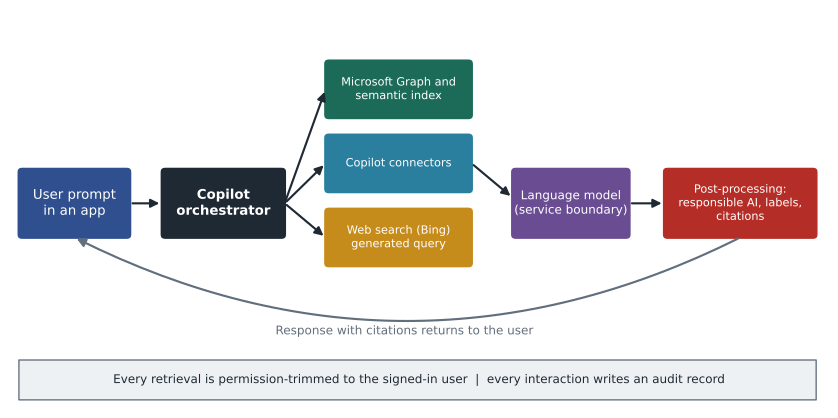
A prompt is the request a person types or speaks, together with anything they attach or reference. When a licensed user sends a prompt in Word, Outlook, Teams or the Microsoft 365 Copilot app, it does not go straight to a language model. It goes first to the Copilot orchestrator, the service that decides what information the model needs and which tools to call.
The orchestrator then grounds the prompt. Grounding means retrieving relevant information so that the model can answer from facts rather than from general patterns alone. For work content, Copilot searches Microsoft Graph, the data and permission layer behind Microsoft 365, using the semantic index, which maps the relationships between words and documents so that a search for 'visit cancellation policy' can find a document titled 'When clients cancel'. If the organization has added Copilot connectors (formerly called Graph connectors), content from outside systems such as a ticketing tool or an intranet is searched in the same way. If web search is allowed, the orchestrator can also generate a short search query and send it to Bing; lesson 3 covers exactly what is sent.
Every retrieval is permission-trimmed. Copilot searches as the signed-in user, so it can only find what that user could already open. This single fact explains most of the governance work in this course. Copilot does not create new access, but it makes existing access very easy to use. A file shared with 'everyone in the organization' years ago becomes something Copilot can quote to anyone who asks the right question.
Next, the orchestrator combines the user's prompt, the retrieved content and system instructions into a request to a large language model (LLM). Microsoft runs these models inside the Microsoft 365 service boundary, and Microsoft 365 Copilot can now use more than one model family; administrators can turn some model families on or off in Copilot settings, as lesson 3 explains. The model's response then goes through post-processing: responsible AI checks, protected material detection, sensitivity label handling and citation generation. Only then does the user see an answer, with references to the files, emails or web pages it drew on.
What stays inside the boundary
Microsoft describes its commitments for business Copilot under the heading enterprise data protection. For prompts and responses in Microsoft 365 Copilot and Copilot Chat signed in with a work account, Microsoft acts as a data processor under the Data Protection Addendum and the Product Terms. Prompts and responses are not used to train the foundation models, and they are stored with the same protections as other Microsoft 365 content, which means they can be retained, searched and deleted with Microsoft Purview. Web search is the main exception: the short queries sent to Bing are covered by different terms, which is why the web search decision in lesson 3 matters so much to a health care organization.
Data residency follows the same principle. Copilot interaction content is stored in the tenant's geography, and Microsoft has announced in-country processing of Copilot requests for a list of countries; the dates announced in 2025 and 2026 put the United States by the end of 2026 and Canada in 2027. Teodor's runbook records those dates as Microsoft's announcements and tells readers to check the Microsoft 365 roadmap before relying on them.
| Component | What it does | What the administrator controls |
|---|---|---|
| Orchestrator | Plans the response, chooses data sources and tools | Indirectly, through settings, agents and connectors |
| Microsoft Graph and semantic index | Find work content the user can access | Permissions, sharing, restricted content discovery, labels |
| Copilot connectors | Bring outside content into search and grounding | Which connectors exist and who can see each item |
| Web search (Bing) | Adds current public information | The Allow web search in Copilot policy and domain exclusions |
| Language models | Generate the response | Which optional model families are allowed |
| Post-processing | Responsible AI checks, citations, label handling | Sensitivity labels and data loss prevention |
| Audit and retention | Record and keep interactions | Purview audit, retention policies, eDiscovery |
Copilot Chat, Microsoft 365 Copilot and agents
Three kinds of experience share this architecture, and the exam expects you to tell them apart.
Microsoft 365 Copilot Chat is available to users with an eligible Microsoft 365 plan, with or without a Copilot licence. Without a licence, it grounds on the web and on content the user uploads or pastes, but it does not search the user's mailbox, files and meetings through Microsoft Graph. Microsoft has used more than one name for this experience during 2025 and 2026, so read admin center labels carefully.
Microsoft 365 Copilot is the paid, per-user experience. It adds Graph grounding, Copilot in the Office apps and Teams, Researcher and Analyst, and the right to use agents that reason over work data. At Corvallin, four IT staff hold it today and 40 pilot users will receive it in May 2027.
Agents are specialized versions of Copilot that follow instructions, use particular knowledge sources and can take actions. Declarative agents, built with Agent Builder, a SharePoint site or Copilot Studio, run on Copilot's own orchestrator and models. Custom engine agents bring their own orchestration and models, for example agents built in Microsoft Foundry and published to Microsoft 365. Both kinds appear in the agent registry in the Microsoft 365 admin center. Agents introduce two new questions that ordinary Copilot does not: what identity the agent acts under, and what it is allowed to do without a person checking first. Lessons 4 and 5 answer them.
A fourth experience arrived in 2026. Microsoft 365 Copilot Cowork, which Microsoft made generally available in June 2026, is described by Microsoft as an agentic system rather than an agent. It completes multi-step tasks for a user, can act in the Edge browser with the user's sign-ins, and can run scheduled or event-triggered tasks. It is billed by usage, and access is granted through spending policies, which lesson 9 covers. By default it asks the user before sending email, posting a message or changing a shared system.
The Copilot Control System
Microsoft groups the administrative tools for all of this under the name Copilot Control System. It is a framework rather than a single console, and it has three pillars.
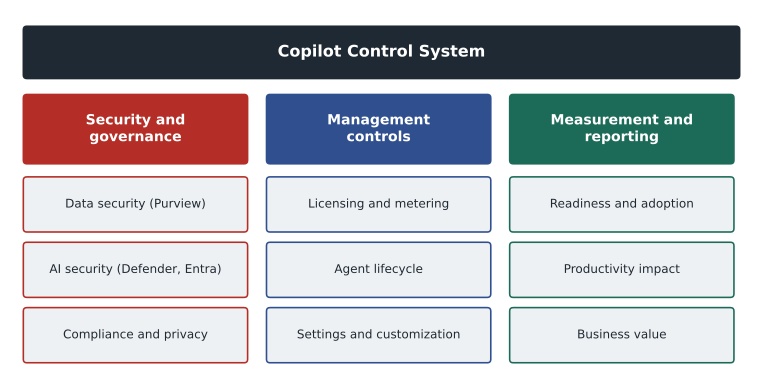
- Security and governance protects the data that Copilot and agents reference or create. Most of its tools are in Microsoft Purview (labels, data loss prevention, retention, audit, data security posture management), Microsoft Defender (threat detection) and Microsoft Entra (identity and access, including agent identities).
- Management controls decide who gets which experience and how agents are deployed: licensing and metering, agent lifecycle, settings and customization. Most of these are in the Microsoft 365 admin center, with some in the Power Platform admin center and Copilot Studio.
- Measurement and reporting shows readiness, adoption and impact, mainly through Copilot Analytics and the usage reports in the Microsoft 365 admin center. AB-650 also expects you to monitor Copilot service health through the same set of tools.
Teodor used the three pillars as the outline for the runbook. Lessons 2, 3 and 9 are mostly management controls; lessons 4 and 5 span management and security; lessons 6, 7, 10 and 11 are security and governance; lesson 8 is measurement.
Agent 365 in the picture
Microsoft Agent 365, generally available since May 1, 2026, extends the same model to agents. Microsoft describes it as an observability and control platform with four pillars of its own: management, governance, security and business value. In practice it adds to the Microsoft 365 admin center a fuller agent registry with owner, usage and risk information, an Agent Map, connections to agents built on other platforms, a tools registry, and cost management by agent. It draws risk signals from Defender, Entra and Purview. Agent 365 is licensed per user, and it is included in Microsoft 365 E7 along with E5, Microsoft 365 Copilot and the Microsoft Entra Suite.
Corvallin does not have E7. Its office staff and managers have Microsoft 365 E3, home-care staff have F3, and six administrators have the E5 Security add-on. That mix shapes several decisions later in this course, because some features need licences the agency only partly owns.
Roles for AI administration
Least privilege applies to AI services as much as to mail or identity. The AI Administrator role in Entra ID can manage Copilot settings, agents and pay-as-you-go services in the Microsoft 365 admin center without holding Global Administrator. Global Reader can view the Copilot pages, including the Copilot security dashboard, but cannot change anything. Billing Administrator manages pay-as-you-go billing policies. Purview, Defender and Entra each keep their own roles for the security work.
At Corvallin, Teodor became eligible for AI Administrator through Privileged Identity Management with a four-hour activation, matching his other eligible roles, and Ines kept her permanent Global Reader assignment so that she can see everything without being able to change it by accident.
Worked problem
Answering the clinical director's first question
Dr. Ostrander-Bey asks: 'If a care coordinator asks Copilot to summarize last week's incidents at Branch 2, could Copilot show her an incident report from Branch 4 that she has never seen?' Explain what decides the answer.
Show solution
- Copilot searches Microsoft Graph as the coordinator, so it can only retrieve items she already has permission to open.
- If the Branch 4 incident report is in a site she can access, or was shared with an organization-wide link, the semantic index can find it and Copilot can quote it, even if she has never opened it.
- If the report is in a site she cannot access, Copilot cannot retrieve it, and it will not appear in the answer or the citations.
- If the report carries a sensitivity label that encrypts it without granting her the EXTRACT usage right, Copilot can reference it but cannot quote its content.
Answer: Her existing access decides it. Copilot never grants new access, but it can surface anything she can already reach. That is why the oversharing clean-up is a board condition for the pilot.
Why the architecture matters for the rest of the runbook
Each later chapter of the runbook can be read as an answer to one box in the architecture diagram. Grounding on Microsoft Graph is why oversharing (lesson 7) and labels (lesson 6) matter. Web search is why lesson 3 exists. Agents and their tools are why identity (lesson 5) and approval (lesson 4) matter. Usage-based services are why cost management (lesson 9) is part of security rather than just finance. Teodor put the diagram on the runbook's first page so that every reader could find where a control acts.
Common mistakes
MistakeTelling staff that Copilot 'only sees what it needs'.
InsteadCopilot can retrieve anything the user can access. Explain permission trimming accurately and fix oversharing first.
MistakeTreating web search as part of the Microsoft 365 service boundary.
InsteadGenerated web queries go to Bing under different terms. Decide on web search separately.
MistakeAssigning Global Administrator to the person who manages Copilot settings.
InsteadUse the AI Administrator role, made eligible through Privileged Identity Management.
MistakeAssuming all agents use Copilot's own models.
InsteadCustom engine agents bring their own orchestration and models, and need their own review.
Summary and key terms
- A prompt goes to the Copilot orchestrator, which grounds it in Microsoft Graph, Copilot connectors and optionally the web, calls a language model and post-processes the response.
- Every retrieval runs as the signed-in user, so Copilot surfaces existing access rather than creating new access.
- Enterprise data protection covers prompts and responses; generated web queries to Bing are covered by different terms.
- Copilot Chat, Microsoft 365 Copilot, agents and Cowork share the architecture but differ in data access, licensing and risk.
- The Copilot Control System has three pillars: security and governance, management controls, and measurement and reporting.
- Agent 365 extends registry, governance, security and cost management to agents from Microsoft and other platforms.
- Orchestrator
- The Copilot service that plans a response, retrieves data and calls tools and models.
- Grounding
- Retrieving relevant information so that a model answers from facts.
- Semantic index
- An index that maps relationships between words and content for better retrieval.
- Permission trimming
- Returning only results the signed-in user is allowed to access.
- Enterprise data protection
- Microsoft's contractual and technical commitments for business Copilot prompts and responses.
- Copilot Control System
- Microsoft's framework of security, management and measurement controls for Copilot and agents.
- Microsoft Agent 365
- A platform for registering, governing, securing and measuring agents across an organization.
- AI Administrator
- An Entra ID role that manages Copilot and agent settings without full Global Administrator rights.
Practice problems
Work each problem on paper first, then reveal the answer to check.
Why does Copilot make old oversharing more dangerous even though it grants no new access?
Show answer
It searches everything the user can reach and can quote it on request, so content shared too broadly becomes easy to find.
Name the three pillars of the Copilot Control System.
Show answer
Security and governance; management controls; measurement and reporting.
What is the difference between a declarative agent and a custom engine agent?
Show answer
A declarative agent runs on Copilot's orchestrator and models; a custom engine agent brings its own orchestration and models.
Which role lets someone view the Copilot pages in the admin center without changing settings?
Show answer
Global Reader.
Lesson quiz · 5 questions
Score 60% or more to complete this lesson.
Create a free account to save your progress, take quizzes and earn a certificate.