
MSBA-205 · Lesson 2 of 12 · 20 min
Readiness: licences, apps, data and network
▶ Video coming soon A video version of this lesson is on the way.
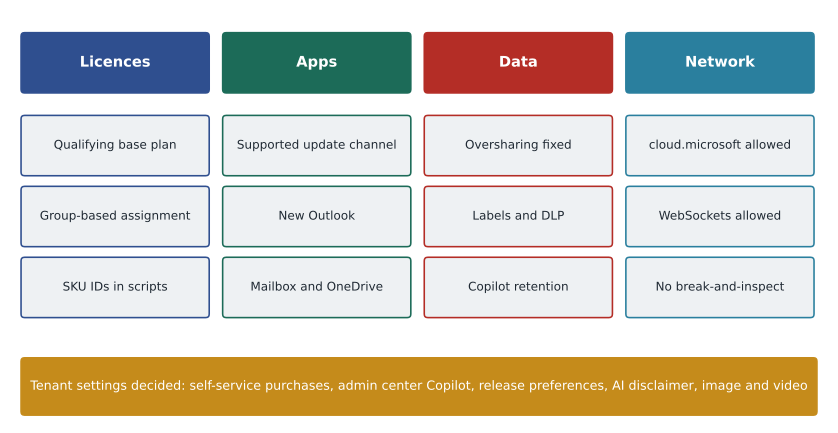
The second chapter of Teodor's runbook is a readiness checklist. AB-650 asks administrators to 'assess tenant readiness for Copilot, including in-app experiences' and to 'identify and resolve data readiness issues'. Ines wanted the checklist to be something the help desk could run again before the pilot, not a one-time report, so Teodor wrote it in four parts: licences, apps, data and network. He added a fifth part for the tenant-wide Copilot settings that need a decision before anyone gets a licence.
The MSBA-103 course already ran a first readiness report in late October 2026. It found that 112 of Corvallin's 120 E3 users were eligible (the other eight were service and shared accounts), and that 14 provisional pilot users were on an old Microsoft 365 Apps update channel. This chapter turns that one-off report into a repeatable process and goes deeper on the parts that matter for security.
Licences
Microsoft 365 Copilot is licensed per user on top of a qualifying base plan. The qualifying plans include the Microsoft 365 E3 and E5 suites, Business Standard and Business Premium, and Office 365 E1, E3 and E5, among others; the current list is on Microsoft's Copilot licensing page and changes from time to time. Frontline plans such as F1 and F3 have been added to the list in some forms, but Teodor's runbook tells readers to check the list for each plan rather than assume, because Corvallin's 340 home-care staff are on F3 and are not part of the pilot.
Microsoft also changed how the licence is sold in late 2026. A message center post announced that the 'add-on' wording would appear in product names from October 2026, that new subscriptions could be bought without a base licence from December 1, 2026, and that sales of the old add-on would end that day while renewals continued. For an administrator, the practical lesson is to identify licences in scripts by their SKU ID, a fixed identifier, rather than by display names that Microsoft can change.
Licences should be assigned through group-based licensing in Microsoft Entra ID, which requires Entra ID P1 (included in Microsoft 365 E3). Corvallin's plan uses a group called Copilot-Pilot for the 40 pilot users and a group called Copilot-IT for the four IT staff, who were first given licences directly. Group-based assignment makes the licence follow membership: when someone leaves the pilot group, the licence is removed automatically and returns to the pool.
# Report Copilot subscriptions and who holds them (Microsoft Graph PowerShell).
Connect-MgGraph -Scopes 'Organization.Read.All','User.Read.All','Group.Read.All'

# Find the Copilot SKU by its part number rather than its display name.
$sku = Get-MgSubscribedSku | Where-Object SkuPartNumber -like '*Copilot*'
$sku | Select-Object SkuPartNumber, SkuId, ConsumedUnits,
    @{n='Enabled';e={$_.PrepaidUnits.Enabled}}

# List members of the pilot group to compare with assigned users.
$group = Get-MgGroup -Filter "displayName eq 'Copilot-Pilot'"
Get-MgGroupMember -GroupId $group.Id -All |
    ForEach-Object { (Get-MgUser -UserId $_.Id).UserPrincipalName }
Apps
Copilot in the desktop apps needs a supported version of Microsoft 365 Apps on a supported update channel. Microsoft supports Copilot on Current Channel and Monthly Enterprise Channel; the Semi-Annual Enterprise Channel receives Copilot features later. The 14 finance users who had been held on an older channel during a payroll upgrade were moved to Monthly Enterprise Channel by Ama Owusu-Pratt through Intune, and two of them drifted back after their laptops were rebuilt from an old image. The runbook now includes a check after every rebuild.
Other app requirements are easier to miss. Copilot in Outlook works best in the new Outlook for Windows and Outlook on the web. Copilot in Teams needs the meeting transcription settings decided in the MSBA-220 and MSBA-222 courses; Corvallin's Clinical-Meetings meeting policy keeps transcription and Copilot off for clinical case conferences. Every pilot user needs an Exchange Online mailbox and a OneDrive, because Copilot stores some content there, and shared or service accounts should not be licensed at all.
In-app experiences have their own readiness question: will users see Copilot where they expect it? The Microsoft 365 admin center's readiness view shows which users are eligible for a licence and which apps and channels they use. The Copilot page in the admin center also shows recommended actions. Teodor runs both views every Monday during the pilot preparation.
Data
Data readiness is the largest part of the work and the reason the pilot is in May rather than January. AB-650 names three kinds of data readiness issue: data leaks, where sensitive content can reach the wrong people or leave the organization; data oversharing, where content is shared more widely than its owners intended; and data compliance, where content is not labelled, retained or protected as regulations require.
The MSBA-102 course started Corvallin's clean-up, and lesson 7 of this course shows how Teodor tracks what is left. For the readiness checklist, he reduced data readiness to five questions that can be answered yes or no:
- Has every SharePoint site with the 'Everyone except external users' group on it been reviewed?
- Do all sites have at least two owners?
- Are sensitivity labels published, with a default label for new documents?
- Is there a data loss prevention policy for the Microsoft 365 Copilot location?
- Is there a retention policy for Microsoft Copilot experiences?
In November 2026, three answers were yes and two were no: 23 sites still had the organization-wide group, and 41 sites had no owner. Both are scheduled for December 2026 and January 2027 in the plan the MSBA-102 course set out.
Network
Copilot is a cloud service, and most network readiness is about not getting in its way. Microsoft publishes the endpoints Copilot needs, and recommends allowing the cloud.microsoft domain and its subdomains and the other Microsoft 365 endpoints in proxies and firewalls. Copilot uses WebSocket connections for streaming responses, so proxies that block or break WebSockets cause Copilot to hang or fail. Microsoft also recommends not sending Microsoft 365 traffic through break-and-inspect TLS proxies, which add delay and can interfere with authentication.
Felix Okonkwo-Reyes, who looks after Corvallin's network, found one problem: the branch offices' firewall had a content filter that categorized some cloud.microsoft addresses as 'uncategorized' and slowed them down. He added the published endpoints to the bypass list. Copilot Chat on personal devices is a separate matter, governed by Conditional Access and app protection policies rather than the network.
| Check | Where to look | Corvallin result (November 2026) |
|---|---|---|
| Qualifying base plan | Microsoft 365 admin center, Licences | 112 of 120 E3 users eligible; F3 staff out of scope |
| Update channel | Microsoft 365 Apps admin center or Intune | All provisional pilot users on Monthly Enterprise Channel; rebuild check added |
| Mailbox and OneDrive | Exchange and SharePoint admin centers | All pilot users have both |
| Oversharing | SharePoint Advanced Management, data security posture management | 23 sites with organization-wide group; 41 ownerless sites |
| Labels and DLP | Microsoft Purview portal | Labels published to IT and privacy only; Copilot DLP in simulation |
| Network | Firewall and proxy configuration | cloud.microsoft bypass added at branches |
Tenant settings that need a decision
AB-650 lists a set of tenant-wide Copilot settings that an administrator must be able to configure: self-service purchases, Copilot in admin centers, release preferences, the AI disclaimer, and video and image generation. Most are on the Copilot settings page in the Microsoft 365 admin center, which the AI Administrator role can manage. They are worth deciding before the pilot because each one changes what users see on day one.
- Self-service purchases let users buy Copilot or other AI products with a credit card. Corvallin turned them off in October, so every licence goes through procurement and the pilot group.
- Copilot in admin centers lets administrators use Copilot inside the Microsoft 365, Entra, Intune and other admin centers. Teodor kept it on for the IT team, with a rule that Copilot-suggested changes are checked before being applied.
- Release preferences decide whether the tenant gets new Copilot features early, through programs such as Frontier, or at general availability. For a health care organization in a pilot, Corvallin chose general availability for everyone except the four IT licences, which receive early features so that IT can test them first.
- The AI disclaimer is the short notice shown with Copilot responses reminding users that AI output can be wrong. Microsoft lets organizations customize the link it points to. Corvallin points it to the two-page Copilot use guide on the intranet that the MSBA-103 course describes.
- Video and image generation lets Copilot create images and short videos. Corvallin allows image generation with two rules from the use guide: label generated images, and never depict clients or staff. Video generation stays off during the pilot.
The MSBA-103 course recorded these decisions when it set up the first four licences. The runbook records who made each decision and when it will be reviewed, because every setting on that page can change the risk picture.
Worked problem
A readiness gap found on a Monday
On a Monday readiness run, Teodor finds that a new finance analyst who will join the pilot has a OneDrive but no Exchange Online mailbox, because her account was created as a shared-mailbox user by mistake. What should he do before she is licensed?
Show solution
- Confirm in the Exchange admin center that the account is a shared mailbox rather than a user mailbox.
- Create or convert the account so that she has her own licensed user mailbox, following the joiner process from the MSBA-201 course.
- Check that she is in the right groups, including the Copilot-Pilot group, only after the mailbox exists.
- Rerun the readiness view to confirm she is now eligible.
Answer: Fix the account first, then add her to the pilot group. Licensing an account without a proper mailbox produces a poor Copilot experience and an untidy audit trail.
Readiness for in-app experiences
AB-650 singles out in-app experiences because they are where most users first meet Copilot and where readiness problems are most visible. A user who opens Word and sees no Copilot button does not know whether the cause is the licence, the update channel, a policy or a network block, and neither does the help desk unless it has a checklist. Teodor's help desk card lists the checks in the order that finds the cause fastest:
- Licence. Is a Microsoft 365 Copilot licence assigned, and has it had time to take effect? New assignments can take several hours to reach every app.
- Account. Is the user signed in to the Office app with their work account, not a personal Microsoft account? A mixed sign-in is a common cause on shared or home computers.
- Channel and version. Is the app on Current Channel or Monthly Enterprise Channel, and up to date? The About page in each app shows the channel and build.
- Policy. Has a Cloud Policy setting or the optional connected experiences policy turned off the feature? Corvallin keeps a short list of the policies that affect Copilot so the help desk can check them.
- Network. Does Copilot Chat work in the browser but not in the app? If so, a local proxy or firewall rule may be blocking the app's connection.
The card turned a common class of help desk tickets into a five-minute check. In the IT team's own first month, the only two Copilot tickets were a stale licence assignment and a laptop still signed in to Office with a personal account.
Readiness as a recurring report
A readiness check that runs once goes stale within weeks, because people join, leave and change roles, and devices are rebuilt. The runbook schedules the checks:
| Check | Frequency | Owner |
|---|---|---|
| Copilot readiness view in the admin center | Weekly from March 2027 | Teodor |
| Update channel report for pilot devices | Weekly and after every rebuild | Ama |
| Pilot group membership against the approved list | Before each licence change | Teodor and HR |
| Data readiness questions | At each Thursday review | Teodor and the records manager |
| Network endpoint list against Microsoft's published changes | Monthly | Felix |
The last row matters because Microsoft adds and changes endpoints over time. Felix subscribes to the Microsoft 365 endpoint change notifications and reviews them with the Monday message center triage.
Common mistakes
MistakeLicensing shared or service accounts so that 'everyone in the team' gets Copilot.
InsteadLicense people, not shared accounts. Shared mailboxes are reached through each user's own licence.
MistakeScripts that match the Copilot licence by display name.
InsteadMatch by SKU ID or part number; Microsoft can rename products.
MistakeTurning on early release for all users of a pilot.
InsteadGive early features to a small IT test group and keep pilot users on general availability.
MistakeTreating network readiness as optional because 'it's just a website'.
InsteadAllow the published endpoints and WebSocket connections, and avoid break-and-inspect for Microsoft 365 traffic.
Summary and key terms
- Readiness has four technical parts (licences, apps, data and network) and a set of tenant setting decisions.
- Assign Copilot licences through groups and identify them in scripts by SKU ID.
- Desktop Copilot needs a supported update channel; mailboxes and OneDrive are prerequisites.
- Data readiness covers leaks, oversharing and compliance, and is usually the longest part.
- Allow cloud.microsoft endpoints and WebSockets, and avoid break-and-inspect proxies for Copilot.
- Decide self-service purchases, Copilot in admin centers, release preferences, the AI disclaimer and image and video generation before the pilot.
- Qualifying base plan
- A Microsoft 365 or Office 365 plan that a Copilot licence can be added to.
- Group-based licensing
- Assigning licences to an Entra ID group so that members receive them automatically.
- SKU ID
- The fixed identifier of a licence product, used in scripts and reports.
- Update channel
- The release cadence for Microsoft 365 Apps, such as Current or Monthly Enterprise.
- Data oversharing
- Content shared more widely than its owners intended.
- Release preferences
- The tenant setting that controls when users receive new Copilot features.
- AI disclaimer
- The notice shown with Copilot output reminding users to check it, with a customizable link.
Practice problems
Work each problem on paper first, then reveal the answer to check.
Why is group-based licensing recommended for a Copilot pilot?
Show answer
Licences follow group membership, so adding or removing pilot users is controlled and reversible.
Name the three kinds of data readiness issue in the AB-650 skills outline.
Show answer
Data leaks, data oversharing and data compliance.
What network feature does Copilot rely on for streaming responses?
Show answer
WebSocket connections.
Give two Copilot tenant settings that should be decided before a pilot.
Show answer
Any two of self-service purchases, Copilot in admin centers, release preferences, the AI disclaimer, and video and image generation.
Lesson quiz · 5 questions
Score 60% or more to complete this lesson.
Create a free account to save your progress, take quizzes and earn a certificate.