
MSBA-205 · Lesson 7 of 12 · 19 min
Oversharing assessment and remediation
▶ Video coming soon A video version of this lesson is on the way.
Oversharing is the risk that the board wrote into the pilot conditions, and it is the risk that most organizations underestimate. The MSBA-102 course found the scale of it at Corvallin: about 210 SharePoint sites and 1.6 million files, the 'Everyone except external users' group on 23 sites, 41 sites with no owner, 340 files containing health card numbers outside the clinical sites, and an old funding-application export containing every client's address and diagnosis. That export was deleted, two sites were locked down and a plan was drawn up to finish the rest by April 2027.
This seventh chapter of the runbook is about running that plan as an administrator, week by week, until the go/no-go meeting: how to assess oversharing continuously, how to decide what to fix first, which tools fix which problems, and how to show the board that the risk is falling. AB-650 frames it as 'identify and resolve data readiness issues for Copilot, including data leaks, data oversharing, and data compliance'.
Why oversharing matters more with Copilot
Before Copilot, an overshared file was found mostly by people who went looking for it, or by accident. With Copilot, every licensed user has a tireless research assistant that searches everything they can reach and summarizes it on request. Microsoft states plainly that Copilot works within existing permissions, so overshared content can appear in results. Oversharing therefore turns from a theoretical risk into a practical one on the day licences are assigned.
Three patterns cause most oversharing in Microsoft 365:
- Broad groups on sites. The 'Everyone except external users' group (often shortened to EEEU) or large distribution groups added as members or visitors, usually years ago, to make a site easy to find.
- Organization-wide sharing links. Links that let anyone in the organization open a file, created by users clicking Share and accepting a default that was too permissive.
- Ownerless and forgotten content. Sites and libraries whose owners have left, so nobody reviews who has access or deletes what is no longer needed.
Assessing: the tools
An administrator has several assessment tools, and they answer different questions.
| Tool | Question it answers | Where |
|---|---|---|
| Oversharing assessment in data security posture management | Which sites hold sensitive data that many people can reach, and what did Copilot access? | Microsoft Purview portal |
| Data access governance reports | Which sites use EEEU, which have many sharing links, which hold labelled content? | SharePoint admin center (SharePoint Advanced Management) |
| Site access review | Does the site owner confirm that the current access is right? | Started from data access governance reports, completed by the site owner |
| Content management assessment | Which sites are inactive, ownerless or have risky settings? | SharePoint Advanced Management, every 30 days |
| Copilot security view | What is the overall state of DLP and oversharing controls for Copilot? | Microsoft 365 admin center, Copilot |
| Copilot Search as a test user | What would a typical user actually find? | Microsoft 365 Copilot app |
The oversharing assessment in Purview's data security posture management runs by default every week on the 100 SharePoint sites with the most activity, and administrators can create custom assessments for other sites, with results kept for 30 days. Its value is that it combines three facts the other tools keep separate: how sensitive the content is, how many people can reach it, and whether Copilot or agents actually accessed it. The MSBA-102 course used it to find that 45 items on the Branch 3 Operations site had been accessed by Copilot in a single month.
Data access governance reports in SharePoint Advanced Management give the structural view: which sites have EEEU, which have the most sharing links of each type, and which hold labelled content. From a report, an administrator can start a site access review, which asks the site owner to confirm or remove access. Reviews put the decision where it belongs, with the people who know whether the 40 members of a branch site all need to be there.
Microsoft includes several SharePoint Advanced Management features with Microsoft 365 Copilot licences, and others need a SharePoint Advanced Management licence. Teodor checked the current list on Microsoft's licensing page before planning, because it changed during 2025 and 2026.
Prioritizing: sensitivity times reach
With 210 sites, Teodor could not fix everything at once. He prioritized with a simple rule: risk is sensitivity multiplied by reach. A site with health information that 400 people can open is urgent; a site with old event photos that everyone can open is not.
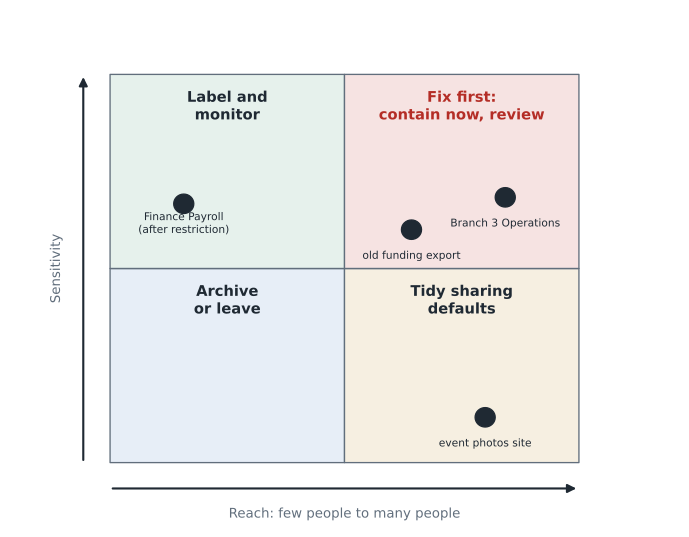
In practice, the top-right quadrant gets an immediate containment control, such as restricted content discovery or restricted access control, followed by a proper fix through a site access review. The top-left quadrant needs labels and monitoring. The bottom-right needs better sharing defaults. The bottom-left can wait or be archived.
Remediating: matching the tool to the problem
Each remediation tool does something different, and using the wrong one either fails to reduce risk or breaks people's work.
- Remove broad groups and links. The real fix for EEEU and organization-wide links is to remove them and grant access to the right groups. Site owners do this through site access reviews; administrators can do it in bulk where owners agree.
- Restricted content discovery (RCD). A site-level setting that stops the site's content appearing in Copilot and organization-wide search for everyone, without changing permissions. People who already know where a file is can still open it. It is a containment tool: fast and safe, but not a fix. Corvallin applied it to Branch 3 Operations in the MSBA-102 course while the site's 290 organization-wide links were reviewed.
- Restricted access control (RAC). A site-level setting that limits access to members of specified groups, overriding broader sharing. Corvallin applied it to the Finance Payroll site, limited to a five-person group.
- Sensitivity labels and DLP. Labels without EXTRACT and DLP label exclusions, from lesson 6, limit what Copilot does with sensitive items people can still open.
- Change sharing defaults. Microsoft's default sharing settings are the most permissive. Changing the default link type to 'people with existing access' or 'specific people' stops new oversharing. Corvallin plans this for December 2026.
- Archive and delete. Content nobody needs should not be searchable at all. Microsoft 365 Archive moves inactive sites to cold storage that Copilot does not use; deletion under a retention policy removes what has passed its retention period. The 31 sites untouched for a year were archived in the MSBA-102 course.
- Fix ownership. Ownerless sites get new owners before anything else, because every other remediation step needs someone to make decisions.
Microsoft has also introduced a SharePoint Admin Agent and Copilot-assisted remediation in SharePoint Advanced Management, which can suggest access changes and summarize site activity. The runbook lets Teodor use them for suggestions but requires a site owner to approve any access change.
Corvallin's remediation plan
The plan from the MSBA-102 course runs to the April 2027 go/no-go. Teodor's chapter turns it into weekly measures that the Thursday review can track:
| Measure | Start (Oct 2026) | Nov 20, 2026 | Target (Apr 2027) |
|---|---|---|---|
| Sites with EEEU | 23 | 17 | 0, or each one documented and approved |
| Ownerless sites | 41 | 26 | 0 |
| Files with health card numbers outside clinical sites | 340 | 212 | 0, or labelled and restricted |
| Sites under restricted content discovery | 1 | 3 | As few as possible, each with a review date |
| Site access reviews completed | 0 | 9 | All high-risk sites |
| Default sharing link type | Organization | Organization | People with existing access |
Two things in the table are deliberate. First, the number of sites under restricted content discovery is expected to go up and then down: it is a temporary measure, and every RCD site has a review date. Second, the targets allow documented exceptions. A home-care organization has a few sites, such as the staff noticeboard, that really should be open to everyone, and the goal is a reviewed decision, not a zero for its own sake.
Preventing new oversharing
Remediation without prevention is a treadmill. The runbook's prevention measures are mostly settings that stop the problem recurring:
- Default link type changed to people with existing access, and organization-wide links disabled for sites labelled Confidential or higher through sensitivity labels for sites.
- Site creation limited to a request process, so new sites get owners and labels from the start.
- Ownerless site policy to notify and reassign when owners leave, matching the ownerless group policy from the MSBA-221 course.
- Recurring assessments: the weekly oversharing assessment and the 30-day content management assessment, reviewed by Teodor each Monday.
Worked problem
Choosing between RCD and RAC
The quality team's site holds incident investigations. It has EEEU as a visitor and 60 organization-wide links. The quality lead needs four weeks to review who really needs access. The pilot is still months away, but four IT staff already have Copilot. Which control should Teodor apply now, and what comes next?
Show solution
- The content is sensitive and widely reachable: top-right quadrant, so contain it now.
- Restricted access control would immediately cut off everyone outside a named group, which could block staff who legitimately use the site before the review is done.
- Restricted content discovery stops the content appearing in Copilot and organization-wide search without changing who can open it, so nobody's work breaks.
- Apply RCD now with a review date, start a site access review with the quality lead, then remove EEEU and the organization-wide links, and lift RCD when the site's access is correct.
Answer: Apply restricted content discovery as containment, then fix permissions through a site access review. Consider restricted access control only if the review shows a small, stable group should have access.
Working with site owners
Oversharing remediation is mostly a people process. Site owners at a home-care agency are branch managers, team leads and coordinators, not IT staff, and an email from IT saying 'please review your site's access' is easy to ignore. Teodor's runbook describes what made site access reviews work at Corvallin:
- A short explanation of why. Each review request includes one sentence about Copilot: 'From May, Copilot will be able to summarize anything in this site for anyone who has access to it.'
- A specific question. Instead of 'review access', the request lists the broad groups and links found and asks whether each one is still needed.
- A deadline and a default. Owners have three weeks to respond. If they do not, the broad group is removed and the owner is told how to restore it if something breaks. Nobody has asked for a restore yet.
- Help on the call. Teodor or Ama joins a 15-minute call with any owner who wants help, which turned out to be about half of them.
The nine reviews completed by November 20 removed EEEU from six sites and about 300 organization-wide links, and found two sites that should be archived rather than fixed.
Measuring for the board
The board does not need site counts; it needs to know whether the risk is falling. Teodor's monthly board summary reports three numbers: the share of sensitive files (by sensitive information type matches) that are reachable by more than 100 people, the number of high-risk sites without a completed access review, and the number of sites under temporary restricted content discovery past their review date. All three should fall to near zero by April. The summary also lists exceptions that the clinical director or privacy officer has approved, with the reason for each.
Two exceptions were approved in November: the staff noticeboard site, which is meant for everyone, and the public forms library, which holds blank forms only. Each has a one-line reason and a review date in the summary.
Common mistakes
MistakeTreating restricted content discovery as the fix.
InsteadUse it to contain, then fix permissions and remove broad groups and links.
MistakeRemoving access in bulk without site owners.
InsteadUse site access reviews so owners confirm what people need.
MistakeMeasuring only the number of sites fixed.
InsteadTrack sensitivity and reach together, and report exceptions explicitly.
MistakeLeaving the default sharing link as organization-wide.
InsteadChange the default to people with existing access to stop new oversharing.
Summary and key terms
- Copilot makes existing oversharing easy to exploit, so it must be addressed before licences are assigned widely.
- Broad groups, organization-wide links and ownerless content cause most oversharing.
- Oversharing assessments combine sensitivity, reach and Copilot access; data access governance reports and site access reviews give structure and owner decisions.
- Prioritize by sensitivity multiplied by reach, containing high-risk sites first.
- Restricted content discovery contains; restricted access control limits access; removing groups and links, labels, archiving and sharing defaults fix.
- Prevention settings and recurring assessments stop new oversharing.
- Oversharing assessment
- A Purview assessment of sensitive content, its reach and AI access across SharePoint sites.
- EEEU
- The 'Everyone except external users' group, which grants access to all internal users.
- Data access governance report
- A SharePoint Advanced Management report on sharing, broad access and labelled content.
- Site access review
- A request for a site owner to confirm or remove access to their site.
- Restricted content discovery
- A site setting that hides its content from Copilot and organization-wide search without changing permissions.
- Restricted access control
- A site setting that limits access to members of specified groups.
- Microsoft 365 Archive
- Cold storage for inactive SharePoint sites, not used by Copilot.
Practice problems
Work each problem on paper first, then reveal the answer to check.
What three facts does the Purview oversharing assessment combine?
Show answer
How sensitive the content is, how many people can reach it, and whether Copilot or agents accessed it.
Why is restricted content discovery called a containment tool?
Show answer
It hides content from Copilot and search quickly but does not change permissions, so the underlying oversharing remains.
Which setting change prevents most new oversharing from sharing links?
Show answer
Changing the default link type to people with existing access.
Why should ownerless sites be fixed before other remediation?
Show answer
Every other step needs an accountable person to make access decisions.
Lesson quiz · 5 questions
Score 60% or more to complete this lesson.
Create a free account to save your progress, take quizzes and earn a certificate.