
MSBA-205 · Lesson 4 of 12 · 20 min
Agent inventory, approval and lifecycle
▶ Video coming soon A video version of this lesson is on the way.
By November 2026 Corvallin had four agents of its own, three built by Microsoft that users could see, and one from a vendor that was blocked. That is a small number, and Teodor knew every one by name. The point of the fourth chapter was to set up a process that would still work when the number was forty, because every organization that adopts Copilot finds that agents multiply faster than anyone planned.
The MSBA-103 course introduced the agent pages in the Microsoft 365 admin center: the overview, the list of all agents, requests, and the settings that decide which agent types are allowed. This lesson goes further, as AB-650 does, into the agent registry, Agent 365, approval as a governed process, and the full lifecycle of an agent from idea to retirement.
The agent registry
The agent registry is the inventory of agents available in the tenant. It appears in the Microsoft 365 admin center under Agents, and Agent 365 extends it. Microsoft's documentation describes the registry as listing agents from Microsoft, from partners and from the organization's own teams, plus agents brought in from other platforms, with owner, usage and risk information for each.
AB-650 asks administrators to 'discover and manage Microsoft and third-party agents in the agent registry', to 'review requests and publish or reject agents', and to 'install, block, or control access to agents in the agent registry, including uploading custom agents'. The registry is where all three happen.
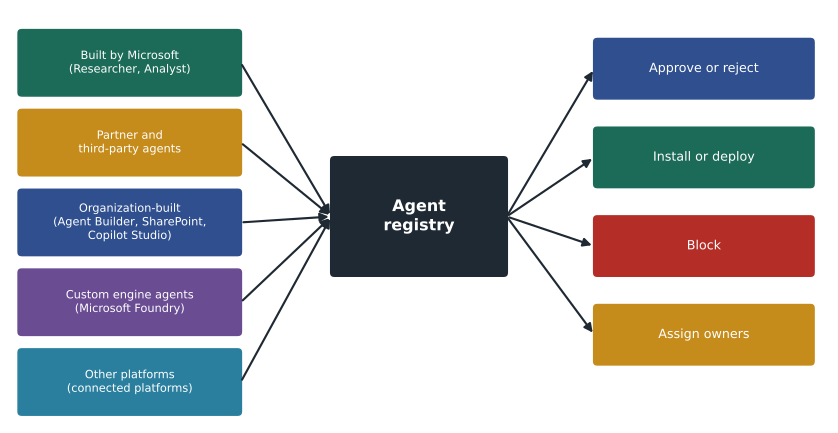
Each agent in the registry has a type that affects what an administrator can do with it. Microsoft-built agents such as Researcher and Analyst can be blocked or allowed but not edited. Third-party agents from the store can be deployed, blocked or have their availability limited to groups. Organization-built agents can be approved, published, updated, reassigned and deleted. The MSBA-103 course lists the exact actions; the key exam point is that blocking a Microsoft-built agent such as Researcher applies tenant-wide, while most other agents can be made available to specific users or groups.
Uploading custom agents is the route for agents built outside the usual tools, such as an agent package created by a developer or a partner. An administrator uploads the package, reviews its declared capabilities, permissions and knowledge sources, and then decides who can use it. Corvallin has not uploaded any custom agents; the runbook says no upload happens without the same review as a store agent.
What Agent 365 adds
Agent 365 turns the registry from a list into an operating view. Its features, as Microsoft documented them in November 2026, include:
- Ownership and risk on every agent, with risk signals from Microsoft Defender, Microsoft Entra and Microsoft Purview, and the ability to block a risky agent immediately.
- Agent Map, a visual view of agents by the platform they were built on and how they connect.
- Connected platforms, which bring agents built on other vendors' platforms into the same registry.
- Management rules that reassign agents whose owner leaves, apply standard policy templates to new agents and control which tools agents can use.
- Cost and usage views: active users and run time per agent, and Copilot Credit consumption by agent, user and group.
At Ignite in November 2026 Microsoft announced further capabilities, several in preview: shadow AI discovery in the agent registry, which finds agents and AI tools in use that nobody registered; discovery of agents running locally on devices through Defender; and dynamic agent risk, which updates an agent's risk level as its behaviour changes. Teodor's runbook lists these as 'watch' items: Corvallin will evaluate them once they are generally available, and the course describes them only as Microsoft announced them.
Agent 365 is licensed per user, at least one user must hold a qualifying licence to enable it, and Microsoft says it works best with E5 as a prerequisite. For Corvallin, which has E3 and E5 Security for six administrators, the runbook recommends a licence decision in the 2027 budget, because without it the registry still exists but several governance and security views do not.
Approval as a process
An organization-built agent normally reaches the registry as a request. A maker builds the agent and submits it for publishing to the organization; the request waits under Requests until an administrator acts. The admin center lets an AI Administrator or Global Administrator publish it to the store for the organization, reject it with a reason, or ask for an update. Microsoft notes that Global Administrators cannot approve some third-party agents that need other reviews, and that pending requests can be rejected automatically after a set time by a management rule; Corvallin's rule rejects requests pending for more than 30 days.
The admin center records the decision, but it does not decide whether the agent is safe. That needs a review checklist. Teodor's has eight questions, and an agent is not published until all eight have answers:
| Question | Why it matters | Evidence |
|---|---|---|
| Who is the owner, and who is the backup owner? | Ownerless agents drift and break | Two named owners in the registry |
| What is the agent for, and who is it for? | Scope limits risk and cost | One-paragraph purpose and target group |
| Which knowledge sources does it use? | Copilot surfaces whatever the sources contain | List of sites, files and connectors, each with an owner |
| Which tools or actions can it take? | Actions can change data or send messages | List of connectors or tools, with read or write access |
| Whose identity does it act under? | Decides what it can reach | User delegated, maker credentials or an agent identity |
| What happens with clinical or personal data? | Health information has extra duties | Data classification and privacy officer sign-off if needed |
| How was it tested? | Agents fail in surprising ways | Test sheet with expected answers and refusals |
| How will it be billed and monitored? | Pay-as-you-go agents can surprise budgets | Billing policy, budget and usage review date |
The MSBA-103 course showed the checklist in use: the first version of the New Hire Guide was rejected because it pointed at draft policies, and the Intake Questions agent was approved with a 30-question test sheet. For this chapter Teodor added the governance step: approvals are recorded in a Planner plan called 'Agent decisions', alongside the message center triage plan from the MSBA-101 course, so that the reasons survive staff changes.
The agent lifecycle
An agent has a lifecycle like any other piece of software, and each stage has an administrative control.
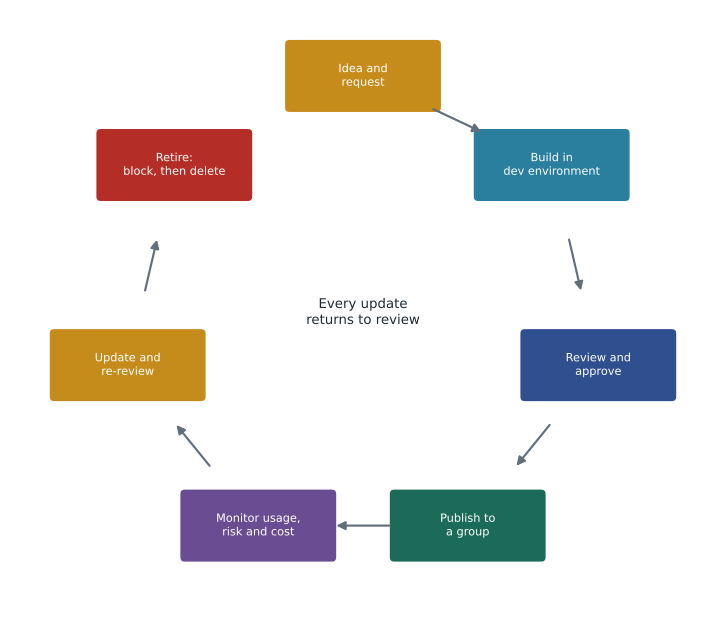
- Idea and request. Someone proposes an agent. Corvallin asks for a short form: purpose, users, data and owner. Many ideas end here, because an existing agent or a saved prompt already does the job.
- Build. Agent Builder agents are built in the maker's own context; Copilot Studio agents are built in a managed environment, Corvallin Agents Dev, so that the strict data policy and sharing limits from the MSBA-103 course apply.
- Review and approve. The eight questions above, then a decision in the admin center.
- Publish. The agent is made available to a specific group, not to everyone. User access settings in the admin center decide who can see it.
- Monitor. The registry shows active users, run time, risk signals and cost. Lesson 8 covers usage reporting and lesson 9 cost.
- Update. A change to instructions, knowledge or tools goes back through review. An agent that quietly gains a write action is a different agent.
- Retire. When an agent is no longer needed, it is first blocked, so users lose access but its configuration remains, and later deleted. Microsoft keeps deleted organization agents in a soft-deleted state for 30 days before permanent deletion, which gives a window to restore a mistake.
Ownership
AB-650 lists 'manage agent owners' as a separate skill, and for good reason. An agent's owner is the person who answers for it: they keep its knowledge current, respond to feedback and decide when it should be retired. When an owner leaves or changes role, the agent becomes ownerless, and ownerless agents are one of the warning cards on the agent overview page.
The admin center lets AI Administrators and Global Administrators add, remove and reassign owners. Management rules can reassign ownerless Agent Builder agents to the former owner's manager automatically, which Corvallin turned on in October. For agent identities in Microsoft Entra, a similar idea appears under the name sponsor, covered in lesson 5. The runbook requires two owners for every published agent, so that one departure never orphans it.
Corvallin's register in November 2026 looked like this:
| Agent | Type | Owners | Status |
|---|---|---|---|
| Intake Questions | Agent Builder | Teodor (temporary); Nadia Prevost when licensed | Approved for Copilot-Pilot; owner change planned |
| Procedures Helper | SharePoint agent | Ansel Marrowby; Teodor | Published to Schedulers on pay-as-you-go |
| New Hire Guide | Agent Builder | HR and training lead; Teodor | Second version in review |
| Help Desk Triage | Copilot Studio | Ama Owusu-Pratt; Teodor | Testing in Corvallin Agents Dev |
| VisitWise Assistant | Third-party | Vendor | Blocked pending privacy review |
| Researcher, Analyst | Built by Microsoft | Microsoft | Allowed for licensed users |
Inventory beyond the admin center
Not every agent starts in the Microsoft 365 admin center. Copilot Studio agents also appear in the Power Platform admin center inventory, which lists agents by environment with their connectors and usage, and from which an administrator can block (quarantine) or delete them. Agents built in Microsoft Foundry are managed there and can be published to Microsoft 365. Agent 365's connected platforms bring agents on other vendors' platforms into view.
The runbook's monthly inventory task compares three lists: the agent registry, the Power Platform inventory and the agent identities in Microsoft Entra. Anything that appears in one list but not the others needs an explanation. In November the comparison found one test agent in the default Power Platform environment, created by Felix during a training session and never published. It was deleted the same day, and the default environment's maker access was tightened as the MSBA-103 course recommended.
Worked problem
A request that skips the checklist
A branch manager submits a 'Visit Notes Helper' agent built with Agent Builder. Its instructions say it 'summarizes visit notes for managers', and its knowledge source is a SharePoint library called Visit Notes - All Branches. The request asks for it to be published to all staff. What should the administrator do?
Show solution
- Check the knowledge source: a library of visit notes from all branches almost certainly contains client health information.
- Check the target: publishing to all staff would let anyone with access to the library ask questions about any client's visit.
- Check permissions on the library: if it is shared broadly, the agent would surface that oversharing directly.
- Reject the request with a reason, refer the manager to the privacy officer, and record the decision in the Agent decisions plan.
Answer: Reject it. The agent's purpose may be valid, but it needs a narrower knowledge source, a narrower audience and a privacy review before it can be reconsidered.
Agents built by Microsoft
Microsoft-built agents need governance too, even though nobody at Corvallin designed them. Researcher and Analyst can search widely across the user's work data and, for Researcher, the web, and they can run for many minutes on a single request. Microsoft documents that Researcher is limited to a set number of queries per user per month and that administrators can block Researcher and Analyst, but only tenant-wide. Corvallin allows both for licensed users and covers them in the use guide, with one rule: Researcher reports used in decisions about clients are checked against the record like any other AI output.
Microsoft also adds new built-in agents through the year, often first in early-release programs. Because Corvallin's release preferences keep pilot users on general availability (lesson 2), new Microsoft agents reach the IT team first, and the Monday message center triage includes a question for each one: allow, block or wait.
Common mistakes
MistakeApproving agents in the admin center without a written review.
InsteadUse a checklist that covers owners, knowledge, tools, identity, data, testing and cost, and record the decision.
MistakePublishing new agents to everyone.
InsteadPublish to a specific group and widen access after monitoring.
MistakeDeleting an agent as soon as it is no longer wanted.
InsteadBlock it first, then delete; remember the 30-day soft-delete window.
MistakeLetting one person own every agent.
InsteadRequire two owners and turn on reassignment rules for departures.
Summary and key terms
- The agent registry lists agents from Microsoft, partners, the organization and other platforms, with owners, usage and risk.
- Agent 365 adds risk signals, Agent Map, connected platforms, management rules and cost views, licensed per user.
- Requests are published, rejected or returned for update; the admin center records the decision but a checklist decides it.
- The lifecycle runs from request through build, review, publish, monitor and update to retirement by block then delete.
- Every agent needs accountable owners, and ownerless agents should be reassigned automatically.
- Compare the registry, the Power Platform inventory and Entra agent identities to find unregistered agents.
- Agent registry
- The inventory of agents available in a tenant, in the Microsoft 365 admin center and Agent 365.
- Agent request
- A submission to publish an organization-built agent, awaiting administrator review.
- Agent Map
- An Agent 365 view of agents by platform and connection.
- Connected platforms
- Agent 365 integrations that bring agents from other platforms into the registry.
- Shadow AI
- Agents and AI tools in use without registration or approval.
- Ownerless agent
- An agent whose owner has left or been removed, with nobody accountable for it.
- Soft delete
- A deleted state from which an agent can be restored for a limited time.
Practice problems
Work each problem on paper first, then reveal the answer to check.
What is the difference between blocking and deleting an organization agent?
Show answer
Blocking removes access but keeps the agent; deleting removes it, with a 30-day soft-delete window before permanent deletion.
Why should an agent be published to a group first rather than to everyone?
Show answer
It limits exposure while usage, accuracy, risk and cost are monitored.
Name three things Agent 365 adds to the basic agent pages.
Show answer
Any three of risk signals from Defender, Entra and Purview; Agent Map; connected platforms; management rules; cost by agent.
Which three lists does Teodor compare in the monthly inventory?
Show answer
The agent registry, the Power Platform inventory and Entra agent identities.
Lesson quiz · 5 questions
Score 60% or more to complete this lesson.
Create a free account to save your progress, take quizzes and earn a certificate.